




How Do Agentic Operations Move Beyond Network Automation for NVIDIA Spectrum-X AI Factories?
 November 16, 2026
 Network Copilot ™
TL;DR
AVIZ AI NOC is a multi-agent AI platform that works on top of AVIZ ONES and runs AI factory network operations through natural-language requests. In a simulated NVIDIA Spectrum-X AI factory built in NVIDIA DSX Air, ONES handles Day 0 design and deployment, while AI NOC handles Day 1 tenant and GPU allocation and Day 2 monitoring, audits and troubleshooting. ONES stays the system of record, and tenant changes require explicit operator confirmation. Engineers spend less time collecting and correlating evidence, and still validate final root-cause conclusions themselves.
Introduction: An AI Factory Needs More Than a Deployed Network
Building an AI factory is not simply a matter of connecting GPU servers to high-speed switches. The network must be designed correctly, deployed consistently, segmented securely, and continuously monitored to support demanding AI workloads.
As AI infrastructure scales, operators must manage multiple network domains simultaneously: East-West GPU communication, North-South application and storage connectivity, management networks, and multi-tenant resource allocation.
Deploying the fabric is only the beginning. Once the infrastructure is running, the operational challenges become more complex:
- How do you onboard new tenants and allocate GPU resources without manually configuring switches?
- How do you monitor East-West and North-South fabrics from a unified operational view?
- How do you correlate inventory, topology, running configurations, and telemetry when investigating a network issue?
- How do you validate network health against AI factory operational thresholds?
- How do you identify the potential root cause of network failures without navigating multiple dashboards and manually correlating data?
Traditional network operations rely on engineers navigating different management interfaces, executing CLI commands, querying APIs, and correlating information from multiple systems.
For AI factories, this operational model needs to evolve.
The next step is agentic network operations: infrastructure teams describe what they want to accomplish, and specialized AI agents coordinate the required operational workflows through the network management platform.
In this article, we extend our previous AI fabric simulation using NVIDIA DSX Air and AVIZ ONES to demonstrate how AVIZ AI Network Operations Center (AI NOC) brings conversational, agentic operations to an AI factory.
Related article: From Design to Operations: Simulating AI Fabric with AVIZ ONES and NVIDIA DSX Air
How does the AI fabric lab extend from deployment to operations?
The lab moves from Day 0 design and deployment with AVIZ ONES to Day 1 tenant and GPU management and Day 2 monitoring, audits and troubleshooting through AVIZ AI NOC, all on a simulated NVIDIA Spectrum-X AI fabric in NVIDIA DSX Air.
In the previous lab, we demonstrated how AVIZ ONES can design and deploy a simulated NVIDIA Spectrum-X AI fabric inside NVIDIA DSX Air.
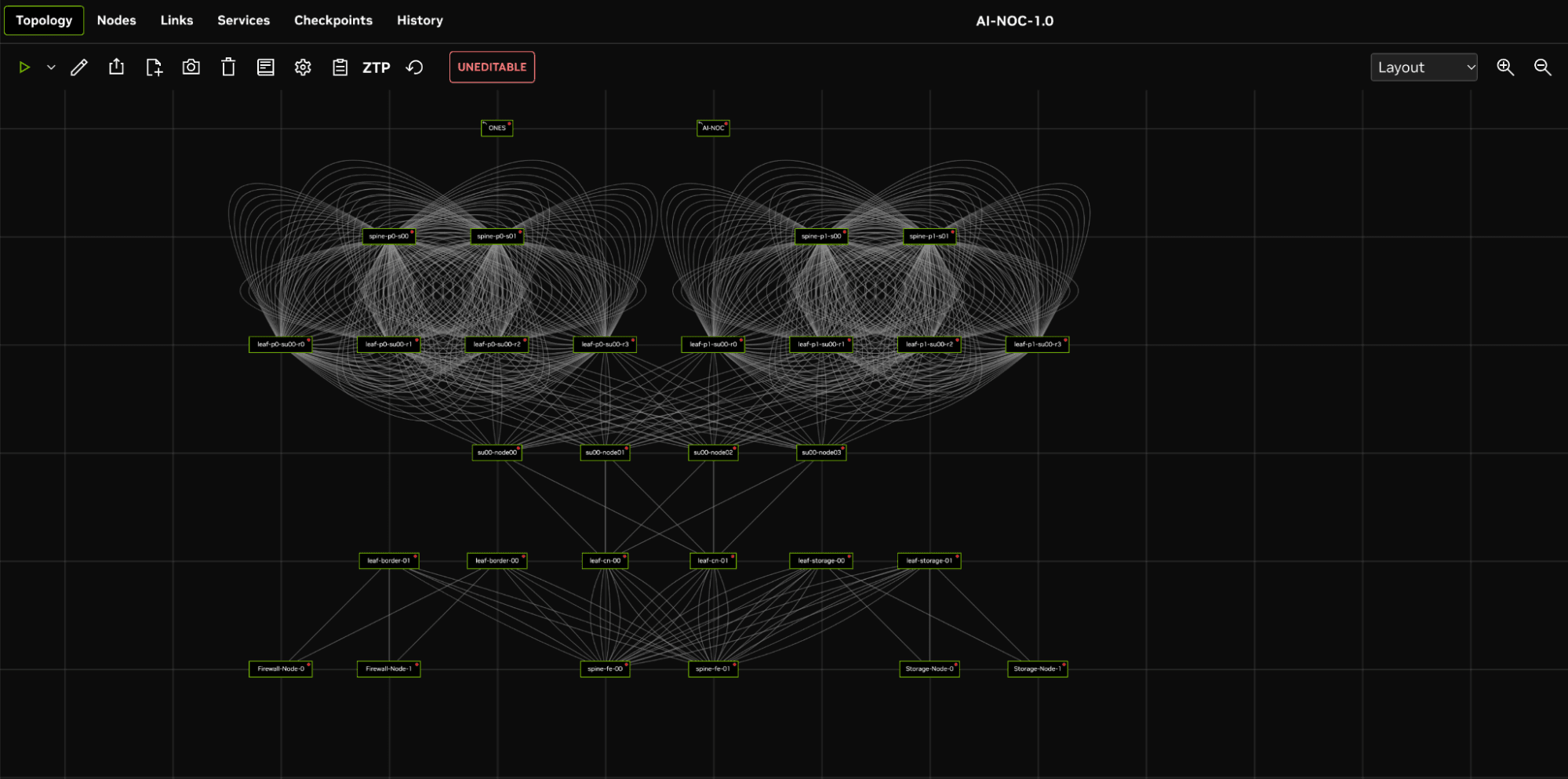
The environment represents a compact AI factory with separate East-West and North-South network fabrics.
The East-West fabric connects simulated GPU compute nodes through leaf and spine switches, representing the high-bandwidth connectivity required for distributed AI training and inference.
The North-South fabric connects compute infrastructure to frontend services, storage, firewalls, and external networks.
A dedicated management network provides out-of-band access, while AVIZ ONES provides centralized fabric management, automation, and telemetry.
For this next phase, we introduce AVIZ AI NOC, an agentic AI platform that interacts with ONES to perform network operations through natural-language requests.
The objective is to demonstrate the complete operational lifecycle:
- Day 0: Design and deploy the AI fabric using ONES.
- Day 1: Manage tenants and GPU resource allocation through AI NOC.
- Day 2: Monitor network health, analyze telemetry, validate configurations, generate audit reports, and investigate network failures.
AI Factory Simulation
How does AVIZ AI NOC add an agentic operations layer to ONES?
AVIZ AI NOC is a multi-agent AI platform designed to simplify network operations through natural-language interaction.
Rather than requiring operators to understand every API, navigate multiple dashboards, or manually execute a sequence of operational commands, AI NOC accepts requests in conversational language.
Specialized AI agents collaborate to interpret the request, identify the required operations, invoke the appropriate ONES APIs, and present the results in structured responses, tables, and charts.
For this lab, AI NOC uses an open weight model gpt-oss-120B fine tuned for agentic operations and deployed through LLM endpoint provided by Aviz.
The architecture consists of four primary components:
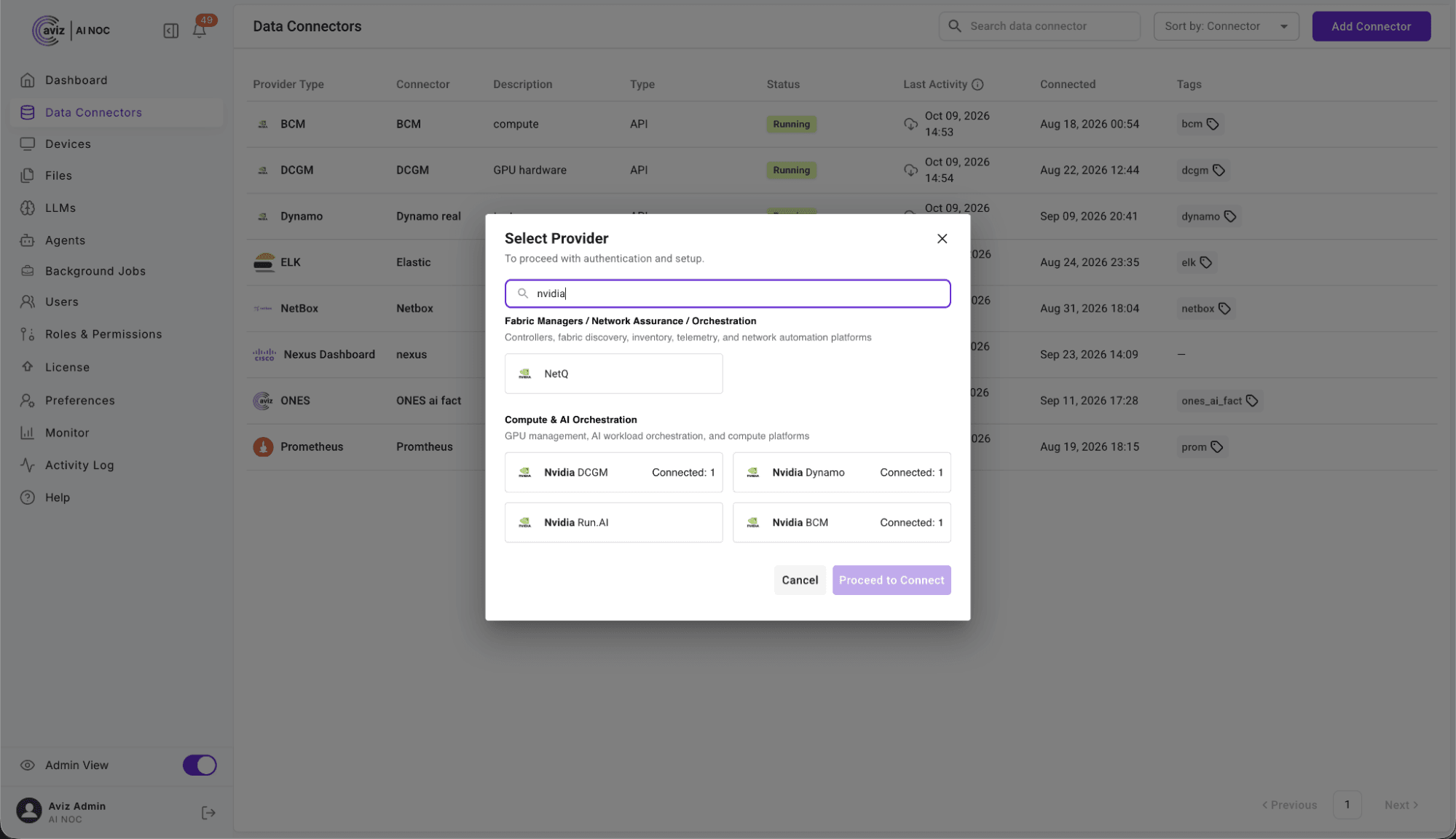
- Conversational interface: Operators interact with AI NOC through a project configured with the appropriate LLM and ONES data connector, Nvidia tools chain, RunAI, DCGM, BCM and Dynamo connectors.
- Agent Brain: reasoning and planning: The LLM interprets the request, determines the required workflow, and coordinates the agent execution.
- Specialized AI agents: AI agents select the appropriate ONES operations, execute the required API calls, process the responses, and construct the final answer.
- ONES integration: The ONES connector provides access to telemetry and supported network operations. ONES remains the system of record, while the Fabric Manager REST API applies supported configuration changes.
What are the operational boundaries between AI NOC and ONES?
AI NOC does not replace ONES or maintain an independent copy of network state.
ONES remains authoritative for fabric inventory, telemetry, and tenant management. AI NOC retrieves information through the configured connector and delegates supported changes to ONES.
This separation is important:
- Read operations retrieve current information from ONES.
- Supported write operations are executed through the ONES Fabric Manager.
- Tenant modifications require explicit operator confirmation.
- Long-running GPU allocation and deallocation operations execute asynchronously.
The result is an agentic interface that works with the existing network management infrastructure rather than introducing another system of record.
How does AI NOC handle Day 1 multi-tenant AI factory operations?
Operators create tenants, allocate GPUs and manage the full tenant lifecycle by asking AI NOC in natural language, while ONES and the Fabric Manager apply the network changes.
AI factories and GPU-as-a-Service environments need to support multiple customers and workloads on shared physical infrastructure.
Each tenant requires controlled access to GPU resources and appropriate network segmentation.
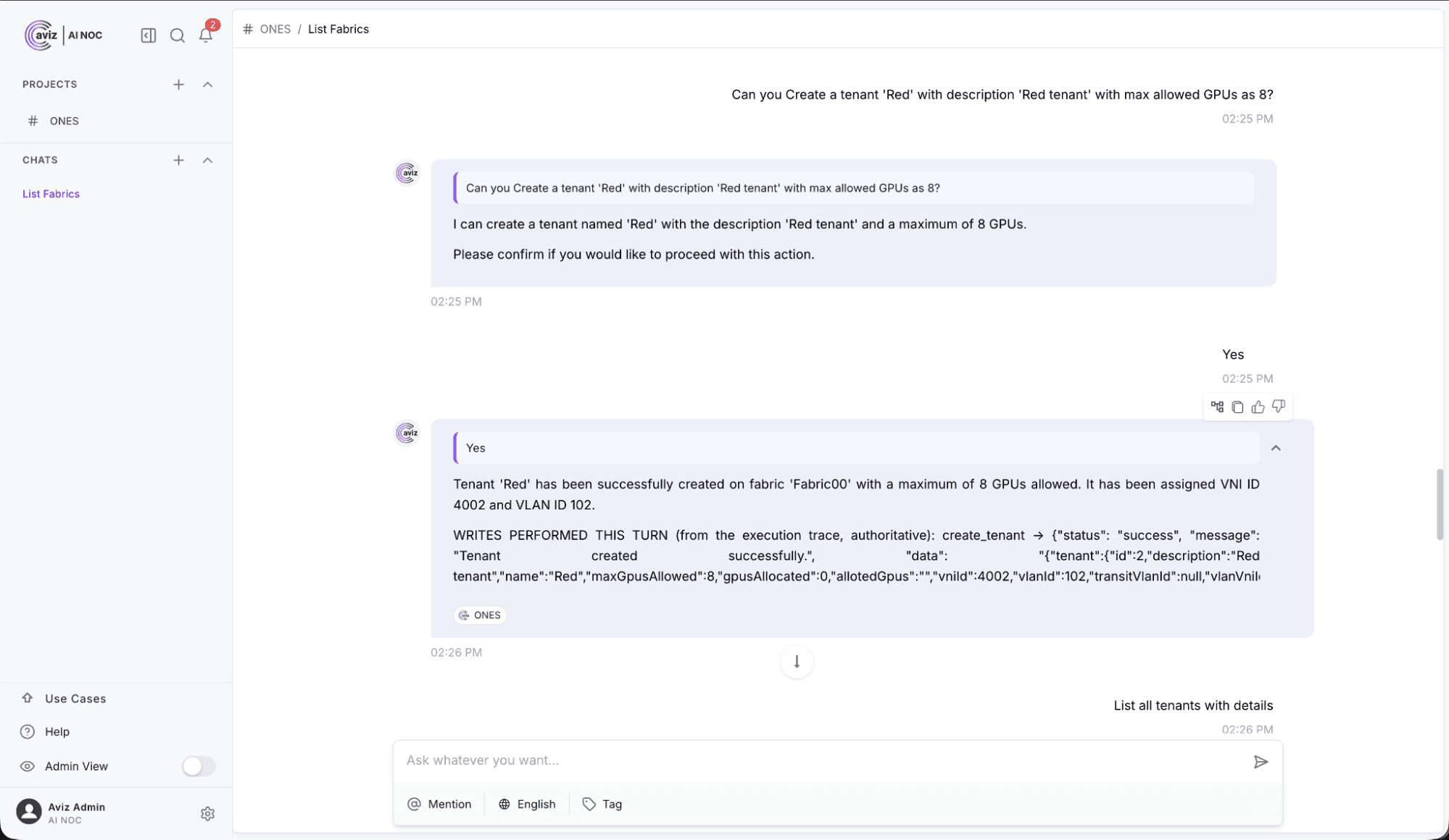
In our lab, we demonstrate this using two tenants: Blue and Red.
Both tenants share the underlying physical AI fabric, but their resource allocation and network segmentation are managed independently.
How do you create Blue and Red tenants with AI NOC?
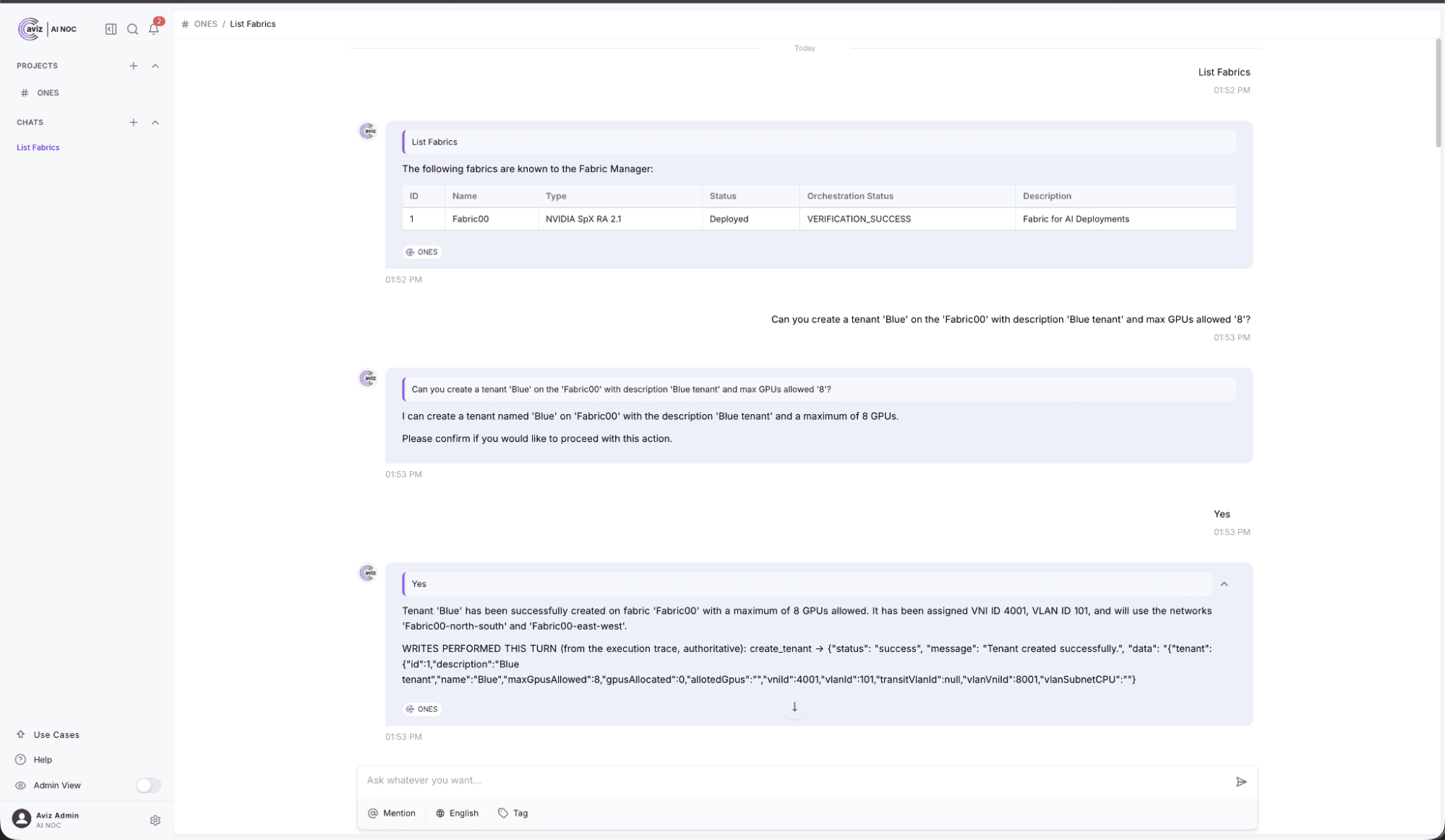
Instead of navigating the ONES GUI or manually constructing API requests, operators can ask AI NOC to create tenants and configure their GPU resource limits.
For example:
Create a tenant named Blue with a GPU limit of 8.
Create a tenant named Red with a GPU limit of 8.
AI NOC retrieves the necessary fabric information, prepares the operation, and requests confirmation before applying the change.
ONES performs the tenant configuration and assigns the required VNI and VLAN information. The corresponding EVPN/VXLAN configuration is then pushed to the appropriate leaf switches through the Fabric Manager.
How do you allocate GPU resources to tenants?
Once the tenants are created, the next step is allocating GPU servers.
An operator can ask:
Show me the available GPU servers in Fabric00.
Allocate 4 GPUs to Blue.
Allocate 4 GPUs to Red.
Before executing the allocation, AI NOC checks the available server resources and presents the intended changes for confirmation.
The Fabric Manager applies the tenant changes to the switches. Since these operations involve network reconfiguration, they can take several minutes.
AI NOC reports when the operation is in progress and allows the operator to retrieve its status later.
Which tenant lifecycle operations does AI NOC support?
The same conversational workflow supports the remaining tenant operations:
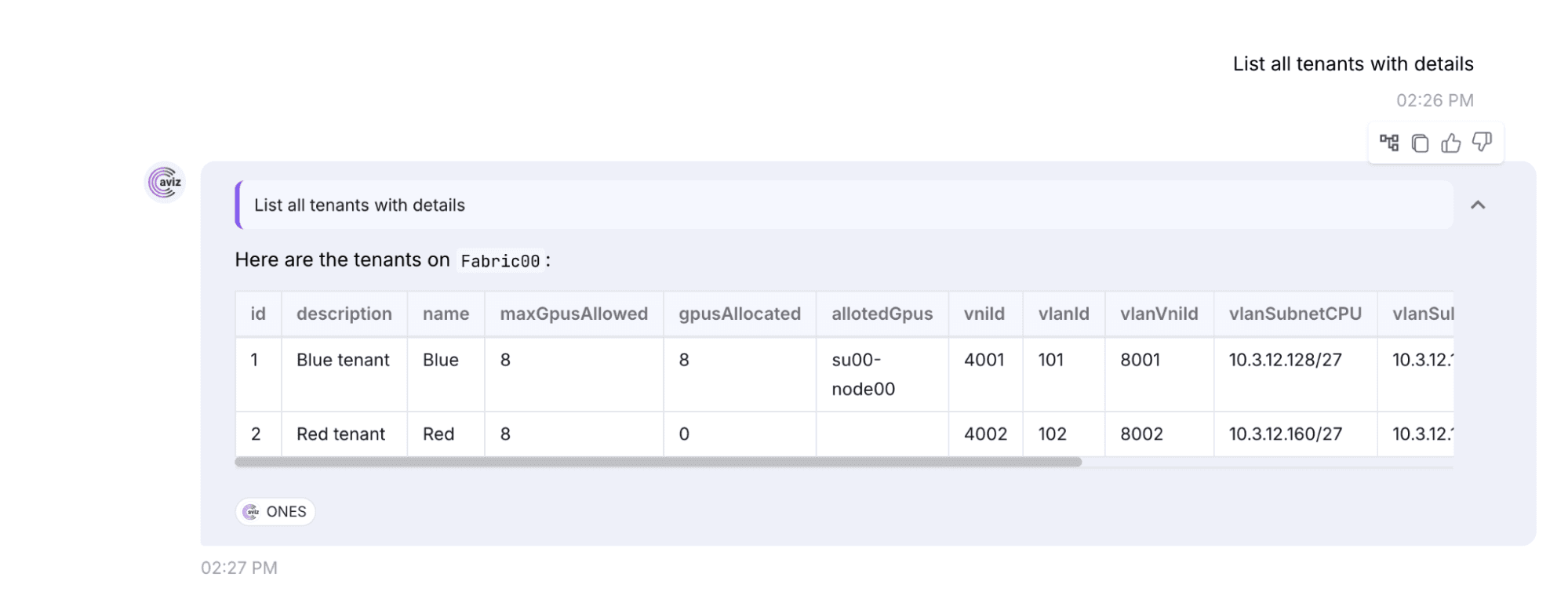
- List existing tenants.
- Inspect tenant GPU allocations.
- Allocate additional GPUs.
- Deallocate GPU resources.
- Delete tenants after their resources have been released.
This is particularly useful in environments where GPU capacity is dynamically assigned to different customers or workloads.
The operational benefit is that tenant lifecycle management becomes a conversational workflow rather than a sequence of manual GUI operations and API calls.
How does AI NOC monitor the AI factory network on Day 2?
Once tenants are running, network operations become the primary concern.
AI workloads depend on reliable connectivity across the fabric. Operators need visibility into device health, interface conditions, resource utilization, and network alerts.
AI NOC provides a conversational interface to retrieve and analyze available ONES telemetry.
In this lab, we focus on three operational areas.
How do you monitor the East-West GPU fabric?
The East-West fabric carries traffic between GPU compute nodes through leaf and spine switches.
Operators need to monitor the health of these devices and their interfaces to identify network conditions that could affect GPU communication.
Using AI NOC, operators can ask:
- Show the health of all East-West switches.
- Identify interfaces with high utilization.
- Show interfaces reporting packet drops.
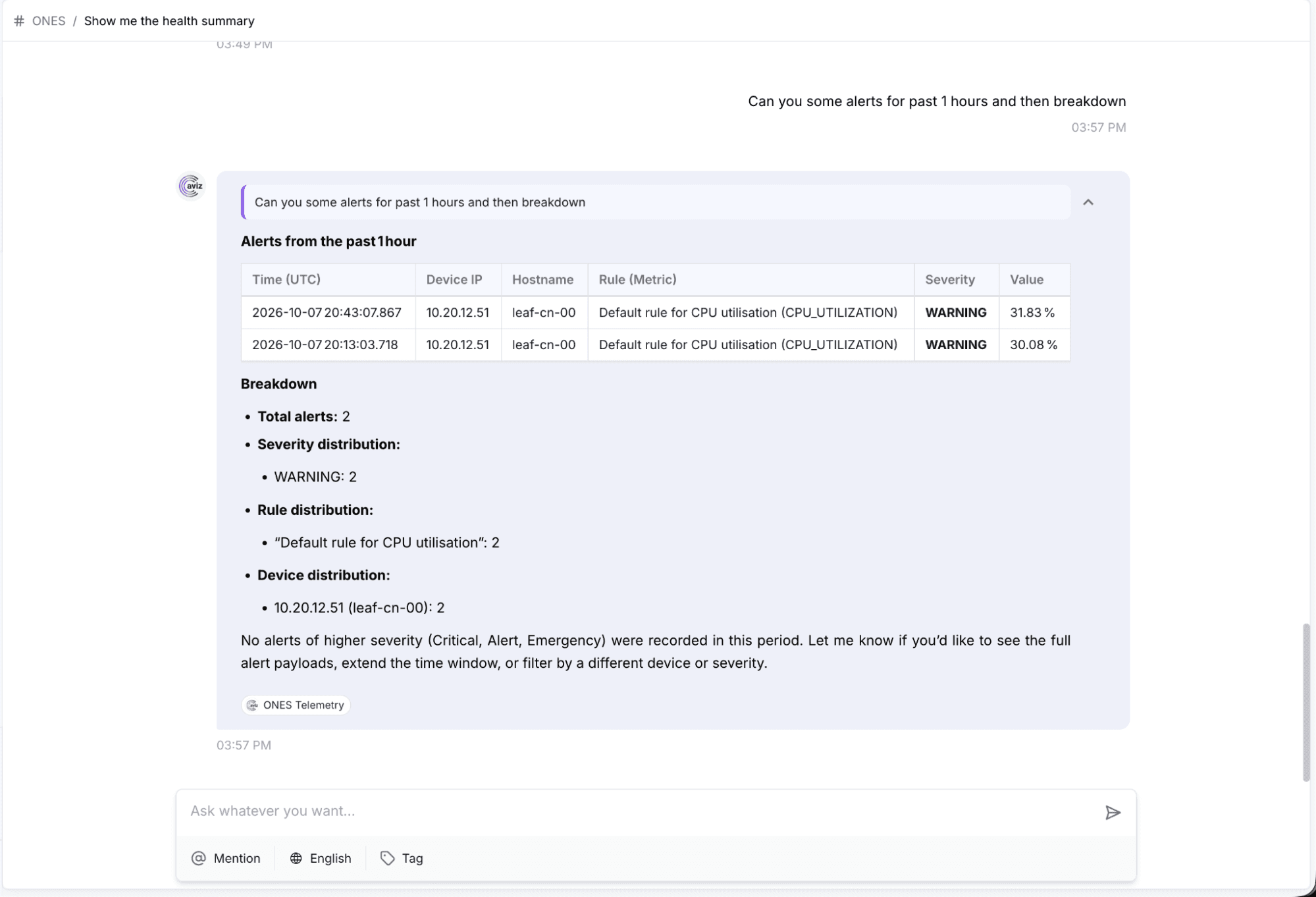
- Show CPU and memory utilization across East-West switches.
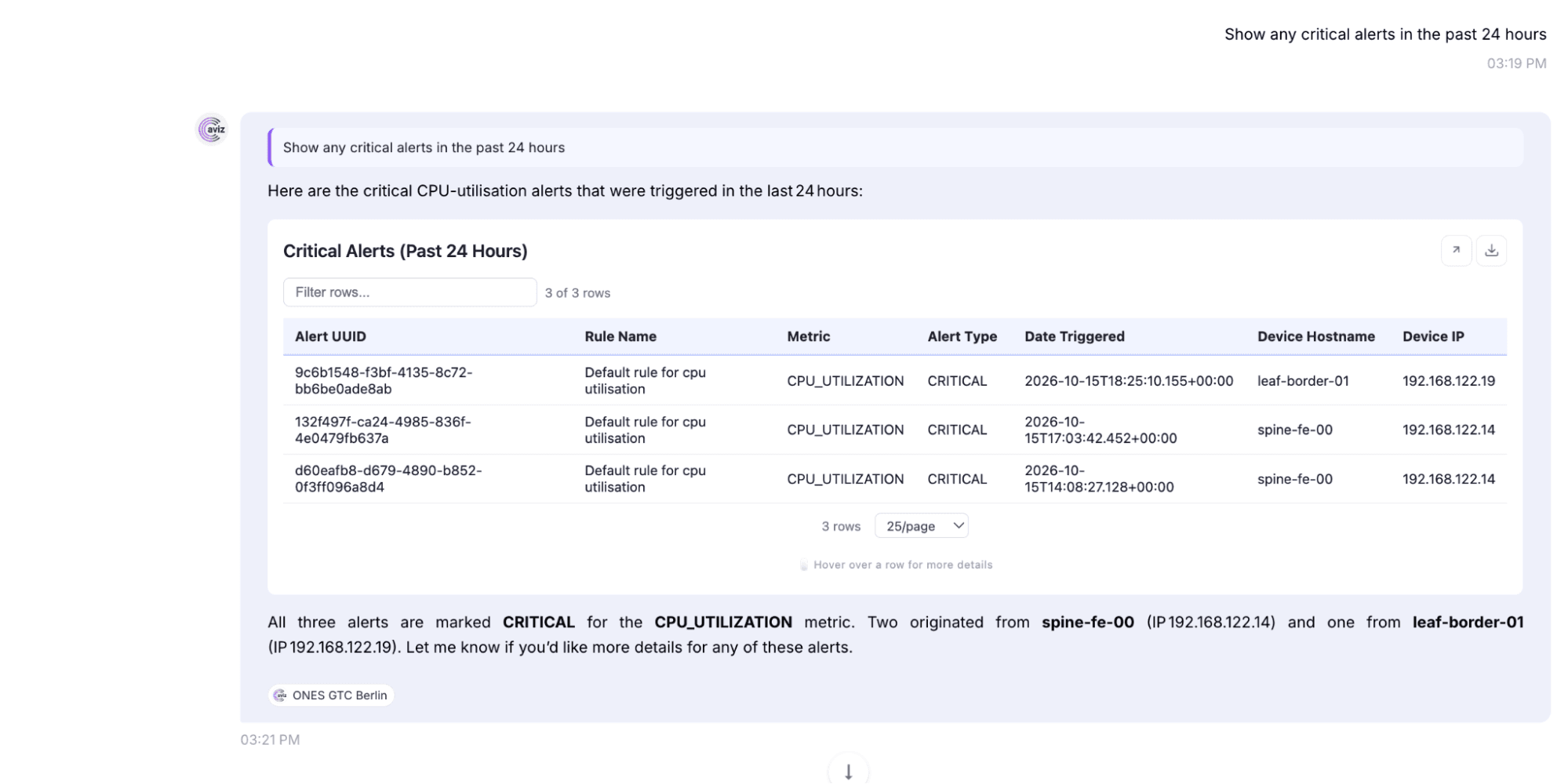
- List critical alerts affecting the GPU fabric.
AI NOC retrieves the available telemetry and presents the results in structured tables and charts.
How do you monitor the North-South fabric?
The North-South network connects GPU compute infrastructure to frontend services, storage systems, firewalls, and external networks.
This fabric is equally important because AI workloads depend on storage access, application connectivity, and external service availability.
Operators can ask:
- Show the health of all North-South switches.
- Identify unhealthy compute-facing interfaces.
- Show storage-facing interface utilization.
- List alerts affecting frontend and border switches.
- Identify devices with abnormal CPU or memory utilization.
AI NOC retrieves the corresponding operational data from ONES, helping engineers investigate the relevant network domain.
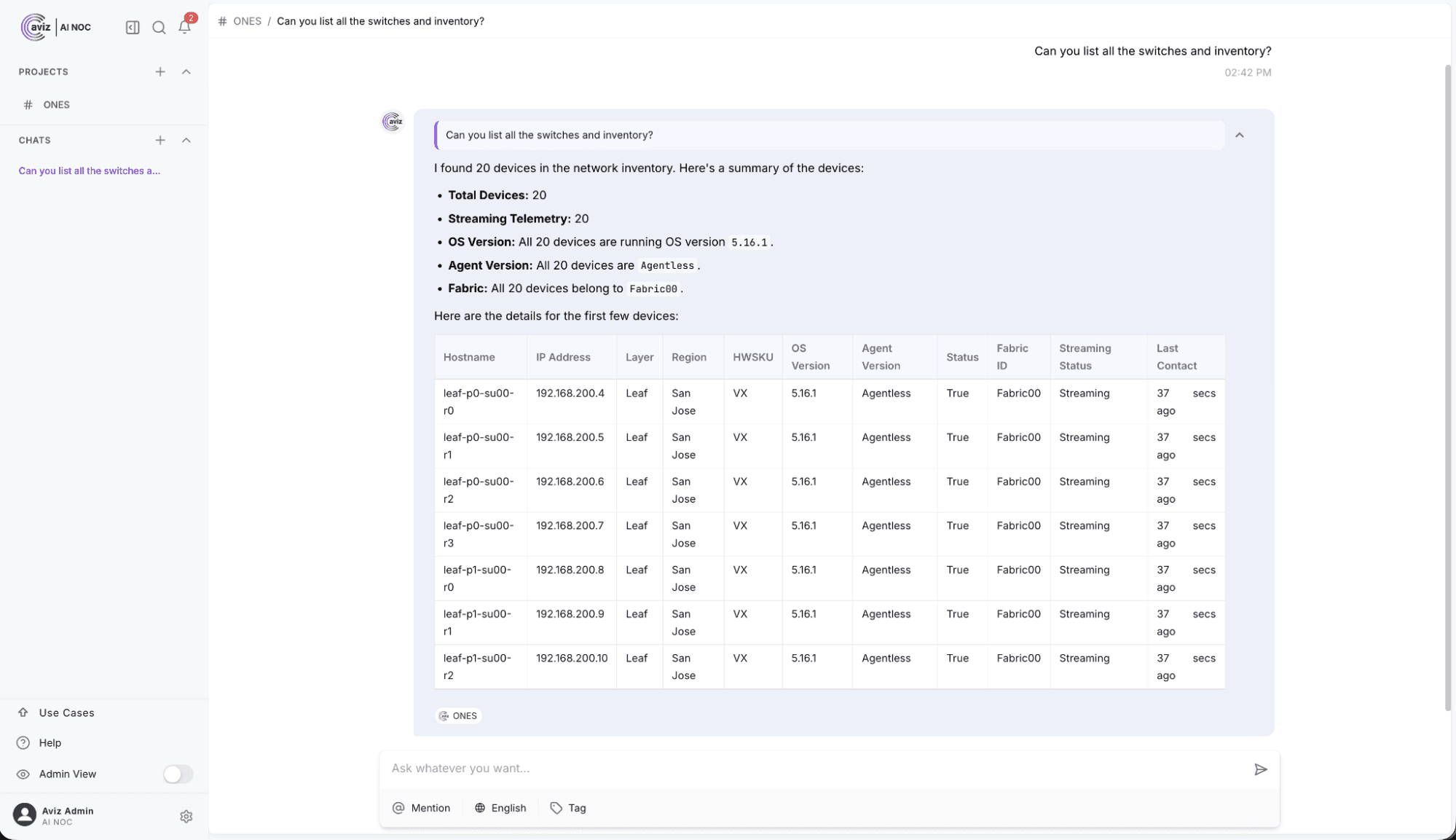
Can AI NOC show overall AI factory fabric health in one view?
Monitoring individual network domains is only part of the operational picture. Infrastructure teams also need to understand overall fabric health.
AI NOC can combine multiple telemetry queries into a single response. For example: Show the overall health of Fabric00, including device availability, CPU, memory, interface utilization, and critical alerts. This provides an aggregated operational view without requiring engineers to navigate multiple monitoring screens.
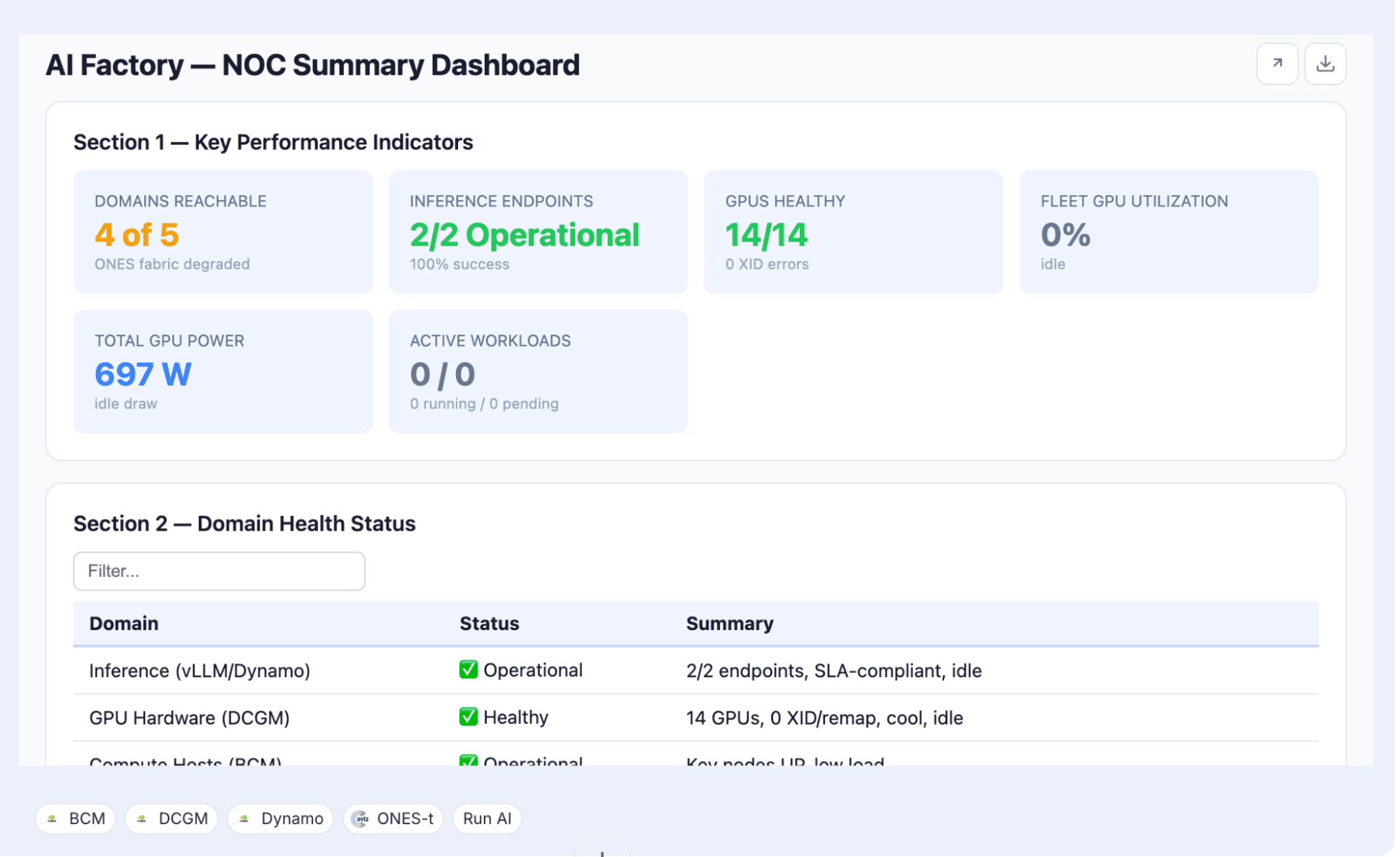
How does AI NOC correlate inventory, topology, configuration and telemetry?
AI NOC brings inventory, topology, running configuration and telemetry together through the ONES connector, so engineers can investigate a network issue with several sources of evidence instead of isolated alerts.
One of the biggest challenges in network troubleshooting is that operational information is distributed across different views.
An interface alert alone may not explain the impact of a network issue. Engineers need to understand which device is affected, where it sits in the topology, what configuration it is running, and what the telemetry indicates.
AI NOC can help bring these operational views together through ONES.
Four information sources are particularly important.
Inventory: Provides visibility into switches, platforms, device roles, and infrastructure resources.
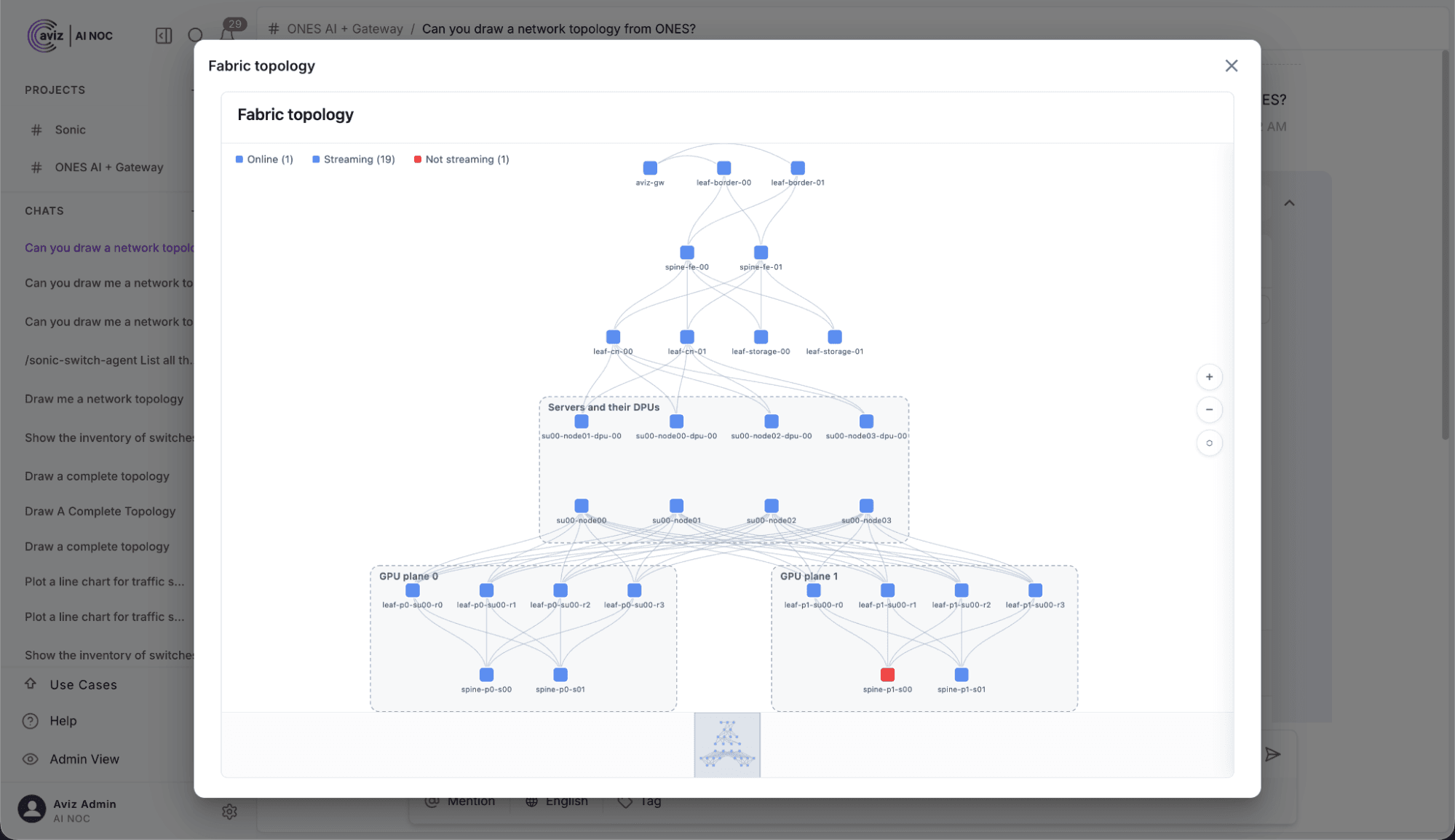
Topology: Shows the relationships between leaf switches, spine switches, compute nodes, and other network elements.
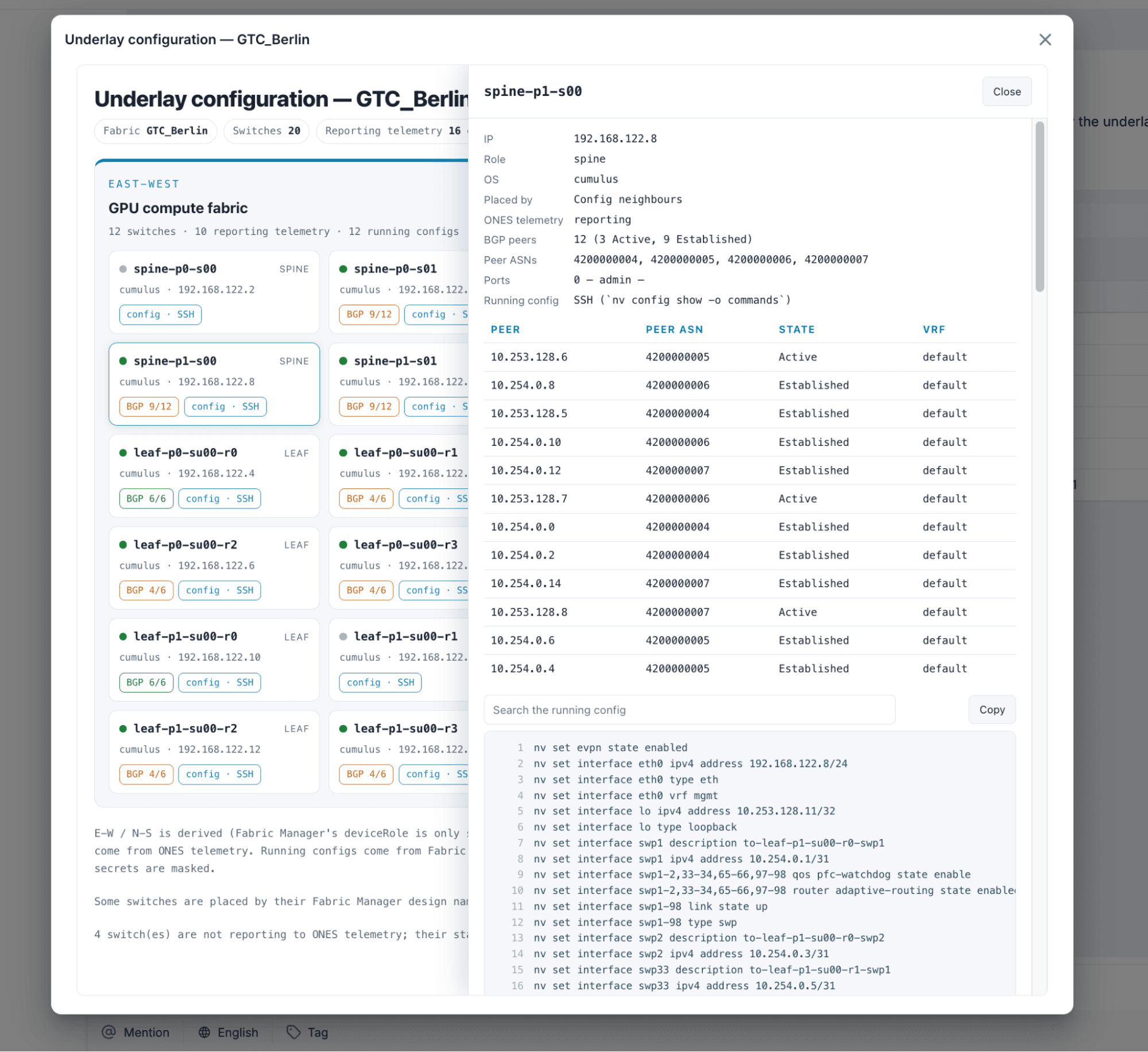
Running configuration: Provides the actual device configuration needed to investigate operational settings and inconsistencies.
Telemetry: Provides device health, interface statistics, utilization, and alert information.
With these views available through the ONES connector, operators can ask questions such as:
- Show the complete inventory of Fabric00.
- Show the East-West and North-South fabric topology.
- Compare the running configurations of the leaf switches.
- Identify devices with interface errors and show their topology relationships.
- Correlate critical alerts with the affected switches and their connected interfaces.
This makes it possible to investigate network conditions using multiple sources of operational evidence rather than relying on individual counters or isolated alerts.
AI Factory Topology
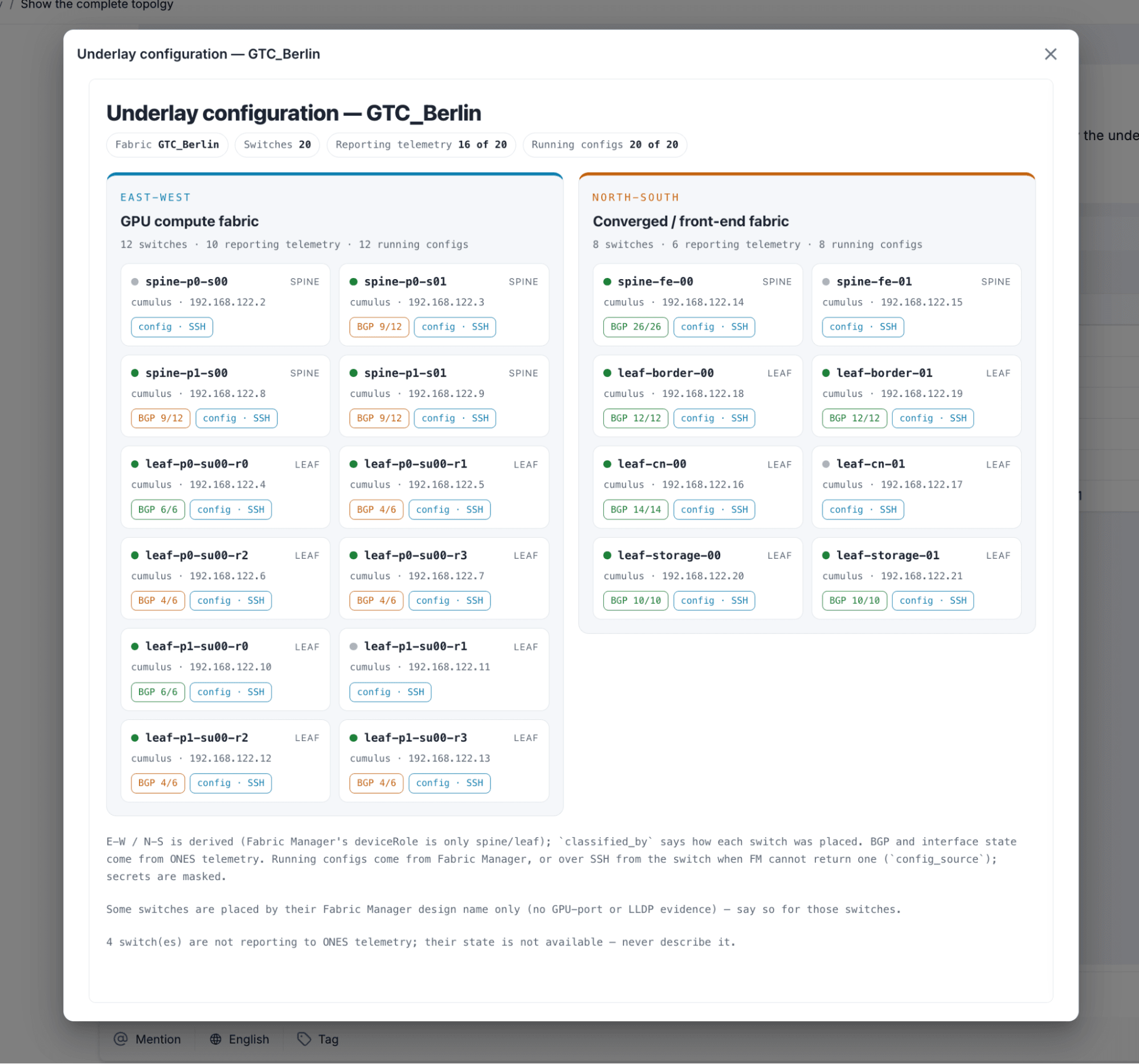
AI Factory Running Configurations
How do you audit an AI factory network against operational thresholds?
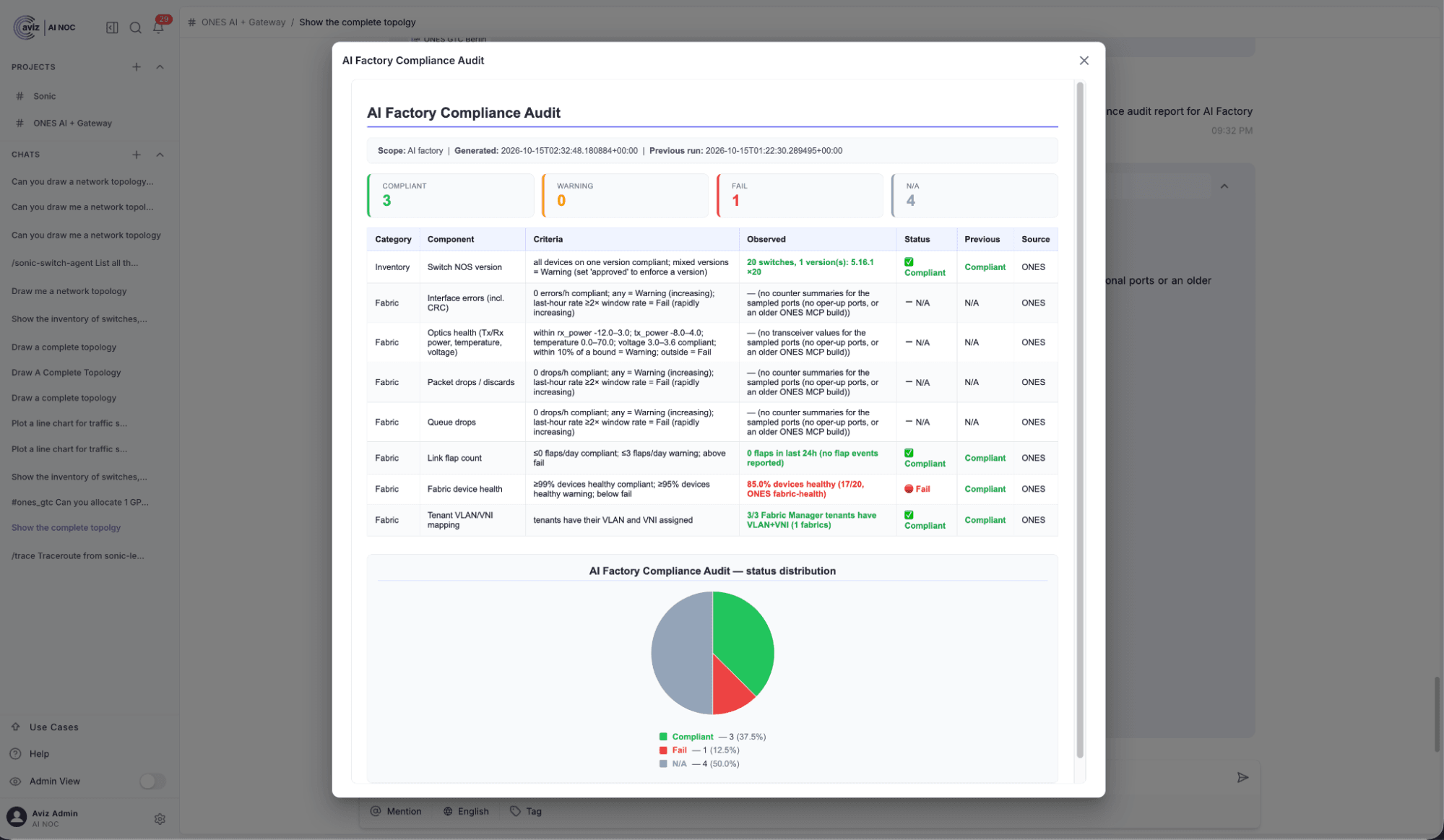
AI NOC retrieves operational data from ONES and helps generate audit reports against the thresholds you define, organized by device, network domain, severity and measured value.
AI factory infrastructure needs consistent operational validation.
Network teams need to know not only whether devices are reachable, but whether the infrastructure is operating within defined performance and health thresholds.
For example, teams may define thresholds for:
- CPU and memory utilization.
- Interface utilization.
- Interface errors and packet drops.
- Device availability.
- Critical network alerts.
- Configuration consistency.
- Tenant resource allocation.
AI NOC can retrieve the relevant operational data and help generate audit-oriented reports against the thresholds and policies provided to the workflow.
An operator can ask:
- Generate an AI factory network health audit report for Fabric00.
- Identify switches exceeding the configured CPU and memory thresholds.
- Find interfaces with utilization above the defined threshold.
- Generate separate East-West and North-South fabric health reports.
- Summarize critical alerts and identify the affected network devices.
- The resulting report can organize findings by device, network domain, severity, and measured value.
How do you investigate AI factory network failures with AI NOC?
AI NOC retrieves and correlates telemetry, topology and running configurations so operators can narrow down the network conditions behind problems such as inference degradation, while engineers validate the final root cause.
Monitoring tells operators when something is wrong. Troubleshooting requires understanding why.
In a large AI factory, network issues can involve multiple devices and network domains.
For example, degraded GPU communication could be associated with interface drops, resource utilization, device health, or configuration inconsistencies. Storage connectivity issues may require a different investigation across the North-South fabric.
AI NOC helps operators investigate these conditions by retrieving and correlating available operational information.
Consider the following troubleshooting scenarios.
How do you investigate AI workload inference degradation in the network?
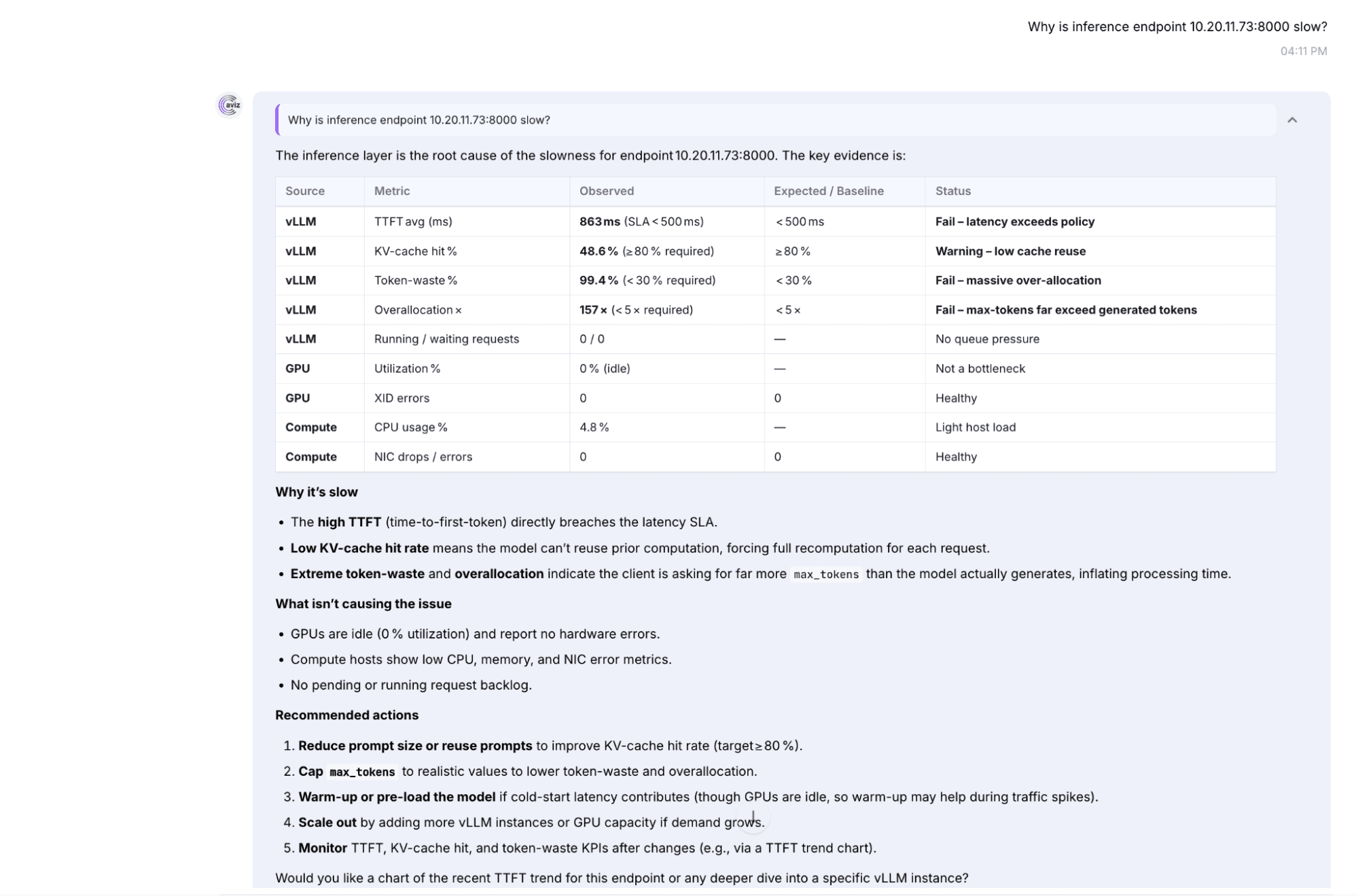
An operator observes an AI factory alert and wants to investigate the work load inference degradation
The operator asks: Investigate the East-West fabric for network conditions that could impact AI workload inference.
Identify switches experiencing interface drops, high utilization, or critical alerts
AI NOC retrieves the available network telemetry, identifies potentially affected switches and interfaces, and highlights abnormal conditions that could contribute to inference degradation.
The operator can then drill down into the affected devices, examine their topology relationships, review running configurations, and correlate additional telemetry to narrow down the potential root cause.
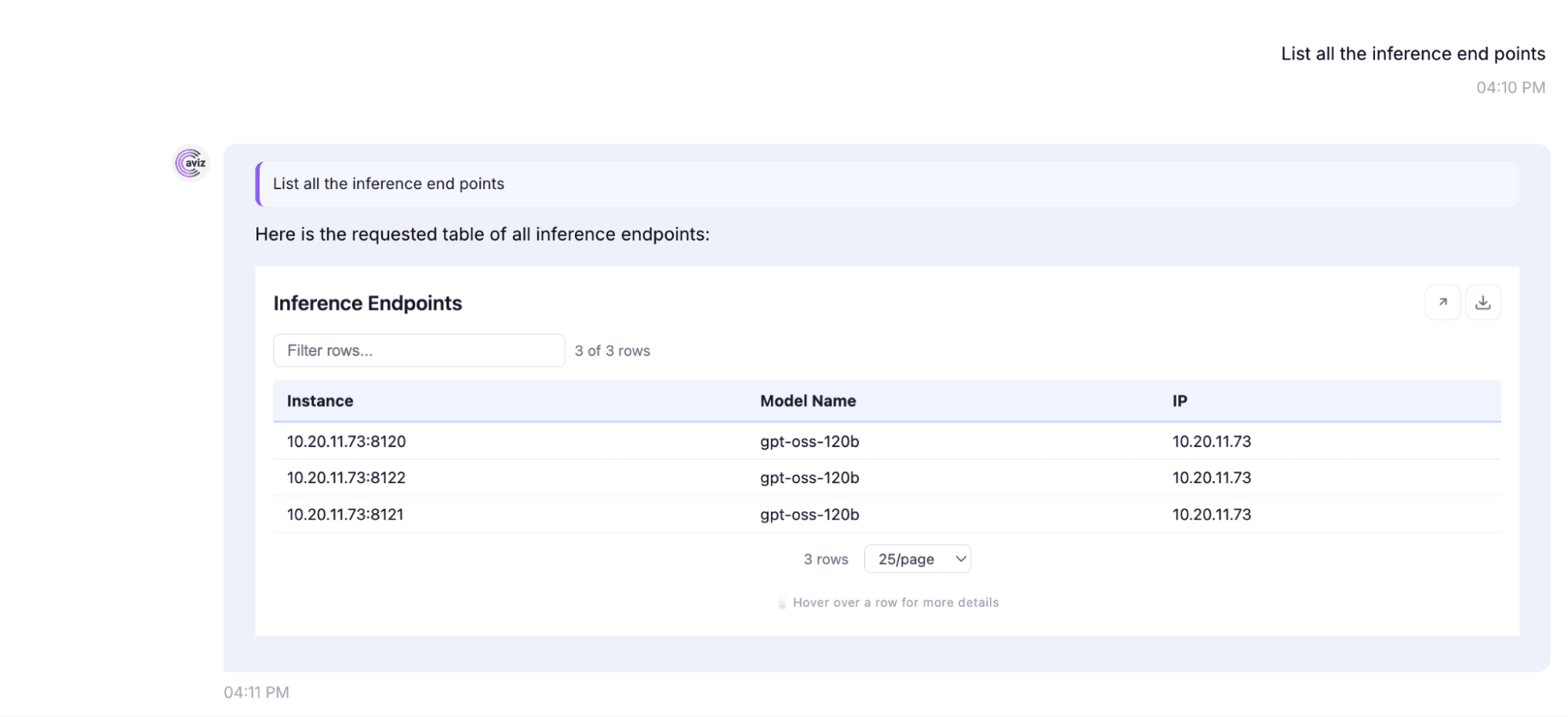
How do you find configuration inconsistencies across leaf switches?
Configuration differences across switches can introduce unexpected operational behavior.
An operator can ask: Compare the running configurations of the leaf switches and identify inconsistencies.
The returned configuration information can help engineers investigate differences in relevant network settings.
How does AI NOC support the final operational decision?
The objective is not to have an AI agent make unsupported assumptions about a failure.
The objective is to reduce the time engineers spend collecting and correlating information.
AI NOC provides a conversational interface to the operational data and helps organize the investigation into a more actionable workflow.
Final root-cause conclusions and any corrective production changes should be validated against the underlying evidence.
See how AVIZ AI NOC brings conversational, agentic operations to your AI factory: explore AI NOC.
What Makes Agentic Operations Different?
Traditional network automation typically executes predefined workflows triggered by scripts, templates, or API requests.
Agentic operations introduce another layer: the ability to interpret an operator's intent, select the required tools, coordinate multiple operations, and construct a response based on the results.
Consider a simple request: Generate an overall health report for my AI factory and identify potential network issues.
A multi-step investigation may involve:
- Retrieving the fabric inventory.
- Identifying East-West and North-South devices.
- Retrieving device health and resource utilization.
- Collecting interface statistics and alerts.
- Identifying measurements outside defined thresholds.
- Organizing the findings by device and network domain.
- Presenting an operational summary with supporting information.
Rather than requiring the operator to manually execute each query, AI NOC coordinates the available operations through specialized agents.
The distinction is important: the agentic layer determines how to execute the requested workflow, while ONES continues to provide the authoritative network state and execute supported changes.
What do AVIZ ONES and AI NOC each do across the AI factory lifecycle?
The combination of AVIZ ONES and AI NOC demonstrates how network operations can evolve across the entire AI factory lifecycle.
| Lifecycle | AVIZ ONES | AVIZ AI NOC |
|---|---|---|
| Day 0: Design and deployment | Fabric design, provisioning, and deployment | Not required |
| Day 1: Multi-tenancy | Tenant and GPU resource management | Conversational tenant lifecycle operations |
| Day 2: Monitoring | Network telemetry, dashboards, and alerts | Agentic monitoring and operational analysis |
| Validation and audit | Provides inventory, configuration, and telemetry | Threshold-based audit workflows and findings |
| Troubleshooting | Provides network state and operational evidence | Coordinates investigations and summarizes potential causes |
The architecture maintains a clear separation between infrastructure management and the agentic operational interface.
ONES manages the network. AI NOC makes those operations accessible through natural language and coordinated AI workflows.
Conclusion: Making the AI Factory Operable Through AI
AI factories require more than high-performance compute and network infrastructure. They need an operational platform that can manage multi-tenancy, maintain visibility across network domains, validate infrastructure health, and help engineers troubleshoot failures.
With NVIDIA DSX Air, infrastructure teams can simulate an AI factory environment and validate its operational workflows before deploying physical infrastructure.
With AVIZ ONES, they can design, deploy, automate, and monitor the network fabric.
With AVIZ AI NOC, they can introduce an agentic interface to Day 1 and Day 2 operations, enabling conversational tenant management, telemetry analysis, network validation, audit reporting, and troubleshooting.
This moves network operations beyond manually navigating dashboards and executing individual commands.
The future of AI factory networking is not just automated infrastructure. It is infrastructure that can be operated through intelligent, coordinated, and evidence-driven workflows.
AVIZ ONES and AI NOC bring that operational model to life.
FAQs
What is AVIZ AI NOC?
AI NOC is a multi-agent AI platform for network operations. Operators make requests in natural language. Specialized agents interpret the request, call the right AVIZ ONES APIs, and return the results as tables, charts, or structured summaries.
How is AI NOC different from AVIZ ONES?
ONES designs, deploys, automates, and monitors the network fabric, and it is the system of record for inventory, telemetry, and tenant management. AI NOC is a conversational, agentic layer on top of ONES. It retrieves information through the ONES connector and hands supported changes to ONES. It doesn’t keep its own copy of network state.
Does AI NOC replace my existing network management tools?
No. AI NOC works with ONES rather than replacing it. Read operations pull current data from ONES, and supported write operations run through the ONES Fabric Manager REST API.
What is NVIDIA DSX Air’s role in this lab?
DSX Air provides the simulated AI factory: a compact NVIDIA Spectrum-X environment with separate East-West and North-South fabrics, GPU compute nodes, and an out-of-band management network. Teams can validate design and operational workflows before deploying physical infrastructure.
Which parts of the AI factory lifecycle does this cover?
• Day 0: design and deployment with ONES. AI NOC isn’t required at this stage.
• Day 1: tenant and GPU resource management through AI NOC.
• Day 2: monitoring, telemetry analysis, configuration validation, audit reporting, and troubleshooting.
How does multi-tenancy work?
Operators ask AI NOC to create tenants (Blue and Red in the lab) with GPU limits. ONES assigns the VNI and VLAN information, and the Fabric Manager pushes the EVPN/VXLAN configuration to the relevant leaf switches. Tenants share the physical fabric, but their resource allocation and segmentation are managed independently.
Can AI NOC change my network without my approval?
Tenant modifications require explicit operator confirmation. Before allocating GPUs, AI NOC checks available resources and presents the planned changes for approval.
Why do GPU allocations take several minutes?
Allocating or deallocating GPUs reconfigures the switches, so these operations run asynchronously. AI NOC reports that the operation is in progress, and the operator can check its status later.
What tenant operations are supported?
Creating tenants, listing them, inspecting GPU allocations, allocating additional GPUs, deallocating GPUs, and deleting tenants once their resources are released.
What can I monitor with AI NOC?
Device health, interface utilization, packet drops, CPU and memory utilization, and critical alerts, for each fabric or combined into a single health view of the whole fabric.
How does AI NOC help with troubleshooting?
It correlates four sources: inventory, topology, running configuration, and telemetry. For example, it can find devices with interface errors and show where they sit in the topology, or compare running configurations across leaf switches to find inconsistencies.
Does AI NOC determine the root cause automatically?
AI NOC reduces the time spent collecting and correlating evidence. Engineers should still validate final root-cause conclusions and any production changes against the underlying evidence.
Which LLM does AI NOC use?
The lab uses gpt-oss-120B, an open-weight model fine-tuned for agentic operations and served through an Aviz-provided LLM endpoint. It also provides a choice of your LLMs. (BYO-LLM)
What other data sources can AI NOC connect to?
The article lists ONES, an NVIDIA tools chain, Run:ai, DCGM, BCM, and Dynamo connectors in the project configuration. The demonstrated workflows use only the ONES connector.
How is agentic operations different from traditional network automation?
Traditional automation runs predefined workflows triggered by scripts, templates, or API calls. Agentic operations interpret the operator’s intent, choose the right tools, chain multiple operations together, and assemble the answer from the results.


