





Unleashing Efficiency: How DevOps, SONiC, and Ansible Redefine Network Automation

Introduction
Traditional network configuration management often involves manual processes, prone to errors, inefficiencies and hard to scale. The distributed workforce is forcing IT teams to rethink their strategies for Automation. Demands for seamless application access and rapid service delivery are driving a cloud-like DevOps shift in Network orchestration. The advent of Open networking and DevOps has introduced new opportunities for network engineers. SONiC, an open networking operating system, provides a versatile platform for building robust DevOps automation models with Ansible. By integrating SONiC with Ansible, organizations can streamline network operations, enhance scalability, and accelerate deployment processes. This powerful combination not only simplifies complex tasks but also empowers teams to achieve greater agility and efficiency in managing modern network infrastructures.
This paper focuses on how Ansible, a powerful automation tool, can be combined with Aviz FMCLI to streamline SONiC configuration deployment. It will demonstrate the advantages of this approach and provide practical guidance for implementation.
SONiC and Ansible Revolution in DevOps Automation
SONiC (Software for Open Networking in the Cloud) offers a robust framework for network switches, but its equal appeal lies in Open Source, Automation and DevOps.
Automation with SONiC Network OS can be achieved effectively using tools like Ansible, which integrates well with network devices running SONiC. SONiC is a network operating system based on Linux that runs on various hardware platforms, particularly in data centers.
“The Ansible Way.” Ansible is celebrated for its simplicity, power, and agentless architecture. It is designed to be accessible, allowing users without extensive coding experience to harness its capabilities effectively.
Why Ansible?
- Simplicity and Power - Ansible’s human-readable automation scripts empower IT professionals to effortlessly create and manage automation workflows. Despite its simplicity, Ansible remains powerful, enabling the automation of complex tasks across diverse IT environments without requiring extensive programming knowledge.
- DevOps / Infrastructure As Code - Ansible enables the automation of infrastructure provisioning, configuration, and management through code, which is a core principle of DevOps. This ensures that infrastructure is consistent, repeatable, and version-controlled.
- Agentless Architecture - Unlike many automation tools that require agents to be installed on target machines, Ansible operates agentless. This architecture provides flexibility and ease of deployment across diverse IT infrastructures, from network devices to servers.
- Configuration Management - Ansible allows DevOps teams to centrally manage and enforce configurations across a wide range of servers and environments, ensuring consistency and compliance. Idempotency, Ansible’s idempotent nature means that running the same playbook multiple times will yield the same result, which is crucial for maintaining stable environments.
Aviz Ansible Tool for SONiC Automation using Fabric Manager CLI (FMCLI)
SONiC CLI, while useful, lacks a unified approach for configuring and managing all device features, which can hinder scaling and customization. To address this, Aviz developed FMCLI (Fabric Manager Command Line Interface), a unified CLI and an easier adaptable alternative. FMCLI offers a comprehensive and unified solution, filling the gaps left by SONiC CLI and enhancing network device management.
FMCLI now supports a wide range of network configurations, few example
- IPCLOS + BGP: Streamline the configuration of BGP IP CLOS fabrics with a focus on intent-driven network architecture.
- L2 VXLAN MCLAG (Multi-Chassis Link Aggregation): Simplify the deployment of L2 VXLAN with multi-chassis link aggregation for enhanced redundancy and scalability.
- L3 VXLAN MCLAG: Extend the flexibility of VXLAN to L3 networks with seamless multi-chassis link aggregation.
Ansible operates using SSH for communication and does not require agents on managed nodes, which simplifies deployment. An Ansible playbook, a YAML file that defines a series of automation tasks, is a powerful tool for configuring and managing systems. It outlines tasks to be performed on a list of hosts, organized into ‘plays.’ Each play describes a set of instructions, such as installing software, updating configurations, or managing services. Playbooks allow users to automate complex workflows in a repeatable and consistent manner, making them essential for managing infrastructure and deploying applications efficiently.
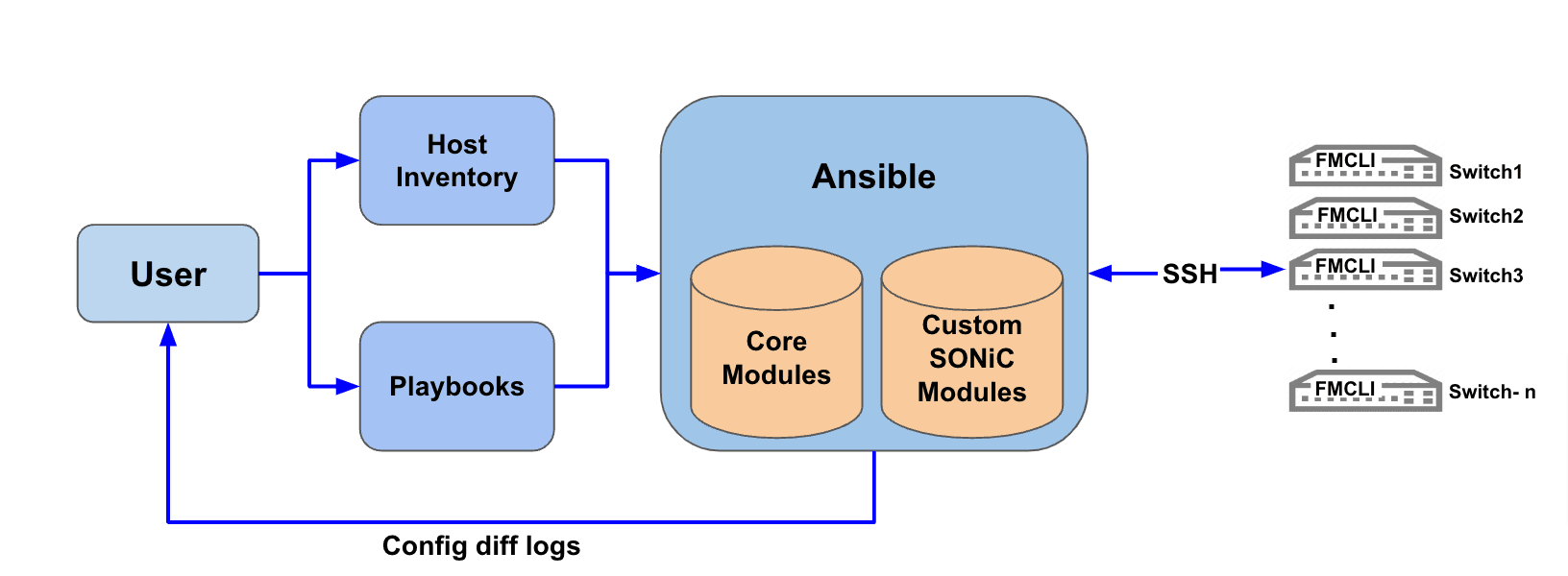
Day1 - Configuration using Ansible + FMCLI
Day 1 configuration refers to the initial setup and configuration tasks that must be completed when a new network device or system is deployed. This configuration is crucial for getting the device or system operational and ready for use within the network or IT infrastructure.
Day-1 Configuration - Example
- name: SONiC port configuration
  sonic_interfaces:
    config:
      - interfaces: ["Ethernet32", "Ethernet4"]
        mtu: 9000
        enable: True
Day2 - Configuration
Day 2 configuration refers to the ongoing management, optimization, and maintenance tasks performed after a network device or system’s initial setup (Day 1 configuration). While Day 1 focuses on operationalizing the system, Day 2 is about ensuring long-term stability, performance, and adaptability.
In the example below demonstrates the process and impact of Day 2 or subsequent configurations. MTU config is updated and set the port description. The log shows that the “Diff”, reveals the removal of the old MTU value and the addition of the new one. Additionally, only the ‘description’ is being added, as it was not included in the previous configuration.
Day-2 Configuration - Example
- name: SONiC port configuration
  sonic_interfaces:
    config:
      - interfaces: ["Ethernet32"]
        mtu: 9100
        enable: True
        description: "fmcli description_eth32"
Log
"diff": {
    "interfaces": {
        "interface ethernet Ethernet32": [
            "- mtu 9000",
            "+ mtu 9100",
            "+ description fmcli description_eth32",
        ]
    }
}
State: Merge / Delete
Ansible’s Two-State support allows for seamless management of configurations throughout Day-0 to Day-N operations. It efficiently handles the merging or deletion of configurations, ensuring that changes are applied accurately and consistently over time. This feature simplifies the process of updating and maintaining system configurations by allowing administrators to effectively manage differences between current and desired states.
1. Merge
A default operation, will be used in case of merge/add/update/override configurations.
Day-0 Configuration
# day-0
- name: SONiC port configuration
  sonic_interfaces:
    config:
      - interfaces: ["Ethernet32"]
        mtu: 9000
        enable: True
        description: "fmcli description_eth32"

      - interfaces: ["Ethernet34"]
        mtu: 9000
        description: "fmcli description_eth34"

    state: merge # default
Day-N Configuration
# day-n
- name: SONiC port configuration
  sonic_interfaces:
    config:
      - interfaces: ["Ethernet32"]
        mtu: 9000
        ip_address: 40.0.0.10/31 # new configuration
        description: "fmcli description_eth32"

    state: merge # default
In this configuration, if an existing configuration is found, it will be overridden; if it doesn’t exist, it will be added as a new configuration.
Log
| Day-0 | Day-n |
|---|---|
"commands": [ "config terminal", "interface ethernet Ethernet32", "mtu 9000", "no shutdown", "description fmcli description_eth32", "end", "save", "config terminal", "interface ethernet Ethernet34", "mtu 9000", "description fmcli description_eth32", "end", "save" ] |
"commands": [ "config terminal", "interface ethernet Ethernet32", "ip address 40.0.0.2/31", "end", "save" ] |
2. Delete
It will delete the configuration if it already exists.
a) Delete inner configs
Day-0 Configuration
# day-0
- name: SONiC port configuration
  sonic_interfaces:
    config:
      - interfaces: ["Ethernet32", "Ethernet36"]
        mtu: 9000
        enable: True
        description: "fmcli description"

    state: merge # default
Day-N Delete Some Config
# day-n delete some config. Ex: delete the description for the interfaces
- name: SONiC port configuration
  sonic_interfaces:
    config:
      - interfaces: ["Ethernet32", "Ethernet36"]
        description: "fmcli description"

    state: delete
Here, day-n task will delete the inner configuration only mentioned under the interface.
Log
| Day-0 | Day-n delete config |
|---|---|
"commands": [ "config terminal", "interface ethernet Ethernet32", "mtu 9000", "no shutdown", "description fmcli description", "end", "save", "config terminal", "interface ethernet Ethernet36", "mtu 9000", "no shutdown", "description fmcli description", "end", "save" ] |
"commands": [ "config terminal", "interface ethernet Ethernet32", "no description fmcli description", "end" "save", "config terminal", "interface ethernet Ethernet36", "no description fmcli description", "end" "save" ] |
b) Delete whole configs
Day-0, Day-1, ... Configuration
# day-0, day-1, ...
- name: SONiC port configuration
  sonic_interfaces:
    config:
      - interfaces: ["Ethernet32", "Ethernet36"]
        mtu: 9000
        enable: True
        description: "fmcli description"
Day-N Delete Whole Config
# day-n delete whole config
- name: SONiC port configuration
  sonic_interfaces:
    config:
      - interfaces: ["Ethernet32", "Ethernet36"]

    state: delete
Here, the day-n task will delete the complete configuration for the listed interfaces
Log
| Day-0 | Day-n delete config |
|---|---|
"commands": [ "config terminal", "interface ethernet Ethernet32", "mtu 9000", "no shutdown", "description fmcli description", "end", "save", "config terminal", "interface ethernet Ethernet36", "mtu 9000", "no shutdown", "description fmcli description", "end", "save" ] |
"commands": [ "config terminal", "interface ethernet Ethernet32", "no mtu 9000", "shutdown", "no description fmcli description", "end" "save", "config terminal", "no interface ethernet Ethernet32", "end" "save", "config terminal", "interface ethernet Ethernet36", "no mtu 9000", "shutdown", "no description fmcli description", "end" "save", "config terminal", "no interface ethernet Ethernet36", "end" "save" ] |
Summary
Integrating Aviz Network FMCLI with Ansible and SONiC enables seamless automation of Day 0, Day 1, and Day 2 DevOps operations. This robust combination streamlines network management and fully leverages the power of DevOps and open-source technologies. With automation at your disposal, you can enhance configurations, maintain consistent deployments, and utilize SONiC’s flexibility to create a more efficient network environment. Embrace the next generation of network automation and discover the transformative advantages of these innovative tools.
Redefining Network Automation with DevOps, SONiC, and Ansible. Contact Us today!
Author: Abhishek Kumar, Khurram Khani