




Zero Guesswork: Track Every Change with ONES
 August 18, 2026
 ONES & SONiC
TL;DR
ONES Audit Service offers an end-to-end auditable trail for network teams, allowing operators to determine quickly what change was made, by whom, when, and how. It records all platform activity, from the UI or API, automatically. Examples include configuration changes, user activities, access logs, and event navigation.
Operators can filter to pinpoint specific activities, pivot on events and examine related activity to understand their sequence, export activity to CSV, and even forward audit events in real time to a Syslog server outside of ONES.
ONES retains a central chronologically ordered audit trail, eliminating the guess work for investigations, troubleshooter operations, and daily activity accounting.
Introduction
Today's data center networks are typically operated with several different operational workflows, with multiple network engineers setting up switches, processing telemetry, orchestrating the fabrics, setting up integrations and managing network policies. ONES consolidates all those workflows into a single pane of glass, fostering team collaboration and bringing network control into a centralized location. However, with multiple hands on deck and changes happening throughout the day, this leads to the obvious question to ask when operations break: Who did what, and when?
A stream of telemetry data disappears or seems to go silent. A fabric policy isn't behaving as expected or a switch configuration doesn't match the team's memory. Without an auditing trail in place of what happened on your platform, basic troubleshooting can turn into a multi-day "swat" effort. To fill this visibility gap, ONES has an Audit Service feature that automatically captures and stores actions performed across ONES, so you'll have context and the ability to trace activity without relying on recollection or exhaustive investigation.
How Does ONES Audit Service Track Every Change?
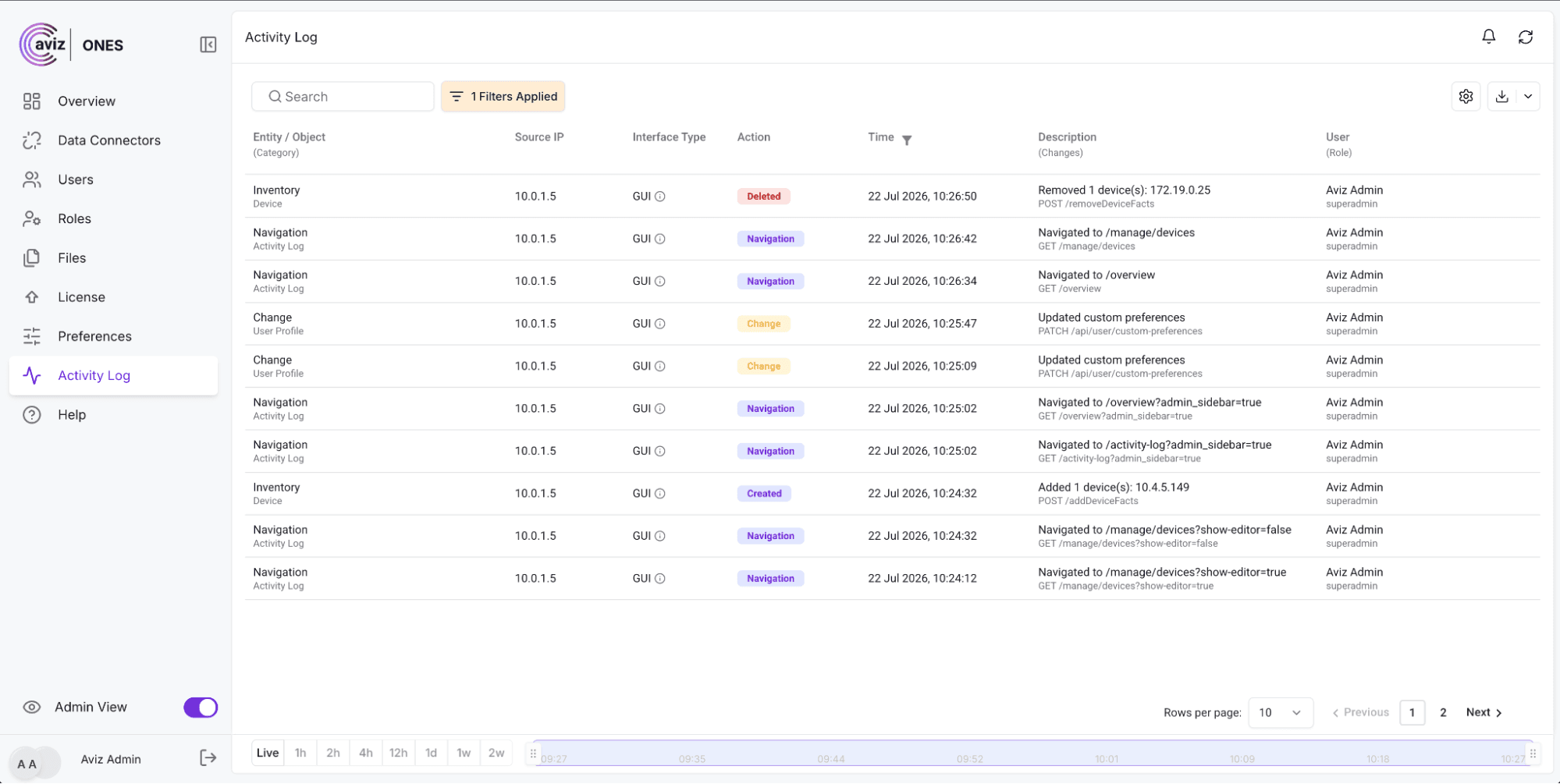
Activity Log is ONES's master, chronologically organized history of what's occurring on the platform. If it came in via UI or a direct API call, you'll find it clearly identified in a single location.
For every activity, the log details:
- Who – operator name & role
- What – the action and the object it impacted
- When – exact timestamp of the activity
- How – UI or API access
Additionally, navigation within ONES is recorded. Thus, the Activity Log not only tracks what’s changed, but where a user browsed before making changes.
What Happens When a Device Is Deleted?
We pulled a device. And you know who pulled it, how, and when - but what else was going on at the time? What did they see before they made that decision? Well now you won't have to guess, thanks to ONES.
How Can ONES Help Reconstruct What Happened?
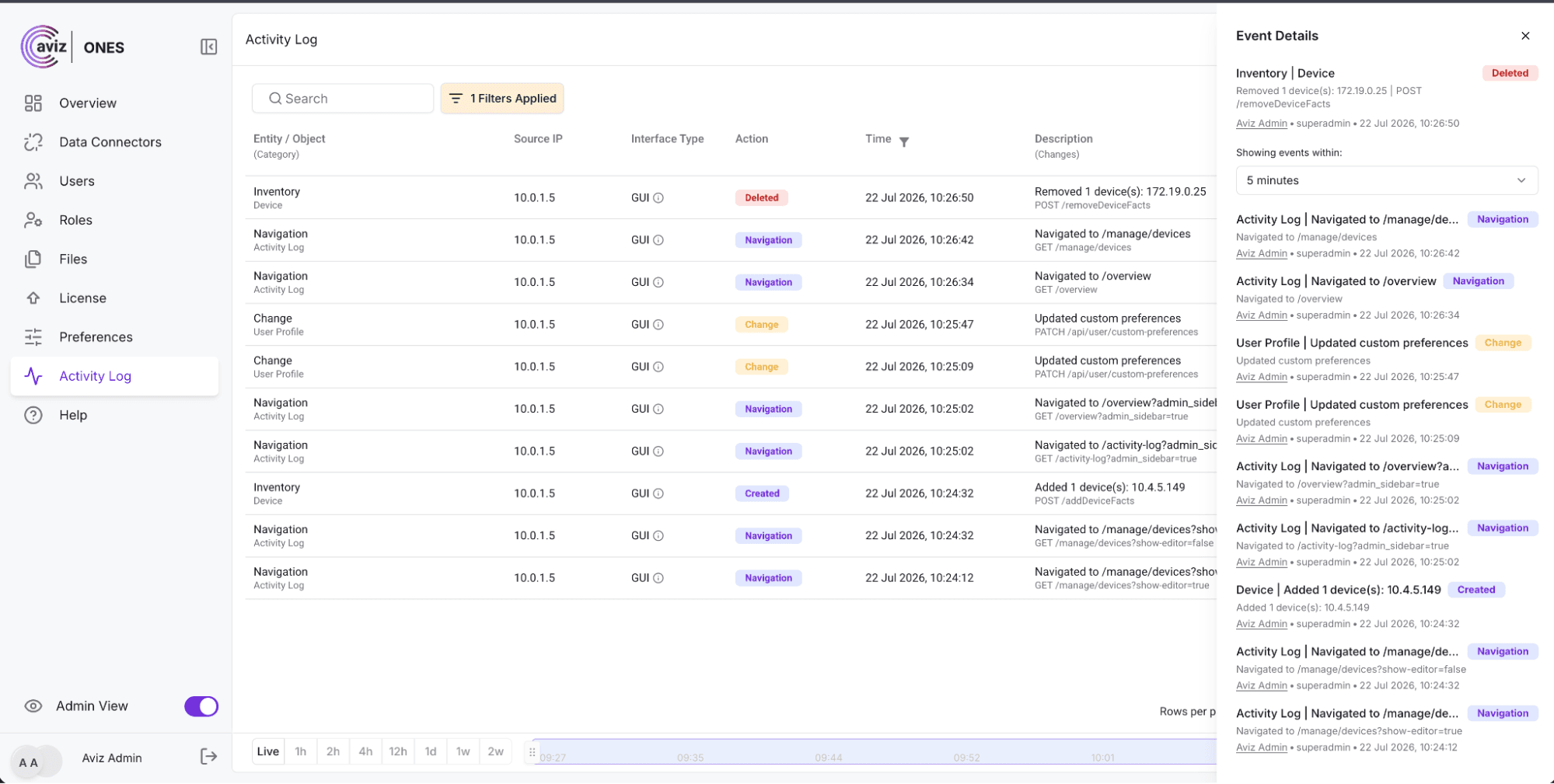
Simply click "View Related" on an event and a side-drawer reveals everything related to that event, including navigation, modifications, status updates, and more so you can track exactly what transpired, in which order, and why.
How Can ONES Forward Audit Events to a Syslog Server?
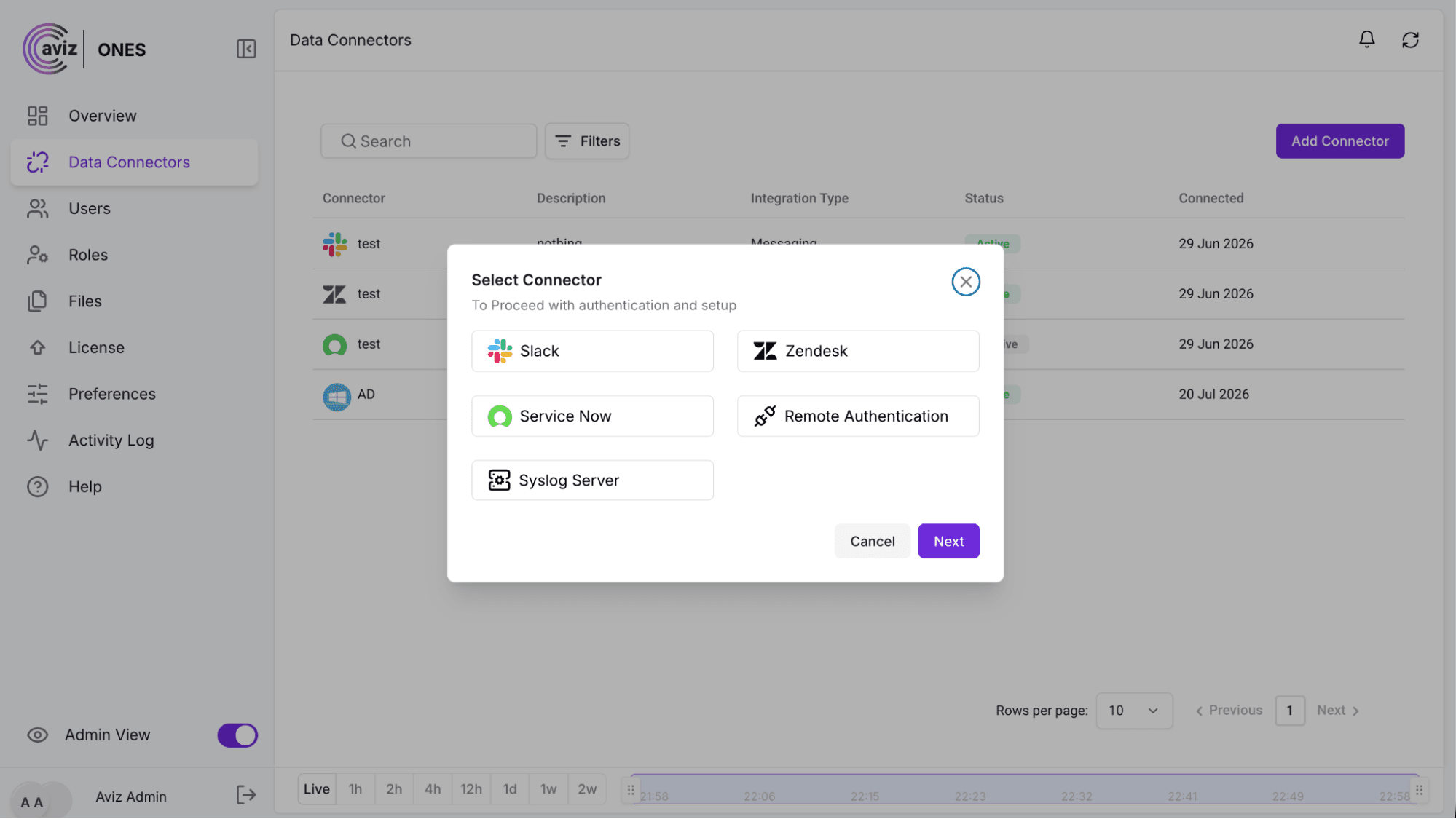
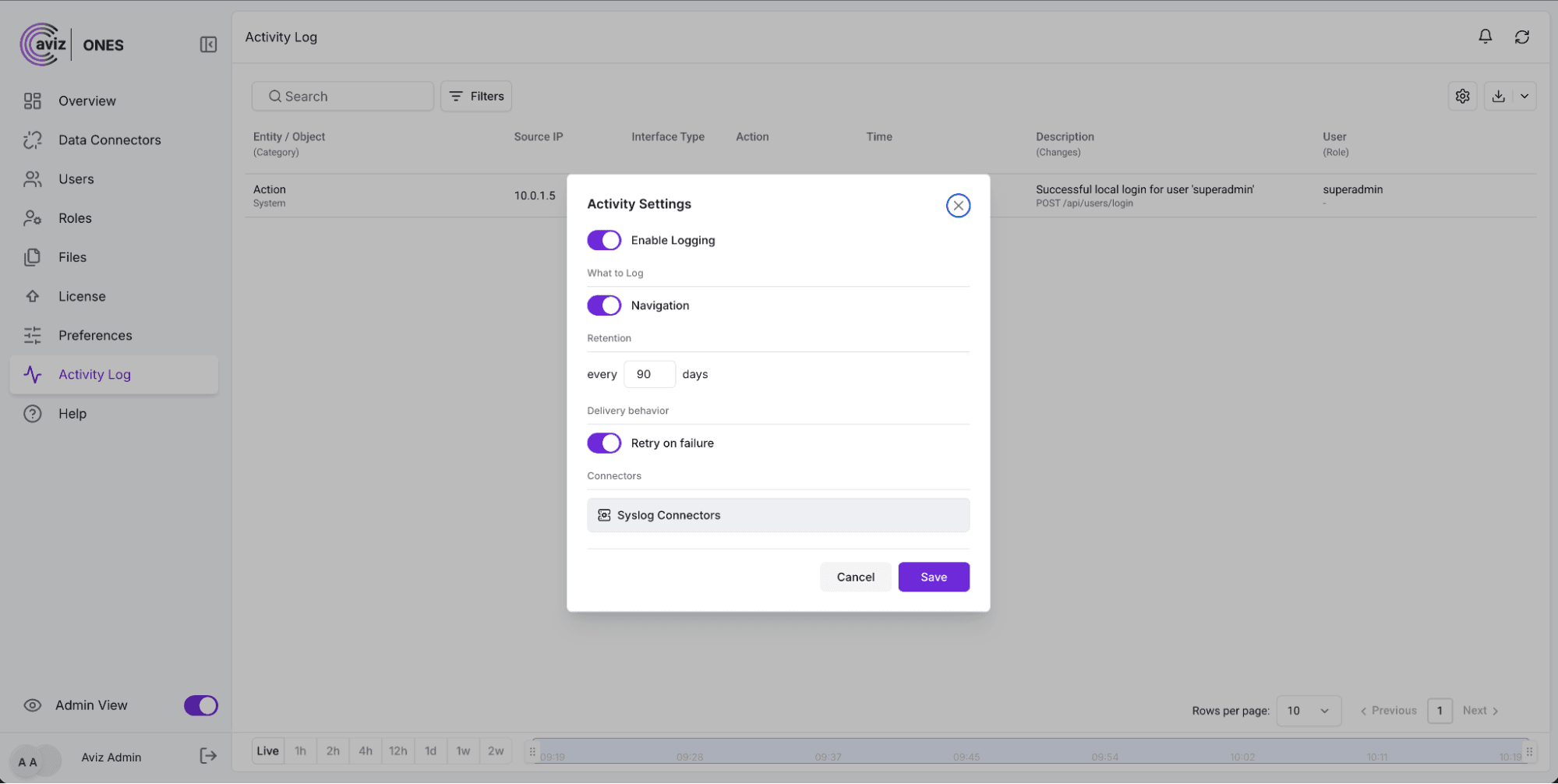
The Syslog Connector Syslog is the de facto standard for ingesting and forwarding log data from throughout your environment. Whether you've got a simple network with a couple routers or a complex, multi-site data center, it uses Syslog to talk to everything from your routers and switches to all of your servers, appliances, and more. Since your team likely already uses Syslog as a central log management system, getting started with ONES is as easy as pointing it to your existing Syslog server and you'll get a live feed of all activity happening within ONES into your existing infrastructure!

How Can You Find Specific Events in the ONES Activity Log?
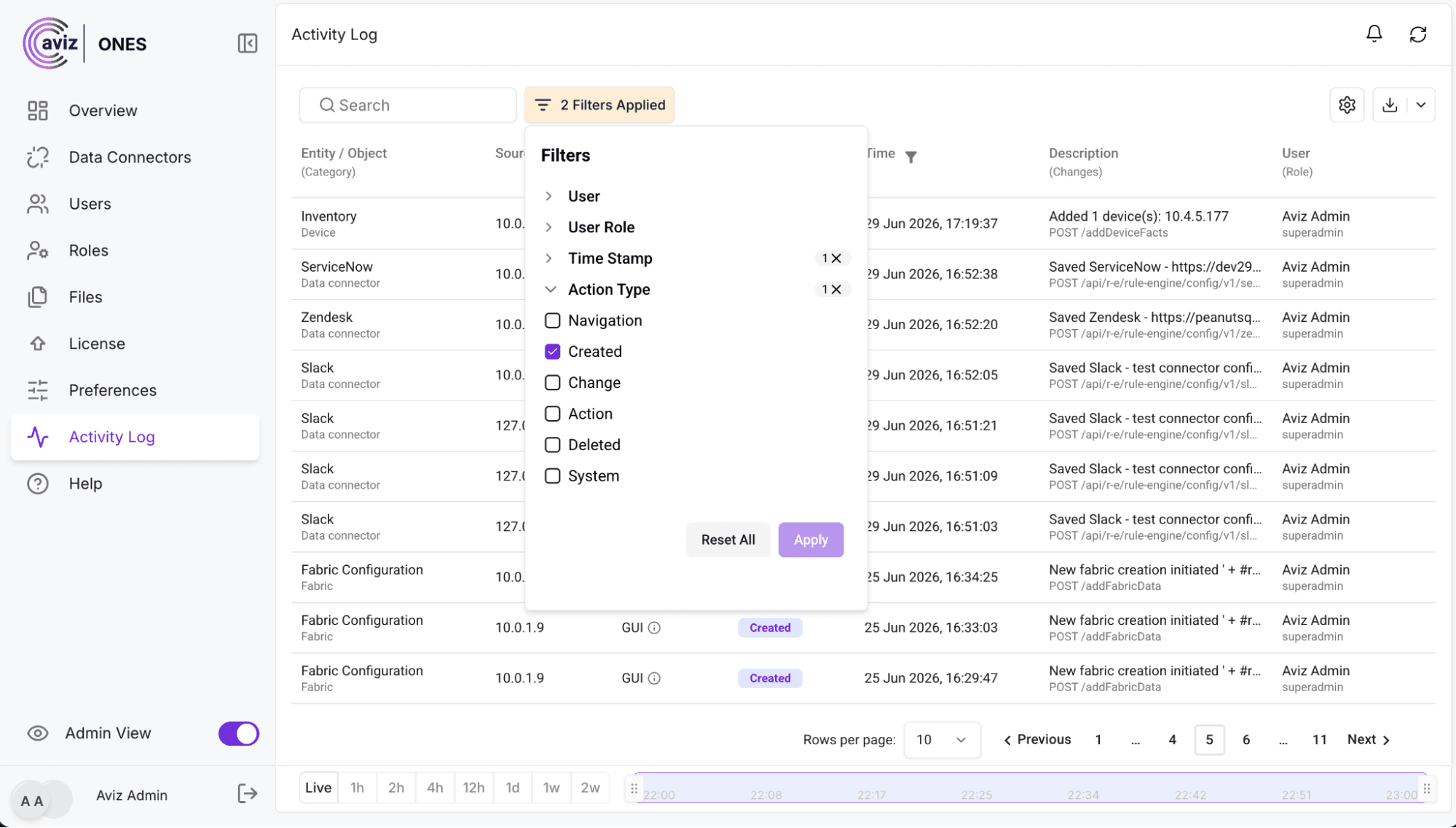
Find What You’re Looking For — Fast
Need to see what was happening in one spot on your platform? An action by a certain user? Look no further. With the ONES platform you'll find exactly what you're searching for by applying the correct filters based on what you're trying to learn. It happens almost instantly.
Take Your Data With You
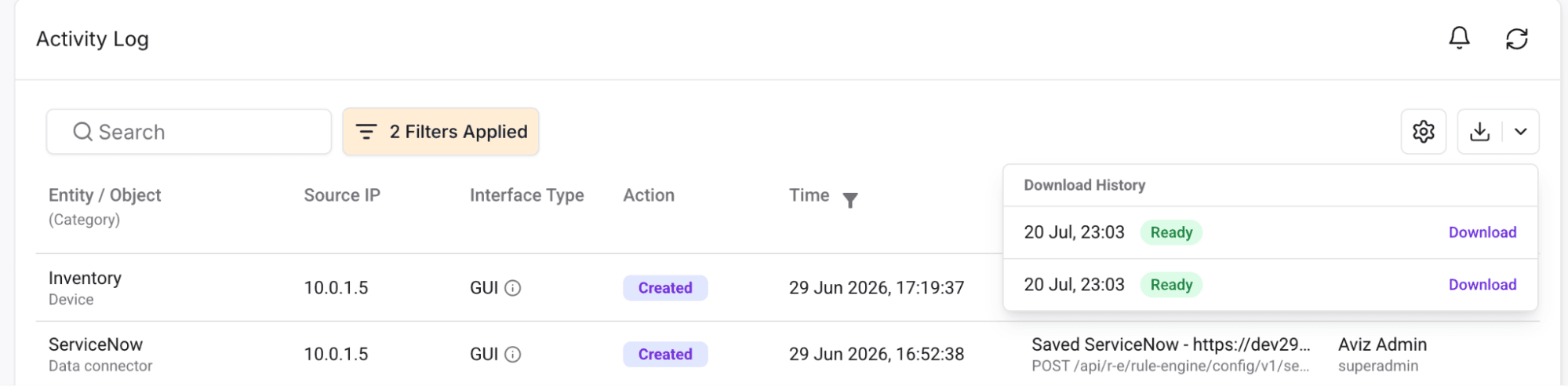
Do you want to analyze your activity the way you want? Export the Activity Log to CSV with a single click. Import it to Excel and analyze, filter, share – everything that works with data outside of the application will serve you well.
How Does ONES Audit Logging Work?
You won't need to set anything up for the audit logs. They are part of the product by default. Any time a mutation is performed - a user is updated, a rule is toggled - ONES logs the action automatically on the server-side.
Since the entire audit log doesn't rely on the frontend recalling to ping a separate endpoint, it's impossible to forget to log a mutation.
It is done when the change occurs at the root source.
What Does ONES Audit Service Provide From Day One?
ONES logs all actions happening in your system. Automatically, from minute one. And with no configuration or set up required. It's a searchable archive of everything that's ever been done - including who did it, when, where from, and whether it was successful. You can filter it, export it, or stream it to your existing monitoring systems. If you've just got to turn it off for some reason - we've got you covered.
In ONES, nothing that happens is ever forgotten again. Forget trying to recall past events.
Conclusion
Understanding network state changes is the backbone of managing and troubleshooting the network. Teams can lose hours trying to piece together a story from what they recall when they are forced to troubleshoot without an accurate audit log. ONES Audit Service helps by providing you a centralized activity log of your platform activity and automatically capturing changes that make it easy for operators to explore and remediate issues.
With an activity log that is easy to search, contains related events for added context, and that can be exported as a CSV, or forwarded via real-time Syslog to your favorite network monitoring solution ONES provides the operational accountability your team needs and integrates auditing into your current process.
ONES records every event, eliminating the need for your team to recreate the network's story from memory.
Frequently Asked Questions
What is ONES Audit Service?
ONES Audit Service is a built-in feature that automatically captures and stores a chronological record of all actions performed across the ONES platform, whether made through the UI or API, with no configuration required.
What information does the Activity Log capture for each event?
For every recorded action, the log details who performed it (operator name and role), what was done and what it affected, when it occurred (exact timestamp), and how it was accessed (UI or API).
Does ONES Audit Service require any setup or configuration?
No setup is required. Audit logging is part of the product by default and begins recording automatically from the moment the platform is in use.
Can I see the context around a specific event, not just the event itself?
Yes. Clicking "View Related" on any event opens a side drawer showing everything connected to that event, including navigation history, modifications, and status updates, in the order they occurred.
How can I search or filter the Activity Log?
You can apply filters based on user, action type, or location within the platform to quickly pinpoint specific events, and results appear almost instantly.
Can I export the Activity Log?
Yes. The Activity Log can be exported to a CSV file with a single click, allowing you to analyze, filter, or share the data outside of the ONES platform.
Can ONES forward audit events to an external system?
Yes. ONES includes a Syslog Connector that streams audit events in real time to your existing Syslog server, integrating platform activity directly into your current log management infrastructure.
Why is server-side logging important for audit reliability?
Because logging happens at the server side when a change occurs at its root source, it is impossible for an action to go unrecorded, regardless of what happens on the frontend.
Discover how ONES provides centralized network operations, observability, automation, and audit visibility for modern data center environments. Learn more about Aviz ONES:


