




What Llama-3 Reveals About GPU Cluster Failures And How ONES 4.0 Helps You Stay Ahead
 September 29, 2025
 ONES & SONiC
Summary
- Meta's Llama-3 405B training highlighted a hidden problem in large AI clusters.
- 78% of interruptions during a 54-day training run were caused by hardware failures, not scaling strategies or training recipes.
- ONES 4.0 helps data center teams catch GPU and infrastructure issues early.
- It prevents downtime and keeps AI workloads running smoothly.
Introduction
Training massive AI models like Llama-3 requires thousands of GPUs, complex fabrics, and high oversubscription ratios, but ensuring reliability is an even bigger challenge.
Enterprise IT teams, AI engineers, and cluster operators face costly risks when GPUs, memory, or networks fail unexpectedly.
This article shares Meta's lessons on GPU cluster failures and shows how ONES 4.0 helps prevent downtime.
Why Did Llama-3 Training Face Interruptions?
Most interruptions happened because of hardware issues, not software or scaling.
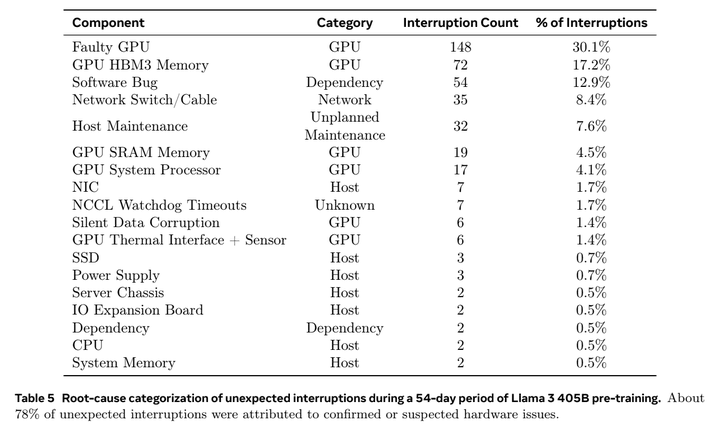
Meta found that 78% of unexpected interruptions during the 54-day training run came from GPUs, memory, network switches, and other infrastructure components.
Breakdown of Issues
- Faulty GPUs: 30% of interruptions
- GPU HBM3 memory problems: 17%
- Network switches & cables: 8%
- Other causes: Host maintenance and software bugs
This isn't just a Meta problem. Any enterprise building AI clusters, whether they use NVIDIA Spectrum-X, AMD Instinct, SONiC fabrics, or Arista EOS, faces the same fragility.
Why GPU Health Matters in AI Infrastructure
GPUs are the engines powering AI workloads. Even a single faulty GPU can slow down or derail a training job, wasting compute cycles and delaying experiments.
Common GPU issues include:
- Overutilization: Some GPUs run at 100% while others sit idle at <20%
- ECC errors: Correctable single-bit vs. uncorrectable double-bit memory errors
- Thermal and power anomalies: GPUs throttle due to cooling or rack-level issues
- Hardware degradation: Failed health checks indicate GPUs need replacement
Without continuous monitoring, these signals are often missed until it's too late.
How ONES 4.0 Helps You Get Ahead of Failures
Direct Answer: ONES 4.0 brings proactive, cross-vendor monitoring to your AI infrastructure so you can detect problems before they escalate.
Key Features
- End-to-end monitoring: GPUs, CPUs, NICs, memory, SSDs, power, and network fabric
- Proactive health checks: ECC error alerts, thermal throttling warnings, and GPU degradation flags
- Cross-vendor support: Works with NVIDIA Spectrum-X fabrics, AMD accelerators, SONiC-based networks, and Arista EOS environments
Example: Detecting GPU Errors with nvidia-smi
$ nvidia-smi --query-gpu=index,name,retired_pages.single_bit_retirement.count,retired_pages.double_bit_retirement.count --format=csv
index, name, retired_pages.single_bit_retirement.count, retired_pages.double_bit_retirement.count
0, A100-PCIE-40GB, 4, 0
1, A100-PCIE-40GB, 0, 1- GPU 0: 4 retired pages due to correctable single-bit errors (warning)
- GPU 1: 1 uncorrectable double-bit ECC error (critical, likely hardware degradation)
ONES highlights these events with severity levels and visual cues so operators can act quickly.
The GPU Dashboard: Health at a Glance
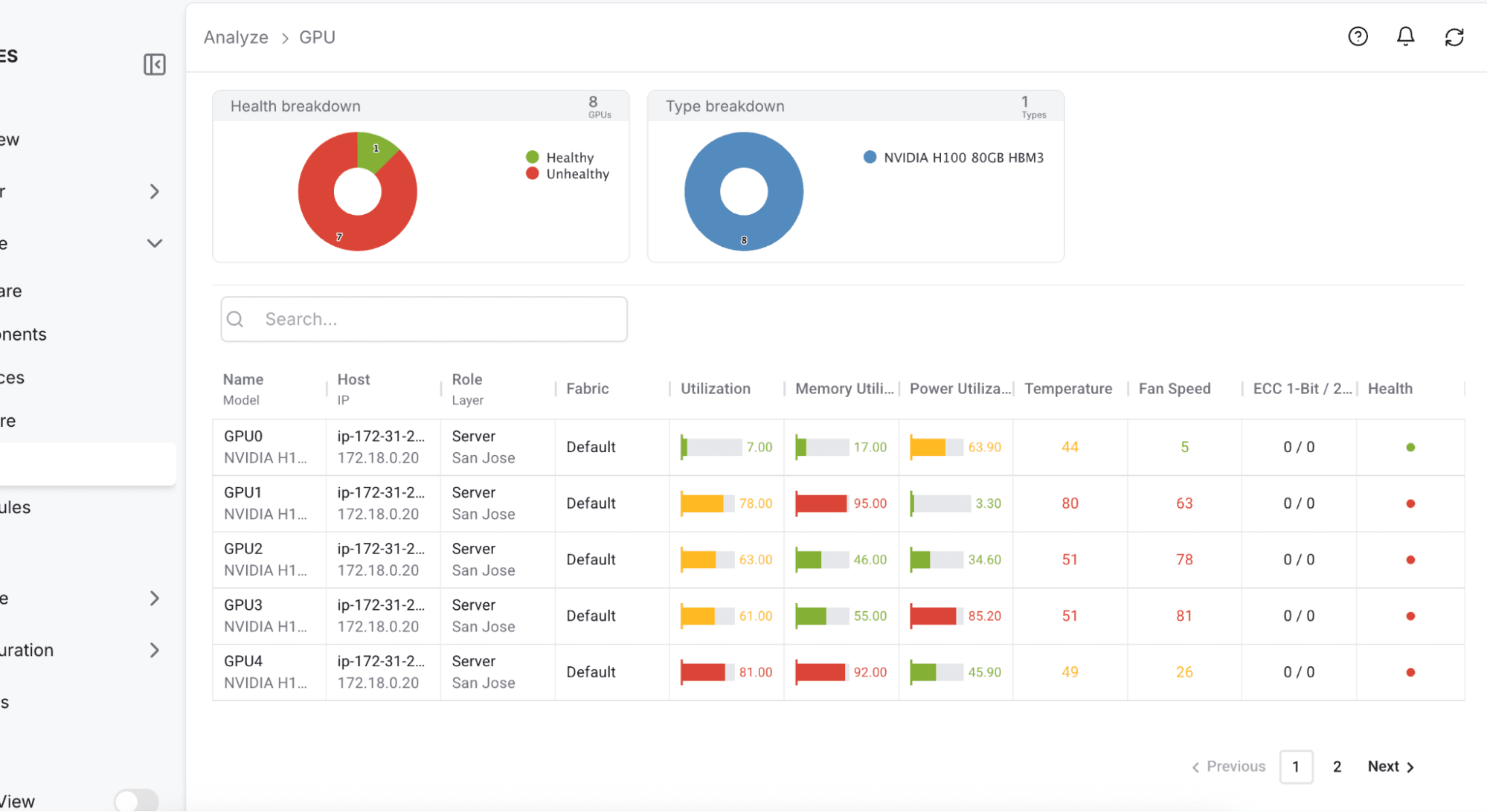
ONES 4.0 provides a GPU dashboard that makes monitoring simple and intuitive.
Dashboard Highlights:
- Inventory view: See all GPUs in your cluster
- Error visibility: Spot ECC single-bit and double-bit errors instantly
- Color-coded health: Green = healthy, Yellow = warning, Red = critical
- Quick audit: Identify underperforming or vulnerable GPUs in seconds
Admins can drill down into root causes or escalate issues via integrated ITSM workflows like ServiceNow, Zendesk, or Slack.
Thresholds and Rules: Layered Safety
Direct Answer: Thresholds and rules provide multiple layers of protection, like instruments and alarms in an aircraft cockpit.
Thresholds
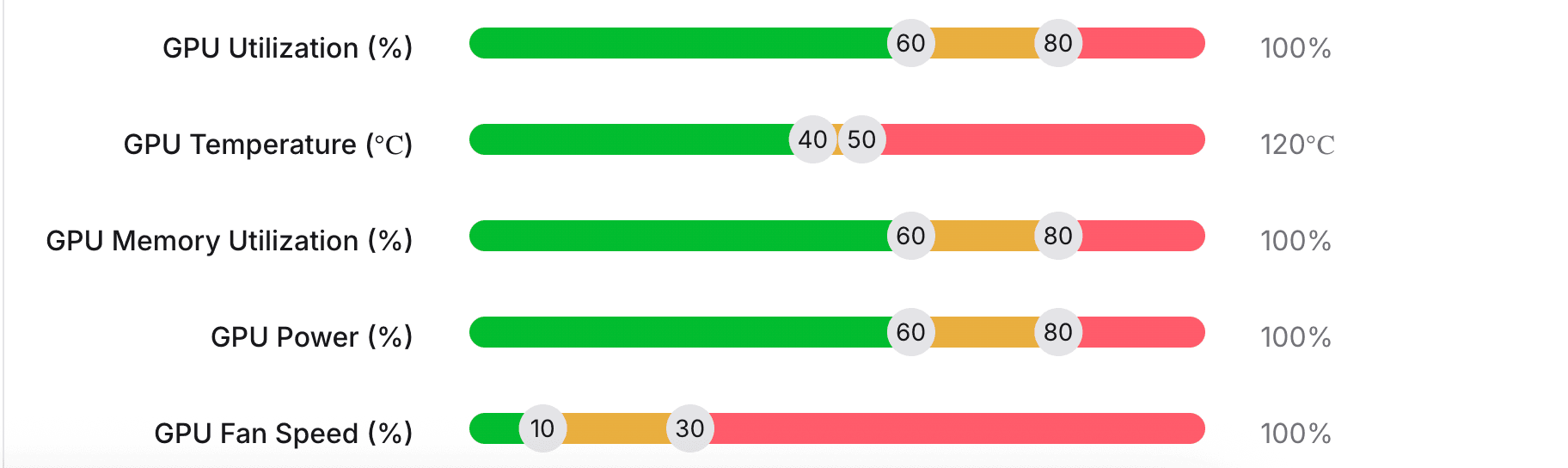
Define what's healthy vs. unhealthy (e.g., Utilization >60% = Yellow, >80% = Red)
Rules
Trigger alerts and notifications based on workload, GPU type, or cluster
Example:
- Warning: Notify via Slack if any GPU sustains >75% utilization for 5 minutes
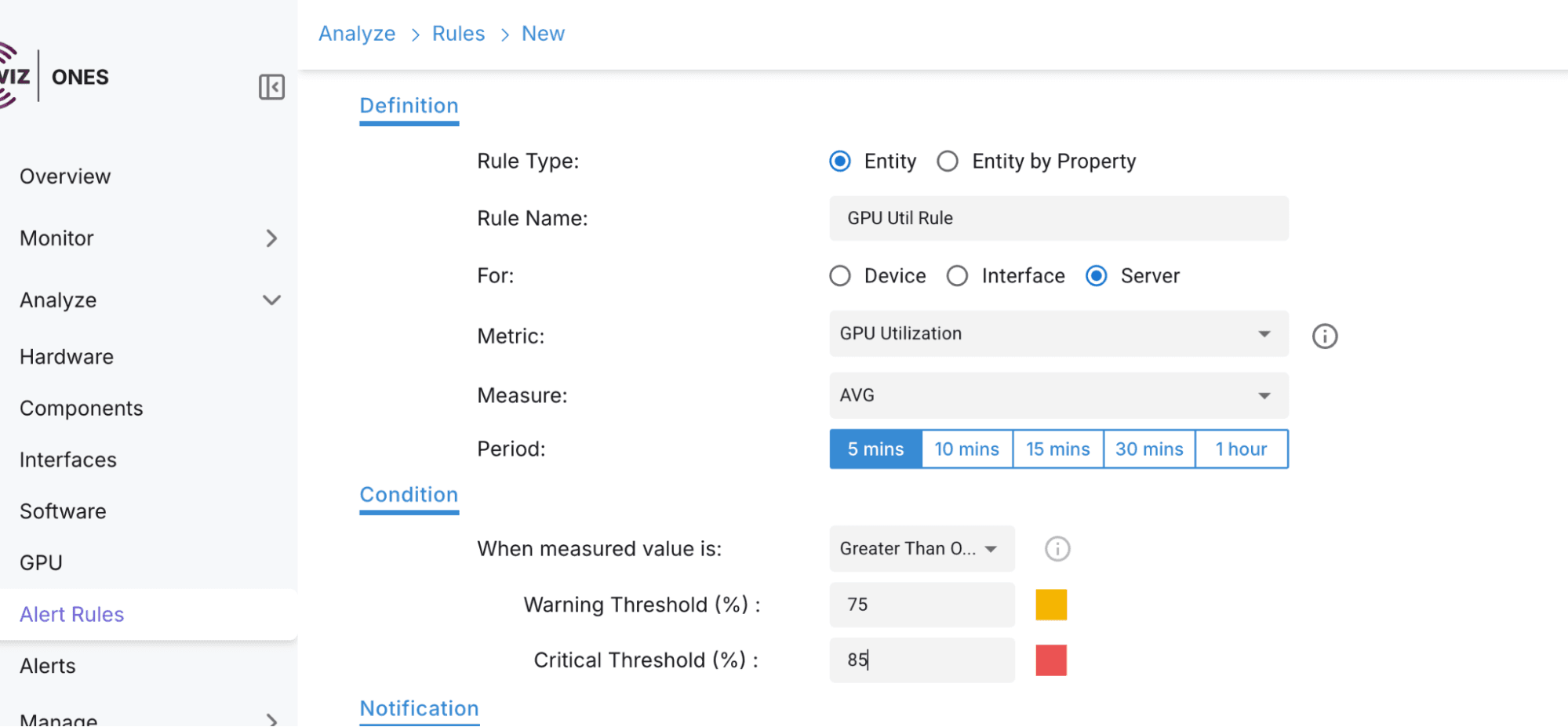
- Critical: Alert if utilization exceeds 85%
This system ensures teams can act quickly before problems escalate.
Lessons from Meta's Llama-3
Direct Answer: Large AI clusters are fragile, but proactive monitoring can make them resilient.
Key Takeaways for Enterprises:
- Early Warnings: Catch GPU issues before they impact critical workloads
- Root Cause Clarity: Faster identification and remediation
- Customizable Policies: Align monitoring with workload priorities
- Vendor-Neutral Design: Freedom to innovate without lock-in
ONES 4.0 acts as a standardization layer across diverse AI infrastructure, letting teams confidently scale clusters on NVIDIA, AMD, SONiC, Arista, or mixed environments.
Conclusion
- Hardware failures caused the majority of interruptions in Llama-3 training
- Continuous GPU monitoring is critical to prevent wasted compute and downtime
- ONES 4.0 provides dashboards, alerts, and cross-vendor support to safeguard AI workloads
- Enterprises can future-proof AI clusters and scale with confidence
Worried about hidden GPU failures disrupting AI training?
Protect your AI infrastructure with ONES 4.0


