




Telco Subscriber and Application Analytics with Aviz Network Copilot
 August 12, 2026
 Network Copilot ™
Bring Aviz Service Node (ASN) subscriber and application analytics into Network Copilot with the 1.7.0 release, and ask telco operational questions in plain language through the ELK connector.
TL;DR
Network Copilot Release 1.7.0 integrates Aviz Service Node (ASN) subscriber and application analytics into conversational AI using the existing ELK data connector. By linking ASN session data on Elasticsearch, operators can ask natural language questions about subscribers, applications, bandwidth, KPIs, mobility, and network performance without resorting to dashboards, custom queries, or specialized tools. Network Copilot turns session-level telemetry into operational insights within chat, from top-level bandwidth consumption to fine-grained subscriber behavior and application analytics.
Introduction
Telco networks chart subscriber and application session data on bandwidth, content types, types of radio access technology (RAT) and their distributions along with handovers, KPIs, and usage. This data is normally buried deep within dashboards and requires either custom queries or an analyst to know the data paths. Friction has now been removed with the 1.7.0 release. The Aviz Service Node (ASN) analytics is now integrated into Network Copilot, meaning data can be queried using simple language, within a chat interface.
This scenario leverages the current ELK data connector. When ASN publishes its application and subscriber metadata to an Elasticsearch stack, all that is needed is to connect the Elasticsearch stack to Network Copilot to enabling the data to be queried using natural language. There is no need for any additional work on modeling the data or creating dashboards. Within Network Copilot, instructing Operators to perform a query is achieved by simply asking a question, and NCP will perform the query and provide the answer in the chat.
How Does the ASN Integration Work?
ASN analytics and session metadata are exported to an Elasticsearch (ELK) stack by ASN on a continuous basis. Network Copilot (NCP) connects to the same ELK stack, using the ELK data connector, and, as a result, makes ASN data queryable in NCP chat. Since the integration is based on the ELK connector, which is used in the ASN deployment, there is no specific ASN configuration beyond pointing the connector to the Elasticsearch instance and the index.
The data is stored in a session-level index, in this example, user-session-data index, which stores over 20 million documents representing user sessions. Each document stores session data, which includes ASN metadata, consisting of the destination, the transport, and many KPIs. Because of this, NCP can answer in detail and at the session level, the questions posed to it.
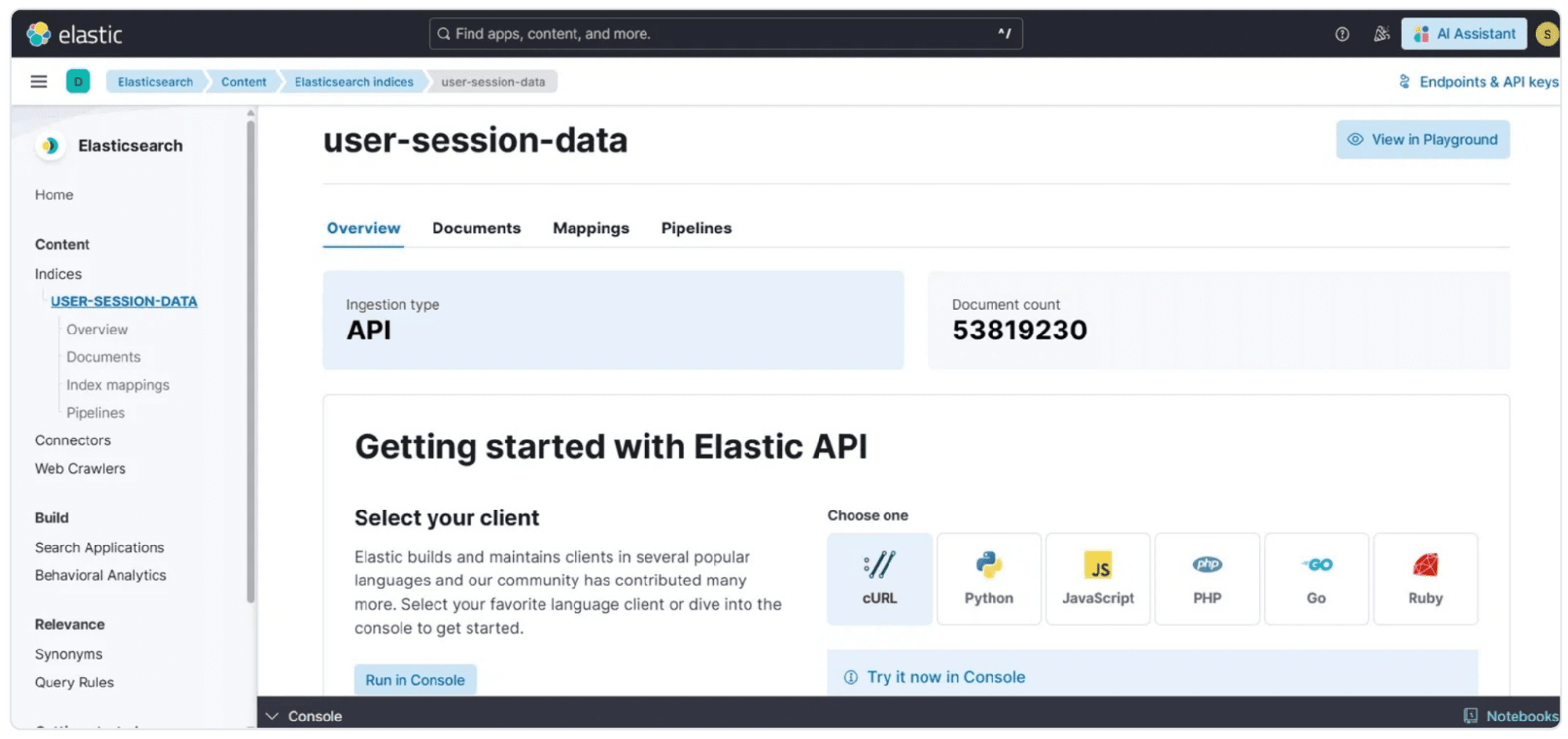
Figure 1: The user-session-data index that ASN populates in Elasticsearch, holding tens of millions of session documents available to Network Copilot through the ELK connector.
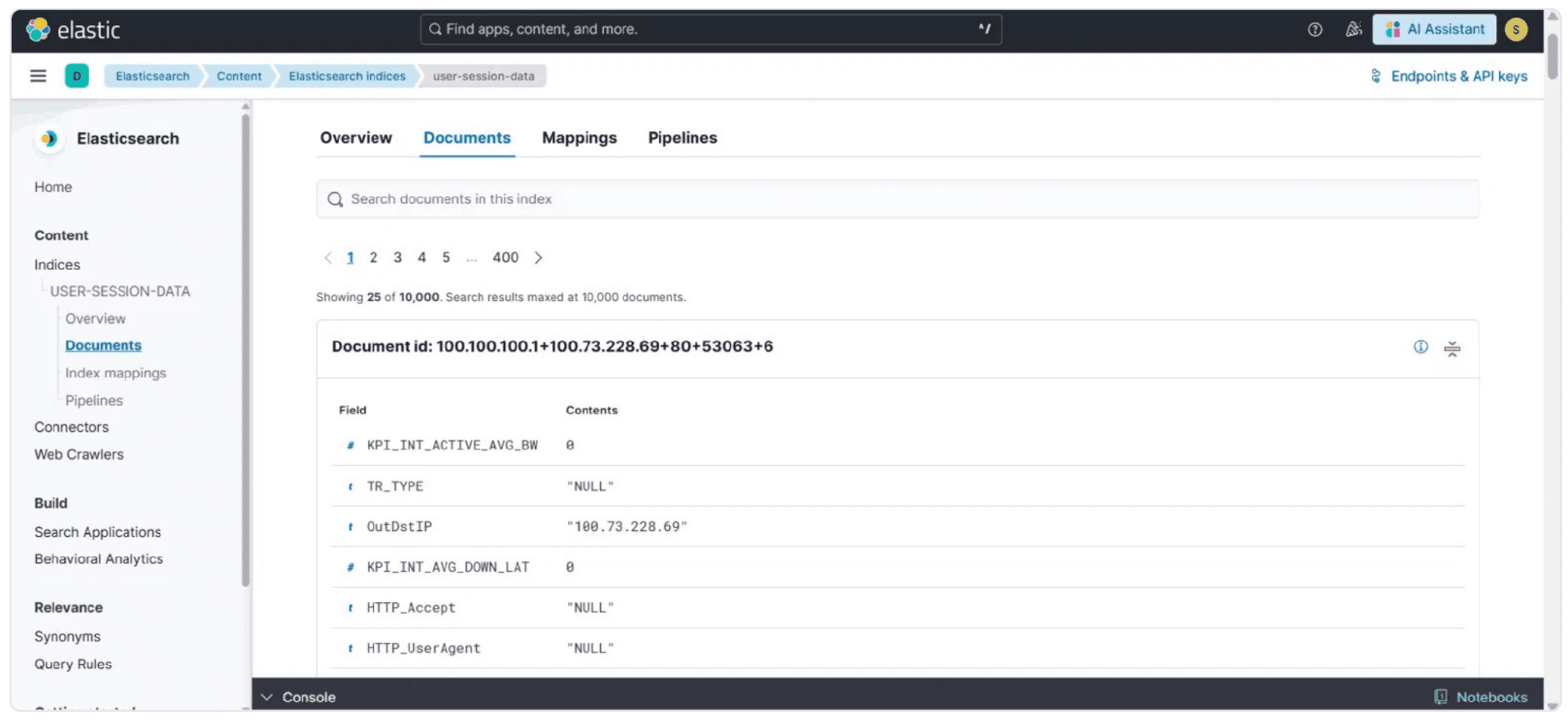
Figure 2: The per-session document structure ingested from ASN, with destination, transport, and KPI fields that NCP can query.
How Can Operators Ask Questions in Plain Language?
Once the ELK connector is hooked to the ASN index, the only way operators can interact with the data is through conversation. You can just ask, “What is the total overall bandwidth consumed?” and receive an answer in chat. Network Copilot takes the session data from the ASN through the ELK connector, aggregates the byte counts, and returns the answer in raw bytes and in easier to read decimal (GB, TB) and binary (GiB) units. In this case, the data set is about 11.1 TB of traffic. This conversational style can be used to answer all subscriber and application analytics. This means that an operator can go from looking at a large overall data consumption number to seeing the breakdown of each individual subscriber.
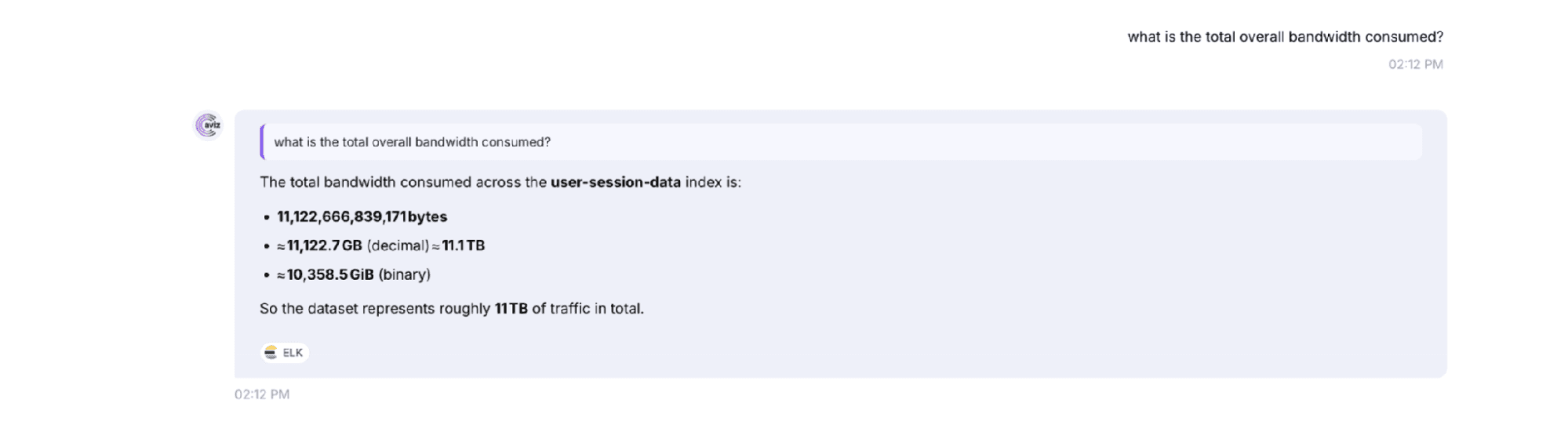
Figure 3: Network Copilot answering a plain-language bandwidth query, returning the total bytes consumed across the ASN user-session-data index in bytes, GB, and TB.
What Subscriber Analytics Can Network Copilot Provide?
From the subscriber viewpoint, Network Copilot can provide insights on who is on the network, how and where they are using it, and also where they are located. Examples of questions that can be asked of Network Copilot include “What is the total number of subscribers?”, “What are the top 10 subscribers based on data usage?”, “What is the total bandwidth consumption for each subscriber in the last 24 hours?”, and “What subscribers have exhibited data usage that is greater than the network average?”
The same format is used for radio and mobility analytics. Some questions that can be asked of Network Copilot include “Show subscriber count by RAT type (4G, 5G),” “What is the subscriber density per tower?” and “Which tower has the highest subscriber density?” “Show the number of handovers per subscriber in the last 24 hours” and “Identify subscribers that had 10 or more handovers in a single hour” can also be asked. Operators can also ask for behavioral and quality views and request things like subscriber churn based on last seen, activity patterns during each hour of the day, and summary KPIs of latency, packet loss, and jitter per subscriber.
These can also be provided in a visual form besides just a text form. Asking Network Copilot to “draw a pie chart for subscribers by categories” yields the following chart. In this chart, subscribers (IMSI) are shown across (AppGroup) as per the data from ASN. In this case, the social category has the highest share and the other categories are evenly distributed. This chart can be viewed in a table or list the categories by clicking on the chart.
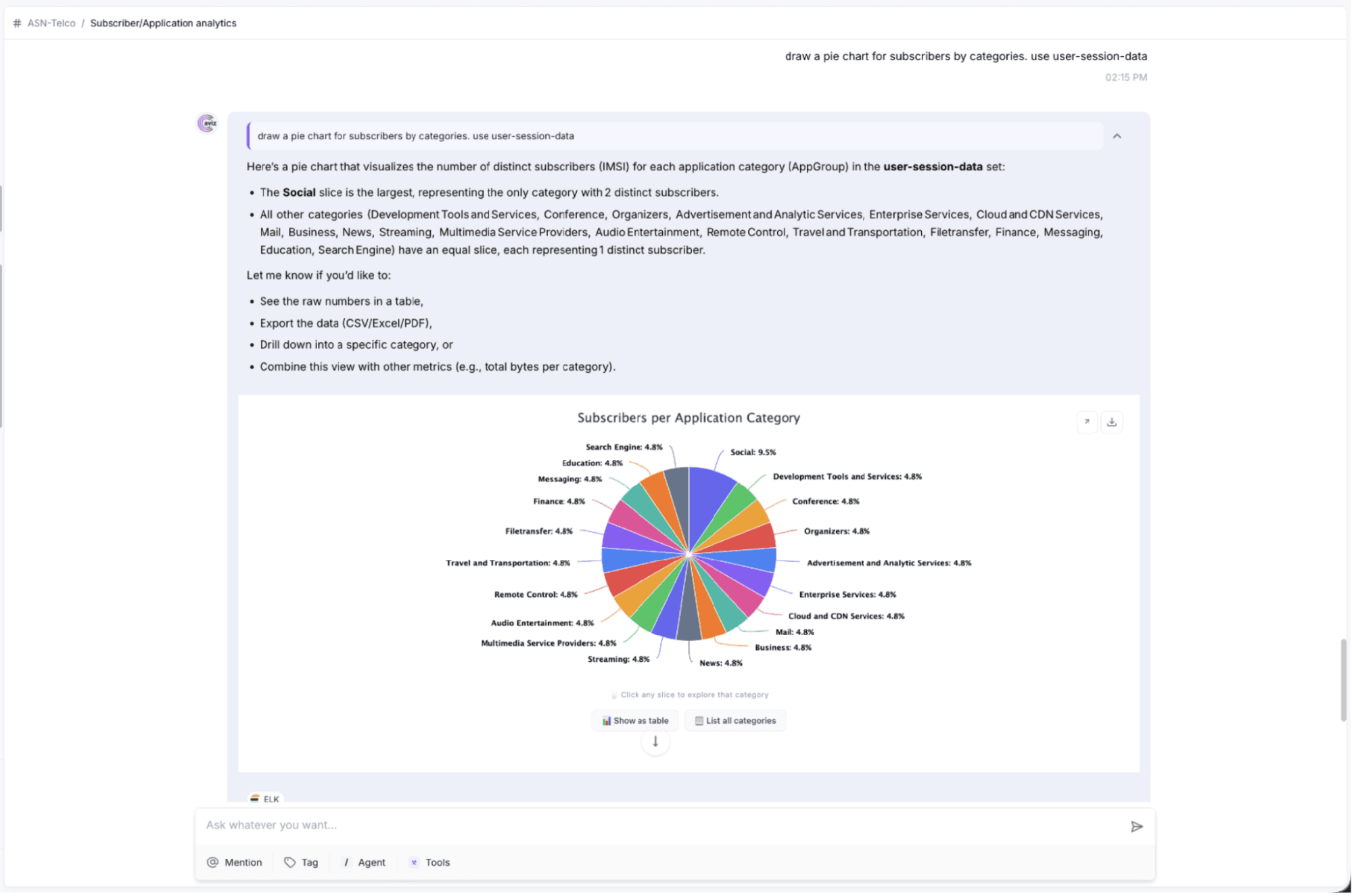
Figure 4: Network Copilot rendering distinct subscribers by application category as an interactive pie chart, built from the ASN user-session-data index.
What Application Analytics Can Network Copilot Provide?
The data foundation helps users perform detailed analysis on network applications on the dashboard. Example questions may include "What are the 10 applications using the most bandwidth?," "Please divide the bandwidth for each application category (Video, Gaming, Audio, VoIP, Other)," or "What percentage of the bandwidth is Video Streaming, Gaming, & VoIP?" detailed questions can be asked to get the most granular information like "What application for gaming uses the most bandwidth?," or "What video streaming application was used the most?"
Network Copilot analyzes usage beyond simple application use. Network Copilot provides engagement and performance data to users beyond simple application usage such as the types of content used, sessions of a given application, the highest used application within the last 24 hours, use within a given application throughout the day, applications with performance issues like high latency or packet loss, and even the most poorly performing sessions.
While subscriber analysis may only return data in the form of charts, Network Copilot can give a ranked answer to a user’s question like "what are the top 5 social networking applications?" and show me the total data consumed for each (along with the other commonly used chart styles). You can also turn Facebook dominating the total bytes in the chart well ahead of the next 4 applications, into a table.
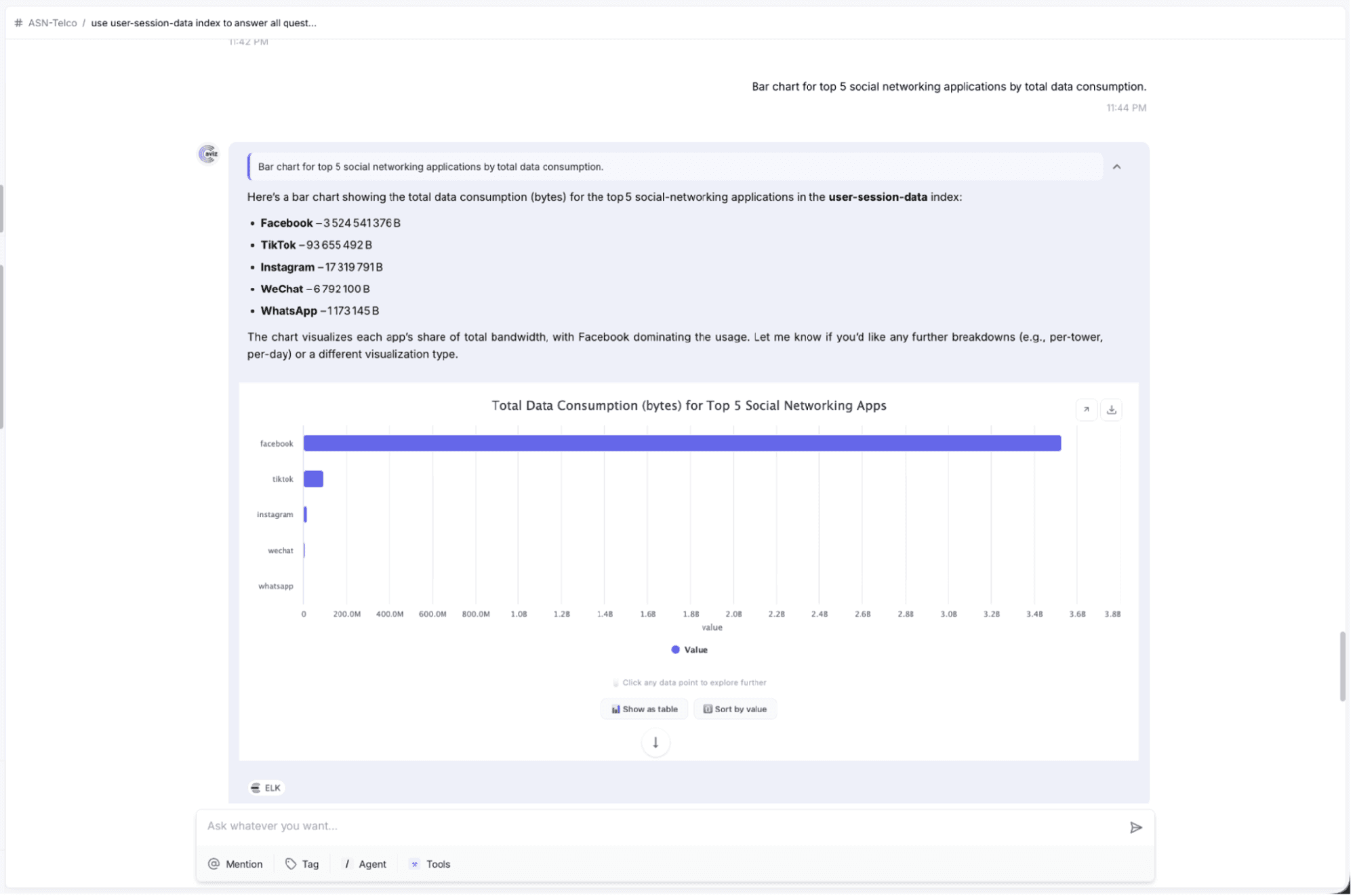
Figure 5: Total data consumption for the top 5 social-networking applications, rendered as a bar chart from the ASN session data.
Performance questions are handled the same way. Asking "Which application type has the highest average latency?" returns the single top application, here cachefly, alongside its average KPI value, so an operator can immediately see which application is most likely to be degrading experience and follow up with a deeper comparison.
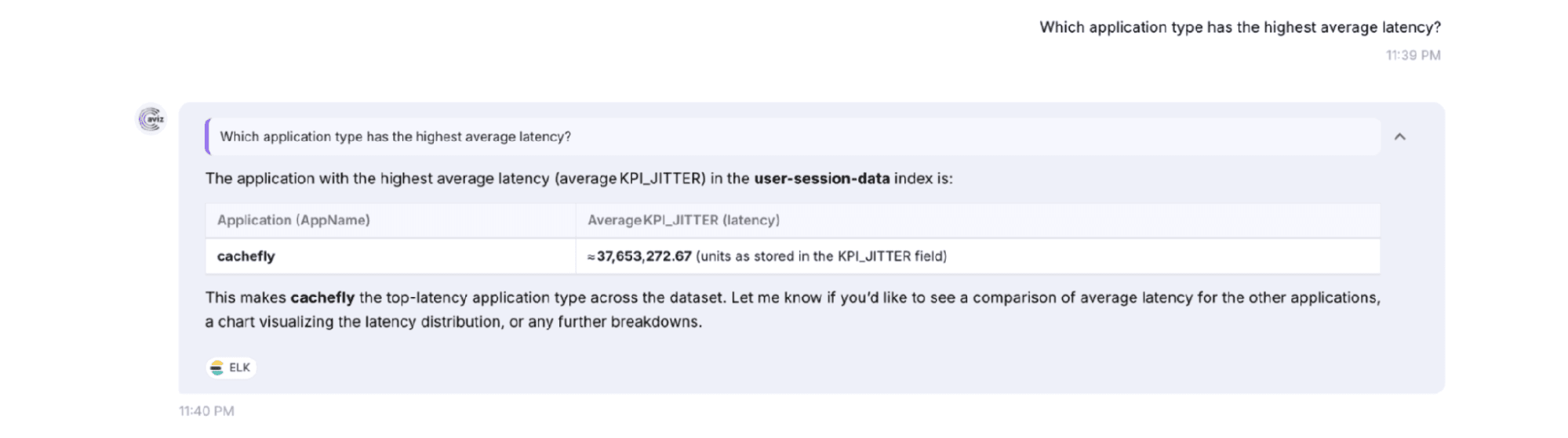
Figure 6: Network Copilot identifying the application with the highest average latency (KPI_JITTER) across the ASN user-session-data index.
Because Network Copilot works at the individual session level, it can also rank the worst sessions outright. "Top 10 worst-performing sessions by combined KPI" returns a sortable, searchable table that combines source and destination IPs, ports, protocol, application name, maximum packet loss, and jitter into a single combined-KPI score. The result is an actionable shortlist that operators can filter in place or export to CSV for further investigation.
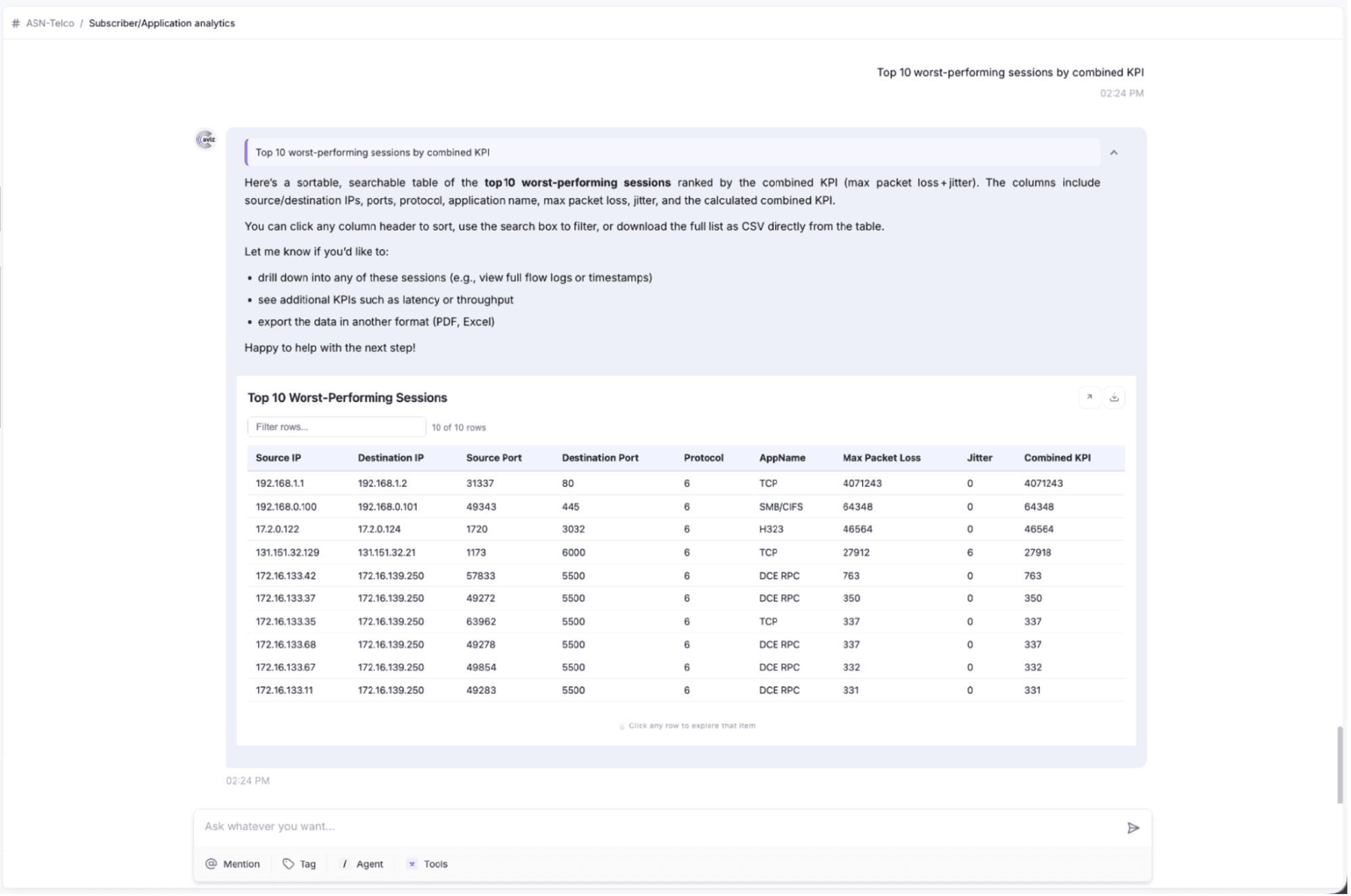
Figure 7: A ranked, searchable table of the top 10 worst-performing sessions by combined KPI (packet loss + jitter), generated directly from the ASN session data.
How Do You Get Started with ASN Analytics?
Activating this use case is simple. First, make sure ASN is sending its analytics and metadata to your ELK stack (Elasticsearch, Logstash, Kibana). Then, when setting up the ELK Connector under Data Connectors, enter the ELK stack’s URL/IP and put the ASN index name or pattern in the Index Information section. When connected, ASN data immediately shows up for natural language querying in NCP Chat. For more about Aviz Service Node, check the ASN docs.
Conclusion
For Telco operators using Aviz Service Node analytics together with Network Copilot and the ELK connector, subscriber and application session data can now be analyzed in a straightforward manner. There is no need for complex dashboards, custom queries, or supplementary tools. One question in a user interface provides answers to many questions about subscriber data and session information including count, distribution, detailed analysis, and performance ranking. Operators are now able to access this data quickly and easily, enabling them to derive maximum value from the data provided by ASN.
Frequently Asked Questions
What is the Aviz Service Node (ASN) integration with Network Copilot?
The ASN integration, introduced in Network Copilot Release 1.7.0, connects Aviz Service Node subscriber and application analytics to a conversational AI interface using the existing ELK data connector. Operators can query session-level telemetry through plain-language chat without dashboards, custom queries, or specialized tools.
How does the ELK connector enable ASN data to be queried in Network Copilot?
ASN continuously exports analytics and session metadata to an Elasticsearch stack, and Network Copilot connects to that same stack using the ELK data connector. Once connected, all ASN data stored in the session-level index becomes available for natural language querying in the NCP chat interface.
Is any special ASN configuration required to set up the integration?
No ASN-specific configuration is needed beyond pointing the ELK connector to the Elasticsearch instance and the relevant index. As long as ASN is already sending its analytics to your ELK stack, the integration is ready to use.
What subscriber analytics can operators access through Network Copilot?
Operators can ask questions about total subscriber counts, top data consumers, bandwidth usage per subscriber, RAT type distribution, handover counts, tower density, activity patterns, and summary KPIs like latency, packet loss, and jitter. Results can be returned as text, tables, or interactive charts such as pie charts.
What application analytics does Network Copilot support with ASN data?
Network Copilot can identify top bandwidth-consuming applications, break down usage by category (Video, Gaming, Audio, VoIP), surface the highest-latency application types, and rank the worst-performing sessions by combined KPI score. Results can be displayed as bar charts, ranked lists, or exportable tables.
How do you get started with ASN analytics in Network Copilot?
Ensure ASN is already sending its analytics to your ELK stack, then configure the ELK connector under Data Connectors by entering the Elasticsearch URL and the ASN index name or pattern. Once connected, ASN data is immediately available for natural language querying in NCP Chat.
What data is stored in the ASN session index?
The session-level index, such as the user-session-data index, stores documents representing individual user sessions, each containing ASN metadata including destination, transport, and KPI fields. The index can hold tens of millions of session documents, enabling detailed and granular query responses.
Ready to unlock conversational analytics for your telecom network? Connect Aviz Service Node with Network Copilot using the ELK data connector and start exploring subscriber and application insights through natural-language queries. Learn more about Network Copilot or schedule a demo to see how conversational AI can simplify telecom operations.


