





ONES 4.4:Right Access for Every Role: Introducing Smarter, Simpler Access Control
 November 18, 2026
 ONES & SONiC
TL;DR
ONES 4.4 redesigns access control so every person gets exactly the access their job requires, and nothing more. The same permissions apply in the ONES interface and through APIs, actions such as taking a backup and rebooting a switch are separate permissions, and there is one central sign-in for the whole platform. Four built-in roles, Read Only, Operator, Admin and Super Admin, are permanently locked, and the interface shows each person only what they can use. Every blocked action is recorded on the Activity page for security and compliance review.
Introduction
In a modern data center, many people work in the same network platform: operations staff watching the network, engineers deploying changes, and administrators managing the platform. When it is unclear who can do what, the risk of mistakes, overreach and security gaps grows quickly. ONES 4.4 addresses this with a redesigned access control experience. Permissions are now clearer, more precise and consistent everywhere you use the platform, so your team can move fast while your security stays tight.
How does ONES 4.4 make permissions consistent and precise?
The same permissions now apply whether someone is using the ONES interface or working through our APIs. If a person is allowed to reboot a device, they can do it from anywhere. If they are not, they cannot, no matter how they try.
Permissions are also far more precise than before. Instead of broad rights such as "read" or "write", ONES separates individual actions. Taking a backup and rebooting a switch are now different permissions, so you can trust a team member with routine tasks without handing over the keys to disruptive ones. Sign-in is simpler too. There is now a single, central sign-in for the whole platform, which means fewer logins to manage and fewer places for access to go out of sync.
What are the four built-in roles in ONES?
ONES ships with four built-in roles that cover the full range of responsibilities in a network team:
- Read Only: View monitoring data, topology and system status, with no ability to change anything. Ideal for auditors, stakeholders and new team members.
- Operator: Handle day-to-day work such as managing rules, tenant configurations and application settings.
- Admin: Everything an Operator can do, plus device lifecycle, fabric and tenancy operations. Built for network engineering teams.
- Super Admin: Full control of the platform.
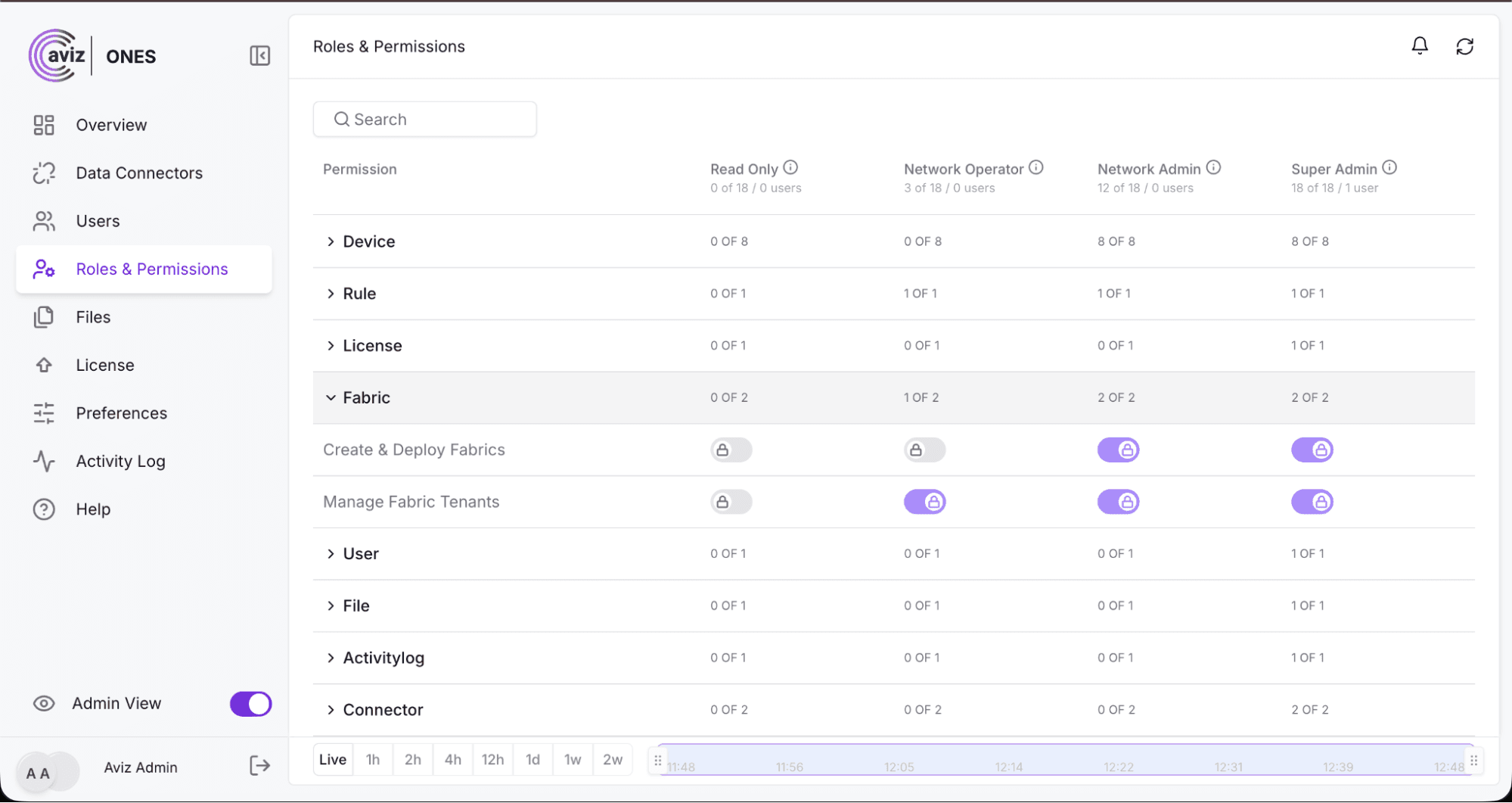
Screenshot: Roles & permissions page in the Admin view
These default roles are permanently locked. Not even a Super Admin can alter them, so the meaning of each role stays the same across your organization and over time. Everyone knows exactly what "Operator" or "Admin" means, and it cannot quietly drift.
How does the ONES interface adapt to each user's permissions?
ONES no longer fills the screen with grayed-out buttons that people cannot click. Instead, the interface adapts to each person. Buttons, menus and pages they have no permission to use simply do not appear.
For example, a Read Only user browsing the Bootstrap details page will not see add, edit or delete options at all. If they try to open a page such as Create Role, they are stopped because they do not have access to it.
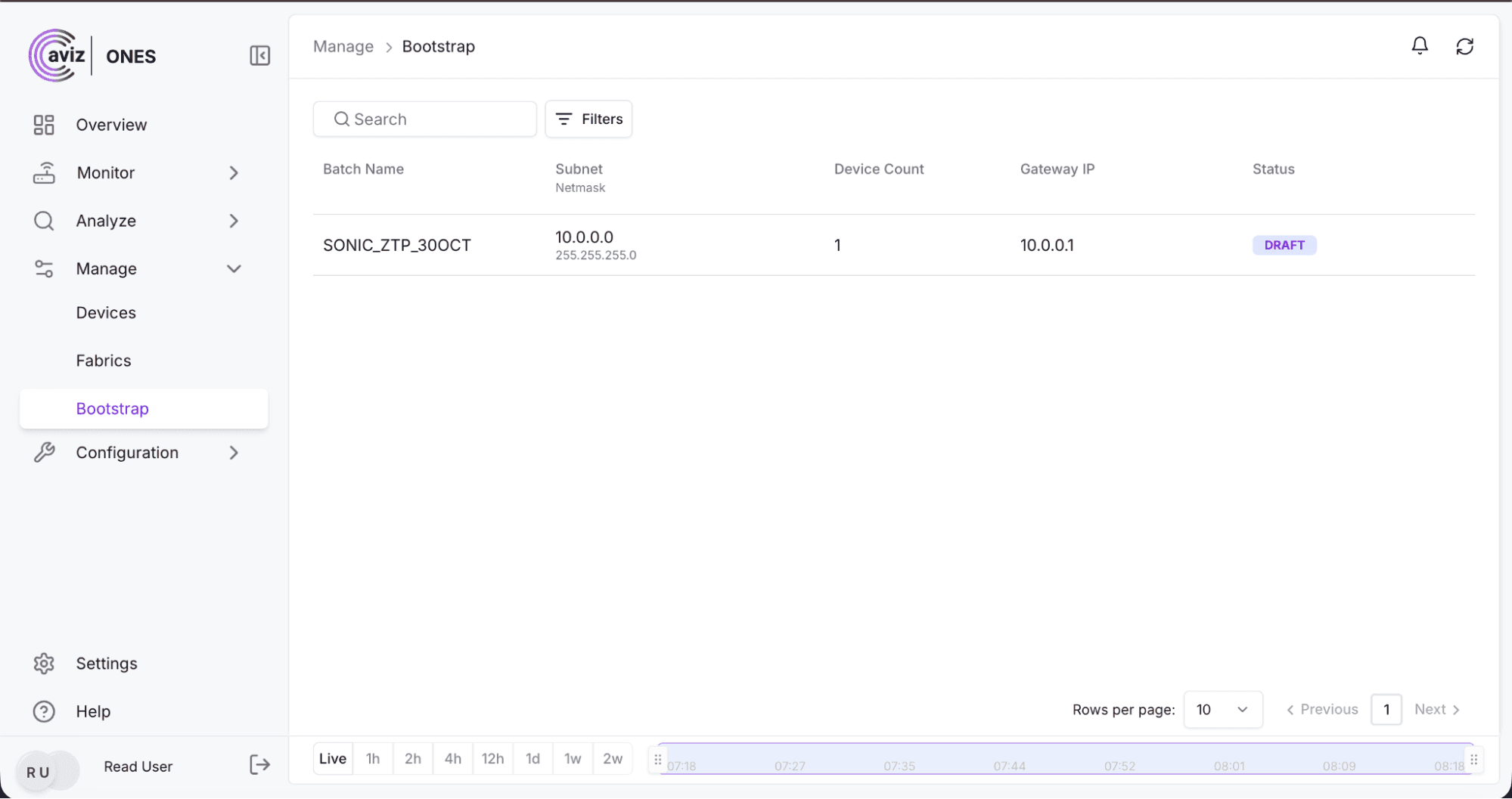
Screenshot: Read Only user viewing Bootstrap details, with no add, edit or delete options
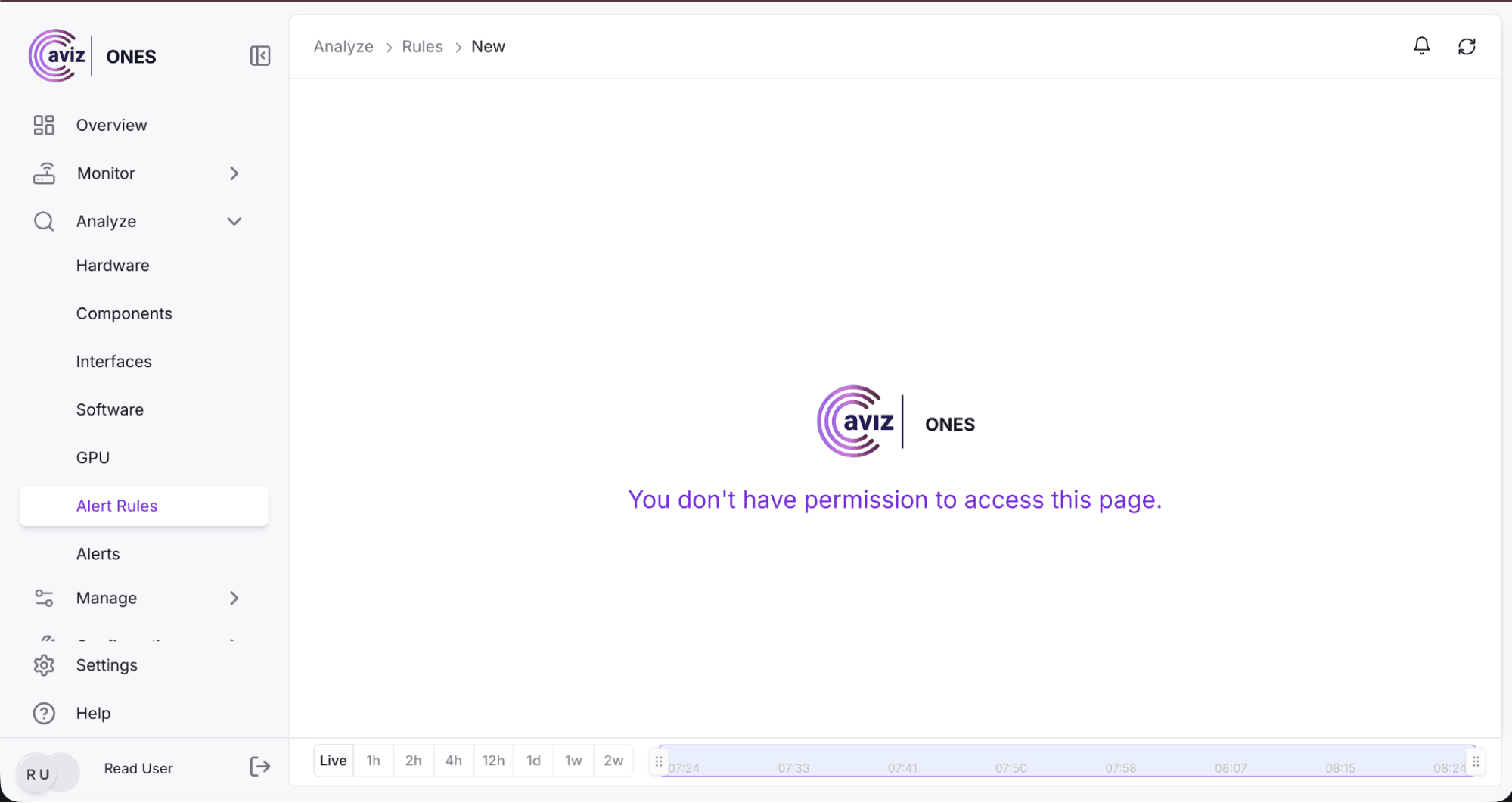
Screenshot: Read Only user blocked from the Create Role page
Notifications follow the same principle. People only receive alerts relevant to their permissions. A user who cannot manage devices will not be notified about devices being added or removed, which keeps each team focused on its own work and protects information that is not theirs to see.
How does ONES record blocked access attempts?
When someone attempts an action they are not permitted to perform, ONES blocks it and records it. Each entry shows who tried, what they tried to do and which permission was missing, for example a Read Only user attempting to reboot a device.
Security and compliance teams get a clear trail of attempted access in the Activity page, without digging through technical logs.
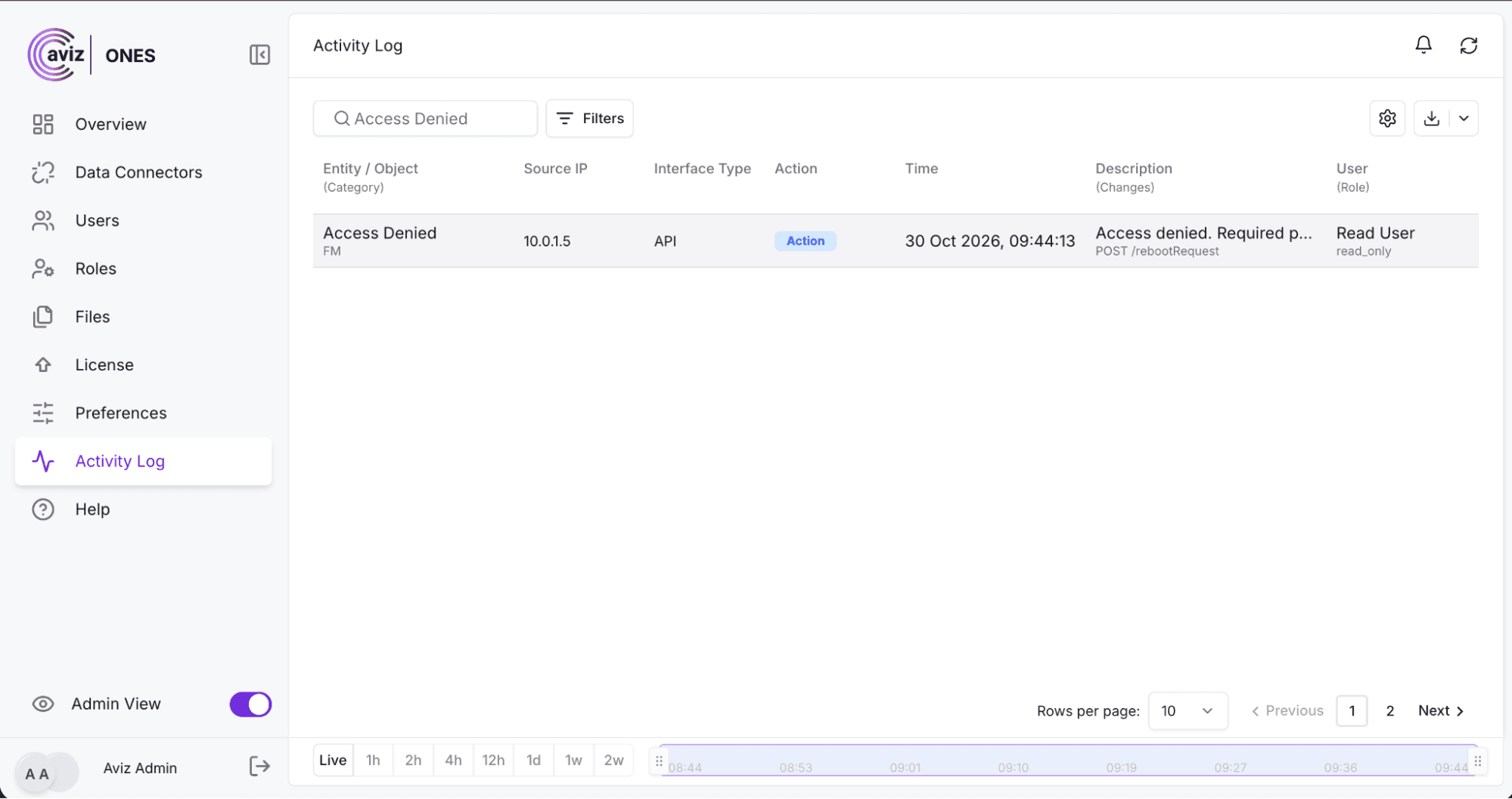
Screenshot: Activity page showing a denied device reboot attempt by a Read Only user
See how Aviz ONES gives every person on your team the right access: explore Aviz ONES.
What does ONES 4.4 access control mean for your team?
- Stronger security: Precise permissions and locked default roles reduce the chance of accidental or excessive access.
- Less confusion: People see only what they can use, so the platform feels cleaner and easier to navigate.
- Consistent control: The same rules apply in the interface and through APIs.
- Simpler administration: One central sign-in and four clear roles are easier to manage.
- Audit-ready: Every blocked attempt is recorded for review.
Conclusion
ONES makes access control something you can rely on instead of something you have to worry about. Upgrade to ONES 4.4 and give each team member the right access from day one.
FAQ
Can a Super Admin change the default roles in ONES?
No. The four default roles are permanently locked, and not even a Super Admin can alter them, so each role means the same thing across your organization and over time.
Are taking a backup and rebooting a switch the same permission in ONES?
No. ONES separates individual actions instead of using broad read or write rights, so you can trust a team member with routine tasks without giving them disruptive ones.
Can a user get around interface restrictions by using the ONES APIs?
No. The same permissions apply in the ONES interface and through the APIs. If a person isn't allowed to do something, they can't do it, no matter how they try.
Do users get notifications about actions they can't perform?
No. People only receive alerts relevant to their permissions. A user who cannot manage devices won't be notified about devices being added or removed.
How many sign-ins does ONES 4.4 need?
One. There is a single, central sign-in for the whole platform, which means fewer logins to manage and fewer places for access to go out of sync.
Which ONES role suits auditors and new team members?
Read Only. It lets people view monitoring data, topology and system status, with no ability to change anything.


