




ONES 4.4 Release: Smarter Monitoring, Stronger Access Control, Expanded and Flexible AI Fabric Orchestration
 November 3, 2026
 ONES & SONiC
Introduction
We are excited to introduce ONES 4.4, the latest release of the Open Networking Enterprise Suite (ONES). AI infrastructure keeps getting larger, more multi-tenant, and more multi-vendor, and operators need a platform that can see deeper into the fabric, control who changes it, and deploy it the way modern IT runs. ONES 4.4 advances on both fronts of the product: ONES Core, the monitoring and operations platform, and ONES GFX, our AI fabric orchestration for NVIDIA Spectrum-X and Aviz reference architectures.
In ONES Core, 4.4 brings ASIC buffer histograms and new QoS buffer metrics that expose microbursts and congestion averages. Access control gets RADIUS authentication with optional MFA and four predefined roles enforced at the API level. ONES can now also be deployed on Kubernetes with Helm, and a set of enterprise enhancements covers nested Active Directory, reverse proxies, agent ports, and OAuth-based ticketing integrations.
In ONES GFX, 4.4 adds Arista EOS for North–South AI fabrics alongside NVIDIA Cumulus and SONiC. It also introduces orchestration for NVIDIA RTX PRO servers, the Aviz Network Operator (ANO) and network policy APIs for tenant-to-tenant communication, Day-0 host configuration for GPU servers, UI-based YAML customization, Aviz Gateway integration, and DSX Air simulation support.
This post walks through the ONES Core and ONES GFX in detail.
Key Features & Enhancements
Cumulus Buffer Histograms
Averages hide the short bursts that hurt AI workloads most. ONES 4.4 extends Cumulus telemetry data paths to include ASIC buffer histograms, giving operators a time-distributed view of buffer behavior instead of a single average value.
The Cumulus histogram samples hardware data such as egress queue depth and ingress buffer occupancy and sorts each sample into configurable bins. ONES collects these histograms and renders them as heat maps, making microbursts, congestion, and the conditions that lead to packet drops easy to spot.
Two new widgets are available under Monitor → Traffic → Advanced:
- Egress Buffer Depth Histogram, per traffic class
- Ingress Buffer Depth Histogram, per priority group
Hovering over a cell shows the depth range of the bin, its share of samples, and the dwell time for that interval.
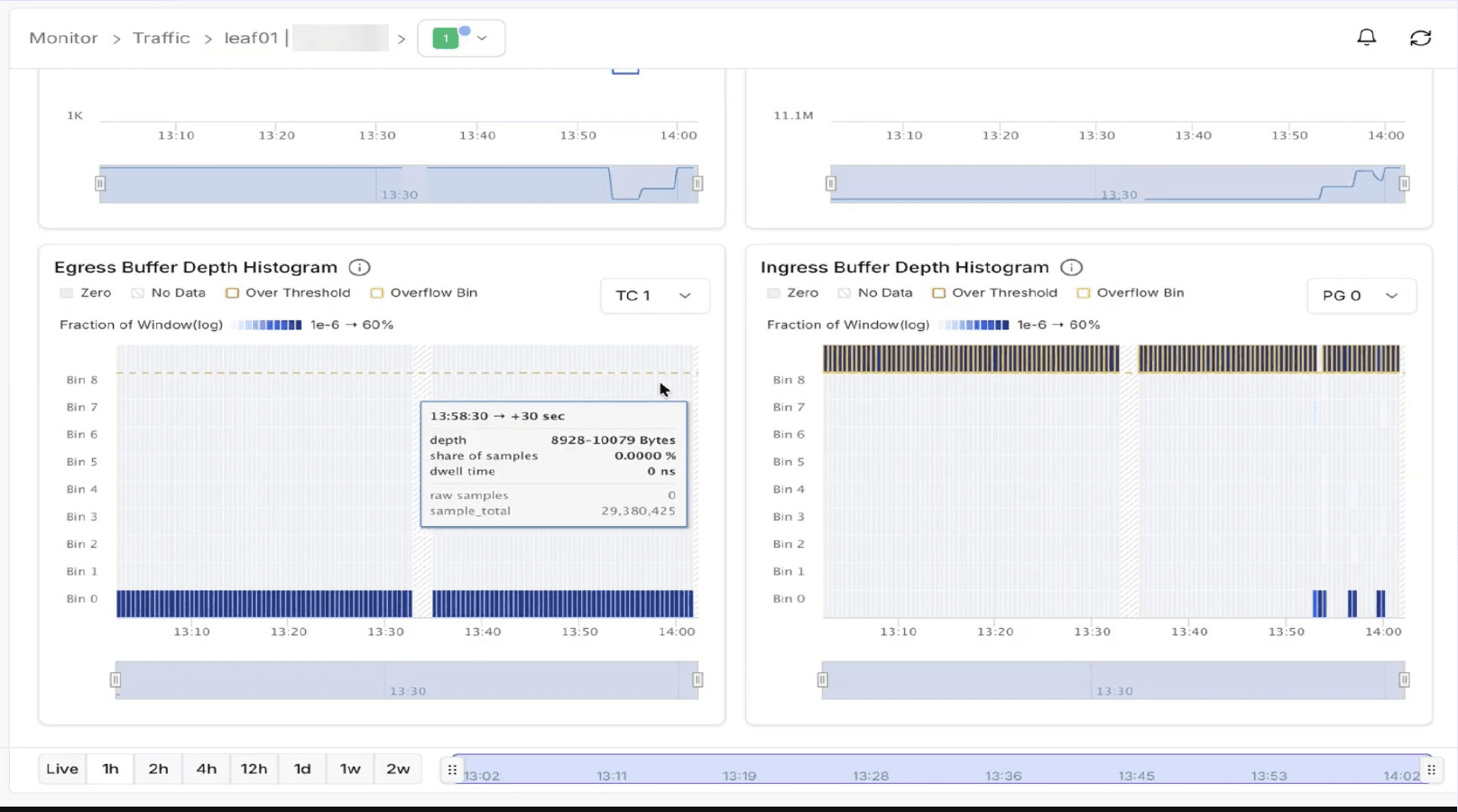
Figure-1: Egress and ingress buffer depth histograms in ONES
QoS Buffer Metrics
ONES 4.4 adds seven new widgets for QoS buffer statistics, so operators can track how switch buffers are being consumed over time.
Under Monitor → Traffic → Advanced:
- Ingress shared buffer occupancy
- Egress shared buffer occupancy
- Headroom buffer occupancy
- Pool shared buffer occupancy
Under Monitor → Capacity:
- Shared buffer pool occupancy
Together with the histograms, these metrics help teams validate lossless (RoCE) configurations, tune buffer thresholds, and catch buffer exhaustion before it turns into drops.
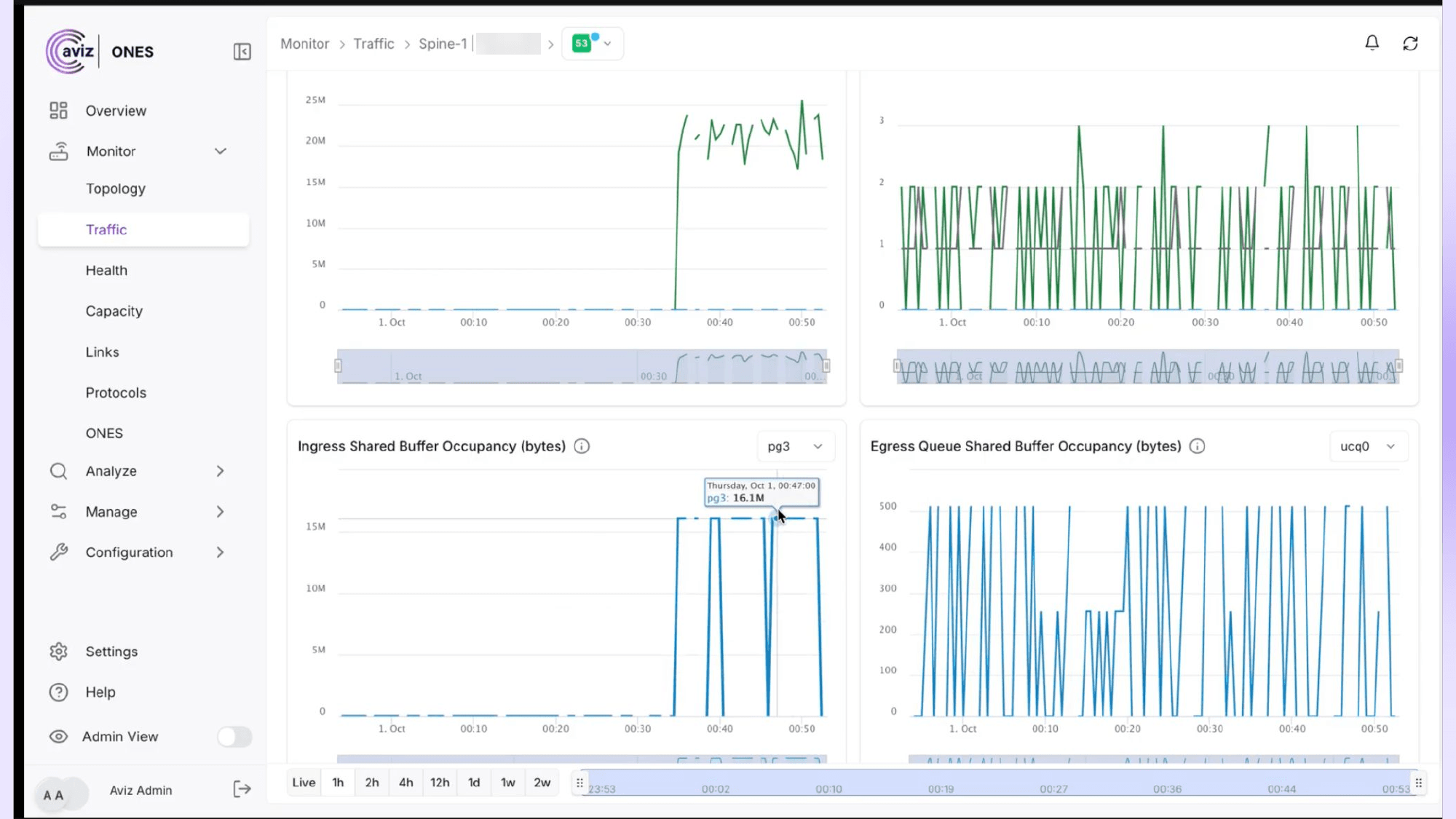
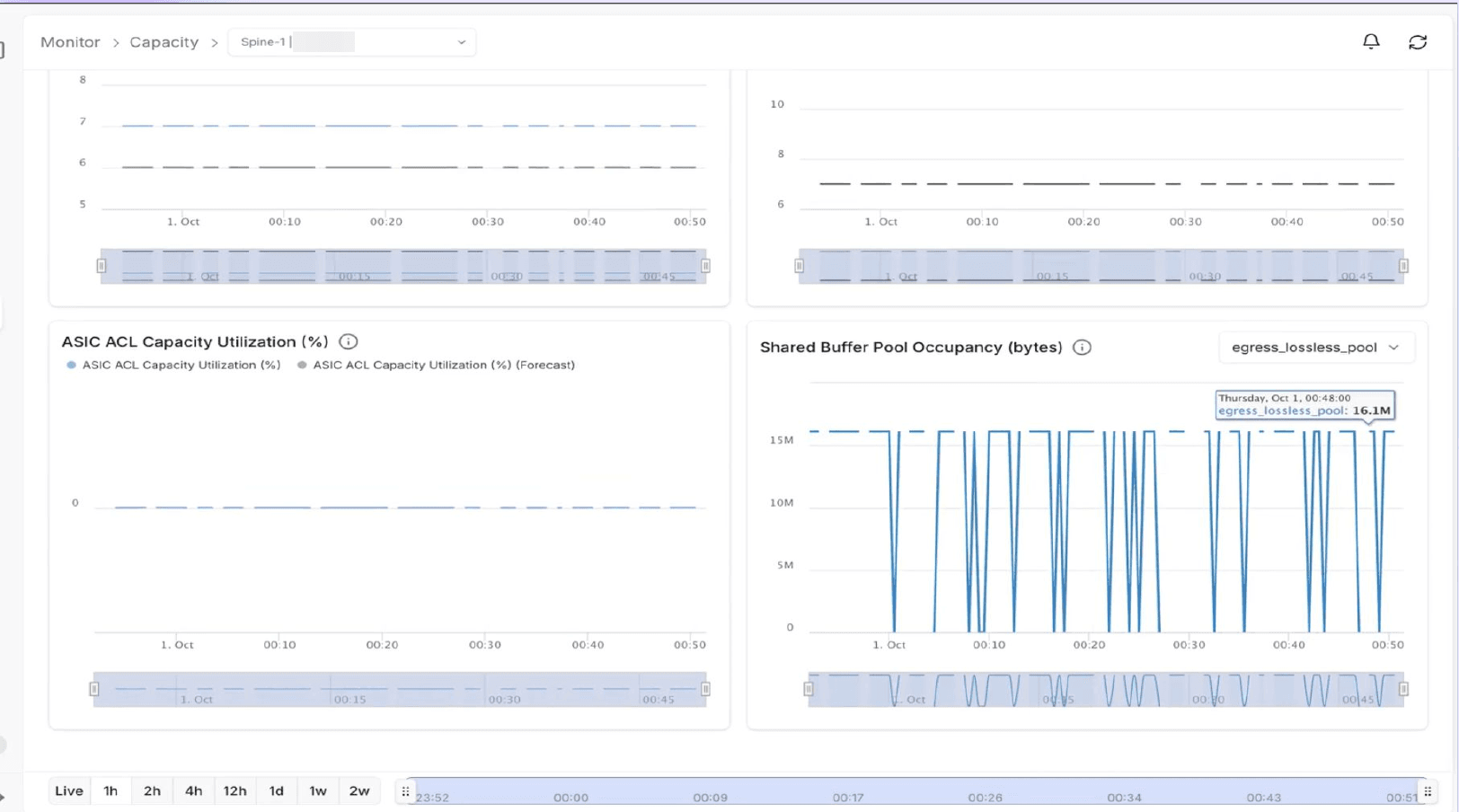
Figure-3: Shared buffer pool occupancy on the Capacity page
RADIUS Authentication
ONES 4.4 adds support for RADIUS-based user authentication. ONES acts as a RADIUS client and delegates all credential validation to a RADIUS server such as FreeRADIUS, which in turn validates users against an OpenLDAP or Active Directory user store.
On an Access-Accept, ONES issues a session token and logs the user in; on an Access-Reject, the login is denied. Optional multi-factor authentication with Google Authenticator can be layered on through the RADIUS server.
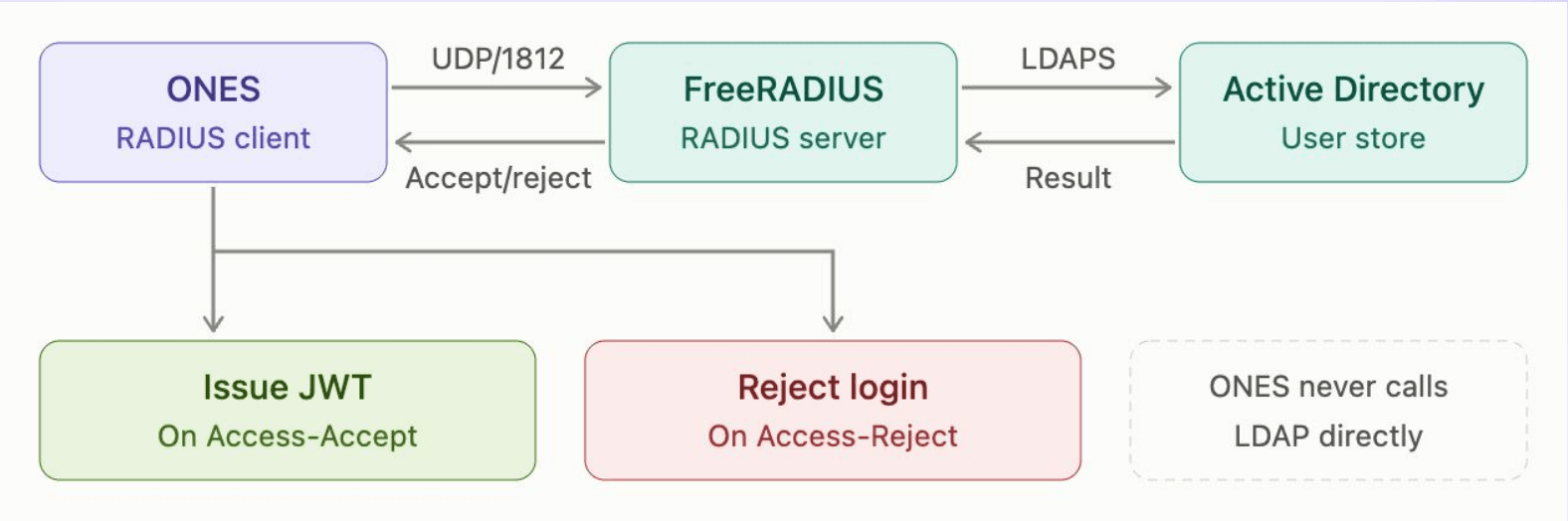
Figure-4: RADIUS authentication flow between ONES, FreeRADIUS, and Active Directory
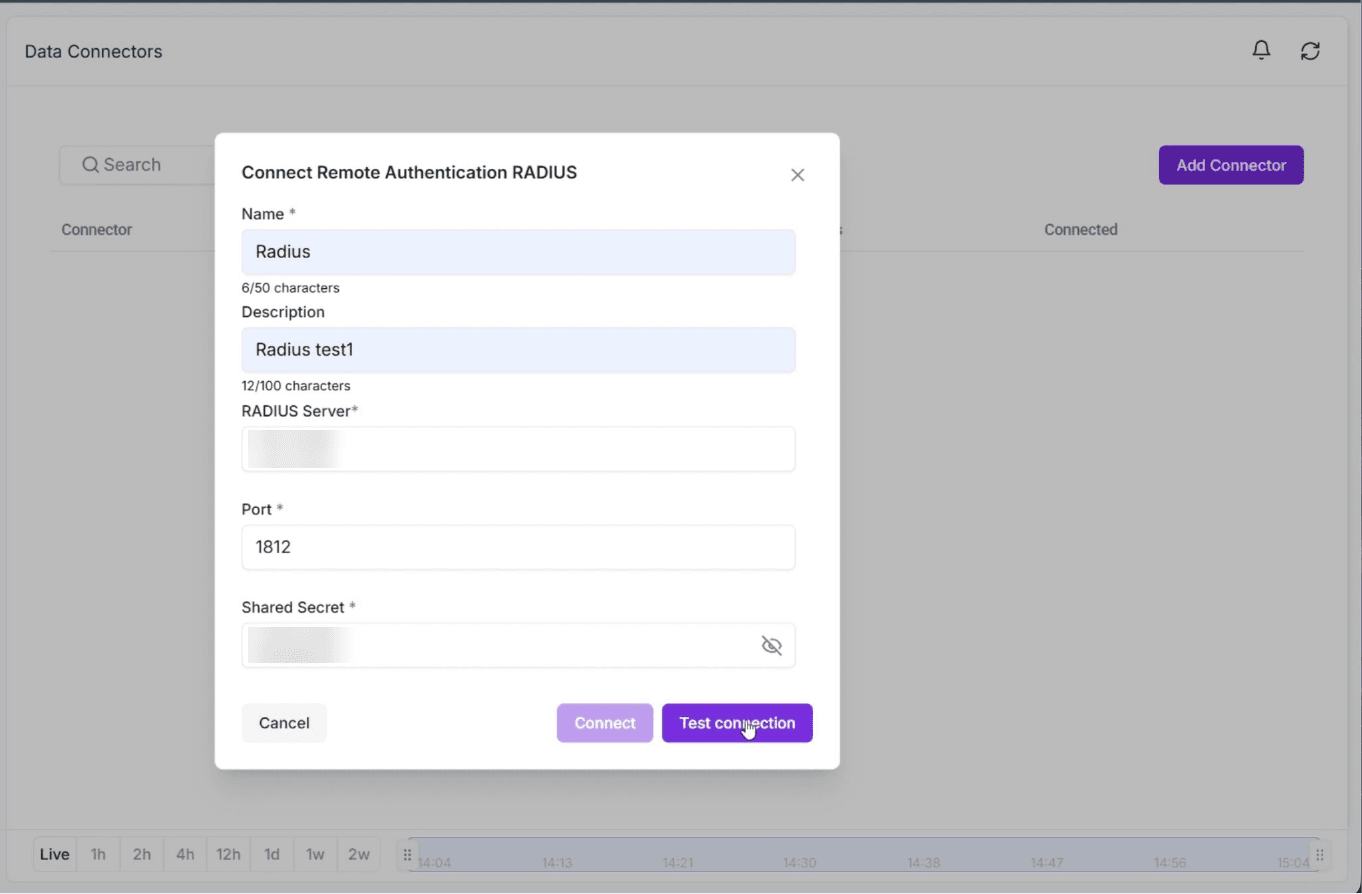
Figure-5: Configuring the RADIUS connector in ONES
RBAC
ONES 4.4 introduces four predefined roles, each with its own permission set, in a clear hierarchy:
Super Admin > Network Admin > Network Operator > Read Only
Permissions are grouped by area (Device, Rule, License, Fabric, User, File, Activity Log, Connector, Settings, and more), and the Roles & Permissions page shows exactly what each role can do. Most importantly, enforcement is implemented at the API level, so the same rules apply whether a user works through the UI or calls ONES APIs directly.
Combined with the audit logging introduced in ONES 4.3.1, RBAC gives security and compliance teams a clear record of who can do what, and who did what.
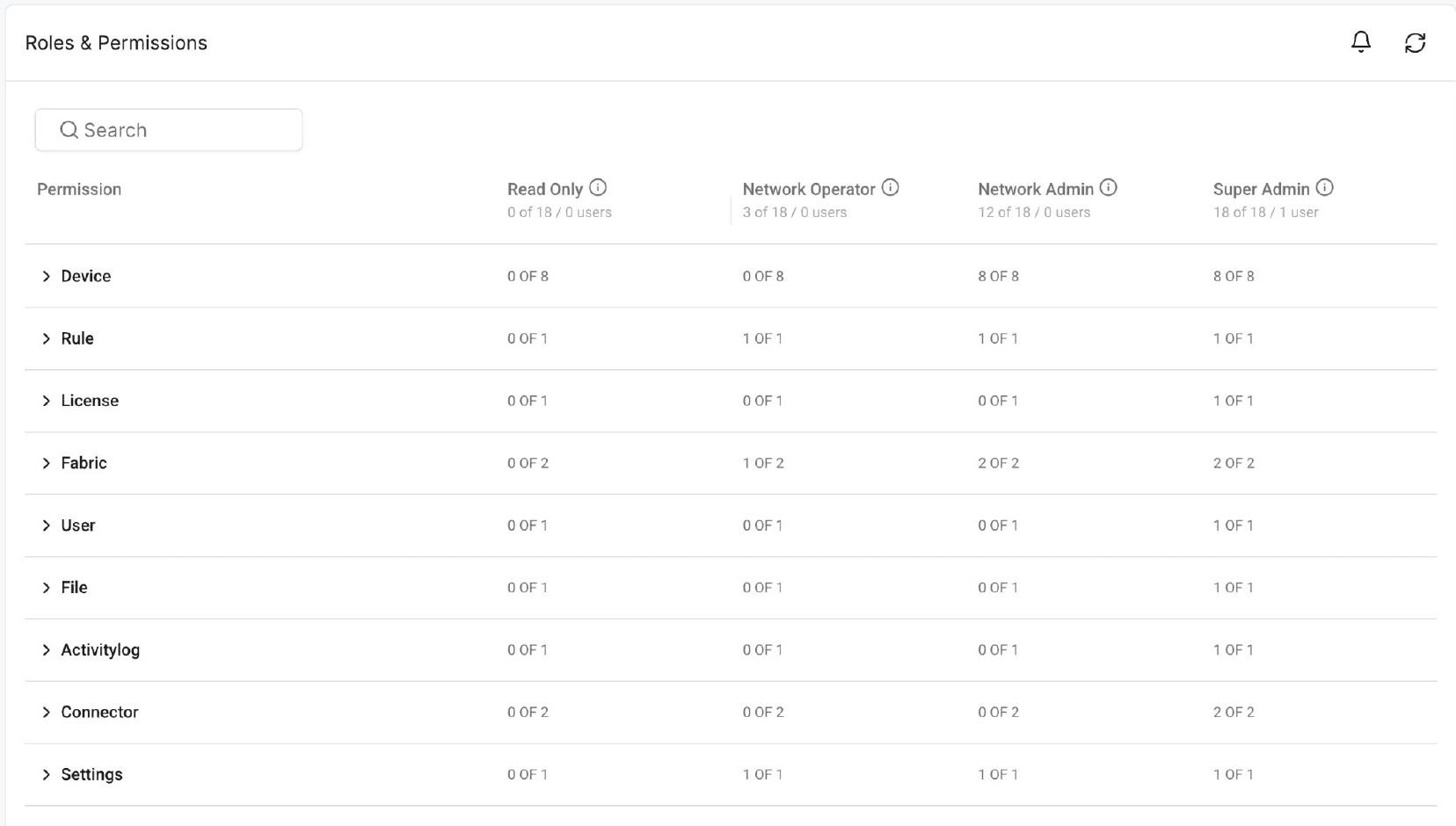
Figure-6: Roles & Permissions page showing the four predefined roles
Deploy ONES on Kubernetes with Helm
ONES can now be deployed on a Kubernetes cluster using Helm charts, in addition to the existing Docker-based deployment. Both K3s and kubeadm clusters are supported.
The package includes a bundled image registry for air-gapped sites and a dry-run mode to validate configuration before installation. For teams that already run their platforms on Kubernetes, ONES now fits into the same tooling they use for everything else.
AI Fabric North–South with Arista EOS
The North–South (front-end) network connects GPU servers to users and storage. ONES 4.4 adds Arista EOS as a North–South fabric option, in addition to the existing NVIDIA Cumulus and SONiC support. In the fabric design workflow (Manage → Fabrics → Network Setup), operators select EOS as the operating system for the N–S (Front-End) network. ONES then generates and pushes the switch configuration using Arista CLI, with options such as VXLAN tenant segmentation, tenant-aware storage, and BF3 or CX7 NICs.
As an enhancement, ONES 4.4.0 transitions Arista telemetry from an API-based model to gNMI streaming, aligning Arista switches with the rest of the ONES monitoring pipeline.
With this addition, customers benefit from:
- Vendor choice for the front-end AI network, without separate tooling per vendor
- Consistent, automated provisioning of North–South fabrics through the same ONES design workflow
- Unified visibility across Arista, NVIDIA Cumulus, and SONiC switches using streaming telemetry
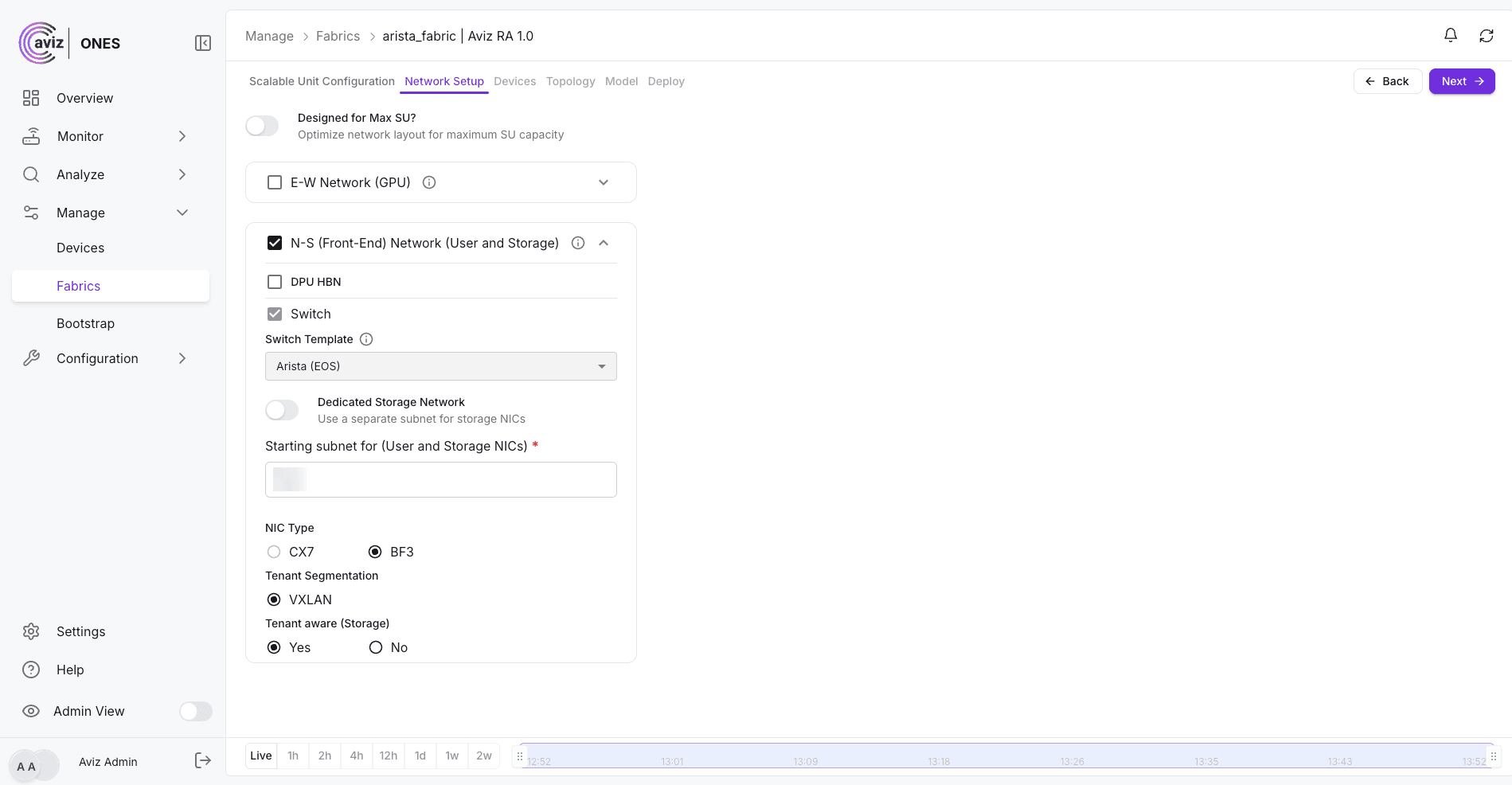
Figure-7: Selecting Arista EOS for the North–South (front-end) network in ONES
AI Fabric Orchestration for NVIDIA RTX PRO Servers
ONES 4.4 extends AI fabric orchestration to NVIDIA RTX PRO servers powered by NVIDIA RTX PRO 6000 Blackwell Server Edition GPUs. These platforms support AI, graphics, and media workloads through a high-performance Spectrum-X compute network built on a fully non-blocking fat-tree architecture.
The architecture is organized into Scalable Units (SUs), each containing 32 servers, two leaf switches, and two spine switches. The reference architecture uses four BlueField-3 SuperNICs per server. ONES supports scaling up to 32 SUs, enabling deployments of up to 1,024 servers and 8,192 GPUs.
ONES 4.4 supports two NVIDIA-defined server configurations: a four-GPU configuration providing 400 Gbps of East–West bandwidth per GPU, and an eight-GPU configuration using four ConnectX-8 SuperNICs as integrated PCIe switches. Automated topology generation and consistent naming conventions simplify fabric deployment and management.
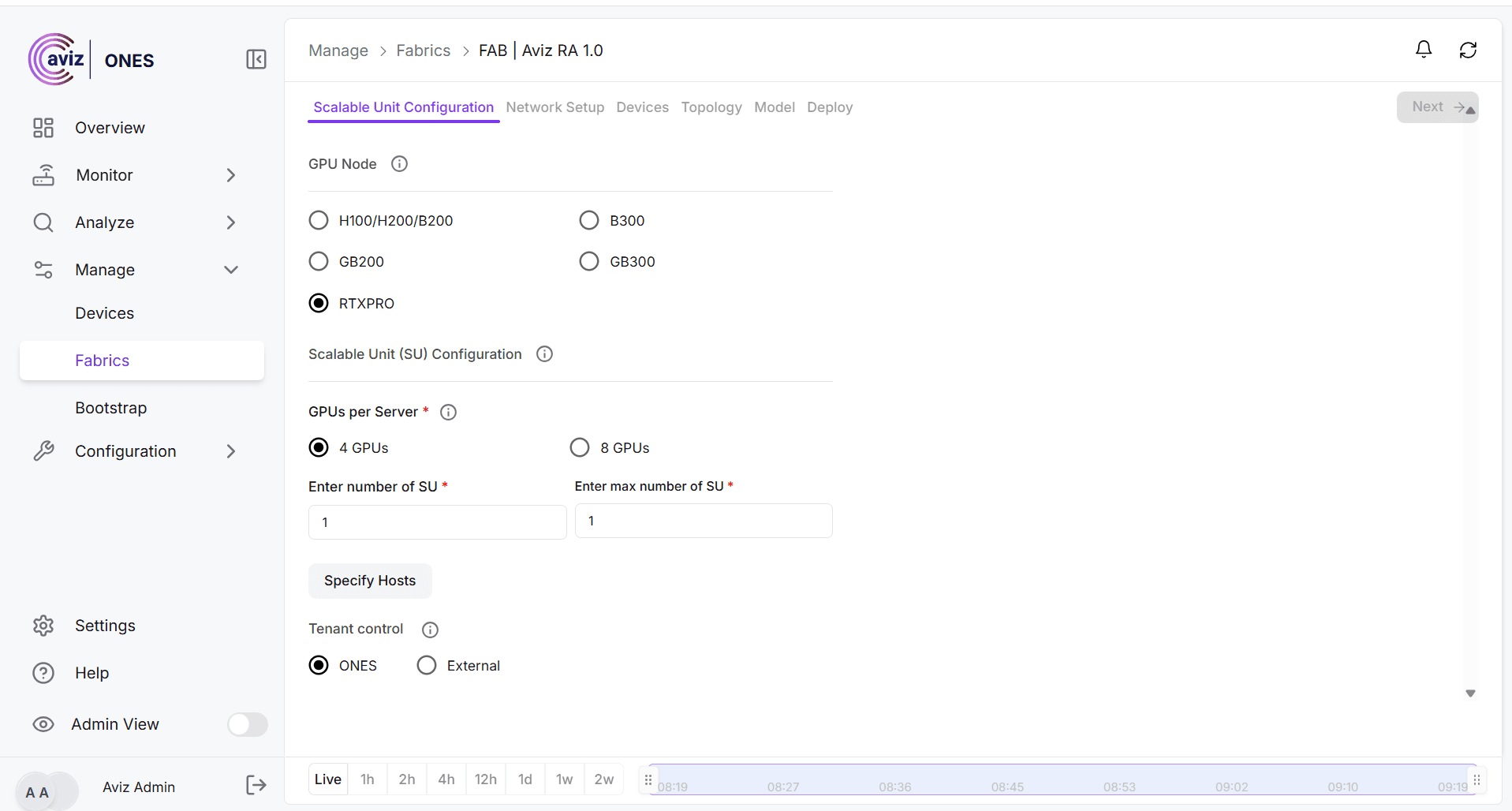
Figure-8: ONES 4.4 – NVIDIA RTX PRO GPU Node and Scalable Unit Configuration.
Flexible YAML for AI Fabric Customization
ONES 4.4 enhances the dynamic YAML capability introduced in the previous release, enabling operators to customize AI fabric topologies to meet customer-specific requirements.
Users can download a fabric YAML from the ONES topology page, customize the design using the Flexi YAML generator, and upload the resulting configuration back to ONES. The generator uses a reference fabric YAML and a design file to create the required topology while preserving essential configuration details, including IP address pools, ASN ranges, border-leaf identities, and external connections.
The generator automatically calculates spine requirements, allocates leaf switches in redundant pairs, maintains ASN numbering, and connects hosts to both leaf switches within their Scalable Unit. ONES validates uploaded configurations to help ensure topology consistency and configuration correctness.
To protect existing deployments, YAML regeneration is limited to the North–South tier. The workflow requires an existing fabric with the same GPU architecture and does not support switching between GPU architectures. This capability simplifies the customization of GB300 SuperPod and RTX PRO fabric designs while maintaining topology consistency.
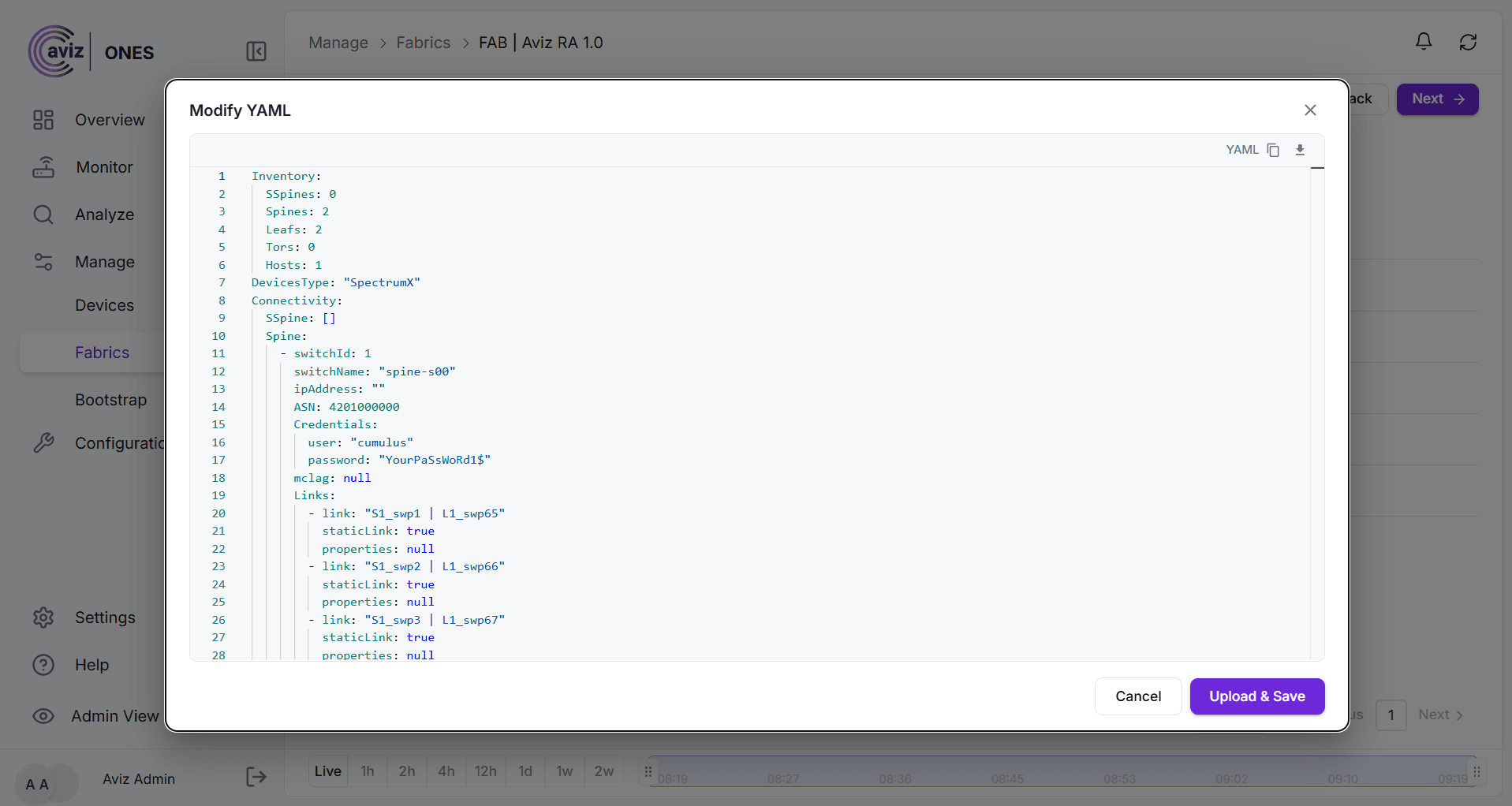
Figure-9: ONES 4.4 – Flexible YAML Configuration
Day-0 Host Configuration for GPU Servers
ONES 4.4 introduces automated Day-0 NIC configuration and validation for GPU server environments, helping ensure host networking is configured according to the selected NVIDIA reference architecture before workloads are deployed.
The capability automates NIC discovery, configuration, and verification for supported BlueField-3 and ConnectX-8 environments. It covers East–West port configuration and North–South interface settings, along with key networking capabilities such as Spectrum-X, RoCE, adaptive routing, congestion control, and inter-packet gap (IPG) settings.
By simplifying host network configuration and verifying the applied settings, ONES 4.4 helps streamline deployment, improve configuration consistency, and reduce manual effort.
Aviz Gateway Integration
ONES 4.4 integrates with the Aviz Gateway to extend gateway and firewall capabilities for multi-tenant AI fabrics. This integration expands the networking options available in ONES-managed environments and supports gateway functionality for tenant network connectivity.
NVIDIA DSX Air Simulation Support
ONES 4.4 introduces support for NVIDIA DSX Air simulation, updated to the latest SDK. This enables teams to validate AI fabric designs and deployment workflows in a simulated environment before deploying them on physical infrastructure.
An ONES license is not required within the DSX Air environment, allowing teams to test and validate fabric designs without requiring an ONES license for the simulation environment.
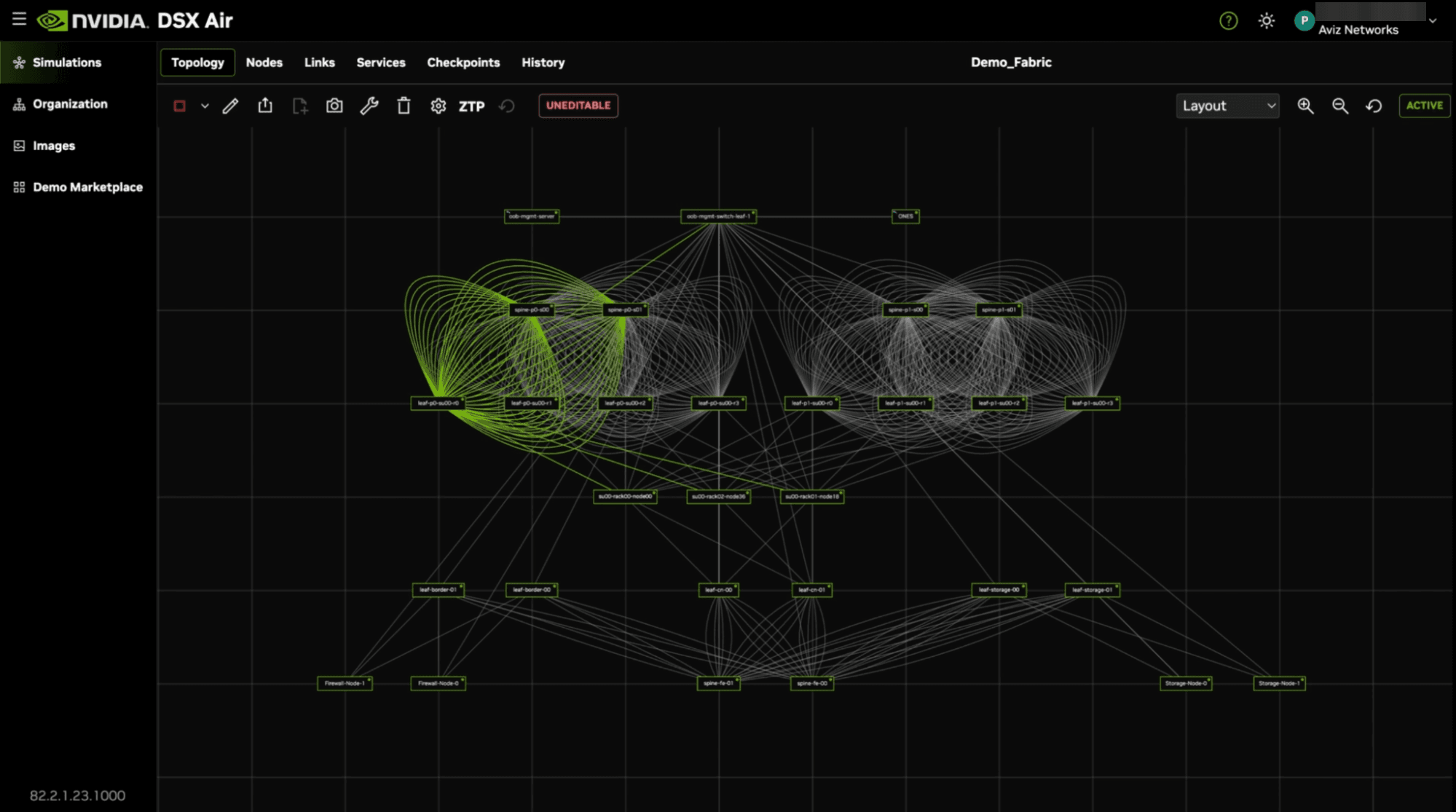
Figure-10: NVIDIA DSX Air Simulation with Aviz ONES Deployed.
Network Policy Management for Multi-Tenant AI Fabrics
ONES 4.4 introduces a network policy framework for controlling communication between tenants, workloads, and services in multi-tenant GPU fabrics. This enhancement helps maintain tenant isolation while enabling authorized communication for specific use cases.
Through integration with the Aviz Network Operator (ANO), ONES provides centralized orchestration for network policies, while ANO implements the underlying network configuration and access controls. The framework supports creating, retrieving, updating, and deleting network policies at the fabric level.
Supported communication scenarios include tenant-to-tenant connectivity, access to specific services across tenants, workload-to-workload communication, and service-to-service communication within a tenant. Depending on the use case, connectivity can be enabled through Virtual Routing and Forwarding (VRF) route leaking, with access controls restricting traffic to the intended workloads or services.
In ONES 4.4, network policy management supports deployments where all nodes use DPUs and deployments where all nodes use non-DPU NICs. Support for mixed DPU and non-DPU environments, along with port- and protocol-level configuration parameters through the ONES API, is planned for future releases.
Conclusion
With ONES 4.4, we take another step toward AI infrastructure that is intelligent, transparent, and secure by design. In ONES Core, ASIC buffer histograms and QoS buffer metrics show the microbursts and congestion that averages miss. RADIUS authentication with Multi-Factor Authentication and API-level role enforcement tightens access control, and Kubernetes deployment via Helm simplifies how ONES runs in enterprise environments. In ONES GFX, Arista EOS joins NVIDIA Cumulus and SONiC for North–South AI fabrics, and orchestration now covers NVIDIA RTX PRO servers. Flexible YAML customization and Day-0 host configuration speed up deployment. Network policy management through the Aviz Network Operator and Aviz Gateway integration enable secure multi-tenant connectivity, and NVIDIA DSX Air simulation lets teams validate designs before deploying them. Together, these features give operators sharper visibility, stronger governance, and greater flexibility across multi-vendor AI fabrics.
Frequently Asked Questions
What is new in Aviz ONES 4.4?
ONES 4.4 advances on both fronts of the product: ONES Core, the monitoring and operations platform, and ONES GFX, the AI fabric orchestration for NVIDIA Spectrum-X and Aviz reference architectures. In ONES Core, 4.4 brings ASIC buffer histograms and new QoS buffer metrics, RADIUS authentication with optional MFA, four predefined roles enforced at the API level, and deployment on Kubernetes with Helm. In ONES GFX, 4.4 adds Arista EOS for North–South AI fabrics, orchestration for NVIDIA RTX PRO servers, network policy APIs for tenant-to-tenant communication, Day-0 host configuration for GPU servers, UI-based YAML customization, Aviz Gateway integration, and DSX Air simulation support.
How does ONES 4.4 help detect microbursts in AI fabrics?
ONES 4.4 extends Cumulus telemetry data paths to include ASIC buffer histograms, giving operators a time-distributed view of buffer behavior instead of a single average value. ONES collects these histograms and renders them as heat maps, making microbursts, congestion, and the conditions that lead to packet drops easy to spot.
Does ONES support RADIUS authentication and MFA?
Yes. ONES acts as a RADIUS client and delegates all credential validation to a RADIUS server such as FreeRADIUS, which in turn validates users against an OpenLDAP or Active Directory user store. Optional multi-factor authentication with Google Authenticator can be layered on through the RADIUS server.
What roles are available in ONES 4.4 RBAC?
ONES 4.4 introduces four predefined roles: Super Admin, Network Admin, Network Operator, and Read Only. Enforcement is implemented at the API level, so the same rules apply whether a user works through the UI or calls ONES APIs directly.
Can ONES be deployed on Kubernetes?
Yes. ONES can now be deployed on a Kubernetes cluster using Helm charts, in addition to the existing Docker-based deployment. Both K3s and kubeadm clusters are supported. The package includes a bundled image registry for air-gapped sites and a dry-run mode to validate configuration before installation.
Does ONES support Arista EOS for AI fabrics?
Yes. ONES 4.4 adds Arista EOS as a North–South fabric option, in addition to the existing NVIDIA Cumulus and SONiC support. ONES generates and pushes the switch configuration using Arista CLI, and transitions Arista telemetry from an API-based model to gNMI streaming.
Does ONES support AI fabric orchestration for NVIDIA RTX PRO servers?
Yes. ONES 4.4 extends AI fabric orchestration to NVIDIA RTX PRO servers powered by NVIDIA RTX PRO 6000 Blackwell Server Edition GPUs. ONES supports scaling up to 32 Scalable Units, enabling deployments of up to 1,024 servers and 8,192 GPUs.
How does ONES manage network policies in multi-tenant GPU fabrics?
ONES 4.4 introduces a network policy framework for controlling communication between tenants, workloads, and services in multi-tenant GPU fabrics. Through integration with the Aviz Network Operator (ANO), ONES provides centralized orchestration for network policies, while ANO implements the underlying network configuration and access controls.
See how ONES 4.4 brings buffer-level visibility, API-enforced access control and multi-vendor AI fabric orchestration to your network.


