





Aviz Network Copilot R1.7.0 Automation, Observability, and Access Management
 July 13, 2026
 Network Copilot ™
On-demand and pre-programmed Background Jobs, real-time monitoring of your environment, user-managed access at the enterprise level, OpenLDAP authentication, within-app chat exports, and content-aware auto-suggestions for prompts.
What's New in R1.7.0
With NCP 1.7.0, our focus has been on: automating ongoing tasks, offering deeper insight into the platform, providing stricter access, and enhancing communication with users in chat via Background Jobs, the new Monitor page, Organization Preferences, OpenLDAP integration, Artifacts to export data, Prompt Suggestions, and two new telco and data-lake use cases.
Background Jobs
You can now launch agent-driven jobs any time - or on a recurring schedule - directly from any project chat using Background Jobs. This makes checking statuses with regular scheduled checks, validating issues on an schedule or generating reports triggered by an event very convenient.
Background Jobs are role-based with Power Users being able to create jobs by default. The schedule options range from hourly up to custom settings - as long as you select at least a 5-minute window - you're all set. Get your alerts in your app or directly in your chat using Slack.
To initiate a job you just need to open a project chat, command NCP to 'Create a new job', select which agent or type of run, define your task and desired method of notification, hit create. Finally review your new scheduled job from the confirmation card presented for your approval before launching! The result of your background job runs will be displayed on your project chat, complete with its completion status, a quick prompt to display the complete report, or quickly relaunch the job on demand.
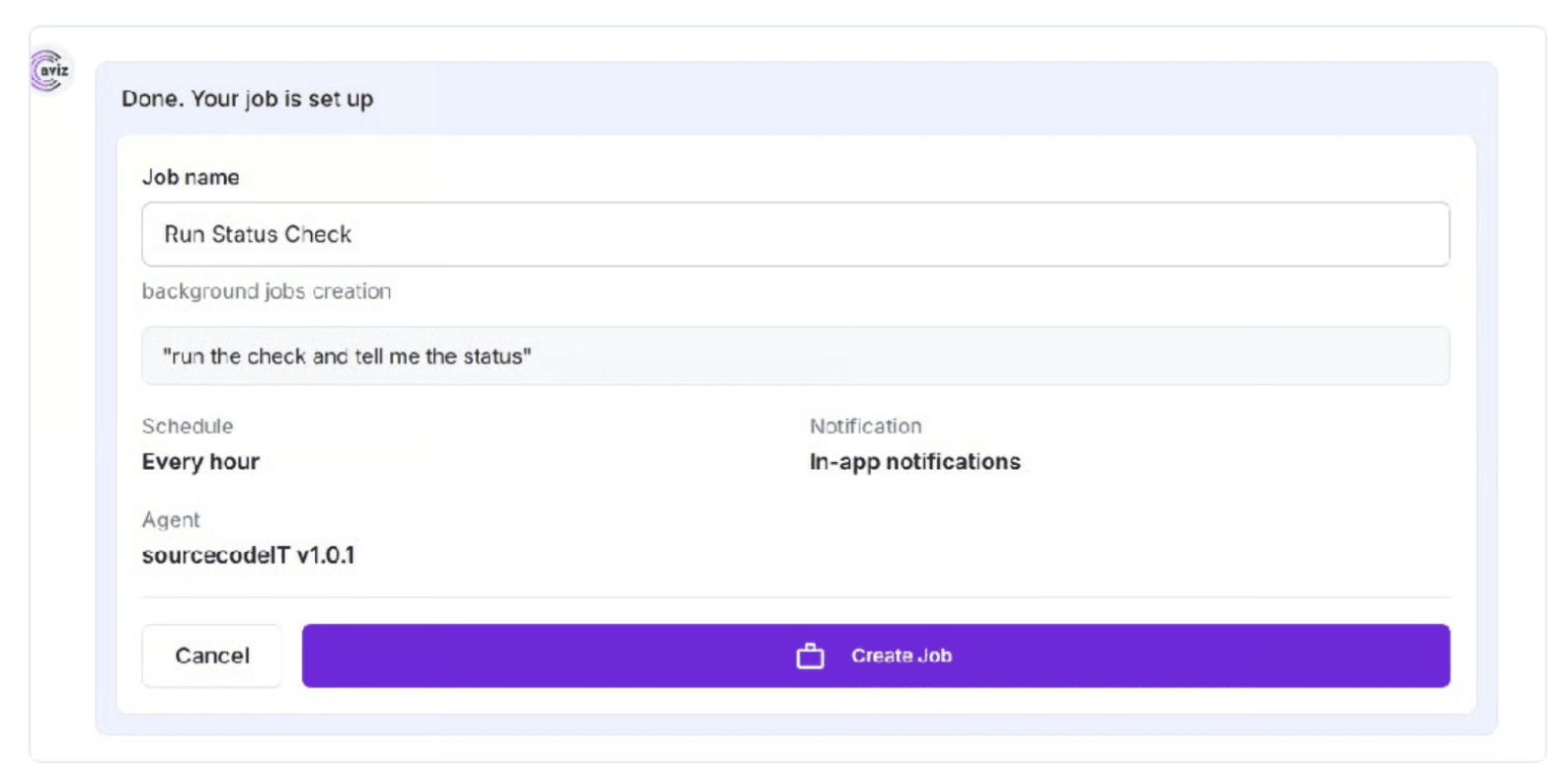
Job confirmation card showing job name, schedule, agent, and notification mode
Monitor
For Admin View only, the new Monitor page gives administrators real-time (and historical) insight into the state of the platform. Summary cards and time-series charts-across CPU, Memory, Disk and Per-GPU levels at defined Critical and Warning levels-provide overviews for the last hour to the last two weeks (using a hoverable timeline scrub bar to zero in on specific values), with a tab to explore what processes and diagnostic logs (consolidated for use in diagnostic and analysis outside of the product) consume what resources. Diagnostic log bundles can be generated on-the-fly and recovered via the Saved Log view (for review and Aviz Support).
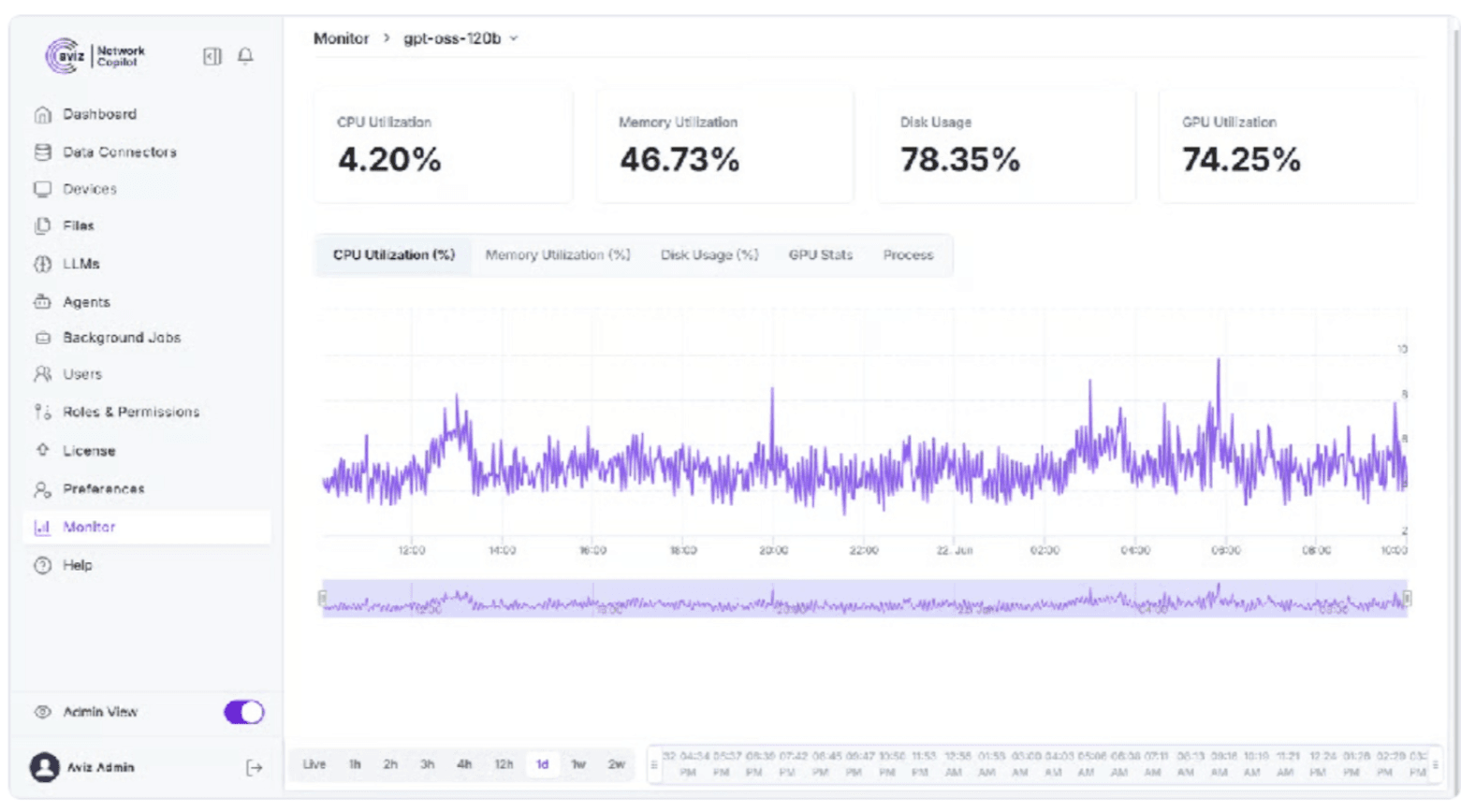
Monitor page showing utilization summary cards and the CPU Utilization time-series chart
Organization Preferences
Organizations allow for organizations to define how your teams onboard new employees and external partners where project visibility would be organization specific. Admins can configure new organizations and associate new members with an existing organization via their user settings under Preferences. Projects now also provide a new "Project User Scope" option to expose your project to all users or to just the users in your organization.
Your list of Organizations is an OrgName with descriptions, counts of users, and Date Created.
You will always have a Default Org and when you are no longer required, group of members can be reallocated to another Org, or Default Org.
OpenLDAP Integration
For an additional data connector, we welcome OpenLDAP that enables authenticating users into their existing directory on LDAP. OpenLDAP means you no longer need to have local accounts, allowing you to add it from the Data Connectors (including; Host, Port, Base DN, Bind credential and Organizational Unit) that will then securely authenticate and enable users to login using their directory's credentials. We also allow for the OpenLDAP as the default platform directory. The OpenLDAP supports the username and password.
Artifacts
Users can easily download Tabular data results as a CSV or Excel file by asking for it in chat. For example, a natural language query like "export list of all devices" results in the Artifact containing not only the download link for the CSV, but also a preview and the number of rows. You can also retrieve time series data like "export cpu utilization data for past 24hrs."
Exports are per-project and per-convo, which means any export we create can be quickly previewed and downloaded again from the chat, instead of recreating the underlying dataset each time.
At launch this only applies to Tabular datasets, though.
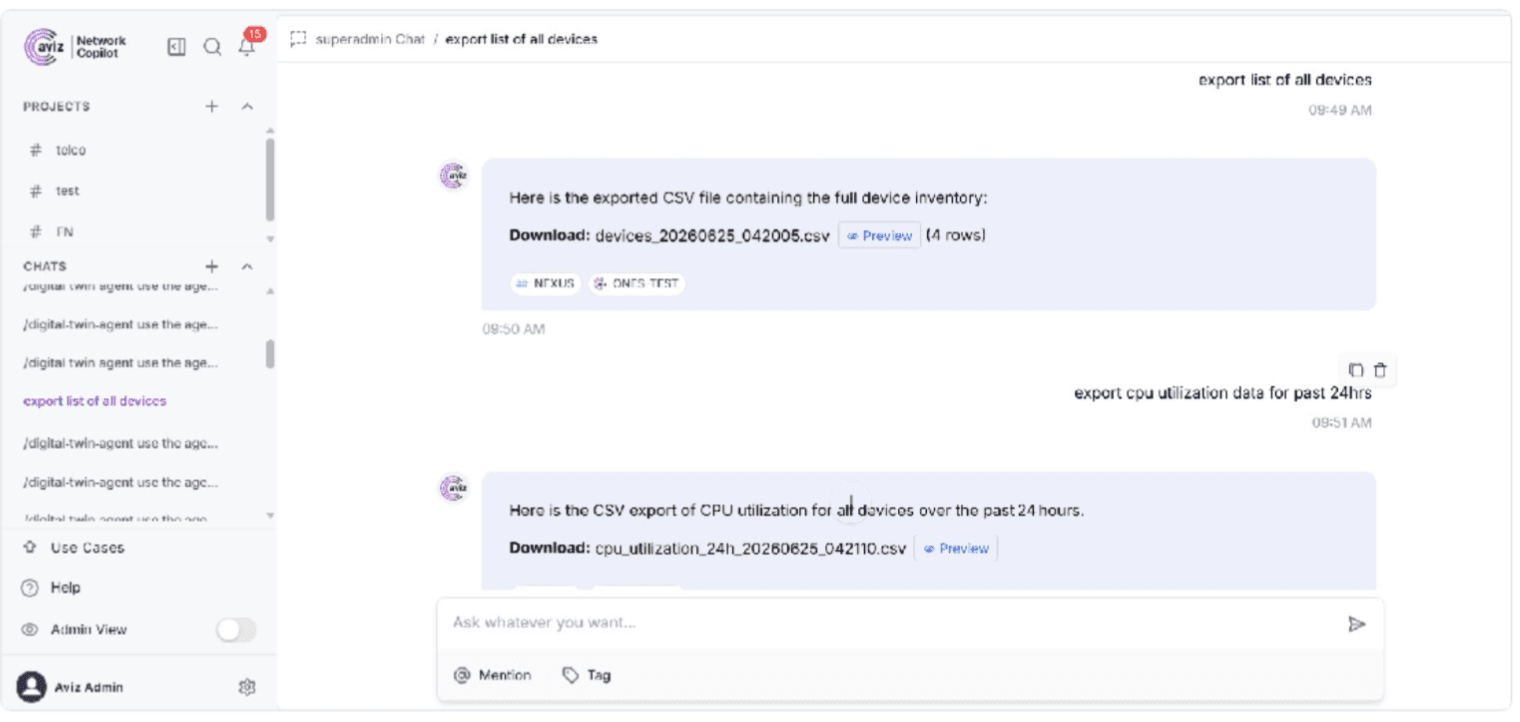
NCP generating a CSV export of the full device inventory from a chat request, with download and preview options
Prompt Suggestions
The Suggestion functionality will offer conversational one-click chips as both followups, after a response, as well as as conversation starters. Follow-up suggestions are dynamic and rely on what took place in the dialogue. For instance, upon enumerating some devices, NCP may return suggestive next turns of "Filter devices by each region", "Group devices by layer", "Export the full device list as CSV", and "Only list reachable devices." These suggestions will only be populated after a main response and will never impede its arrival, with candidates for suggestions filtered to ensure the strongest suggestion is offered to end users.
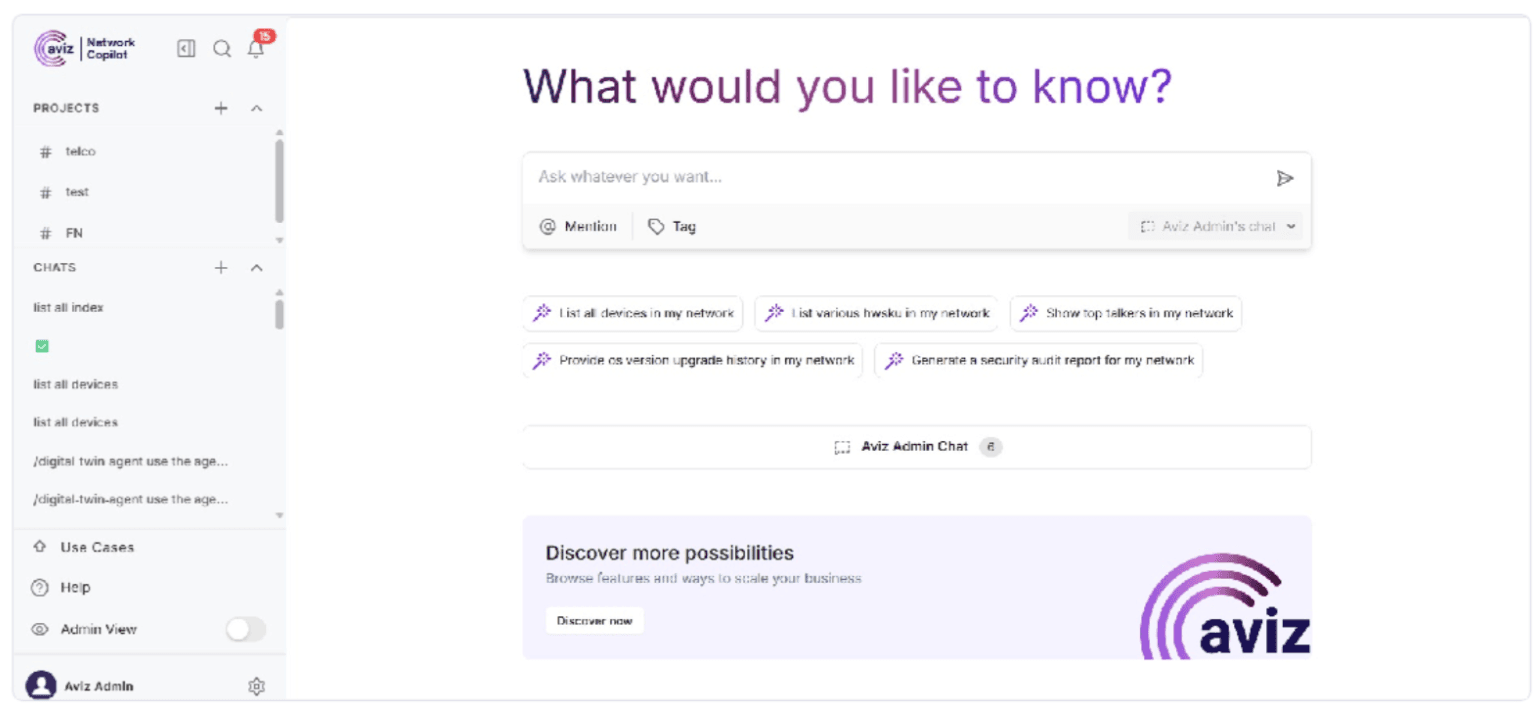
Starter prompt suggestions on a new chat, offering common questions as one-click chips
ASN Integration (Telco Analytics)
NCP seamlessly embeds Aviz Service Node (ASN) telco analytics into chat. Utilizing the available ELK connector, after ASN has outputted subscriber and application metadata to Elasticsearch, subscribers can interact with these metrics using plain English without requiring further integration efforts. Subscriber analytics can include usage patterns, density, churn analysis, RAT-type distribution, handovers, and a KPI summary, whereas application metrics can includebandwidth distributions by category, content type, session lifecycle and per-category metrics such as "top 10 subscribers by data usage" and "What is the distribution of Video Streaming vs Gaming vs VoIP bandwidth".
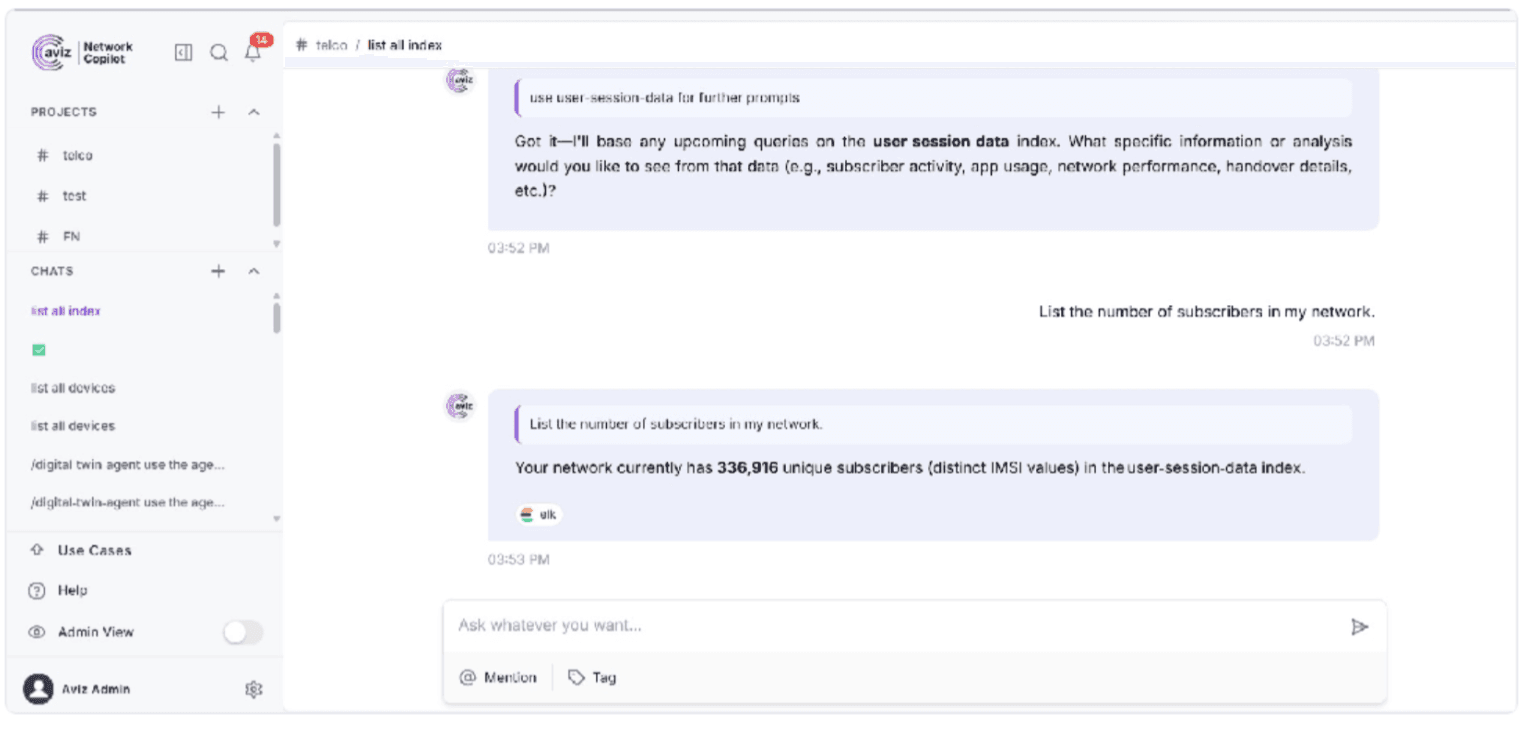
NCP answering a telco subscriber query in chat, returning the distinct subscriber (IMSI) count via the ELK connector
BigQuery Data Lake
NCP is storing its device and interface inventory from various sources as well as time series metrics and topology, in Big Query data warehouse and feeding an AI agent where answers can be obtained by simply asking a question. To further reduce processing latency and guarantee accurate and consistent answers NCP leverages from pre-populated baseline tables. NCP use cases are many and vary from, but are not limited to dynamic baselining, anomaly and deviation monitoring (e.g. 3-sigma, Z-Score) with interactive data exploration capabilities; diagnostic playbooks execution; real-time interface, bandwidth, utilization and circuit performance monitoring and alerting; device capacity tracking and analysis; and on the fly reporting with the creation of interactive reports and charts.
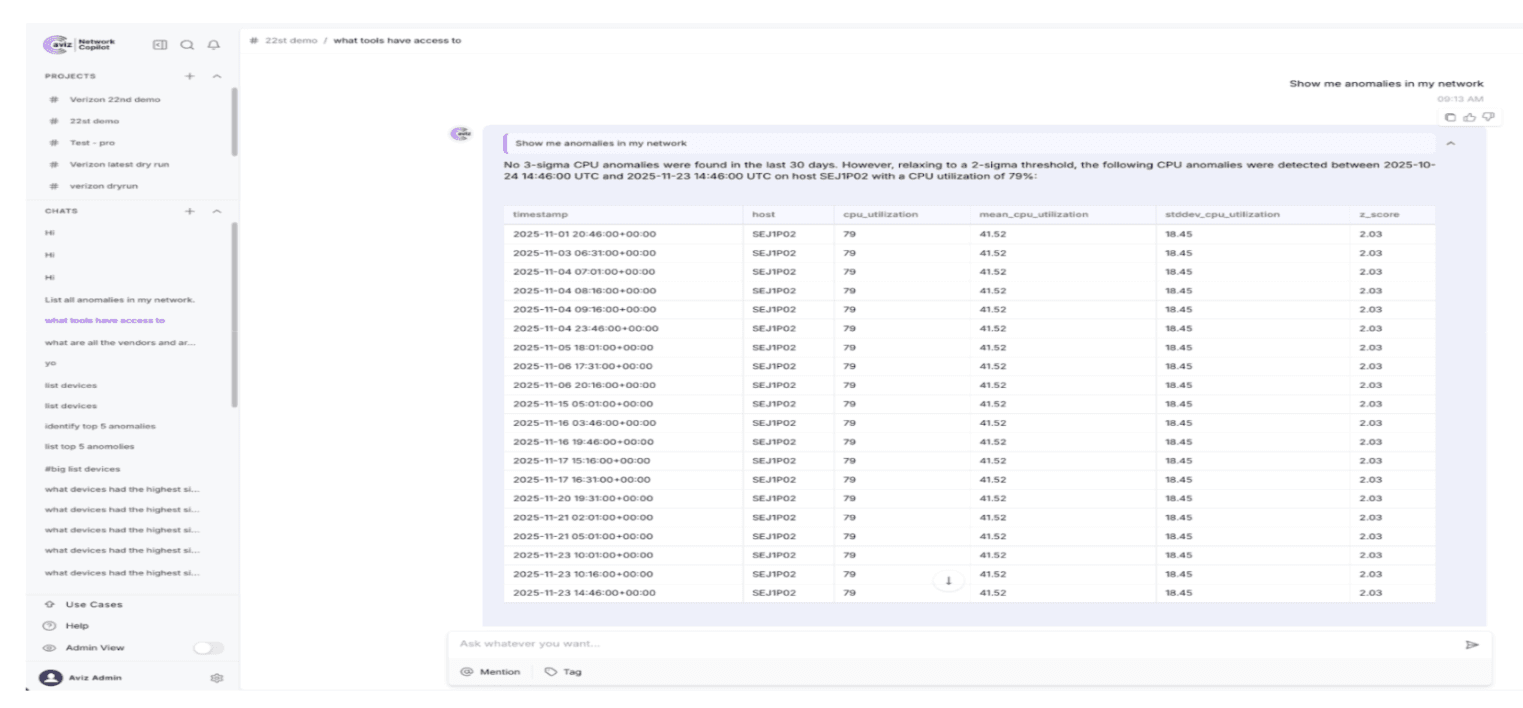
A high-level anomaly detection request processed via Z-score analysis, with NCP identifying the impacted host and providing its mean, standard deviation, and exact deviation score.
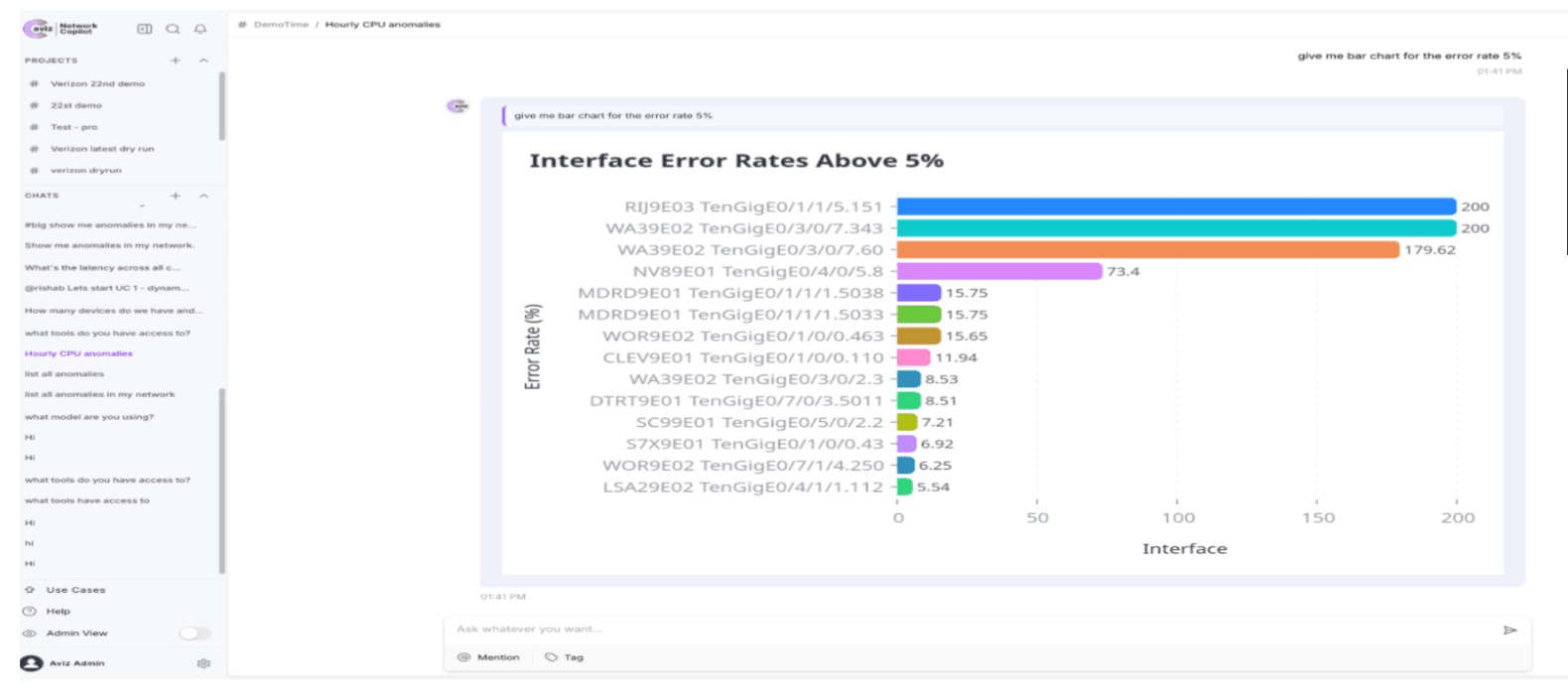
A prompt-driven chart identifying interfaces with error rates exceeding 5%, ranked and rendered within the chat for immediate triage.
Conclusion
By unifying Background Jobs, Monitor, Organization Preferences, OpenLDAP, Artifacts and Prompt Suggestions with the ASN telco and BigQuery data-lake use cases, R1.7.0 creates a more robust base for automating tasks, understanding platform performance, managing access rights and gaining further insights into network data, to put it in simple English.
Frequently Asked Questions
What is included in Aviz Network Copilot R1.7.0?
R1.7.0 introduces Background Jobs, a Monitor page, Organization Preferences, OpenLDAP integration, Artifacts for data export, and Prompt Suggestions, along with two new use cases for telco analytics and BigQuery data lake.
What are Background Jobs in NCP R1.7.0?
Background Jobs allow users to run agent-driven tasks on demand or on a recurring schedule directly from a project chat, with schedules ranging from hourly to custom intervals with a five-minute minimum. Completion alerts can be delivered in-app or via Slack.
What does the new Monitor page provide?
The Monitor page gives administrators real-time and historical visibility into platform health, including CPU, memory, disk, and per-GPU metrics, and is available only in Admin View. Diagnostic log bundles can also be generated on demand and shared with Aviz Support.
How does Organization Preferences improve access control?
Organization Preferences lets administrators group users into organizations and scope project visibility so that projects are visible either to all users or only to members of the same organization. A default organization is always present, and members can be reassigned when an organization is no longer needed.
What authentication method does the OpenLDAP integration support?
The OpenLDAP connector supports username and password authentication, allowing users to sign in with their existing directory credentials and removing the need for local accounts.
How do Artifacts work for data export?
Users can request tabular data exports in plain language directly from chat, and NCP returns a download link, a preview, and the row count for CSV and Excel files. Exports are tracked per project and conversation so files can be previewed and downloaded again without being regenerated.
What are Prompt Suggestions and how do they stay relevant?
Prompt Suggestions surface one-click chips as conversation starters and as follow-ups grounded in what occurred in the previous turn, so they remain contextually relevant. Suggestions are generated only after the main answer completes and are filtered and ranked so the most useful option appears first.
What telco analytics capabilities does the ASN integration add?
Through the existing ELK connector, operators can query subscriber and application analytics in plain language, covering usage, churn, RAT-type distribution, bandwidth breakdowns by category, and per-category performance with no additional integration work.
What can the BigQuery data lake use case do in NCP R1.7.0?
The BigQuery integration consolidates multi-source data including device inventory, time-series metrics, and topology into a single dataset, enabling natural language queries for anomaly detection, capacity watchlists, circuit performance, and on-the-fly chart generation.
Automate repetitive tasks, monitor your platform in real time, manage access securely, and turn network data into actionable insights, all from a single AI-powered platform.


