





How Does Activity Logging in Network Copilot (NCP) Secure AI-Driven Network Operations?
 November 12, 2026
 Network Copilot ™
TL;DR
Network Copilot (NCP) now ships with Activity Logging, a complete audit logging capability that records every meaningful action across the platform, from a user signing in to an AI agent querying a device to an administrator changing a license. Each event carries structured context: user, organization, project, time, source IP, outcome and a correlation ID that ties related actions together. Teams can search, filter, export and set retention for audit data, and forward events in real time to an existing SIEM through a Syslog Data Connector. The result is that every AI action can be traced from prompt to result.
Introduction
Modern network operations teams don't just need answers: they need an auditable record of who asked what, what the system did, and what changed. As AI-driven automation becomes central to running networks, "the copilot did it" is no longer an acceptable answer for a security review, a compliance audit, or a post-incident investigation.
What is Activity Logging in Network Copilot?
That's why Network Copilot (NCP) now ships with a complete Activity Logging (audit logging) capability. Every meaningful action across the platform, from a user signing in, to an AI agent querying a device, to an administrator changing a license, is captured as a structured, tamper-aware audit event you can search, filter, export, and forward to your existing SIEM.
What does Network Copilot activity logging capture?
Activity Logging spans the entire NCP stack, not just the chat interface. Events are grouped into clear categories so you can find exactly what you need:
| Category | Example Events |
|---|---|
| Authentication | Login, logout, failed sign-in attempts, LDAP ↔ Local auth switches |
| User & Access Management | User created / updated / deleted, role changes, organization assignment |
| AI & Agent Activity | Prompts submitted, agents invoked, tools and connectors called, knowledge-base lookups |
| Data Connectors | Connector added, validated, authentication failures, configuration changes |
| Device & Inventory | Device added or removed from inventory |
| Platform Administration | License applied or changed, retention policy changes, data export |
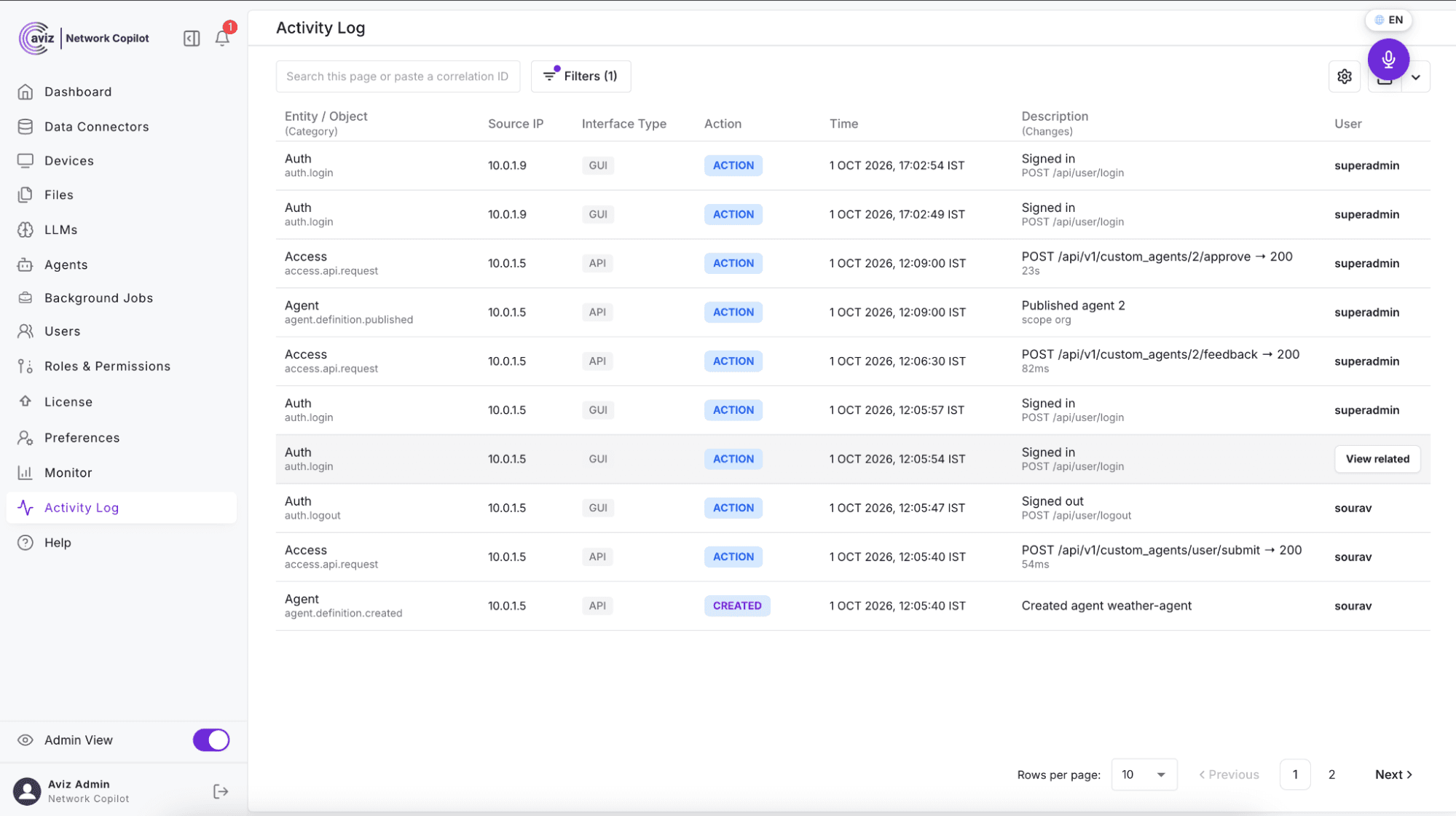
Each event is recorded with rich, structured context: who performed it (user, organization, project), when it happened, where it originated (source IP), what the outcome was (success / failure), and a correlation ID that ties related actions together across the platform.
How do network teams use NCP activity logs?
Teams use NCP activity logs to trace an AI action end to end, strengthen security and accountability, speed up troubleshooting, and meet compliance and retention requirements.
Activity Logging isn't just a compliance checkbox: it actively improves how teams operate NCP day to day.
How do you trace a Network Copilot AI action end to end?
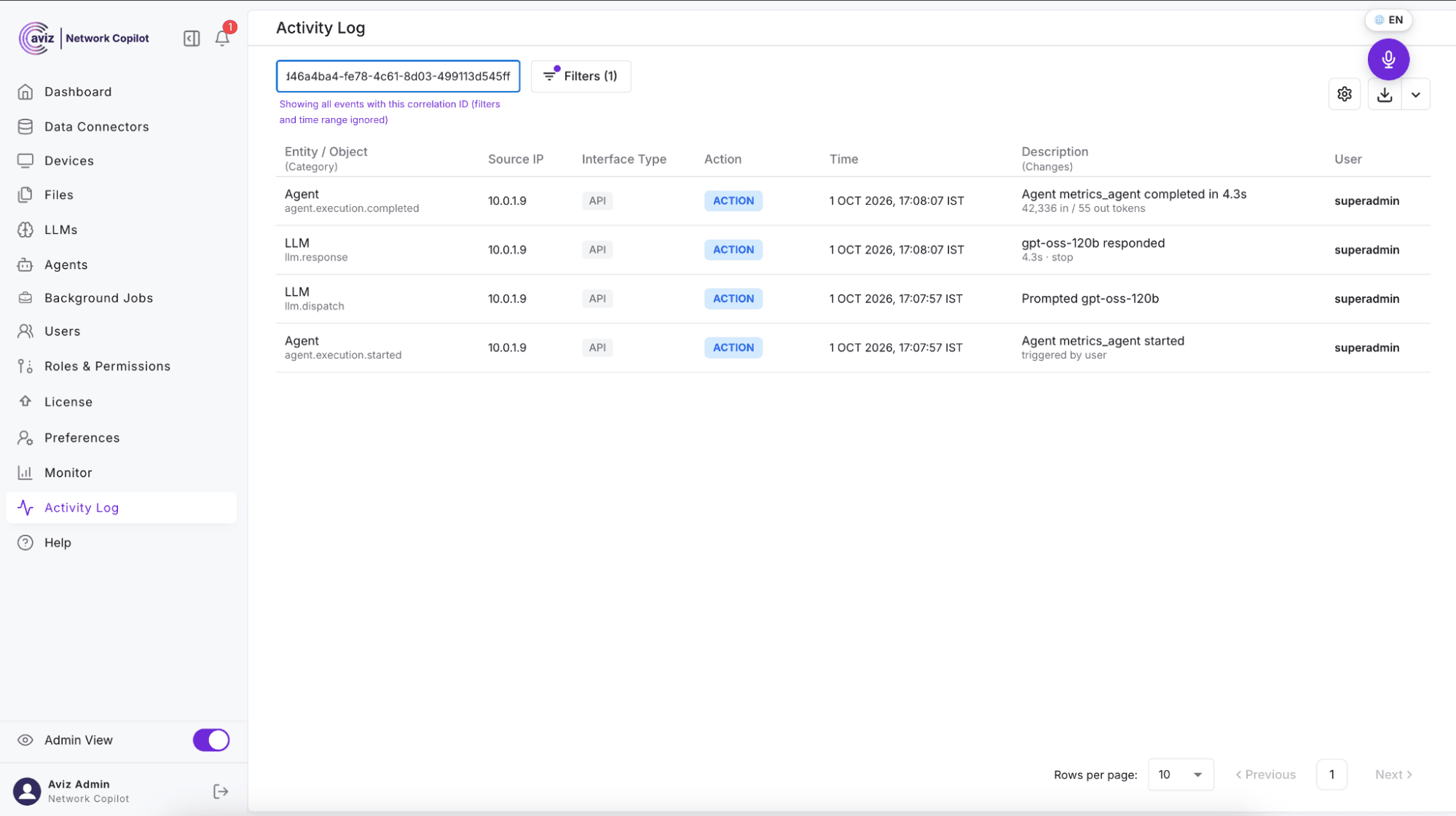
When the copilot takes an action on your network, you can follow the full chain: the user's prompt → the agent that handled it → every tool and connector it called → the final result. The shared correlation ID lets you search the entire sequence with a single lookup, so "what did the copilot actually do?" always has a precise, evidence-backed answer.
How does activity logging strengthen security and accountability?
Failed logins, authentication method switches, connector auth failures, and permission changes are all logged. Security teams get the audit trail they need to detect anomalies and prove compliance, and every action is attributable to a real user and organization.
How does activity logging speed up troubleshooting?
When something looks off, filter the log by user, time window, or event type and immediately see the relevant sequence of actions. The correlation ID turns a multi-system investigation into a one-click search.
How does activity logging help meet compliance and retention requirements?
Configure how long audit data is retained to match your internal and regulatory policies. Export filtered activity for auditors, and forward events in real time to your existing syslog infrastructure so NCP fits cleanly into the tools your security team already runs.
See how Network Copilot keeps every human and AI action traceable: explore Network Copilot.
What are the key features of NCP activity logging?
NCP activity logging includes search and filtering, correlation-ID search, export, configurable retention, and real-time syslog/SIEM forwarding through a Syslog Data Connector.
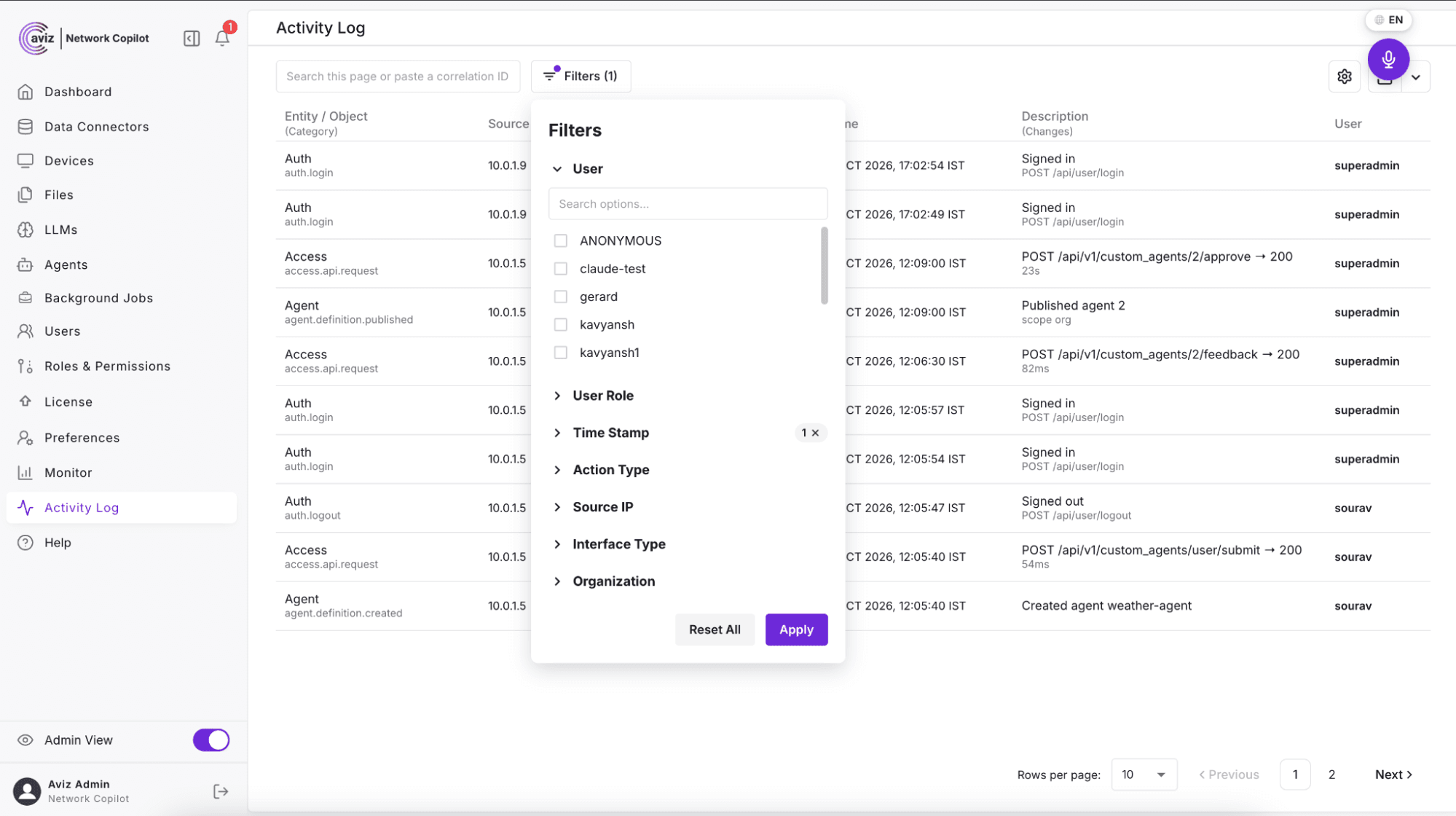
How do you search and filter the NCP Activity Log?
Filter the Activity Log by user, organization, event type, status, source IP, and time range. Filter menus are facet-driven: they automatically list every value that actually exists in your data, so you never have to guess what to search for.
What is correlation-ID search in NCP?
Paste any correlation ID (or let NCP auto-detect it) to instantly pull up every event that belongs to the same action chain, ideal for tracing a single AI interaction from prompt to result.
Can you export NCP activity logs for auditors?
Export the current, filtered view for offline analysis or to hand off to auditors. Exports capture the exact time window and record count so the output is self-documenting.
Can you control how long NCP keeps audit data?
Set retention policies to control how long audit data is stored. Retention changes are themselves audited, so even your governance settings have a paper trail.
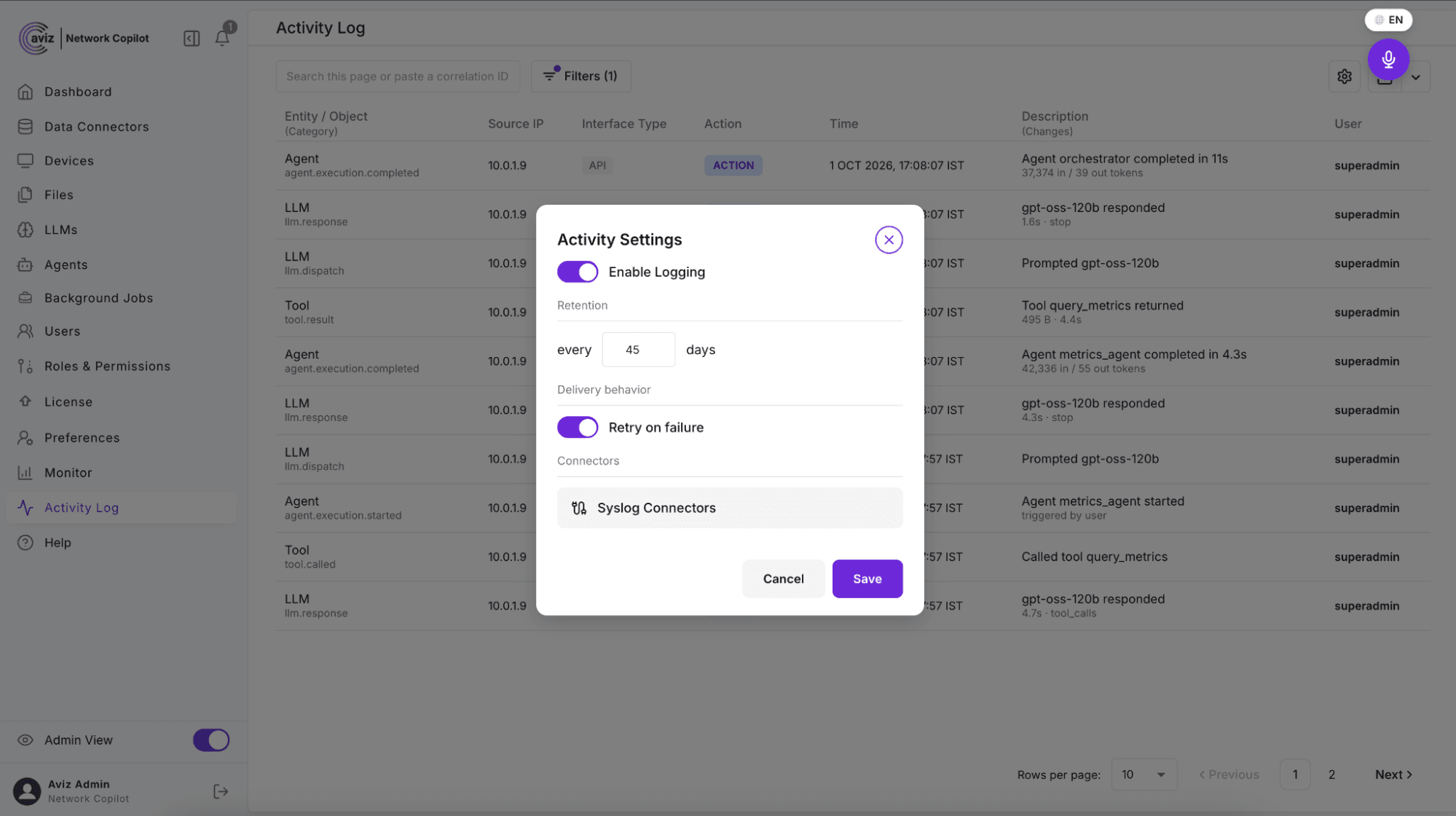
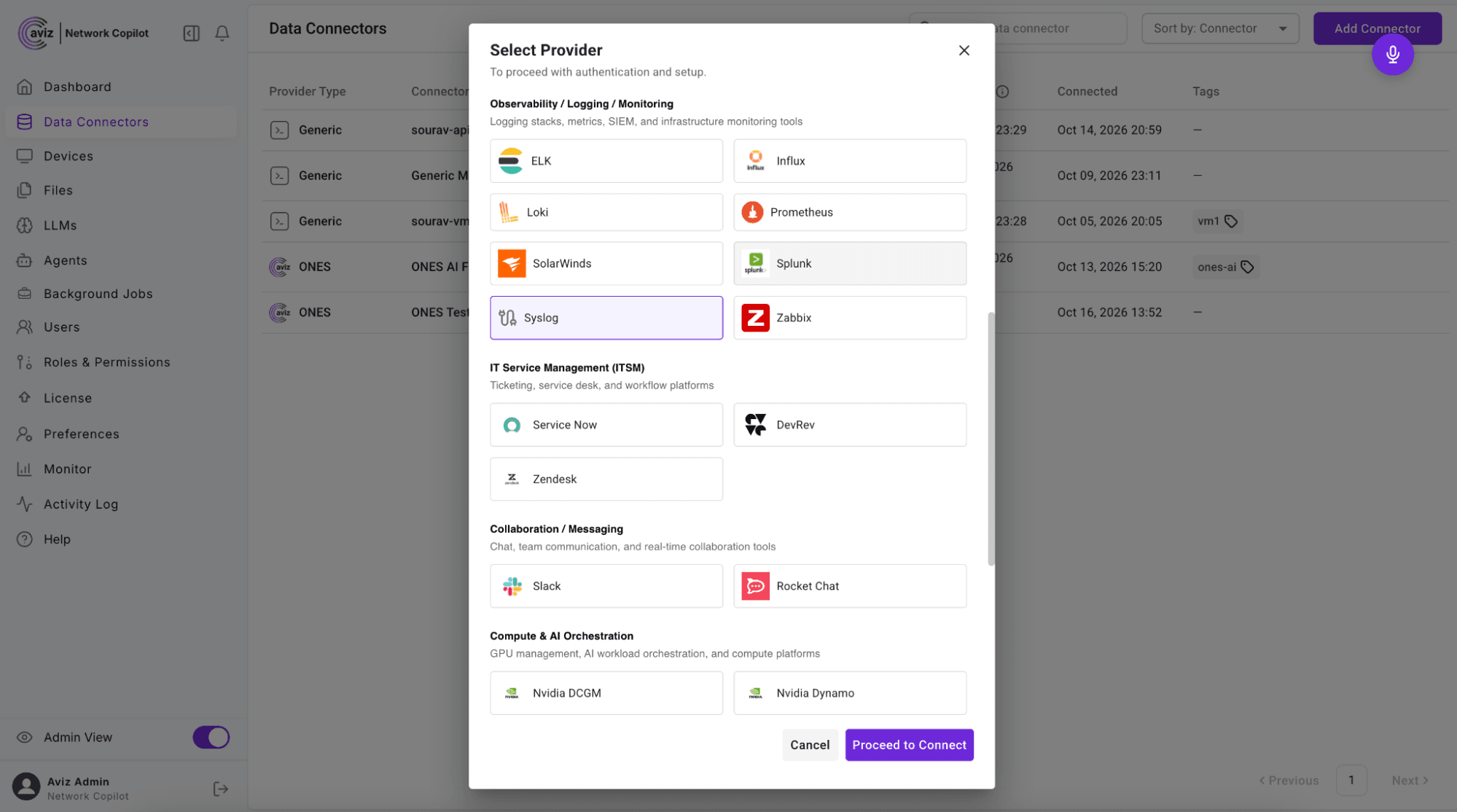
Can NCP forward audit events to a SIEM?
Add a Syslog Data Connector to stream audit events to your external syslog server in real time. Automatic retry ensures events aren't lost during transient network issues, so your centralized security tooling always has a complete picture.
Conclusion
With Activity Logging, Network Copilot gives you complete, structured visibility into every action across the platform, human and AI alike. That means stronger security, faster troubleshooting, easier compliance, and the confidence to let AI-driven automation do more, knowing every step is recorded and accountable.
Transparency isn't an add-on in NCP. It's built in.
FAQ
What details does each NCP audit event record?
Each event records who performed it (user, organization and project), when it happened, the source IP, whether it succeeded or failed, and a correlation ID that ties related actions together across the platform.
Does Network Copilot log failed sign-in attempts?
Yes. Failed sign-in attempts are logged along with logins, logouts and switches between LDAP and Local authentication. Connector authentication failures are logged too.
Does NCP log what AI agents and tools do?
Yes. NCP logs prompts submitted, agents invoked, tools and connectors called, and knowledge-base lookups, so an AI action can be followed from prompt to result.
Does NCP log administrator and inventory changes?
Yes. It logs devices added to or removed from inventory, licenses applied or changed, retention policy changes and data exports, as well as user, role and organization changes.
Do you need to know filter values before searching NCP activity logs?
No. Filter menus are facet-driven, so they automatically list every value that actually exists in your data.
Are audit events lost if the syslog connection drops briefly?
No. The Syslog Data Connector uses automatic retry, so events aren't lost during transient network issues.


