





IP-CLOS with NVIDIA Spectrum-X: Building High-Performance AI Fabrics
 December 15, 2025
 AI Factory
Summary
Building a Spectrum X fabric for large-scale AI workloads requires precise Day 0 design, automation, and error-free orchestration. ONES Fabric Designer simplifies this entire journey by automating IPCLOS topologies, RoCEv2 QoS, and server node integration, ensuring a complete and validated design that is production-ready.
Introduction
Designing an AI network fabric is a complex Day 0 challenge. Every decision you make in the design, architecture, and configuration stages influences the performance and scalability of the entire system. NVIDIA Spectrum X delivers the industry-leading Ethernet fabric for AI, but teams still need a way to translate architectural intent into a ready-to-deploy configuration.
The ONES Fabric Designer solves this problem by turning Day 0 planning into an automated, intent-driven workflow. Instead of spending weeks on manual configuration, teams can now design and generate a complete Spectrum X fabric with confidence.
What Is the ONES Fabric Designer?
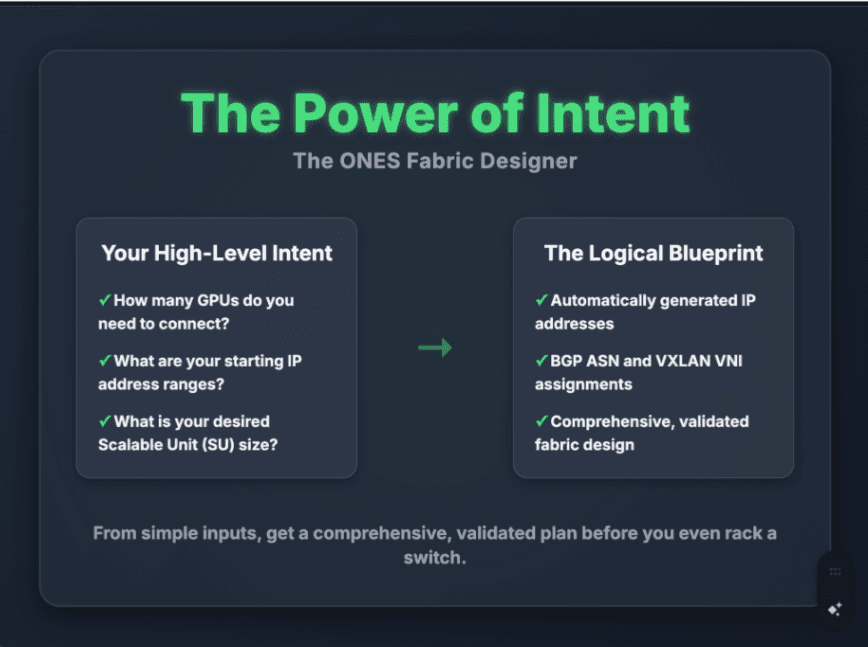
The ONES Fabric Designer is the intent-driven engine that converts your requirements into a complete fabric blueprint. Instead of manually assigning IPs, BGP AS numbers, or fabric parameters, you provide simple inputs such as:
- Required Scalable Unit size
- Number of GPUs to be deployed
- Starting IP address ranges
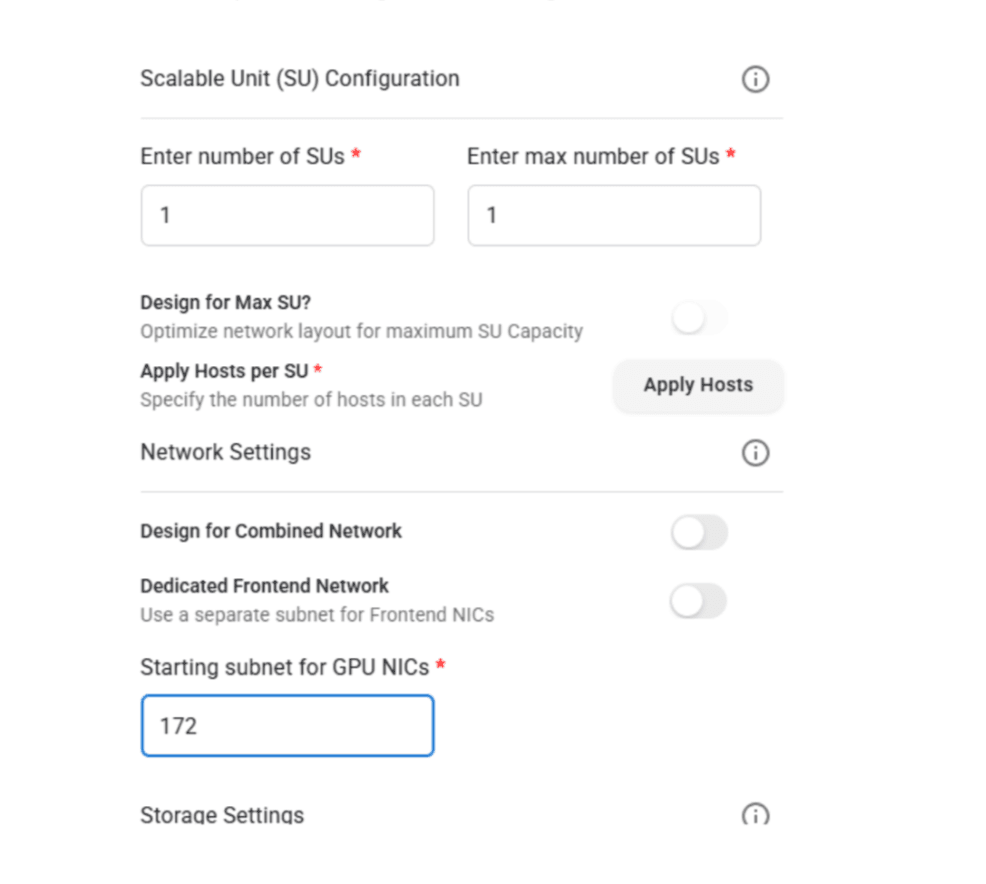
From these inputs, ONES automatically generates the full design and provides a validated plan before any hardware is deployed.
How Does ONES Automate the IPCLOS Underlay?
AI networks depend on spine leaf or IPCLOS designs to deliver predictable, high-bandwidth connectivity. Manually configuring this architecture with BGP EVPN and interface settings usually involves thousands of lines of configuration.
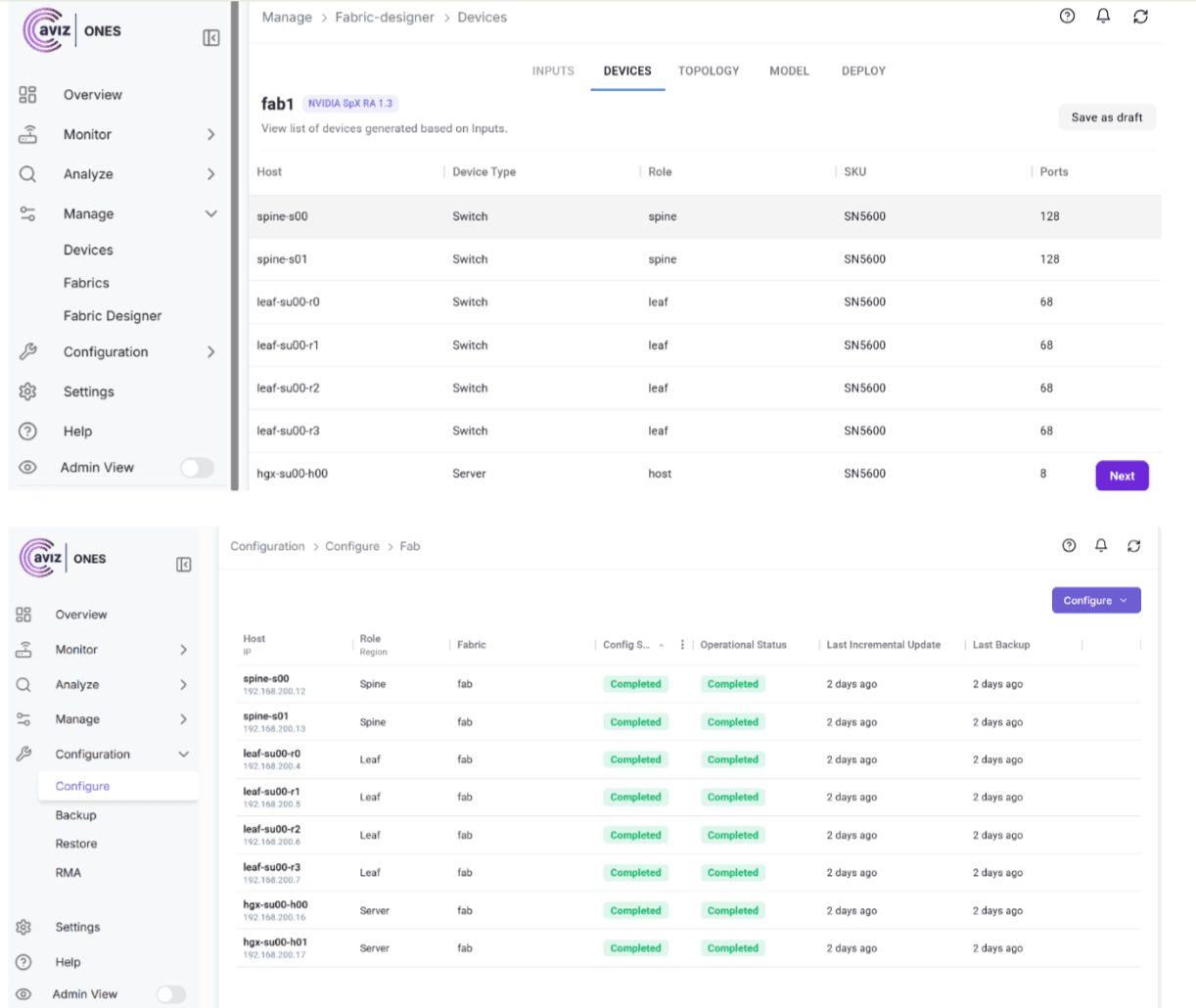
ONES automates the entire process by generating:
Automated Spectrum X Underlay
- Spine and leaf configurations based on GPU and server scale
- Complete BGP peering with AS number allocation and resilient control plane settings
- Consistent interface configurations, including port breakouts, MTU, and IP assignment
Automated GPU Server NIC Configuration
ONES extends the same automation to the NVIDIA BlueField and ConnectX SuperNICs, ensuring they are optimized for AI workloads.
It automatically configures:
- RoCEv2 parameters such as PFC and ECN
- Hardware acceleration and offload features
- Performance tuning, such as adaptive retransmission and Inter Packet Gap adjustments
Tasks that once took days of CLI-based work can now be generated in minutes.
How Does ONES Deliver Zero-Touch QoS for RoCEv2?
RoCEv2 performance depends entirely on a lossless network. Incorrect QoS settings lead to packet drops, which can severely degrade AI training.
ONES prevents this by:
- Applying validated RoCEv2 QoS profiles
- Setting correct trust states, such as DSCP
- Ensuring consistent buffer, PFC, and ECN settings across all ports
The result is a fabric that is lossless from the start and ready for high-speed GPU-to-GPU communication.
How Does ONES Handle Server Node Integration?
AI fabrics require seamless integration between switches and compute nodes. ONES ensures the server-side configuration is always correct and aligned with the fabric.
ONES automates:
- Switch port settings, including VLANs, MTU, and QoS
- LLDP-based validation of physical connectivity
- BlueField 3 SuperNIC configuration for optimized end-to-end performance
With this approach, servers connect to the fabric and begin performing immediately without manual troubleshooting.
What Happens After Design? Deploy with Confidence
The ONES Fabric Designer produces a complete, validated, production-ready configuration for the entire Spectrum X fabric. You can test the design virtually in NVIDIA AIR to verify behavior under load before deploying the final configuration to hardware using Zero Touch Provisioning.
By automating IPCLOS, RoCEv2 QoS, and server node configuration, ONES turns a multi-week manual effort into an intelligent, streamlined Day 0 workflow.
Conclusion
ONES enables fast, accurate, and reliable design of Spectrum X AI fabrics. Its intent-driven automation eliminates complexity, reduces risk, and delivers a complete design that is ready for deployment. This is how modern AI networking should be built: automated, validated, and driven by intent.
Frequently Asked Questions
What is the ONES Fabric Designer?
The ONES Fabric Designer is an intent-driven engine that converts high-level requirements into a complete, validated Spectrum X fabric blueprint. It automates the entire Day 0 design process, eliminating the need for manual IP assignment, BGP AS number configuration, and fabric parameter setup.
What inputs does ONES Fabric Designer require to generate a design?
Users provide simple inputs such as the required Scalable Unit size, number of GPUs to be deployed, starting IP address ranges, and topology preferences. From these inputs, ONES automatically generates a full, validated fabric design before any hardware is deployed.
How does ONES automate the IPCLOS underlay?
ONES generates spine and leaf configurations based on GPU and server scale, complete BGP peering with AS number allocation, and consistent interface configurations including port breakouts, MTU, and IP assignment. Tasks that once required thousands of lines of manual configuration can be generated in minutes.
How does ONES ensure lossless RoCEv2 performance?
ONES applies validated RoCEv2 QoS profiles and enforces correct trust states, buffer settings, PFC, and ECN configurations across all ports. This ensures the fabric is lossless from the start and ready for high-speed GPU-to-GPU communication.
Does ONES configure server-side components as well as switches?
Yes, ONES automates switch port settings, LLDP-based validation of physical connectivity, and BlueField 3 SuperNIC configuration. This ensures servers connect to the fabric and begin performing immediately without manual troubleshooting.
Can I test a fabric design before deploying it to hardware?
Yes, the validated configuration produced by ONES Fabric Designer can be tested virtually in NVIDIA AIR to verify behavior under load before the final configuration is deployed to hardware using Zero Touch Provisioning.
What NVIDIA hardware does ONES Fabric Designer support?
ONES Fabric Designer is built around NVIDIA Spectrum X and automates configuration for Spectrum switches as well as NVIDIA BlueField and ConnectX SuperNICs. It ensures all components are optimized end-to-end for AI workloads.
Ready to design and deploy Spectrum X fabrics with complete automation?
Visit the ONES product page Request a demo from the Aviz Networks team


