





How Do You Deploy NVIDIA RTX PRO AI Factories Using Aviz ONES?
 November 17, 2026
 AI Factory

TL;DR
NVIDIA RTX PRO Servers bring Blackwell-class AI to enterprise data centers, and they come with a clear networking blueprint: a Spectrum-X Ethernet compute fabric for GPU-to-GPU traffic and a BlueField-3 front-end for users and storage. Aviz ONES turns that blueprint into a fabric you can design, review and deploy. Choose RTXPRO as the GPU node in an Aviz RA 1.0 fabric, set the number of scale units, and ONES builds the leaf-spine topology, the addressing and the configs for both networks.
Introduction
Not every AI factory is a liquid-cooled rack of superchips. Many enterprises want GPU acceleration that fits the data centers they already run: air-cooled, power-efficient, standard PCIe servers. That's the space the NVIDIA RTX PRO AI Factory fills. It's built for inference, fine-tuning, generative image and video, physical and industrial AI, and visual computing.
The servers are only half the story, though. Once you go past a single node, performance depends on the network. GPUs need a lossless, high-bandwidth fabric to talk to each other, and every server still needs a front-end path to users, orchestration and storage.
So how do you go from NVIDIA's reference architecture to a running fabric, without hand-building cabling plans, IP schemes and switch configs for every scale unit?
That's where Aviz ONES comes in. ONES includes RTX PRO as a supported GPU architecture in the Aviz RA 1.0 fabric. It generates the east-west compute network and the north-south front-end from a handful of inputs, then validates and deploys them.
What Is an RTX PRO Server?
An RTX PRO Server is an NVIDIA-Certified system with up to eight RTX PRO 6000 Blackwell Server Edition GPUs. Each GPU carries 96 GB of GDDR7, so an 8-GPU node has 768 GB of GPU memory and up to 12.8 TB/s of aggregate memory bandwidth.
From a network point of view, each server has two kinds of NIC:
- Compute (east-west) SuperNICs. These carry GPU-to-GPU traffic: RDMA, RoCE, GPUDirect and collective operations. The reference design uses four BlueField-3 SuperNICs per server.
- One front-end (north-south) DPU. A BlueField-3 DPU connects the server to users, orchestration and storage, and can offload networking and security services from the host.
What Does a Notation Like 2-8-5-200 Mean?
NVIDIA describes RTX PRO configurations as CPU sockets - GPUs - NICs - Gbps per GPU. The NIC count includes both the compute SuperNICs and the front-end DPU.
| Configuration | What's in the server | East-west bandwidth per GPU |
|---|---|---|
| 2-8-5-200 | 2 CPUs, 8 GPUs, 4 BlueField-3 SuperNICs + 1 BlueField-3 DPU | 200 Gbps; NVIDIA's Enterprise RA baseline |
| 2-4-5-400 | 2 CPUs, 4 GPUs, 4 SuperNICs + 1 DPU; half the GPU slots left empty | 400 Gbps |
| 2-8-5-400 | 2 CPUs, 8 GPUs, 4 ConnectX-8 SuperNICs acting as PCIe switches + 1 DPU | 400 Gbps at full GPU density |
NVIDIA recommends 400 Gbps per GPU for workloads that lean hardest on the east-west network, such as fine-tuning and image or video generation. In ONES, you choose between 4-GPU and 8-GPU RTX PRO nodes when you design the fabric.
How Is the East-West Compute Network Built?
The compute network is a non-blocking leaf-spine (fat-tree) fabric built on NVIDIA Spectrum-X Ethernet switches. Its building block is the scalable unit (SU).
What's in One Scalable Unit?
One SU holds 32 RTX PRO servers and two leaf switches. Each server's four compute NICs are split across the pair: two go to the first leaf, two to the second. Each leaf therefore uses 64 × 400G downlinks to the servers and 64 × 400G uplinks to the spines, a 1:1 ratio with no oversubscription.
| Per SU | Count |
|---|---|
| RTX PRO servers | 32 |
| GPUs | 128 (4-GPU nodes) or 256 (8-GPU nodes) |
| Compute NICs per server | 4 × 400G |
| Leaf switches | 2 (64 × 400G down, 64 × 400G up each) |
The split matters for resiliency. If one leaf goes down, every server in the SU keeps half its compute bandwidth.
How Does It Scale?
You add SUs. Each SU adds two leaves, and spines are added in pairs as the leaf count grows.
| SUs | Servers | GPUs (8 per server) | Leaf switches | Spine switches |
|---|---|---|---|---|
| 1 | 32 | 256 | 2 | 2 |
| 2 | 64 | 512 | 4 | 2 |
| 4 | 128 | 1,024 | 8 | 4 |
| 8 | 256 | 2,048 | 16 | 8 |
| 16 | 512 | 4,096 | 32 | 16 |
| 32 | 1,024 | 8,192 | 64 | 32 |
With 4-GPU servers, halve the GPU column. The network counts don't change.
What About the North-South Network?
Each RTX PRO server has a single BlueField-3 DPU for the front-end. With one front-end NIC per server, ONES uses a shared north-south design: user (tenant) traffic and storage traffic share the same front-end path, separated logically rather than on separate NICs.
How Does Aviz ONES Model an RTX PRO Fabric?
In ONES, RTX PRO is a GPU node type in the Aviz RA 1.0 fabric, alongside H100/H200/B200, B300, GB200 and GB300. Selecting it tells ONES everything the reference architecture implies: the server's NIC layout, the scalable-unit size, the switch platform and the cabling pattern.
| What you choose | What ONES derives |
|---|---|
| GPU node: RTXPRO | 4 compute NIC ports plus 2 front-end DPU ports per server |
| GPUs per server: 4 or 8 | GPU count per SU (128 or 256) |
| Number of SUs, max SUs | Leaves, spines and uplinks, sized for today and room to grow |
| E-W starting subnet | Point-to-point addressing for every GPU NIC |
| N-S starting subnet | Addressing for the shared user and storage network |
What Gets Built on Each Side?
The east-west side follows NVIDIA's Spectrum-X design: SN5610 leaves and spines (128 × 400G ports each), two leaves per SU, and every server split across both leaves. ONES runs it with Ethernet and a Cumulus switch template, and makes it tenant-aware so GPU traffic can be isolated per tenant.
The north-south side is a separate, shared front-end fabric. It has compute leaves for the servers' BlueField-3 ports, storage leaves for storage nodes, border leaves to the outside world, and a pair of front-end spines. Tenant segmentation uses VXLAN by default, and storage can be made tenant-aware too.
How Are Devices Named and Addressed?
ONES applies consistent names so a hostname alone tells you where a device sits:
| Role | Name pattern | Example |
|---|---|---|
| RTX PRO server | rtx-su<SU>-<host> | rtx-su00-00 |
| E-W leaf | leaf-su<SU>-r<n> | leaf-su01-r1 |
| E-W spine | spine-s<n> | spine-s00 |
| N-S compute leaf | leaf-cn-<n> | leaf-cn-00 |
| N-S storage leaf | leaf-storage-<n> | leaf-storage-01 |
| N-S border leaf | leaf-border-<n> | leaf-border-00 |
| N-S spine | spine-fe-<n> | spine-fe-00 |
Addressing follows the same Spectrum-X conventions ONES uses for other NVIDIA reference architectures. Each GPU NIC gets a /31 point-to-point link to its leaf, carved from the E-W starting subnet, with the rail, the SU and the host encoded in the address. With four compute NICs per server, an RTX PRO fabric has four rails. Loopbacks and leaf-to-spine links follow the same scheme, so the address of any link tells you which rail, SU and host it belongs to.
Walkthrough: How Do I Create an RTX PRO Fabric in ONES?
Create a new Aviz RA 1.0 fabric, select RTXPRO and size the scalable units, set up the east-west and north-south networks, then review the devices ONES generates.
Here is a 2-SU RTX PRO fabric built end to end in ONES: 64 servers and 512 GPUs, with room to grow to 4 SUs. Every screen below was captured from a live ONES instance.
Step 1: How do you name the fabric and choose Aviz RA 1.0?
From Manage → Fabrics → + New Fabric, give the fabric a name and description and pick Aviz RA 1.0 as the fabric type.
Step 2: How do you select RTXPRO and size the scalable units?
On Scalable Unit Configuration, select RTXPRO as the GPU node. ONES then asks how many GPUs each server has: 4 or 8. Enter the number of SUs you're deploying now and the maximum you plan to grow to. ONES uses the maximum to reserve spine capacity, so adding SUs later doesn't mean re-cabling the spine layer.
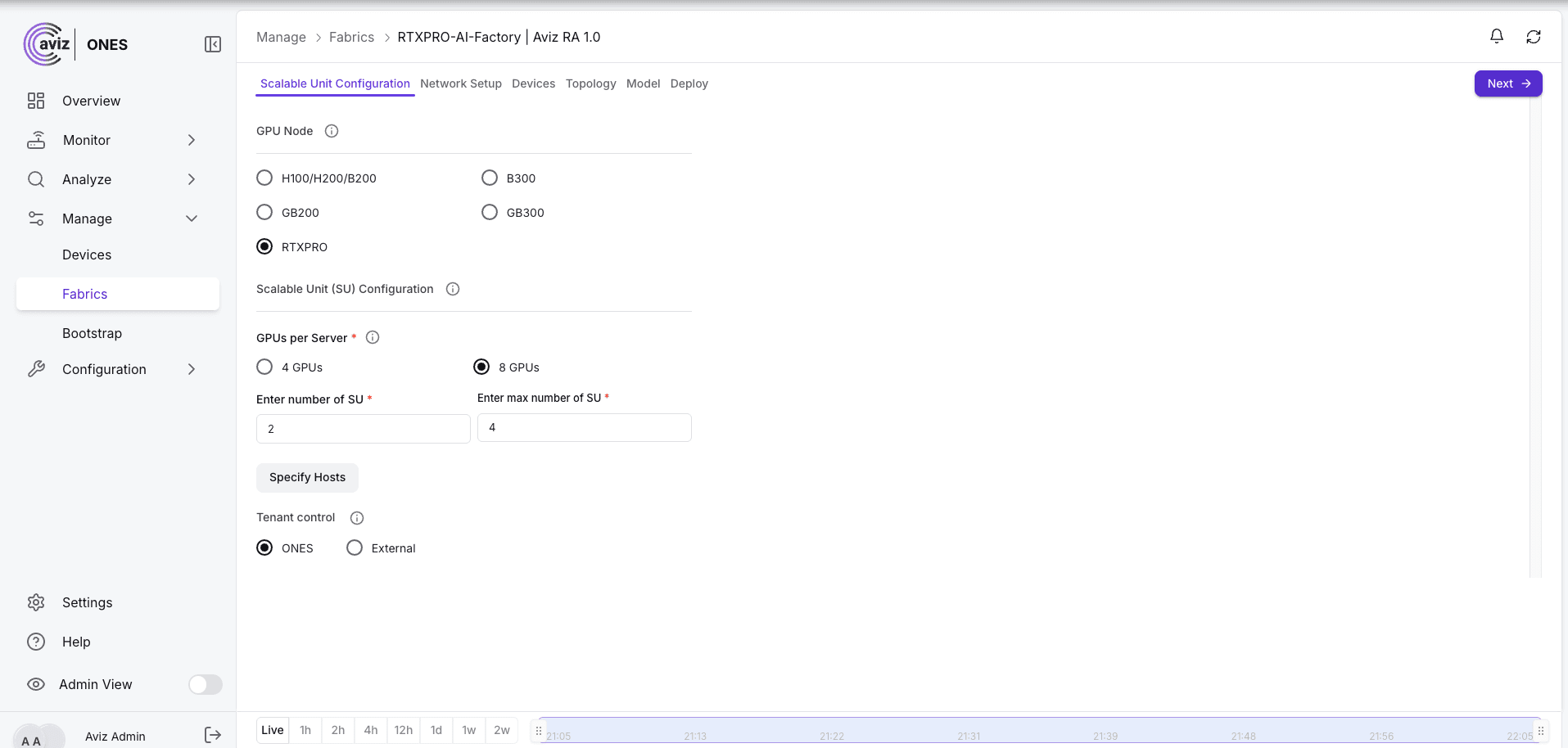
Specify Hosts sets the server count per SU. It defaults to 32, the full RTX PRO SU, and can be lowered for a partially populated first SU.
Tenant control decides who drives tenant operations: ONES itself, or an external system through the Fabric Manager APIs.
Step 3: How do you set up the east-west network?
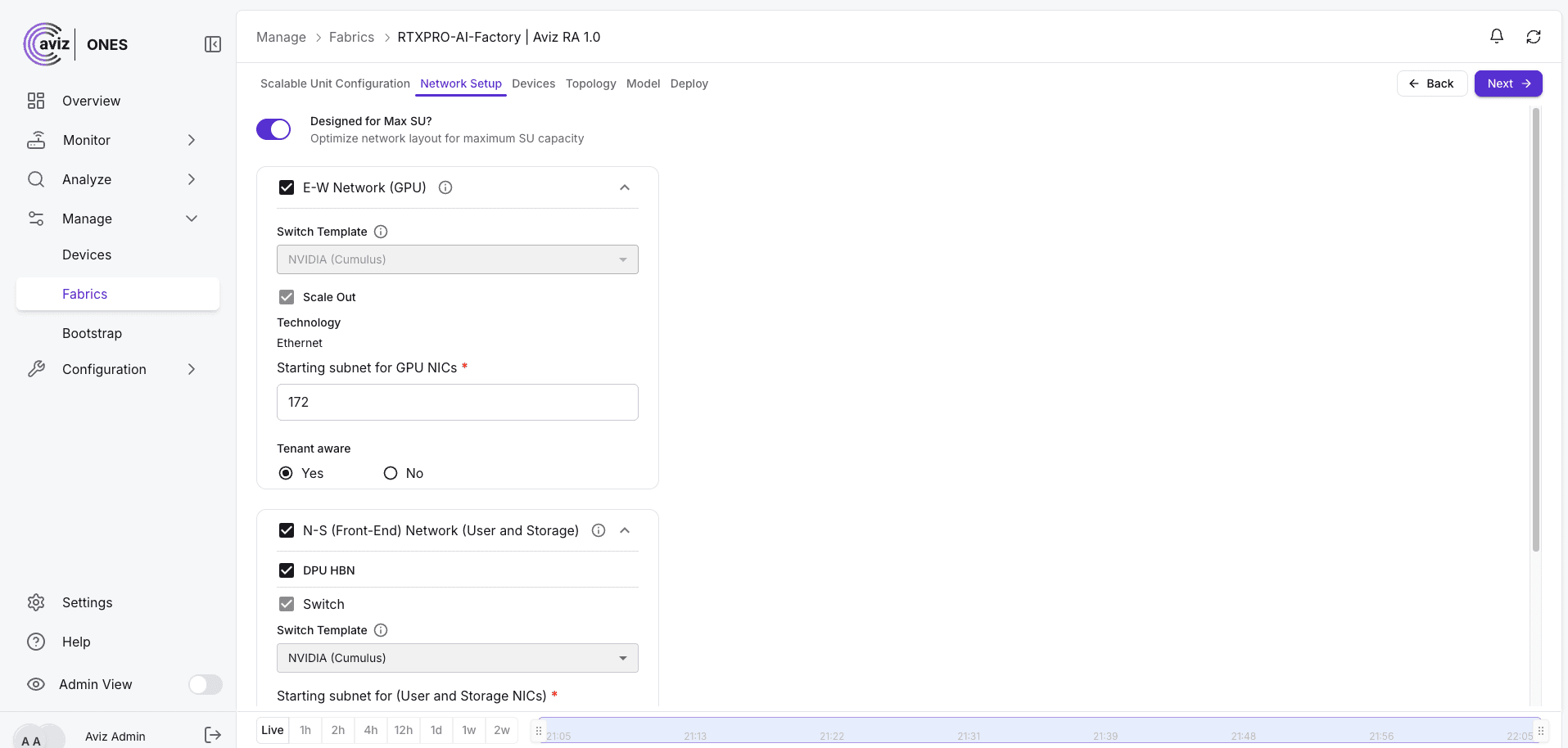
On Network Setup, enable the E-W Network (GPU). For RTX PRO, ONES fixes the right defaults: the NVIDIA (Cumulus) switch template, scale-out, and Ethernet as the technology. You only provide the starting subnet for the GPU NICs and whether the network should be tenant-aware.
Step 4: How do you set up the north-south network?
Enable the N-S (Front-End) Network (User and Storage). ONES selects BlueField-3 as the NIC type. You choose the switch template, the starting subnet for user and storage NICs, tenant segmentation (VXLAN or VLAN), and whether storage is tenant-aware. The DPU HBN option moves routing and tenant VRFs onto the BlueField-3 itself, as covered in our earlier post on HBN.
Step 5: How do you review the generated devices?
Click Next and ONES generates the full device inventory. For this 2-SU design that's 78 devices.
| Network | Devices | Ports per device |
|---|---|---|
| E-W spines | spine-s00, spine-s01 (SN5610) | 128 |
| E-W leaves | leaf-su00-r0/r1, leaf-su01-r0/r1 (SN5610) | 128 |
| RTX PRO servers | rtx-su00-00 ... rtx-su01-31 (64 servers) | 6 (4 E-W + 2 N-S) |
| N-S spines | spine-fe-00/01 | 20 used |
| N-S compute leaves | leaf-cn-00/01 | 72 used |
| N-S storage leaves | leaf-storage-00/01 | 8 used |
| N-S border leaves | leaf-border-00/01 | 4 used |
See how Aviz ONES designs, validates and deploys AI factory fabrics: explore ONES for AI factory networking.
How Do I Review the Topology Before Deploying?
The Topology tab draws the generated design three ways. Nothing has touched a switch yet: this is the design, ready for review.
Per scalable unit. Each SU's 32 servers sit between their two north-south leaves above and their two east-west leaves below, with every dual-homed link drawn.
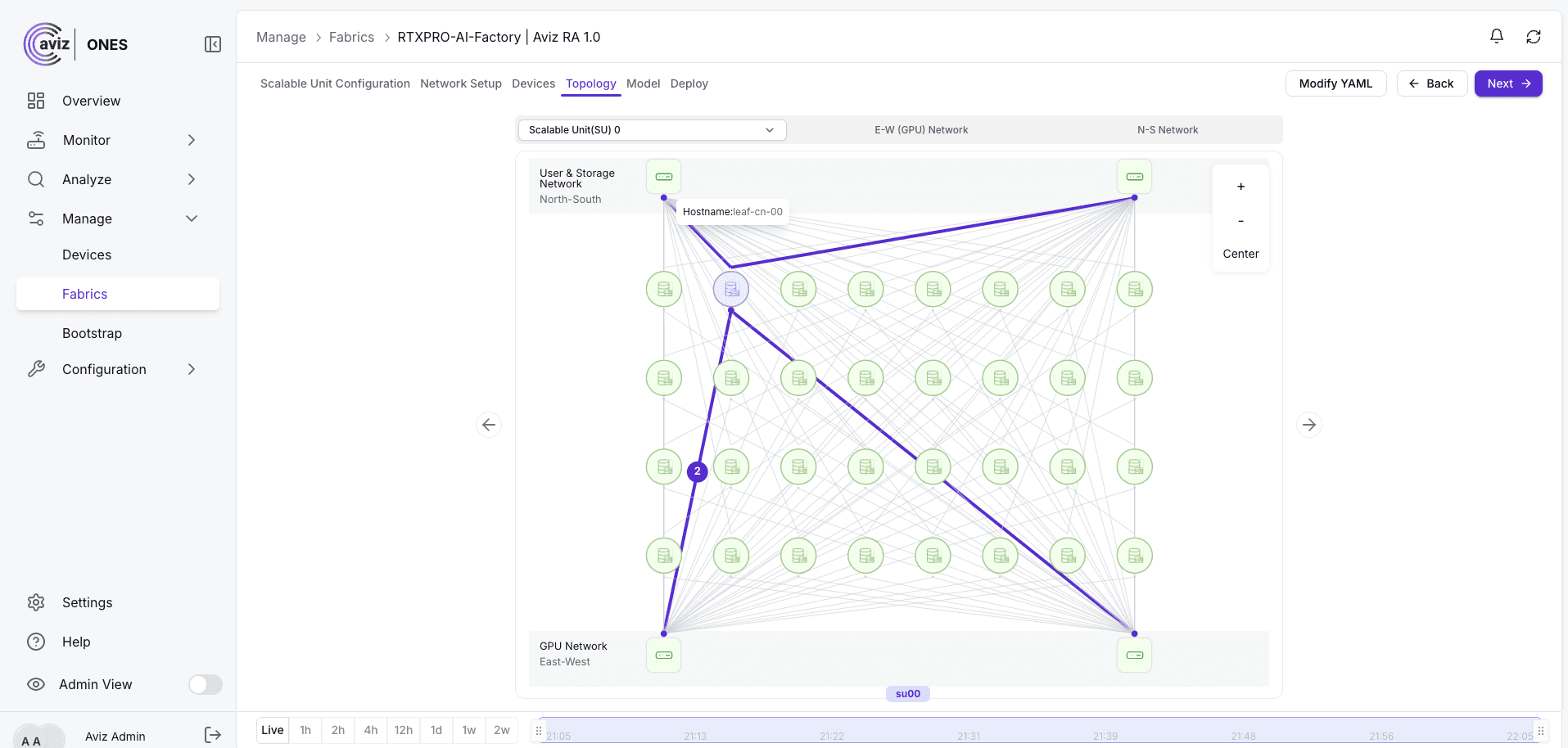
East-west network. The leaf-spine view shows each SU's leaf pair and how every leaf reaches both spines.
North-south network. The shared front-end shows border, compute and storage leaves under the front-end spines.
Can I Customize the Generated Design?
Yes. Reference designs are a starting point, and real deployments often differ: a different border connection, extra storage links, a site-specific naming rule. Modify YAML opens the fabric's full generated definition: inventory, connectivity, links and ASNs. From there you can copy it, download it, edit it offline and use Upload & Save to bring it back.
An uploaded YAML goes through validation before ONES accepts it. Checks include missing reverse links, a port used twice on the same device, self-loops, orphaned devices with no links, duplicate switch names or IDs, north-south ASN ranges, and YAML syntax. A broken edit is caught at upload, not at deploy.
What Happens Next?
The Deploy tab then validates the real switches and servers and pushes the configuration. Tenant onboarding, network policy and Day-2 operations follow from there, through the ONES UI or through APIs and Terraform.
Conclusion
The NVIDIA RTX PRO AI Factory brings Blackwell-class AI to air-cooled, standard enterprise data centers. Its networking blueprint is clear: four compute NICs per server on a non-blocking Spectrum-X fabric, 32 servers per scalable unit, and a BlueField-3 front-end for users and storage. Turning that blueprint into cabling plans, IP schemes and switch configs is where the effort usually goes.
Aviz ONES collapses that work into a few choices. Pick RTXPRO in an Aviz RA 1.0 fabric, choose 4 or 8 GPUs per server, set the number of SUs, and ONES generates both networks: devices, names, links and addressing, laid out for review. When your site differs from the reference, the YAML is yours to adapt, with validation catching mistakes before deploy.
From the first SU to thirty-two, the design grows by adding scalable units, not by redesigning the network. That's the RTX PRO AI Factory, made deployable by Aviz ONES.
FAQ
Is the RTX PRO compute fabric oversubscribed?
No. Each leaf uses 64 × 400G downlinks to the servers and 64 × 400G uplinks to the spines, a 1:1 ratio with no oversubscription.
What happens if one leaf switch fails in an RTX PRO scalable unit?
Each server's four compute NICs are split across the two leaves, so if one leaf goes down, every server in the SU keeps half its compute bandwidth.
Do you have to re-cable the spine layer when adding scalable units?
No. ONES uses the maximum number of SUs you plan to grow to when it reserves spine capacity, so adding SUs later doesn't mean re-cabling the spine layer.
Which switches does ONES use for the RTX PRO east-west fabric?
NVIDIA Spectrum-X SN5610 switches, with 128 × 400G ports each, as both leaves and spines. ONES runs the fabric with Ethernet and a Cumulus switch template.
How much east-west bandwidth does each RTX PRO GPU get?
The 2-8-5-200 baseline gives 200 Gbps per GPU, while the 2-4-5-400 and 2-8-5-400 configurations give 400 Gbps. NVIDIA recommends 400 Gbps per GPU for fine-tuning and image or video generation.
Which other GPU node types does Aviz RA 1.0 support?
Besides RTX PRO, the Aviz RA 1.0 fabric in ONES supports H100/H200/B200, B300, GB200 and GB300 GPU nodes.


