





How Can You Achieve Lightweight Traffic Visibility in Cloud-Native Networks with vasn_tap?
 April 23, 2026
 Deep Network Observability

TL;DR
vasn_tap is a lightweight, production-grade packet tap designed for cloud-native environments. It enables efficient traffic capture, filtering, truncation, and forwarding without impacting production systems. Built for simplicity and performance, it runs on Linux hosts, supports AF_PACKET and eBPF, and uses userspace tunnelling via VXLAN or GRE.
Introduction
In today’s data-driven infrastructure, network visibility is no longer optional; it is essential. Whether you are feeding traffic to a monitoring appliance, an AI-powered analytics platform, or a security tool, you need a reliable way to capture, filter, and forward packets without disrupting production traffic.
That is exactly what vasn_tap delivers.
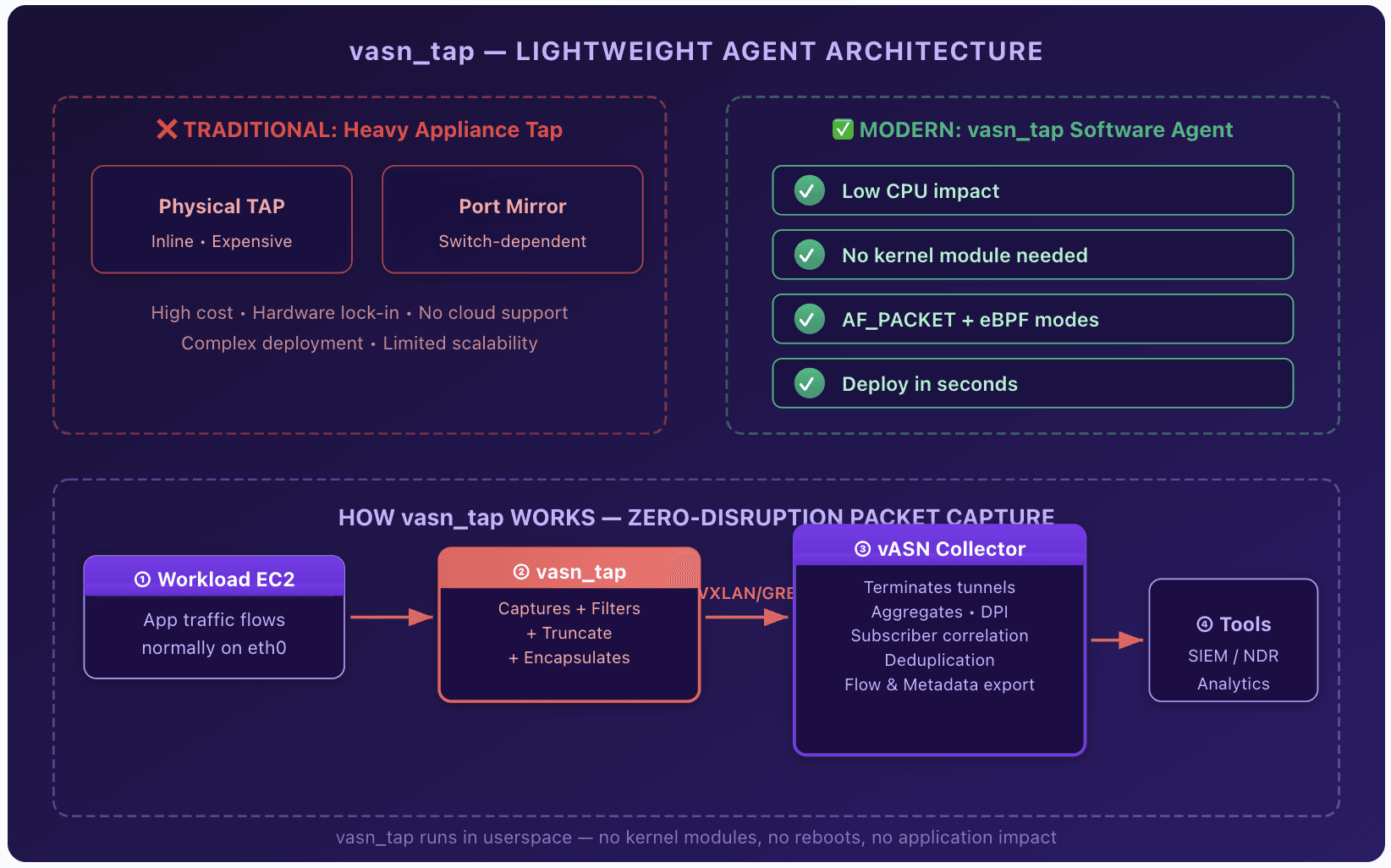
Developed by Aviz Networks as a companion to the Aviz Service Node (ASN), vasn_tap is a lean, production-grade packet tap that runs on standard Linux hosts. It copies traffic from a source interface, optionally applies flexible filtering and truncation, and forwards the result either to a local output interface or encapsulates it in VXLAN or GRE for delivery to a remote collector.
Best of all, it is simple to deploy, highly efficient, and requires zero kernel tunnel devices. All encapsulation happens in userspace.
Why should you use vasn_tap for network visibility?
vasn_tap should be used because it provides lightweight, flexible, and efficient traffic visibility without the overhead or limitations of traditional tapping solutions.
Traditional tapping solutions can be heavy, inflexible, or tightly coupled to specific hardware. vasn_tap takes a different approach:
Key Capabilities
- AF_PACKET, recommended for most deployments
- eBPF, excellent for newer kernels (>= 5.10 with BTF)
- First-match ACL filtering (up to 128 rules) with protocol, ports, IPv4 addresses or CIDR, eth_type, and single VLAN support
- Optional post-filter truncation (64–9000 bytes) with automatic IPv4 length and checksum updates
- default_action (allow or drop) for clean policy control
- Userspace VXLAN (VNI, custom port) or GRE (with optional key)
- Or simple L2 forwarding to a local output interface
- Drop mode is available when no output or tunnel is configured, useful for pure counting or monitoring
- All behaviour is defined in a single YAML config file
- No CLI runtime flags, no in-band reloads
- Changes take effect after a clean restart
Two high-performance capture backends:
Flexible per-packet processing:
Tunnel or direct forward:
Zero runtime surprises:
What operational benefits does vasn_tap provide?
Key Benefits for Operators and Architects
- Low overhead: Optimised rings, zero-copy where possible, and careful memory design with detailed before and after numbers in the docs
- Observable by design: Rich file-based stats (RX, TX, drop, truncate, filter hits, rates, CPU percentage, RSS) updated every second, plus vasn_tapctl counters --watch
- Easy operations: vasn_tapctl provides validate, apply, start, stop, restart, diagnose, dry-run, version, logs, and a one-command tech-support bundle
- Production-ready: Graceful shutdown, root and CAP requirements clearly documented, supported on multiple flavours like Ubuntu, Amazon Linux 2023, RHEL
- Secure and contained: No kernel device creation, no encryption (use your existing transport security), no built-in GUI or API surface
How do you deploy vasn_tap quickly?
You can deploy vasn_tap in minutes using a simple install script, YAML configuration, and systemd service.
Steps
- Extract the prebuilt tarball
- Run
sudo ./install.sh - Edit
/etc/vasn_tap/config.yamlto set input and output interfaces, mode, filter rules, and optional tunnel - Run
sudo vasn_tapctl validate && sudo vasn_tapctl start
That is it. The service runs under systemd, stats appear automatically, and you can monitor everything with vasn_tapctl counters --watch.
Example Minimal Configuration (Allow all, no tunnel)
  yaml

  runtime:
  input_iface: eth0
  output_iface: eth1
  mode: afpacket
filter:
  default_action: allow
  rules: []
Or tunnel everything via VXLAN to your Aviz Service Node:
  yaml

    runtime:
  input_iface: eth0
  output_iface: eth1
  mode: afpacket
tunnel:
  type: vxlan
  remote_ip: 192.168.200.10
  vni: 1000
filter:
  default_action: allow
  rules: []
Who should use vasn_tap?
vasn_tap is ideal for engineers and organisations that need efficient, flexible, and scalable traffic visibility in modern network environments.
Suitable Users
- Enterprises and service providers using Aviz Service Nodes for visibility, DPI, or AI-driven analytics
- Network engineers who need selective mirroring without SPAN port exhaustion
- Teams operating high-speed Linux-based routers, bare-metal servers, or virtualised environments
- Anyone who values simplicity, performance, and full control over what traffic leaves their infrastructure
vasn_tap is part of Aviz’s broader mission to bring hyperscaler-grade networking tools to every organisation, open, efficient, and built for real-world scale.
Get Started Today
Download the latest vasn_tap package from your Aviz representative or portal. Full documentation, example configs, architecture details, and troubleshooting guides are included.
vasn_tap Capture what matters. Forward it cleanly. Observe with confidence.
Frequently Asked Questions
1. How can you achieve lightweight traffic visibility in cloud-native networks with vasn_tap?
You can achieve lightweight traffic visibility into cloud-native networks by using vasn_tap because it copies and transmits traffic directly from Linux hosts without impacting production traffic. Its design involves lightweight packet capture, lightweight packet filtering and userspace tunnelling so overhead is low but full visibility.
2. How can vasn_tap capture network traffic without impacting production performance?
The reason vasn_tap does not impact production performance is because it features highly optimized rings and will zero-copy packets where possible. Memory management will be highly efficient as well. Packet will be copied and transmitted without impacting production workload.
3. How can vasn_tap forward traffic to local or remote monitoring tools?
Vasn_tap can transmit traffic to a local and a remote monitoring system through either of the following methods: 1) Directly L2 to the local interface and 2) userspace encapsulation (VXLAN/GRE) towards the remote collector. Local collectors get L2 traffic on the specified local interface. The collectors get packet in user space, without the necessity to create a kernel tunnel device.
4. How can selective traffic filtering be implemented using vasn_tap?
With the use of vasntap, first-match ACL filtering can be implemented up to 128 entries. Filters can select traffic based on a large range of criteria including protocol and port, or IPv4 addresses (including CIDR range), or VLAN and ethtype.
5. Why is coming up with networking ideas important for being competitive, in the AI era?
Coming up with new networking ideas is important because AI is changing what we think of as good infrastructure. Companies need to come up with ideas to stay competitive. Gilad Shainer, Senior Vice President of Networking at NVIDIA says this is really important.
6. How can operators observe and monitor vasn_tap behavior in production?
To observe vasntap behavior, operations and performance in production environments, you can use rich file-based statistics that are updated every 1 second, and include, among others: packet transmission rates, packet loss, resource consumption (CPU, RAM), etc. Furthermore, watch mode with vasntapctl counters is available to provide a near real time view on what is happening.
7. How can vasn_tap be deployed quickly in a Linux environment?
The deployment of vasntap in a Linux host consists in a few simple commands. First, unpack the tarball. Second, launch the provided install script. Third, create a YAML file containing the vasntap configuration. Finally, the service starts automatically with systemd.
8. How can teams benefit from vasn_tap compared to traditional packet tapping solutions?
The major advantage of vasn_tap over traditional packet tapping systems such as tcpdump with a separate packet capture agent on each node or even kernel-level tunnel devices (for performance-conscious setups) are the hardware and kernel dependencies are greatly simplified while providing full traffic visibility.
Simplify network traffic visibility with Aviz vasn_tap. Access the latest release and supporting documentation in one place.


