





How Are Autonomous AI Agents Transforming NetOps?
 April 24, 2026
 Network Copilot ™
TL;DR
- Traditional NetOps is slow, fragmented, and manual.
- NCP Agent SDK enables autonomous agents that analyze, correlate, and act on network data.
- Teams move from reactive troubleshooting to AI-driven operations.
What is the challenge with traditional NetOps today?
Traditional network data platforms often leave engineers drowning in fragmented data and manual processes. Troubleshooting a network issue can feel like piecing together a puzzle from CLI outputs, SNMP traps, log files, and multiple dashboards a slow and error-prone endeavor. Aviz Networks’ Network Copilot (NCP) Agent SDK aims to change this paradigm by enabling network teams to build custom intelligent agents that autonomously analyze data and take action. Instead of reactive “click-ops” and hunting through data silos, teams can simply ask the network questions in plain English and receive correlated insights or even automated remediation steps. The NCP Agent SDK transforms a traditional static data platform into a dynamic, AI-driven NetOps copilot that accelerates troubleshooting, ensures compliance, and frees engineers to focus on strategic tasks.
How is the NCP architecture designed for AI-driven NetOps?
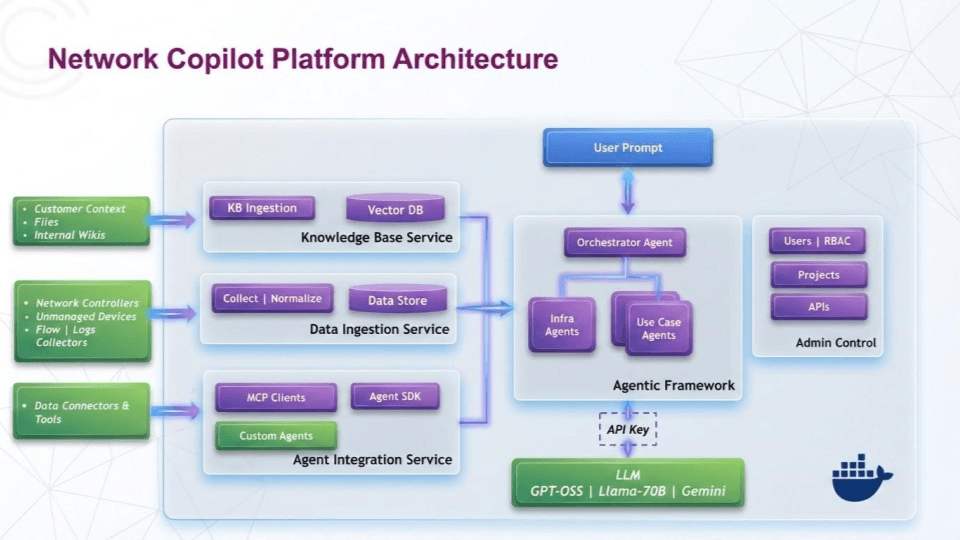
At the heart of NCP is a private AI architecture that combines a fine-tuned Large Language Model (LLM) with a powerful multi-vendor data integration layer. The design principles emphasize vendor-neutrality, on-premises deployment, and open integration. All data stays within the user’s environment for security, and the platform uses cost-effective open-source LLMs to enable rapid innovation at a fraction of the cost of cloud AI solutions.
The architecture follows a modular approach: a data ingestion and normalization layer feeds into a unified data store, which the AI engine augments with an embeddings-driven knowledge base for Retrieval-Augmented Generation. On top of this, the NCP Agent SDK provides an agent runtime where custom logic and AI reasoning intersect. Key design principles include support for on prem enterprises and hybrid multi-cloud environments and diverse network operating systems (NOS) from Cisco (NX-OS and IOS), Cumulus and SONiC to cloud APIs achieved by using open standards and connectors across the stack. This means the same AI-driven platform can correlate data from an on-premises router, a cloud data lake, and a ticketing system in one context. Ultimately, the architecture is built to be scalable, extensible, and secure by design, so network teams can trust an autonomous agent to operate within guardrails while handling the heavy lifting of data analysis.
What types of AI agents can be built with NCP?
The NCP Agent SDK supports a range of agent types to address different operational needs. Some agents act as interactive assistants for example, a chatbot-style agent that fields network questions from engineers via a chat interface or Slack. Other agents are proactive monitors that run continuously or on schedule to watch for anomalies, compliance drift, or security issues. For instance, a compliance agent can retrieve device configurations and validate them against security policies (ACLs, AAA, logging settings, etc.), then produce audit reports automatically. There are troubleshooting agents geared towards root-cause analysis these agents might ingest telemetry and logs during an incident and reason through symptoms to suggest likely causes and fixes. We also have performance and capacity agents that analyze metrics (like interface counters or NetFlow records) to identify bottlenecks or forecast capacity needs.
In practice, Network Copilot’s built-in AI copilot already covers use cases like compliance monitoring, upgrade verification, security auditing, performance analysis, and even business-intent analytics. The Agent SDK lets teams customize these or create new ones whether it’s a “maintenance window” agent to verify all devices (Cisco, Arista, Cumulus and multi vendor SONiC etc.) came back healthy after a reboot, or a “ticket triage” agent that integrates with ITSM to gather context on new incidents. Each agent type can be tuned to operate autonomously within its domain, continuously learning from data and following the rules encoded by the developers.
What core platform services power NCP agents?
Beneath the hood, NCP provides core platform services that these agents leverage so developers don’t have to reinvent the wheel. A unified data mobility service connects to network devices and tools across vendors, normalizing telemetry and configuration data into a common model. This means an agent can ask for “interface errors on router X” and the platform will gather that data whether router X is a Cisco device, a Cumulus Switch, or a SONiC switch. NCP continuously ingests, correlates, and analyzes data across domains including telemetry streams, config snapshots, inventory databases, and even ticketing or monitoring systems. An integrated knowledge base service stores documentation, past incident knowledge, and other reference data, enabling the AI to pull in relevant context (via RAG) when formulating answers.
The NCP platform also includes services for identity and access control, ensuring that agents only access authorized data, and logging/audit trails for every query and action an agent performs (critical for compliance). A central orchestration service manages agent workflows coordinating between the LLM and the various tools or data connectors.
Finally, the LLM service itself is part of the core: NCP uses a fine-tuned foundation model (on the order of billions of parameters) that has been trained on networking vocabulary and scenarios. This model translation service turns natural language requests into structured queries or actions, while the agent reasoning service handles multi-step logic like summarizing results or performing calculations.
In short, the NCP platform offers a rich set of services data access, context storage, security, and AI reasoning so that custom agents can focus on implementing the unique workflow logic required by the network team, rather than dealing with low-level data wrangling or AI mechanics.
How does NCP simplify data access and retrieval across systems?
One of the biggest advantages of the NCP Agent SDK is simplified access to diverse network data. The platform acts as a universal translator and aggregator of data sources. Agents can pull information from Cisco routers, switches and via various controllers (Nexus Dashboard, Catalyst Center and ONES), cloud networks, and more, all through a consistent interface. NCP expanded device telemetry ingestion to support streaming via gNMI, flow records via sFlow/NetFlow, and direct API calls, in addition to SNMP and existing telemetry agents. This means an agent can just specify the data it needs (interface statistics, BGP neighbor state, CPU load, etc.) and NCP will retrieve it from the device using the appropriate method under the hood. The data retrieval layer normalizes differences in vendor data models whether a device exposes metrics via an OpenConfig gNMI model or a Cisco-specific SNMP OID, the agent simply gets a structured result. Beyond live device telemetry, agents can query historical data from time-series databases or log stores (NCP integrates with platforms like Elastic, Splunk, InfluxDB, etc.).
For example, an agent investigating a network issue could pull last hour’s interface error counters from a router via gNMI, and also fetch related logs from Splunk all in one combined query. The SDK allows agents to use natural language or high-level queries that the LLM translates into these data fetches. Thanks to the retrieval-augmented architecture, agents can incorporate both real-time telemetry and knowledge base content (such as config guidelines or known issues) when formulating a response. In practice, this enables questions like “Which Cisco ASR1001 routers had BGP flaps in the last 24 hours and what were the error messages?” to be answered by a single agent query, instead of manually pulling data from each router and log system. The heavy lifting of multi-source data retrieval and correlation is handled by NCP, empowering custom agents to be extremely data-rich in their analysis.
How does the tool framework enable autonomous actions?
To achieve autonomous operations, NCP agents rely on a tool framework that allows them to perform actions and queries as if they were skilled engineers with a toolbox. The NCP Agent SDK abstracts common network operations into “tools” that an agent can invoke programmatically. For example, there may be a tool to run a CLI command on a device (useful for fetching a specific show command output), another tool to query metrics from the telemetry database, another to open a ticket in ServiceNow or send a Slack alert.
Under the hood, these tools are exposed to the AI agent in a standardized way the agent doesn’t directly use SSH or SQL; instead it calls a tool like GetDeviceConfig(device_id) or QueryAlerts(query) and the platform executes the actual integration logic. This design follows modern agentic AI patterns where an AI model serves as an MCP client that can call external functions as needed.
The Model Context Protocol (MCP) (discussed more below) is one implementation of how tools are defined and invoked via JSON-RPC, ensuring each tool call and result passes through a consistent interface. The Agent SDK likely provides a way to register new tools or extend existing ones, so that if your environment has a custom API (say a proprietary network inventory), you can wrap it as a tool and let your agent use it seamlessly. The framework also handles tool discovery and context passing for instance, an agent’s first step might be to call a “TelemetryQuery” tool to get data, then use that data in a follow-up call to a “Remediation” tool. Developers using the SDK can script these multi-step workflows, or let the LLM reason out the sequence of tool calls to satisfy a high-level goal.
By providing a library of pre-built integrations (for common systems like Slack, NetBox, ITSM, etc.) along with the means to add new ones, the tool framework ensures that NCP agents can both read from and write to the surrounding IT ecosystem as autonomous actors. This is crucial for turning insights into actions for example, after detecting a config compliance violation, an agent might automatically call the “CreateServiceNowTicket” tool with details and then use a “ConfigPush” tool (if allowed) to remediate the issue, all as part of its programmed logic.
What is MCP and how does it standardize AI agent interactions?
The NCP platform embraces the emerging Model Context Protocol (MCP) to standardize how AI agents interact with data and tools. MCP is an open standard (originating from Anthropic) that defines a universal, two-way interface between an AI agent (the model) and external resources. Instead of hard-coding API calls or building brittle one-off integrations, MCP provides a structured JSON-RPC mechanism where agents can query data or invoke actions through an MCP server that sits between the AI and the tools. In NCP’s context, the MCP integration means an agent’s requests (e.g., “get device stats” or “post message to Slack”) are sent to an MCP server service which then routes to the actual connector or API, handling authentication and context passing. This yields several benefits dynamic tool discovery (tools auto-register with the MCP server so agents can use new capabilities without code changes), context retention (the MCP server can maintain state so an agent’s successive tool calls share context), and model-agnosticism (tools are not tied to a specific AI engine, so Aviz or the user can swap out the LLM model without re-writing how integrations work).
NCP’s agent SDK uses MCP under the hood to allow custom agents to plug into existing tools easily and safely. For example, if you develop a new agent that needs to interface with a cloud database, you could run an MCP server adapter for that database’s API your agent’s LLM can then query it as a resource without needing native training on that API format. The integration of MCP also enhances security and governance because all agent-tool interactions go through a mediation layer, it’s easier to enforce access controls and logging (the MCP server becomes a checkpoint for policy enforcement).
In summary, by aligning with the Model Context Protocol, Aviz NCP ensures its intelligent agents can fluidly interact with a growing ecosystem of tools and data sources, with portability and future-proofing. The result is a more robust, context-aware agent that can leverage real-time information and execute tasks across systems in a standardized, auditable manner.
How can NCP be configured and customized for different environments?
Every network is unique, and the NCP Agent SDK acknowledges this by enabling extensive configuration and customization. Out of the box, Network Copilot comes with predefined agents and templates for common NetOps tasks (troubleshooting flows, compliance checks, etc.), but teams can adapt these to fit their environment. Using the SDK, network engineers can configure agents with custom prompts, rules, and thresholds. For example, you might customize a Compliance Agent to check not just generic best practices, but your company’s specific configuration standards perhaps ensuring every Cisco ASR1001 router, Nvidia Cumulus Spectrum Switch or a SONiC switch has the proper QoS policies and NTP servers configured. This could be done by editing a policy file or writing a few lines of code to tweak the agent’s criteria. The platform supports AI agents with SDK support, meaning you can refine how the AI responds or what style of output it gives for your use cases. If you want more verbose reasoning or specific formatting (say, a JSON output for machine parsing), those can be configured in the agent’s settings.
NCP also allows integration of custom knowledge bases you can load your internal network diagrams, device inventory, or past incident reports into the system so that the AI agents consider that context when answering queries. On the integration side, NCP is designed to easily plug into existing workflows using standard protocols and connectors. This means if your environment uses a particular monitoring system or IT service management tool, you can configure NCP to connect to it (often via built-in connectors). Customization extends to the UI and triggers as well an admin can set up curated questions or workflows in the interface (like one-click buttons for “Check site bandwidth usage” which run a specific agent query), tailoring the user experience for their operations team.
Finally, the SDK provides APIs or configuration files to manage all these settings as code. In essence, NCP provides a baseline of intelligent behavior, but encourages network teams to imprint their own knowledge and preferences onto the agents resulting in a truly bespoke NetOps assistant that aligns with your network’s DNA.
What is the lifecycle of an NCP agent from development to deployment?
Developing and operating custom agents in NCP involves a clear lifecycle to ensure reliability and continuous improvement. The development phase starts with defining the agent’s goal and scope for instance, “monitor BGP health and auto-remediate common issues” and using the SDK to code the agent’s logic (this may involve writing Python or a high-level YAML to declare the agent’s steps and tool usage).
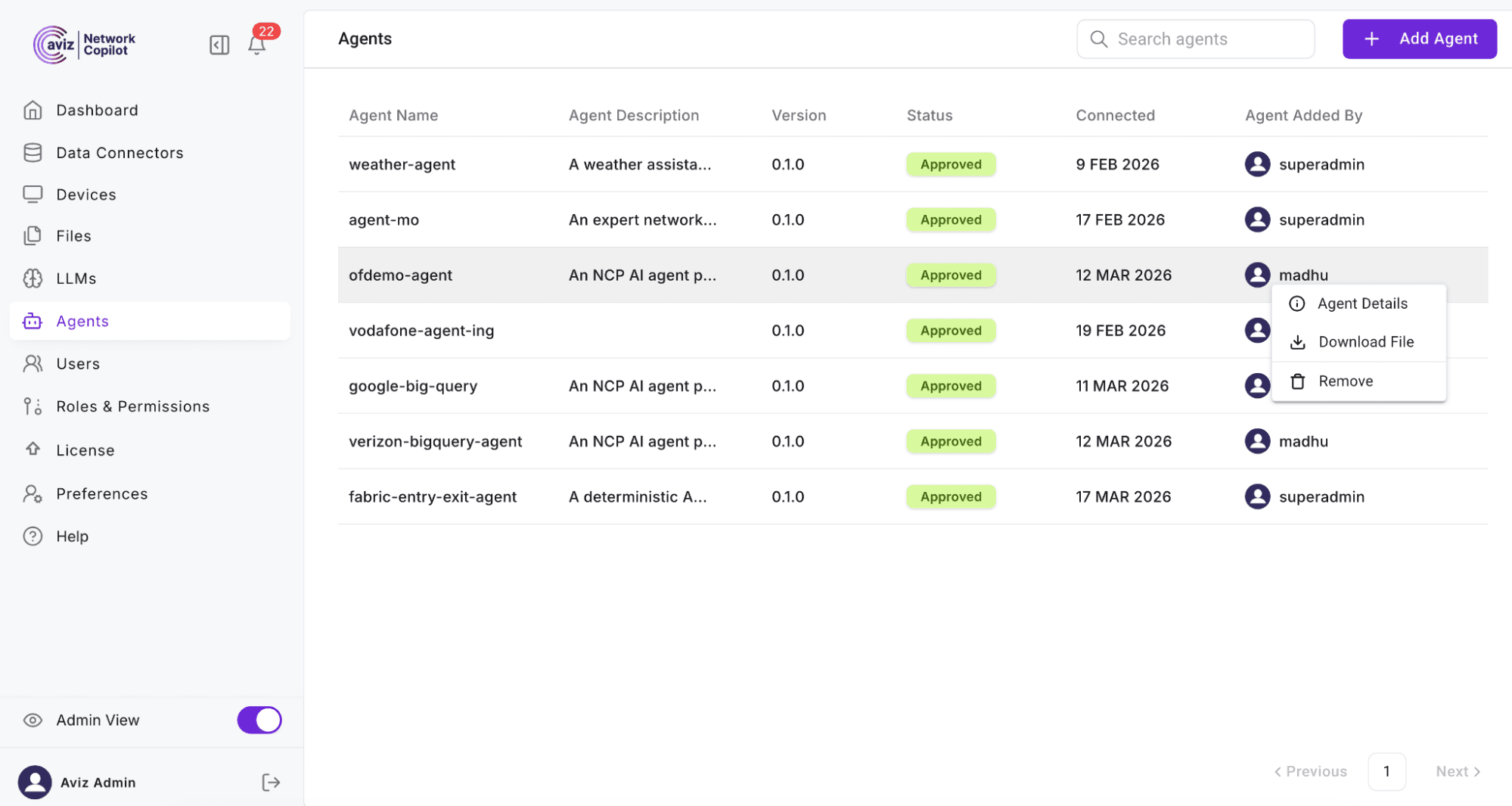
During development, engineers can test the agent in a staging environment or on sample data. NCP likely provides a sandbox mode where agents can be run in “read-only” fashion to observe their behavior without impacting live systems. Once satisfied, the agent moves to the deployment phase, where it is registered in the NCP platform (often via a configuration or through the web UI). The platform handles packaging the agent and any dependencies, deploying it as a service (possibly containerized) that the central copilot orchestrates.
Version control and updates are critical parts of the lifecycle. Teams can maintain agent definitions in a source repository when an improvement or bug fix is made (e.g., refining how an agent interprets a certain telemetry pattern), a new version of the agent can be deployed.
NCP might support side-by-side versioning (deploying a new agent version while the old one is still running) to allow phased rollouts or A/B testing of agent behaviors. Each agent in production is subject to monitoring (see the Monitoring section) so operators can track its performance and any errors. If an agent misbehaves or its task is no longer relevant, the retirement phase involves disabling or removing the agent.
NCP likely provides controls to gracefully disable an agent (ensuring no half-completed actions are left). Throughout this lifecycle, governance checkpoints can be applied: for example, requiring code review or approval before an agent with “write” capabilities (like config changes) is promoted to production, akin to how one would treat automation scripts. The Agent SDK, combined with NCP’s management interface, thus gives a full DevOps-style workflow: develop -> test -> deploy -> monitor -> iterate. This helps network teams treat their AI agents as maintainable assets, much like any critical software component in the infrastructure.
How does NCP ensure security and governance for autonomous agents?
When introducing autonomous agents into network operations, security and governance are paramount. Aviz Network Copilot is built with a security-first mindset: it’s an on-premises platform, so sensitive network data and access credentials never leave your controlled environment. Role-based access control (RBAC) can be enforced to ensure only authorized users can deploy or trigger certain agents for example, perhaps only senior network engineers can enable an agent that can push configuration changes, whereas anyone in NetOps can use read-only query agents. Each agent action is subject to policy validation and audit logging.
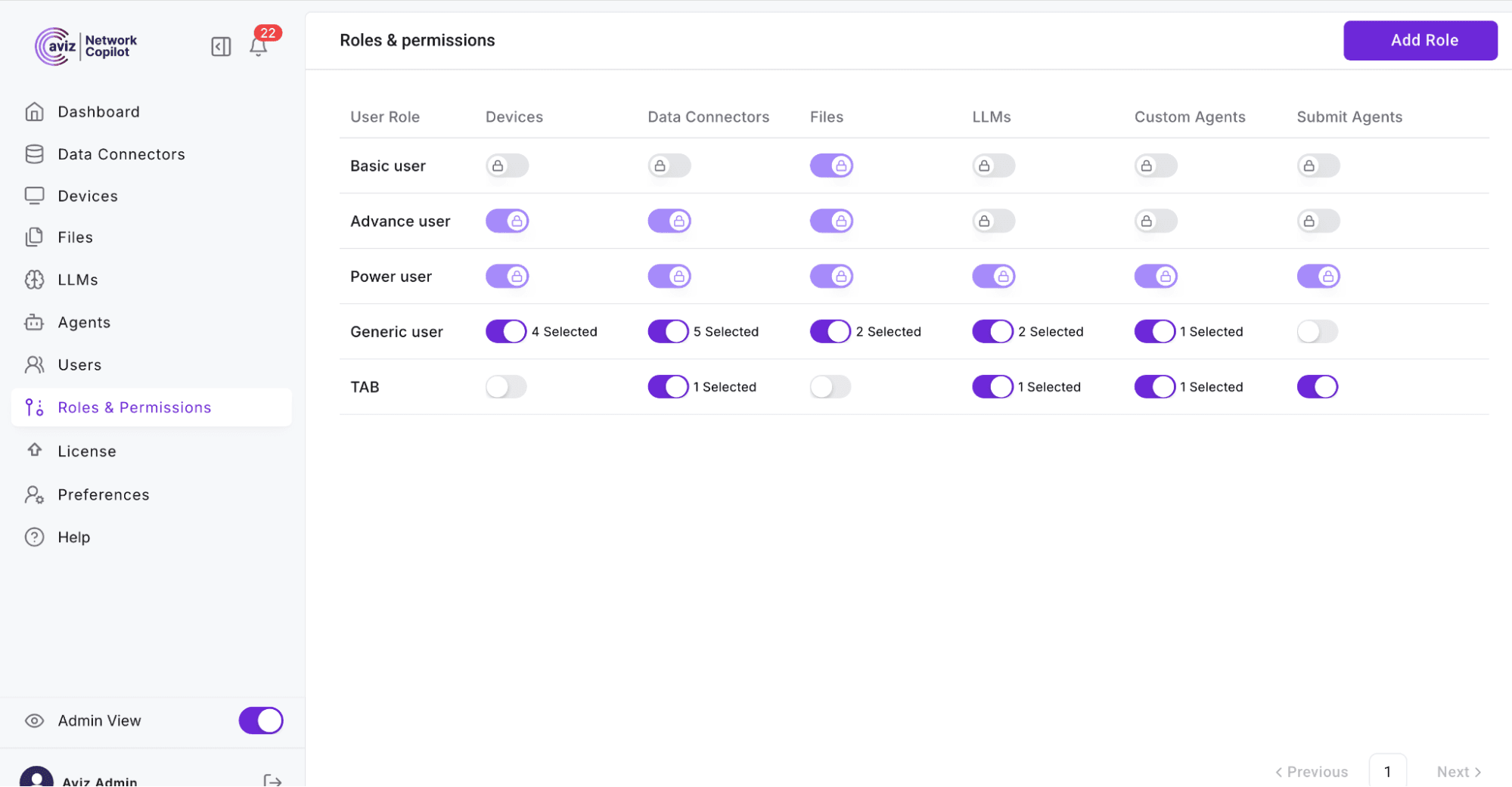
In practice, this means if an AI-driven agent decides that a firewall rule needs to be updated, that decision is funneled through workflow checks before execution. This could involve requiring a human approval, or automatically verifying the change against compliance rules via an existing orchestrator. This kind of layered governance ensures that while agents bring autonomy, they do not operate unchecked.
The Model Context Protocol integration further aids security tools and resources expose only what is necessary via the MCP server, which can enforce authentication and access control for each query. This sandboxing means an agent asking for data will get only the data it’s permitted to see (e.g., an agent for campus devices won’t accidentally retrieve data from data center systems if not intended). All interactions are logged: who/what agent accessed which device or made which API call at what time, and what the result was. These logs provide a robust audit trail for compliance and for understanding agent decisions after the fact. Additionally, Aviz’s approach to AI favors transparency because it uses a controlled LLM and not a black-box cloud service, organizations can implement data governance like scrubbing sensitive information from prompts or responses as needed. The platform likely includes safe completion techniques to prevent the AI from suggesting actions outside its scope or leaking sensitive info.
Network Copilot’s emphasis on being “securely on-premises” and policy-driven is directly aimed at enterprises with stringent security requirements. In summary, strong guardrails are in place: agents operate within defined boundaries, every action is validated and auditable, and the network team stays in ultimate control of what the AI is allowed to do.
What is the user experience of Network Copilot like?
Despite its sophisticated underpinnings, Network Copilot presents a user interface that is approachable and intuitive for network operations teams. The primary UI is a conversational interface essentially a chat-based interaction model where users can ask questions or issue requests in natural language. This interface is accessible via a web portal and can integrate with collaboration tools like Slack (so you could query the copilot from a Slack channel).
The experience is designed to feel like chatting with a knowledgeable co-worker who has instant access to all your network data. Users don’t need to remember specific syntax or switch between multiple consoles; for example, an engineer could type “Show me the interfaces with errors on ASR1001-X and any related log events” and get a consolidated answer instead of manually running show interface and searching syslogs. The UI provides streaming responses as the agent gathers data or forms an answer, you see the reply being built in real time, which is useful for long analyses. This creates a more interactive feel, and the user can interject follow-up questions if needed.
The interface also supports contextual conversations. You can ask a series of questions and the copilot remembers context (for example, after asking about ASR1001 interfaces, you could ask “what about errors on ASR1002?” without repeating the whole query). Other convenience features include the ability to export conversations (for documentation or audit), regenerate responses (in case you want the agent to retry with a different approach), and even user feedback mechanisms to rate or correct the AI’s answers. Aviz has implemented multi-language support, so teams in different regions can interact in their preferred language (English, Japanese, etc., as noted with enhanced Japanese support).
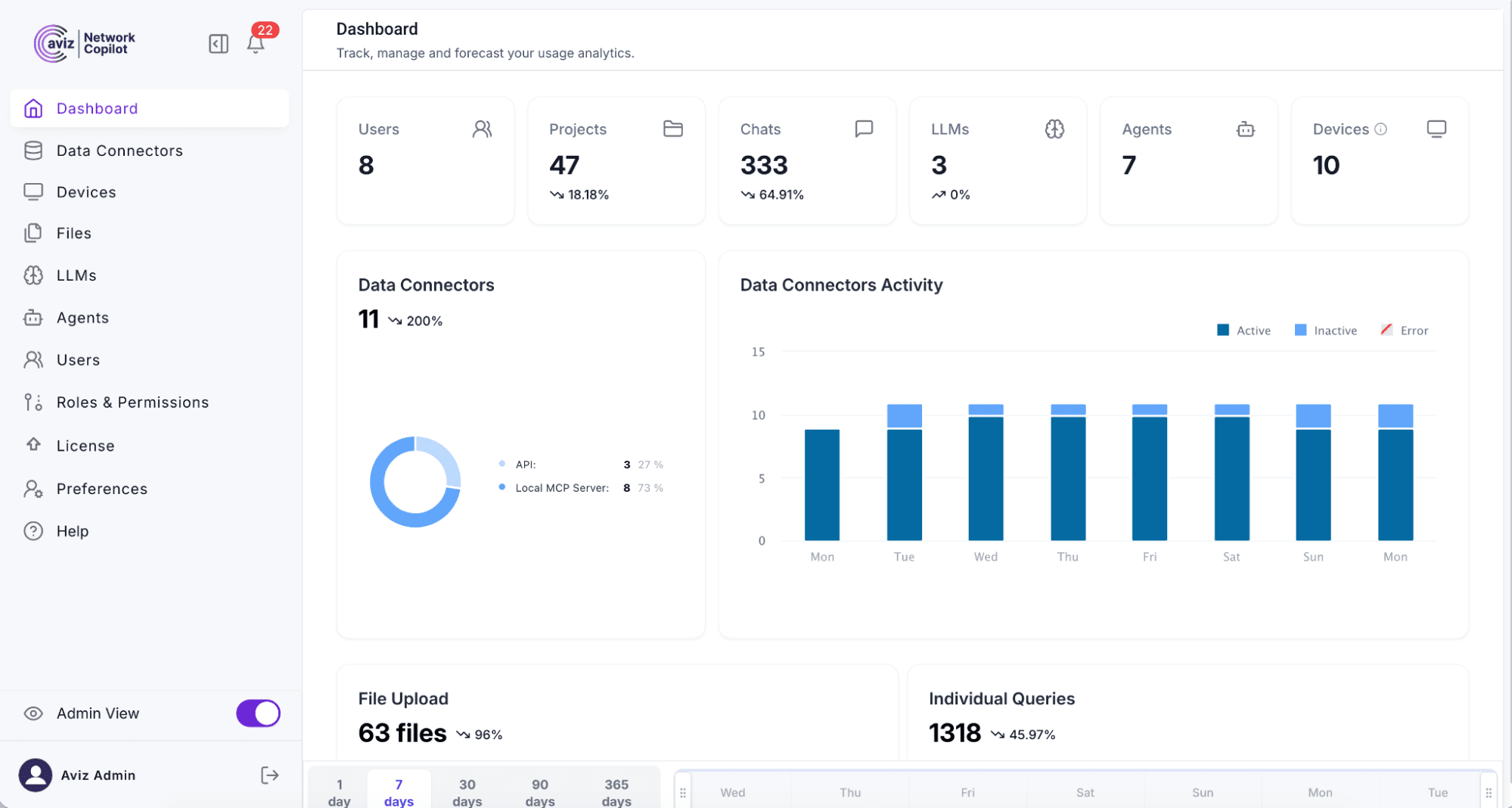
On top of the chat interface, the UI likely provides dashboard elements for monitoring agents and data connectors an admin view shows which devices are connected, when data was last collected, which agents are running or paused, and system health statistics. The design balances powerful capabilities with simplicity: network engineers can get answers without training on a new tool, while power users and platform engineers have the controls to dig into configurations and manage the system. The result is an experience that “bridges critical gaps and empowers professionals to work smarter, not harder,” turning complicated data retrieval into a straightforward Q&A workflow.
Conclusion
Aviz’s Network Copilot Agent SDK redefines NetOps by shifting from reactive data silos and dashboards to autonomous, agent-driven operations. By combining multi-vendor data ingestion, AI reasoning, and secure tool orchestration, it allows engineers to troubleshoot, ensure compliance, and optimize performance simply by asking questions in plain language. Crucially, the Agent SDK goes beyond generating insights it closes the loop. Agents can open tickets, apply configurations, validate remediations, and automatically document the workflow. Governance is built-in with RBAC, audit trails, and MCP-mediated tool interactions, ensuring enterprises retain full control while embracing greater autonomy.
Frequently Asked Questions
1. What makes traditional NetOps obsolete in today's networks?
Today's network teams have their data distributed across CLIs, logs, and dashboards, and as a result, identifying the root cause takes time, effort, and remains largely reactive.
2. How will the NCP Agent SDK transform everyday NetOps practices?
The SDK supports self-healing A I agents that collect and correlate network data, and even take action on their own. Engineers will be able to ask questions in natural language, and the agents will respond with data, diagnosis, or remediation actions.
3. What enables Network Copilot to deliver the first AI-driven NetOps platform?
The NCP platform leverages a private, on-premises AI architecture with an LLM pre-trained on network data. This allows for multi-vendor deployments without data leaving the premises.
4. What types of AI agents will teams be able to create with the NCP Agent SDK?
Teams can use the SDK to create assistants, monitoring agents, compliance checks, and trouble-shooting agents, or they can create custom agents to automate tasks like routine maintenance checks or to triage ITSM tickets.
5. Which platform services support the NCP agents in the background?
A unifying data access layer, knowledge base, orchestrator, and security controls are all built into the platform, while a specially trained LLM enables a single point of intelligence for correlation, reasoning, and multi-step workflow completion.
6. How does Network Copilot provide engineers with consolidated network visibility?
Network Copilot gathers and normalizes the telemetry, configurations, logs and metrics from across all vendors and makes this information accessible to agents as one unified feed, so agents no longer need to worry about vendor-specific data formats.
7. In what ways can NCP agents execute actions rather than just provide insights?
NCP agents are enabled to directly perform actions through pre-built tools by running commands on network devices, initiating probes, opening tickets or sending alerts through controlled, approved workflows.
8. Why is the Model Context Protocol crucial for Network Copilot?
The Model Context Protocol provides a universal way for agents to communicate with various tools and data sources, ensuring that the integration is secure, auditable and extensible to future tools.
9. How is Network Copilot adaptable to different network environments?
Teams will have control over agent rules, prompts, policies, and outputs to ensure the behavior of their agents align with internal standards, enabling integration with internal documentation, workflows, and tooling.
10. How does Network Copilot ensure security and control with autonomous agents?
With on-premises deployment,role-based access, manual approvals for specific tasks, and complete audit trails, agents are operating within the constraints set by administrators without compromising security.
Explore how autonomous AI agents can transform your network operations and simplify troubleshooting, compliance, and performance management. Click on the button to know more.


