




From Ask-Once to Always-On: Background Agents in Network Copilot
 August 14, 2026
 Network Copilot ™
TL;DR
Download latest the version here > Network Copilot release 1.7.0. With this release we bring to your attention ‘Background Agents,’ the feature you need to schedule AI agents to automatically run on CRON schedules or simply as one-time asynchronous jobs. Background Agents is powered by Celery and RedBeat and leverages the very same agents, tools and connectors that exist within chat interfaces to run routine diagnostics, scheduled reporting, health checks, and ticket triage without any user intervention or manual triggering. Network teams can truly move beyond “reactive monitoring to always on network ops” with granular project-based access control, isolated execution, detailed run receipts, and of course both Slack and in-app notifications.
Introduction
Helpful will respond to a question asked by a human user. Game-changing will perform tasks while a human user is away from the computer. Weekly compliance reports; 3 AM health checks; ticket triage sweep already finished before you sit down at your computer.
Until recently, Network Copilot was a transactional, human-initiated and prompted AI, where a formulated response, a complete answer to a prompt in a human readable format, was provided to the user, if and when the user typed a prompt and was assumed to read the output and be blown away.
This isn’t Network Ops, several roles run on startup every shift; others generate a fortnightly report; issues arise at all times, including at the most inconvenient hours. Being expected to provide step-by-step instructions via a chat window, for which the person is being lavishly compensated for, seems like a huge waste of high quality human intelligence. Background Agents fill these gaps; simply set a schedule agent to run an execution with a CRON expression at a certain time on a regular basis, or set it to run a ‘fire and forget’ task on a one-time basis. Just go to the console and there you will find fully developed and self-explanatory answers to your questions which only before this time, lacked and you could only see an empty expectation. You get to go get a cup of coffee with no hassle since everything is completed by the time you get back. Existing agent and connector stacks that you use for your work in the traditional interactive way, bring them to work with you, automatically.
How Do Background Agents Work?
The NCP unattended execution model leveragesCeleryandRedBeatby building on industry standard scheduling technologies with Network Copilot's established message queues and data layers. Relying only on stability -retries, overlap guards and isolates are key ingredients - means we are not building from scratch The new execution model stands on solid, industry tested building blocks:Celery+ RedBeat + NC's data pipeline and message queue are composed into a capability entirely new to NCP. It's about not forcing a choice between stability or innovation - it's about having both!
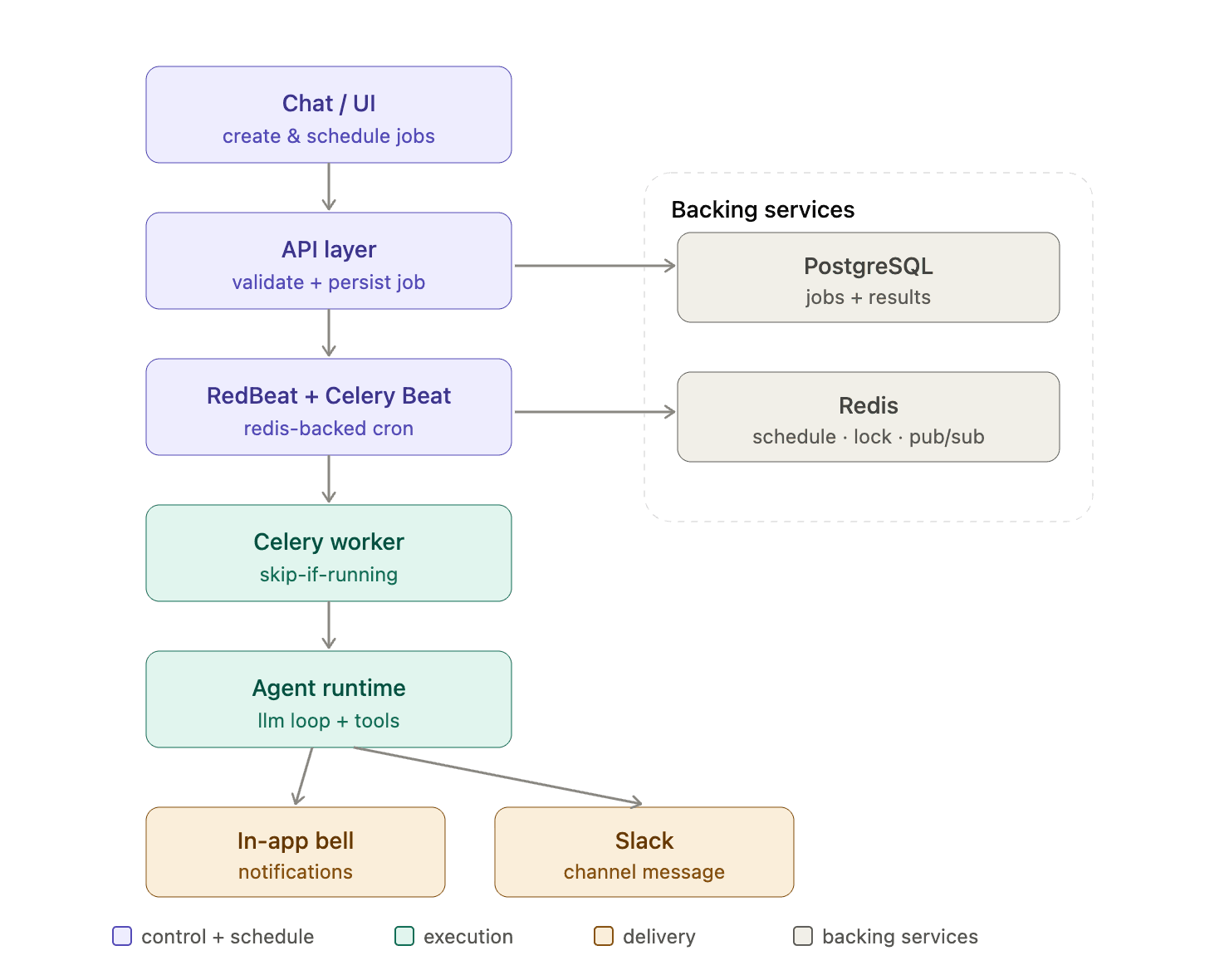
The components (in order):
Chat / UI – Your first port of call. Someone arranges for an Agent via Chat message or a simple form. Both end up in the same position.
Backend / API Layer – The gatekeeper. Check of the schedule/permission/save job to run it whenever possible (who does it/when to run it/what to do/ where to put the output).
RedBeat + Celery Beat – The scheduler. Aware of which tasks to run and the timing for it. Scheduling updates are deployed without any restarts.
Celery Worker – The Executor. A worker is responsible for the execution of the job. Any subsequent run of a job will be skipped to avoid overlapping execution of the same job.
Agent Executor – This executes the scheduled job and calls the Agent. Naturally, this stack (model/tools/connectors) is the same as the interactive chat, making scheduled and manual runs behave in the same way. They are also executed under the context of a project rather than a user, preventing failure if a creator leaves the project.
Backfill services – The persistent state for us... Redis for the queue, lock and PubSub, notification PubSub, Postgres for background jobs and their tasks.
Delivery – Independent and by design Our in-app brings back a notification object that’s deeply tied to the task (via PubSub and triggering our in-app bells). Slack posts a brief oneliner to your attached channels. Each can fail and won’t cascade / impact the other, neither will fail the successful run (as the job was completed before reaching this stage).
Why Do Background Agents Matter?
Interactive-only execution leaves four real gaps:
- Manual Diagnostics – NOC engineers have to run diagnostics manually every single shift.
- Blind Spots – Anomalies that can only happen when no one is querying go undetected.
- Undelegatable Reporting – Recurring project reports cannot be delegated.
- No compute governance – admins cannot define limits or if/when autonomous execution occurs.
Context Agents achieve all four by the execution of autonomous, scheduled tasks and incorporating, from the very foundation, team allocation, access and user assignment capabilities.
What Can You Do with Background Agents?
| Capability | What it gives you |
|---|---|
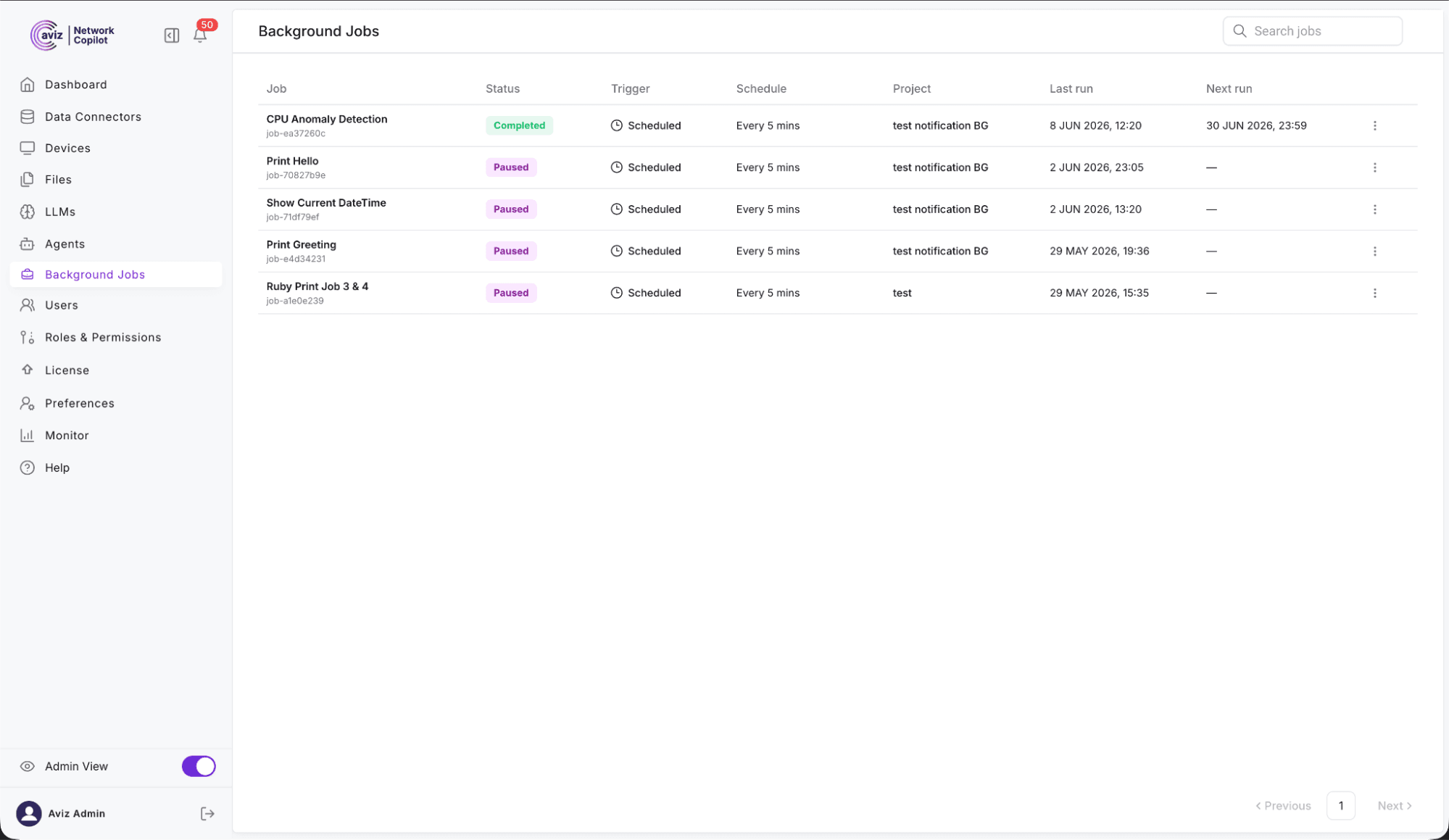
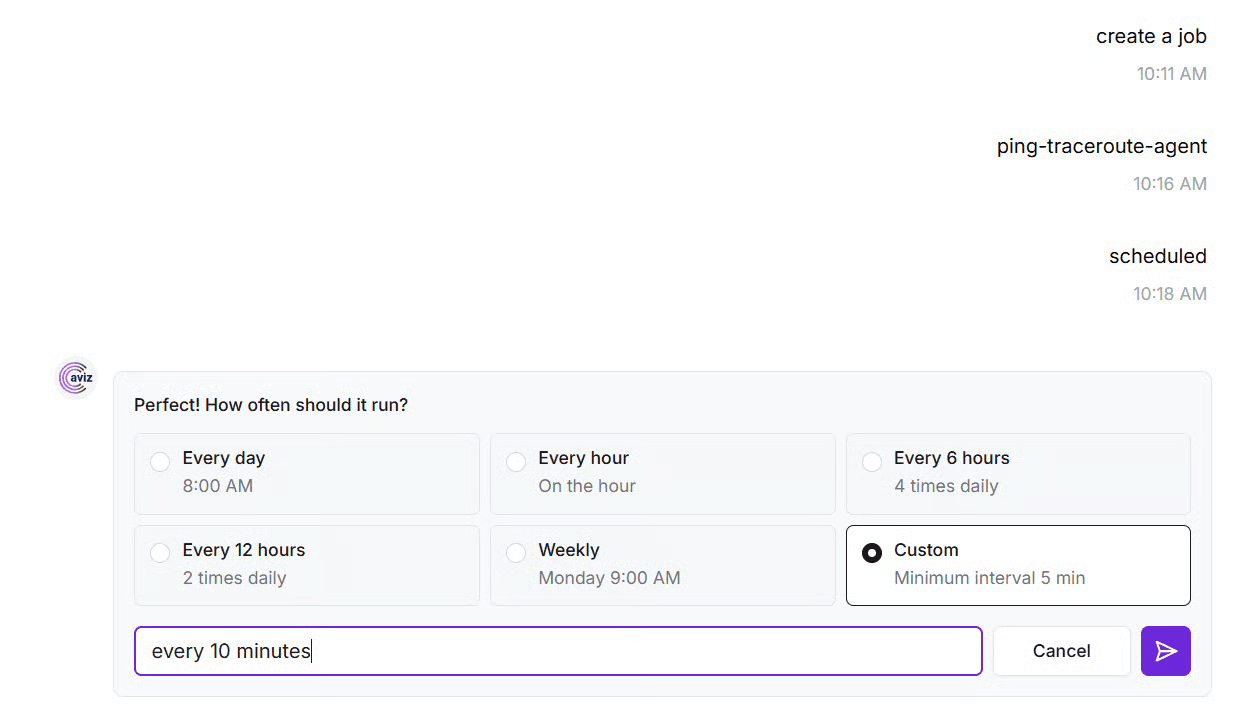
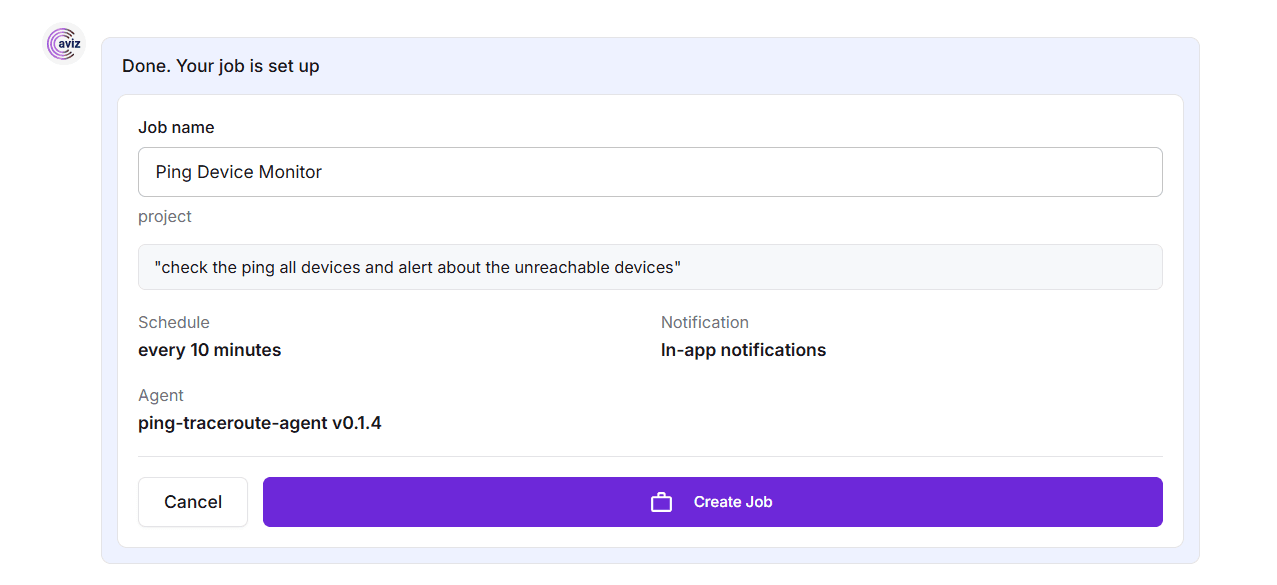
| Scheduled runs (CRON) | Any background-eligible agent on a standard 5-field CRON, with a human-readable preview ("every weekday at 9:00 AM"). New schedules apply instantly no restart. |
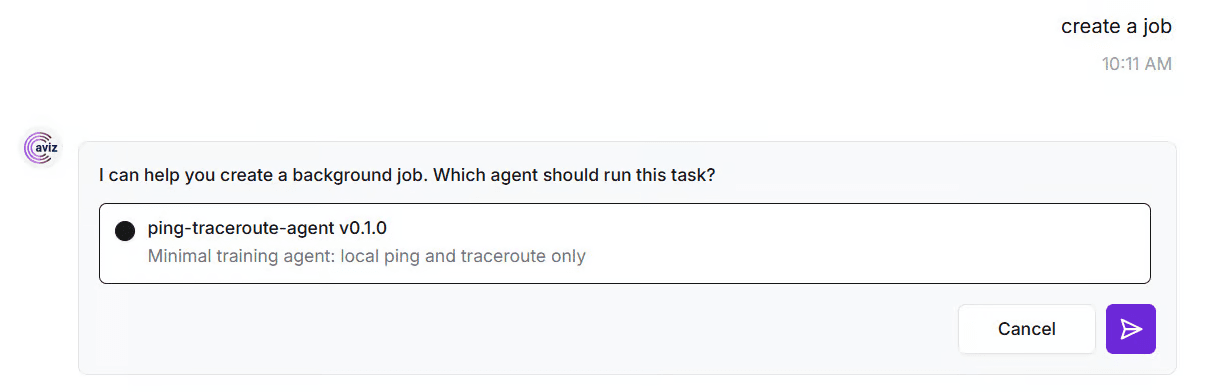
| Run in background | Submit a prompt, choose Run in Background for a one-shot async job. You're never blocked. |
| Skip-if-running | If a run is still going when the next trigger fires, the next is silently skipped and logged. No overlaps, no stale-data collisions. |
| Isolated result tabs | Every run gets its own result conversation, kept separate from interactive sessions. Reads like a normal chat. |
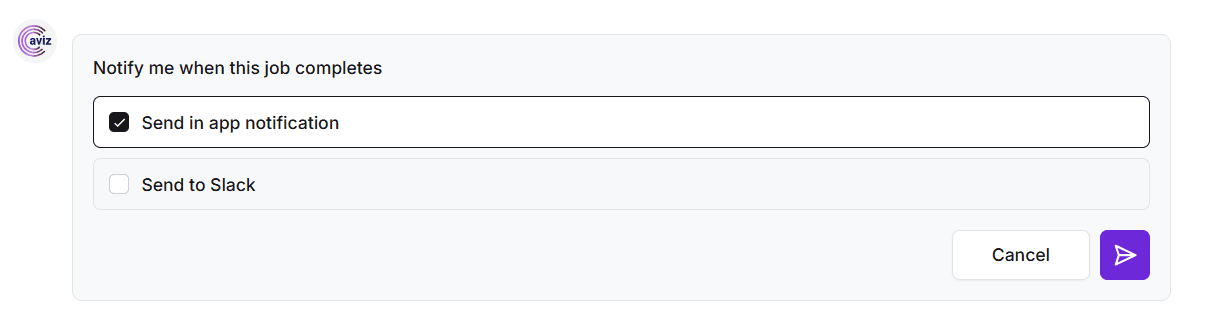
| Bell + Slack | Every completion (success or failure) notifies project members in-app and, optionally, in one or more Slack channels independently. |
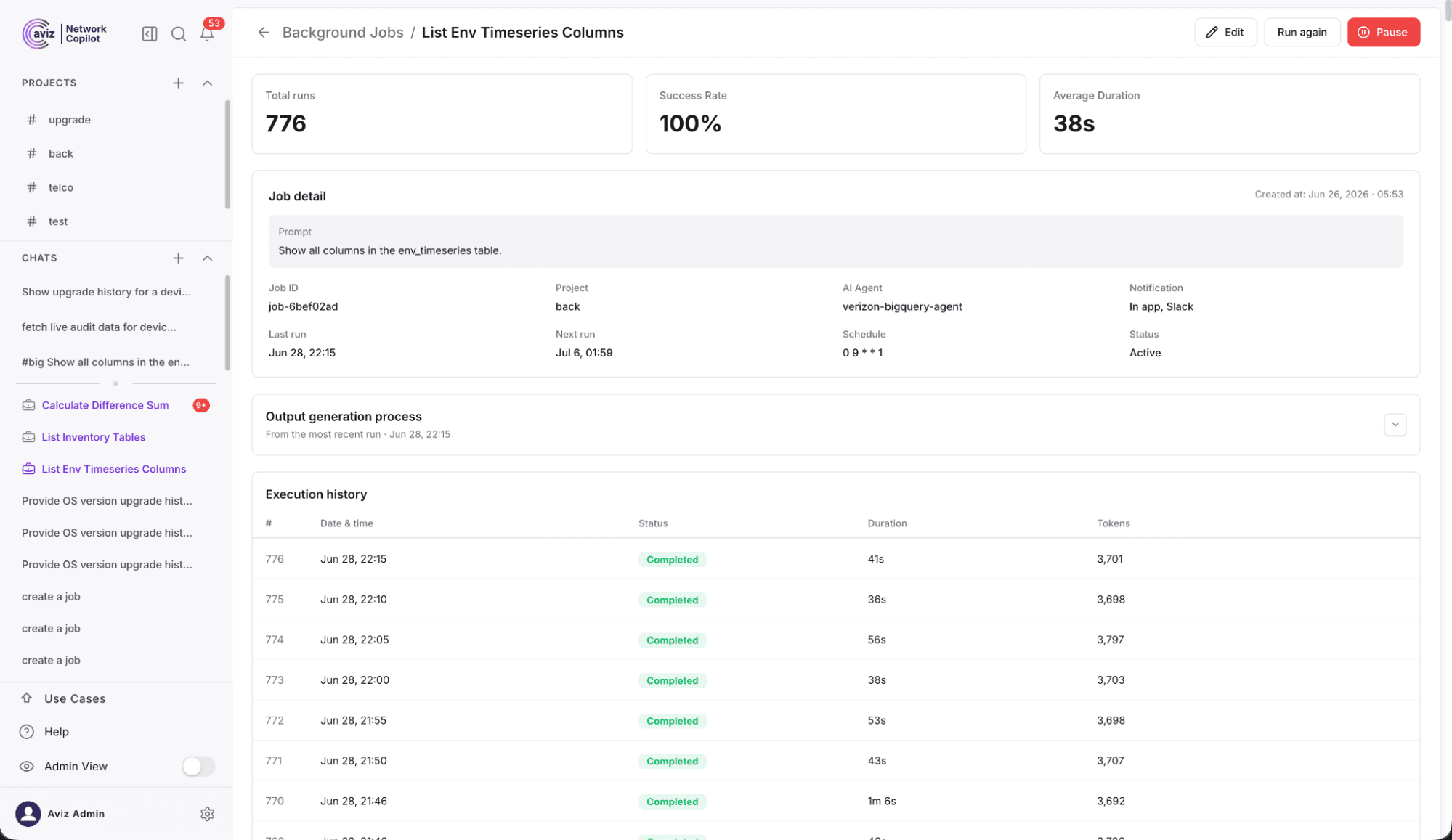
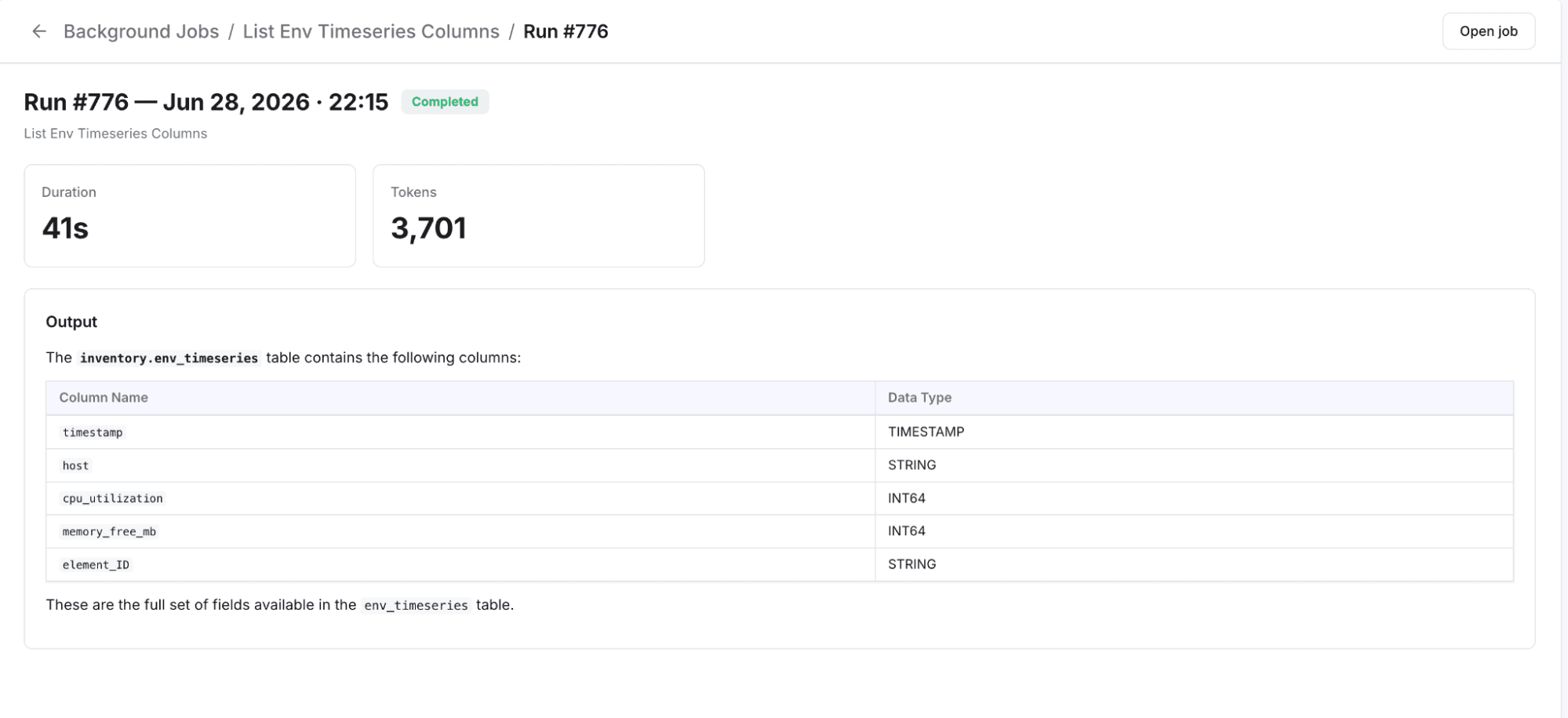
| Per-run receipts | Records comprehensive execution telemetry, including token consumption, total duration, iteration counts, connector utilization, and system metadata, ensuring full transparency for audit and cost analysis. |
What Operational Use Cases Do Background Agents Support?
Use cases
- CPU anomaly sweeps from BigQuery (Network Architect) — "Every 15 minutes, query BigQuery for devices with CPU above 85%.” The BigQuery agent runs on a schedule against your telemetry pipeline and each result tab presents a summary of which devices are hot. The run receipt provides the number of rows processed and tokens consumed, allowing you to size the query and estimate the cost of the query.
- Scheduled reporting (MSP Operations Lead) — "Generate the weekly device-inventory report every Friday at 5 p.m.” The report comes as a chat tab and posts to your ops Slack channel. Scheduled reporting has been done with the auditing tab and will not require any additional work.
- BCM node health checks (NOC Engineer) — "Every morning at 8 a.m., check health status for all BCM switches.” An SONiC/BCM health agent queries the fleet against the metrics collector, drops the summary as a result tab and posts it to #noc channel. You begin your shift with a health snapshot of the fleet, instead of manually opening 100 SSH sessions.
- Overnight critical incidents from Zendesk (Shift Lead / Incident Manager) — "Every morning at 7:45, list critical incidents opened overnight in Zendesk.” This Zendesk agent accesses Zendesk via its MCP integration, and at the scheduled time provides a briefing in a result tab and posts to #noc-morning channel. Instead of creating the list, you begin your shift with the critical incident list.
What Information Does Every Background Run Capture?
Think of the last bit as a human-powered team of experts and imagine how an employee might send their final message that could potentially have the run ticket embedded in it. We would want to capture all of those messages and notes. By logging that information we would be giving transparency into that process and help us better understand the run process overall and update the execution history with those details.
How Do Background Agents Perform Under Load?
A 30-minute capacity run on a 4-worker deployment held 190 concurrent scheduled jobs firing on a */5 cron:
| Metric | Result |
|---|---|
| Runs observed | 434 |
| Success rate | 99.5% (0 failures, 2 system-side skips) |
| Latency | p50 9.1 s · p95 14.9 s · p99 22.2 s |
| Worker memory | flat ~1.5 GiB — no leak |
| Per-project fairness | balanced, no starvation |
p95 at 1.5× the single-run baseline means only mild queueing, the system was nowhere near saturation, with estimated real headroom to approximately 400 concurrent jobs before p95 doubles.
How Do Background Agents Improve Team Operations?
| Challenge | Before | After |
|---|---|---|
| Recurring diagnostics | Rerun by hand every shift | Scheduled, notified on completion |
| Off-hours anomalies | Missed between sessions | Caught on a cadence, pushed to you |
| Repetitive reporting | Manual, undelegatable | Fire-and-forget background jobs |
| Reading job output | Scattered / ephemeral | A first-class result tab per run |
| Team awareness | One person knows | Bell + Slack to all project members |
| Compute governance | None | Project-scoped, role-gated |
What's Next for Background Agents?
- External triggers – webhook (mTLS / OAuth2) and Data Connector event-driven jobs (ServiceNow, SNMP/OpenConfig, ONES, Slack, RocketChat).
- Dynamic prompt templating
- Context memoization – one click to scheduler your refined interactive sessions.
- Token quota enforcement – each run is tracked and we will introduce per-role quotas with auto-pause next.
Conclusion
The best automation is the one you don't know is running. Agents are designed to stay invisible to you. You schedule an agent once, then the answers pop up in front of you, all while you are already working-efficiently, reliably, offline, and with a per-item detailed report available. No new tool, no console. Automatic execution: agents execute in the background, on schedule, and in place of you, and it looks just like your normal work.
Don't get caught tangled up with your network; let it line up for you.
Have just one.
Frequently Asked Questions
What are Background Agents in Network Copilot?
Background Agents are a feature in Network Copilot that allows AI agents to run automatically on CRON schedules or as one-time asynchronous jobs, without any user intervention or manual triggering. They handle routine tasks like diagnostics, scheduled reporting, health checks, and ticket triage.
What technology powers Background Agents?
Background Agents are powered by Celery and RedBeat, built on top of Network Copilot's existing message queues and data layers. This architecture provides stability through retries, overlap guards, and isolated execution.
Can Background Agents run the same agents and connectors used in chat?
Yes, Background Agents use the exact same agents, tools, and connectors available in Network Copilot's interactive chat interface, so scheduled and manual runs behave identically.
How are teams notified when a Background Agent completes a run?
Project members receive both an in-app bell notification and an optional Slack message upon completion or failure. These two delivery channels are independent, so a failure in one will not affect the other.
What happens if a scheduled job is still running when the next trigger fires?
The overlapping run is silently skipped and logged, preventing duplicate execution and stale-data collisions. This behavior is built in by default and requires no configuration.
What operational use cases do Background Agents support?
Common use cases include CPU anomaly sweeps from BigQuery, weekly device-inventory reports, morning BCM node health checks, and overnight critical incident summaries from Zendesk. These tasks run on a schedule and deliver results before a shift even begins.
What does each Background Agent run capture?
Every run produces a per-run receipt that records token consumption, total duration, iteration counts, connector utilization, and system metadata. This provides full transparency for auditing and cost analysis.
How do Background Agents perform under load?
In a 30-minute capacity test with 190 concurrent scheduled jobs on a 4-worker deployment, the system achieved a 99.5% success rate with a p95 latency of 14.9 seconds and flat memory usage. The estimated real headroom extends to approximately 400 concurrent jobs before performance degrades significantly.
What features are planned for Background Agents in future releases?
Upcoming additions include external webhook triggers, event-driven jobs from data connectors like ServiceNow and Slack, dynamic prompt templating, context memoization, and per-role token quota enforcement with auto-pause.
Ready to Automate Mundane Network Procedures? Learn how Network Copilot Background Agents automate health checks, reporting, diagnostics and incident workflow execution – so operations teams can be notified without their manual touch or involvement. Learn more about new capabilities from Network Copilot or schedule a demonstration of always-on AI Agents in your environment.


