





How Does Custom App-ID Name Your Most Critical Network Traffic Beyond Built-In DPI?
 November 19, 2026
 Deep Network Observability
TL;DR
Many business-critical applications are private, proprietary or internally developed, so standard DPI engines can't recognize them and they end up as unknown or generic traffic. Custom App-ID on Aviz Service Nodes (ASN) lets operators describe their own applications in a short rule file, using where the service is hosted, its port and protocol and, when needed, the first bytes of its traffic. ASN labels matching sessions in real time with the operator's application name and group, alongside its built-in DPI, and exports them in the existing AppName and AppGroup fields in Kafka. Rules reload live with no restart and no packet loss, on mobile core and data center traffic over IPv4 and IPv6.
Introduction
Every operator has applications that matter more than the rest: the ERP platform hosted for an enterprise customer, the telemetry from a fleet of IoT devices, the API that a payments partner depends on every second of the day. These are the applications that come up in SLA reviews, partner disputes, and capacity plans.
Many of these applications are unlikely to be recognized by standard DPI engines because they are specific to individual customer networks, often being private, proprietary, or internally developed. This feature allows such applications to be classified using custom names. Overall, it enhances application identification accuracy and increases confidence in the reported data.
Custom App-ID on Aviz Service Nodes (ASN) closes that gap. The operator describes their own applications in a short rule file, and ASN labels matching traffic with their names in real time, in the same session records their dashboards already use. The network operator doesn't wait for a vendor, and nothing needs to be restarted.
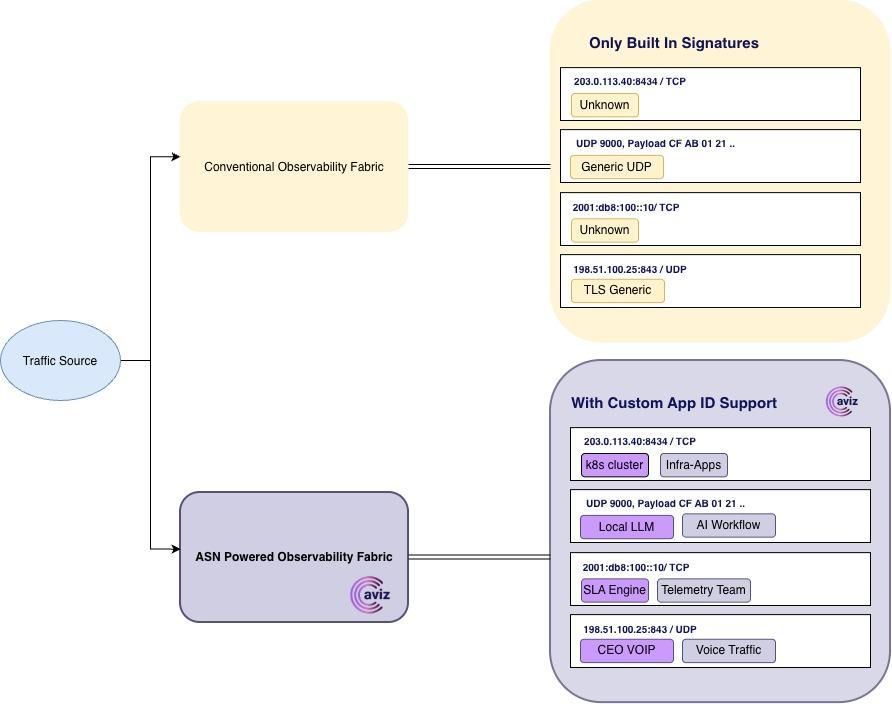
Figure 1. How custom App ID feature brings visibility to unknown traffic
Why can't built-in DPI identify your most critical network traffic?
Built-in deep packet inspection recognises thousands of public applications, from video streaming to social media to messaging. But a signature library is built for the internet at large, not for proprietary networks. The traffic that is unique to enterprise business is, usually, traffic no one else has written a signature for.
When that traffic goes unlabelled, the cost is real:
- Enterprise SLAs are hard to prove. You can't report on the experience of an application you can't see.
- Capacity planning becomes guesswork. A growing "Unknown" bucket hides which services are actually driving demand.
- Zero-rating and partner agreements are disputed. Without a clear label, it's difficult to show exactly which traffic belongs to which service.
- You are waiting on someone else's roadmap. Asking a vendor for a new signature can take weeks, and some applications will never qualify.
What is Custom App-ID on Aviz Service Nodes?
Custom App-ID lets you teach ASN about your applications using the facts you already have: where the service is hosted, which port and protocol it uses and, when that isn't enough, the few bytes its traffic always starts with. Each rule simply gives that combination an application name and an application group.
ASN checks every new session against your rules on live traffic, right alongside its built-in DPI engine. When a rule matches, the session is labelled with your name and group and exported exactly as any other classified session would be.
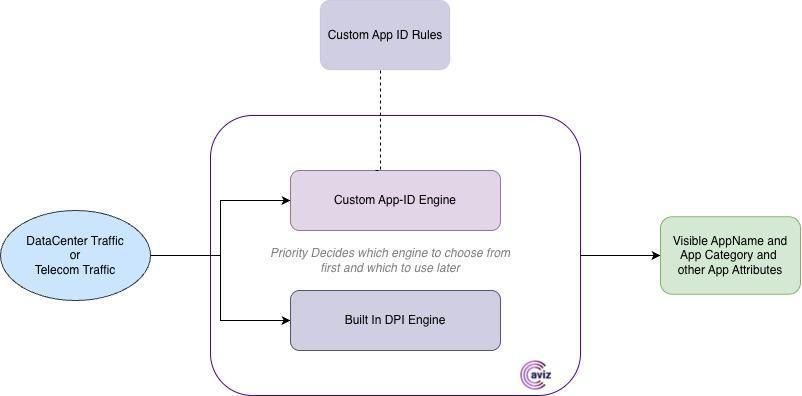
Figure 2. Custom App-ID runs inside the Aviz Service Node, next to built-in DPI, and outputs the app attributes
What are the benefits of Custom App-ID?
Custom App-ID lets you name applications your own way, add rules in minutes, update rules live without disruption, run alongside built-in DPI, and cover mobile core and data center traffic over IPv4 and IPv6.
Can you name applications in your own language?
Name and group each application your way, such as "Acme-ERP" under "Enterprise-Apps", so reports use the language your teams already speak.
How quickly can you add a new application rule?
Add a rule the same day a new service goes live, with no signature request, upgrade or maintenance window.
Do rule updates disrupt live traffic?
Rules reload while traffic keeps flowing, with no restart and no packet loss. Sessions already classified keep their labels.
Does Custom App-ID work with built-in DPI?
The engine works alongside the traditional built in DPI, shipped alongside the ASN. Customer do have a choice to choose which sub engine they want to enable first in the datapath.
Results land in the existing AppName and AppGroup fields in Kafka, so dashboards and KPIs pick them up with no schema change.
Does Custom App-ID cover mobile core and data center traffic over IPv4 and IPv6?
The same rules work inside GTP-U tunnels and on data-center traffic, over both IPv4 and IPv6.
How do you write Custom App-ID rules?
You describe each application in one short YAML rule file, combining only the conditions it needs, such as address, port, protocol and payload prefix, and give each rule an application name and group. Rules are read top to bottom, and the first match wins.
Consider a mobile operator that serves both consumers and enterprise customers. Four services keep coming up in its reviews, and all four appear as unknown or generic traffic today:
- An ERP platform the operator hosts for an enterprise customer on its private 5G network.
- A fleet of IoT trackers that speak a proprietary protocol over UDP.
- A payments partner's API whose availability is contractually guaranteed.
- A corporate voice gateway that has already moved to IPv6.
One short file covers all four:
# /etc/asn/app_id_rules.yaml
priority: before # look at custom rules before built-in DPI
app_id_rules: # read top to bottom; the first match wins
# 1. ERP platform hosted for an enterprise (private 5G) customer
- conditions:
inner_ip:
dst: 203.0.113.40
inner_port:
dst: 8443
inner_proto: TCP
app_name: "Acme-ERP"
app_group: "Enterprise-Apps"
# 2. IoT trackers using a proprietary protocol, known by its first bytes
- conditions:
inner_port:
dst: 9000
inner_proto: UDP
payload_prefix:
offset: 0
bytes: "CAFE01"
app_name: "FleetTrack-Telemetry"
app_group: "IoT"
# 3. Payments partner API over TLS, in either direction
- conditions:
inner_ip:
either: 198.51.100.25
inner_port:
either: 443
inner_proto: TCP
payload_prefix:
offset: 0
bytes: "1603" # start of a TLS handshake
app_name: "Partner-Payments-API"
app_group: "Business-Critical"
# 4. Corporate voice gateway on IPv6
- conditions:
inner_ip:
either: 2001:db8:100::10
inner_proto: UDP
app_name: "Corp-VoIP"
app_group: "Voice"
Example 1. A complete rule file covering four business-critical applications. Addresses are documentation examples.
Each rule combines only the conditions it needs, and a session must meet all of a rule's conditions to match:
| Application | How it is recognised | What the operator gains |
|---|---|---|
| Acme-ERP | Destination server and port, over TCP | Per-customer experience reporting for its enterprise SLA |
| FleetTrack-Telemetry | UDP port plus the protocol's first three bytes, from any device and any address | Live view of fleet health and data usage across every device |
| Partner-Payments-API | Partner address and port in either direction, plus the start of a TLS handshake | Evidence-based availability reporting for a contractual partner |
| Corp-VoIP | IPv6 gateway address, over UDP | Voice quality monitoring for its enterprise customers, on IPv6 |
The result: four services that used to be invisible now have their own lines in every dashboard the operator already runs. The file took minutes to write and went live without a maintenance window.
How do you get Custom App-ID up and running?
Custom App-ID is enabled once, with a single setting in the ASN configuration. After that, day-to-day use is as simple as editing the rule file and running one command.
See how Aviz Service Nodes turn unknown traffic into named applications: explore Aviz Service Nodes.
Where do operators use Custom App-ID?
- Enterprise and private 5G: report on the applications each enterprise customer actually pays for.
- IoT and M2M: separate device fleets by their protocol signature, regardless of which addresses they use.
- Zero-rating and sponsored data: confirm exactly which traffic qualifies under each commercial agreement.
- Partner and B2B services: monitor contractual APIs and interconnects as named applications.
- Security and compliance: flag traffic to specific endpoints so it stands out in existing tools.
- Capacity planning: see the real growth of in-house and regional services instead of a growing "Unknown" bucket.
Conclusion
Visibility is only as good as the names behind it. Custom App-ID gives operators direct control over how their most important traffic is identified: quickly, safely and without disrupting the network. It complements ASN's built-in DPI, feeds the analytics you already rely on and scales with your business.
FAQ
What is Custom App-ID on Aviz Service Nodes?
Custom App-ID lets operators describe their own applications in a short rule file. ASN labels matching traffic with the chosen name and group in real time, in the same session records the dashboards already use. No vendor request and no restart is needed.
Why can't built-in DPI identify every application?
Built-in DPI recognises thousands of public applications, but the signature library is built for the internet at large. Applications specific to individual customer networks, often private, proprietary, or internally developed, usually have no signature written by anyone.
What happens when critical traffic goes unlabelled?
- Enterprise SLAs are hard to prove, since an unseen application cannot be reported on.
- Capacity planning becomes guesswork, because a growing "Unknown" bucket hides which services drive demand.
- Zero-rating and partner agreements get disputed when no clear label shows which traffic belongs to which service.
- Operators wait on a vendor roadmap, and a new signature request can take weeks.
How does a rule identify an application?
Rules use facts the operator already has: where the service is hosted, the port and protocol, and, when needed, the first bytes of the traffic. Each rule gives the combination an application name and an application group, such as "Acme-ERP" under "Enterprise-Apps". A session must meet all conditions of a rule to match. Rules are read top to bottom, and the first match wins.
Does adding or changing a rule disrupt the network?
No. Rules reload while traffic keeps flowing, with no restart and no packet loss. Sessions already classified keep their labels. A rule can go live the same day a new service launches, without a signature request, upgrade, or maintenance window.
How does Custom App-ID work with built-in DPI and existing dashboards?
Custom App-ID runs inside the Aviz Service Node, next to built-in DPI. Customers choose which engine to enable first in the datapath, and a setting in the rule file can place custom rules before built-in DPI. Results land in the existing AppName and AppGroup fields in Kafka, so dashboards and KPIs pick up the new names with no schema change.
Which networks and use cases does Custom App-ID support?
The same rules work inside GTP-U tunnels and on data-center traffic, over both IPv4 and IPv6. Customers use the feature for:
- Enterprise and private 5G reporting per customer
- IoT and M2M fleet separation by protocol signature
- Zero-rating and sponsored data verification
- Partner and B2B API monitoring
- Security and compliance flagging of specific endpoints
- Capacity planning based on the real growth of in-house and regional services


