





Breaking Silos with Network Copilot Agentic AI: Correlating FortiGate and Splunk for Intelligent Operations
 August 26, 2026
 Blog
TL;DR
AI is going beyond hype. We're seeing a true operational impact. This article shows you what the real-world deployment of Network Copilot (NCP) looks like - intelligent agents which capture data from FortiGate firewalls, called MELT (metrics, events, logs, traces), match up MELT to logs that are stored in indexes within Splunk, provide intelligent context-aware and explainable answers to the questions operators ask in real-time, reduce the complexity for operators and significantly lower the mean-time to resolve (MTTR) any troubleshooting problem faced by L1 or L2 teams. As configurations and logs in SIEMS, switches and routers are parsed, coupled with a faster route-cause analysis (RCA), it provides much simpler daily operations.
Introduction
While there was a period of hype surrounding the capabilities of AI, its impact has shifted now toward concrete operational realities. AI-enabled network fabrics are bringing new automation into existence, with intelligent assistant solutions and agent-based approaches to NetOps changing the network and security teams' world fundamentally. In this article, we will show you a practical, live implementation of a Network Copilot (NCP) - consisting of the installation of an intelligent agent on Fortinet Firewalls which receives MELT data (Metrics, Events, Logs & Traces) that then forwards onto the Splunk for collection & indexing.
The agent seamlessly correlates and queries against Splunk to answer user queries with contextual insights. Platform, on the other hand can also store telemetry directly onto its native storage enabling real-time analysis of historical telemetry to get data-driven answer both from Splunk and the platform telemetry stored locally.
With NCP, you can simplify your task, speed up mean-time-to resolution and transform everyday task of L1/ L2 teams through explainable and contextualized answers in human natural language.
The platform Unlike dashboards and analytic systems, NCP is an agentic AI based platform that parses configuration and log data from multiple device sources like SIEM, routers, switches, firewalls to carry out real-time analysis of RCA and root-cause-analysis.
Why Do NetOps Teams Struggle with Siloed Telemetry?
A typical, modern, network and security infrastructure can spew terabytes of telemetry out of diverse, disparate systems. On their own, each powerful observability platform (like Splunk) makes siloed logs. As a consequence, connecting disparate pieces is still the main roadblock for manual operations. This paper explores the operation of the AI operational assistant - Network Copilot (NCP) - which crosses operational and system silos, inferring intent and providing answers like an experienced operator (or at) machine-speed.
How Does NCP Turn Siloed Logs into an Agentic AI Operational Assistant?
Operational Challenges Today:
- Logs are spread across firewalls, SIEMs, and application platforms
- Troubleshooting requires manual correlation and deep domain expertise
- Root-cause analysis is slow and error-prone
- L1/L2 teams depend heavily on senior engineers
Generally NetOps means Fortigate handling the firewalling/access control/threat mitigation and logs getting piped back to splunk for centralized monitoring and collection from disparate systems. The part that the human has historically filled is correlates logs and data across these systems. This is what the NCP solves.
What Does Network Copilot Actually Do?
Essentially, the Network Copilot NCP was created to be like a very experienced network engineer (with a security specialist hat on), just going at machine speed.
Key Capabilities
- Log ingestion and normalization across heterogeneous sources
- Cross-domain correlation (firewall, network, system, application)
- Natural-language interaction ("Why is this user blocked?")
- Explainable root-cause analysis, not black-box answers
- Guided remediation, without risky auto-fixes
With NCP, teams can create and deploy an AI agent to parse configurations and logs from your firewalls, SIEMs, switches, routers and many others. They can do their RCA 3 to 7X faster as they correlated information from different systems, in real time.
What Does the Reference Architecture and Deployment Model Look Like?
This implementation uses a real FortiGate deployment inline with live traffic, closely mirroring production conditions.
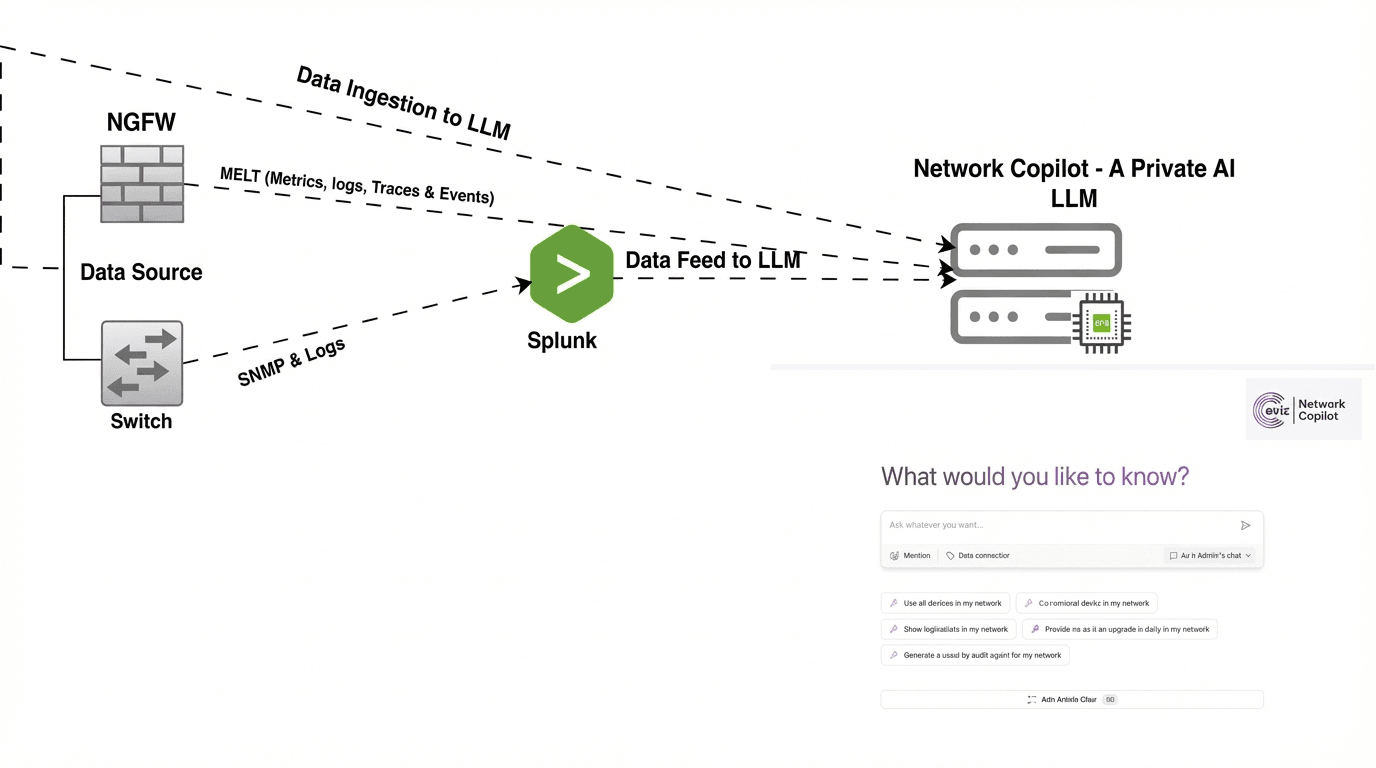
Operational Flow
How it works:
- User and application traffic flows through FortiGate
- FortiGate enforces security policies, NAT, and access controls
- Traffic, authentication, threat, system, configuration, and audit logs are generated
- Logs are exported to Splunk and ingested into Network Copilot
- NCP correlates live and historical telemetry
- Operators interact with NCP using plain English
This ensures NCP learns from real firewall behavior, not synthetic data.
How Does Natural Language Solve Day-to-Day Operations?
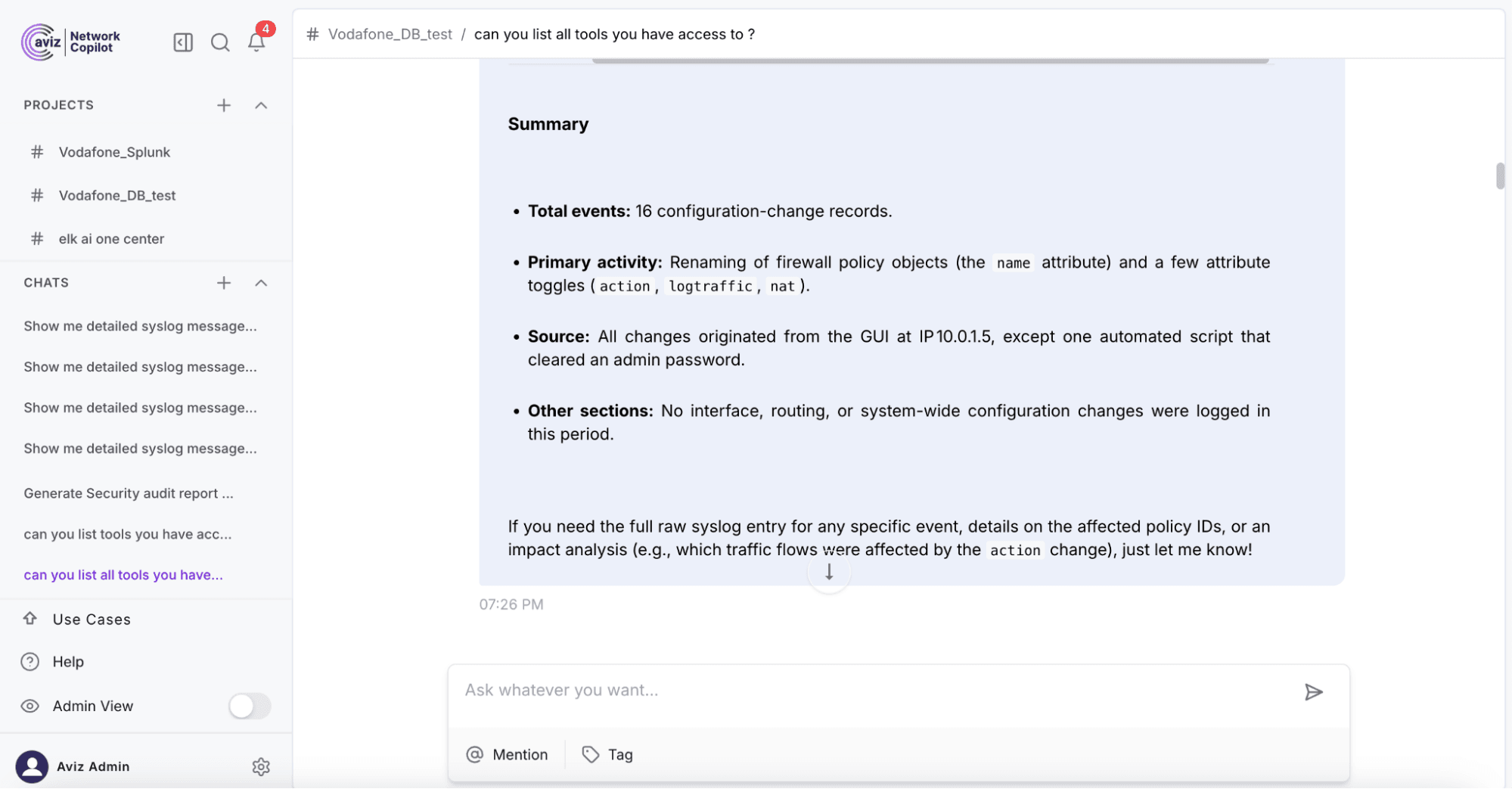
Use Case 1: Identify Recent Configuration Changes
Operator Question: “What configuration changes were made on FortiGate in the last 24 hours?”
Sample FortiGate Log
date=2026-02-12 time=19:53:09 devname="one-ai-fortinetr-10_20_11_29" devid="FGT81ETK18004040"
eventtime=1771008789000000000 tz="-0800" logid="0100044547"
type="event" subtype="system" level="notice" vd="root"
user="superadmin"
ui="GUI(10.0.1.5)"
method="https"
srcip=10.0.1.5
action="cfg-change"
cfgpath="firewall.policy"
cfgobj="policyid=4"
cfgattr="name"
oldvalue="3"
newvalue="34"
msg="Firewall policy name changed from 3 to 34"
Expected NCP Outcome
- Identify configuration changes
- Attribute changes to an admin user
- Highlight affected firewall policies
- Correlate changes with any downstream traffic impact
How to Test
- Modify a firewall policy in the lab
- Confirm logs are ingested into Splunk and NCP
- Query NCP using natural language
- Validate clarity and accuracy of the response
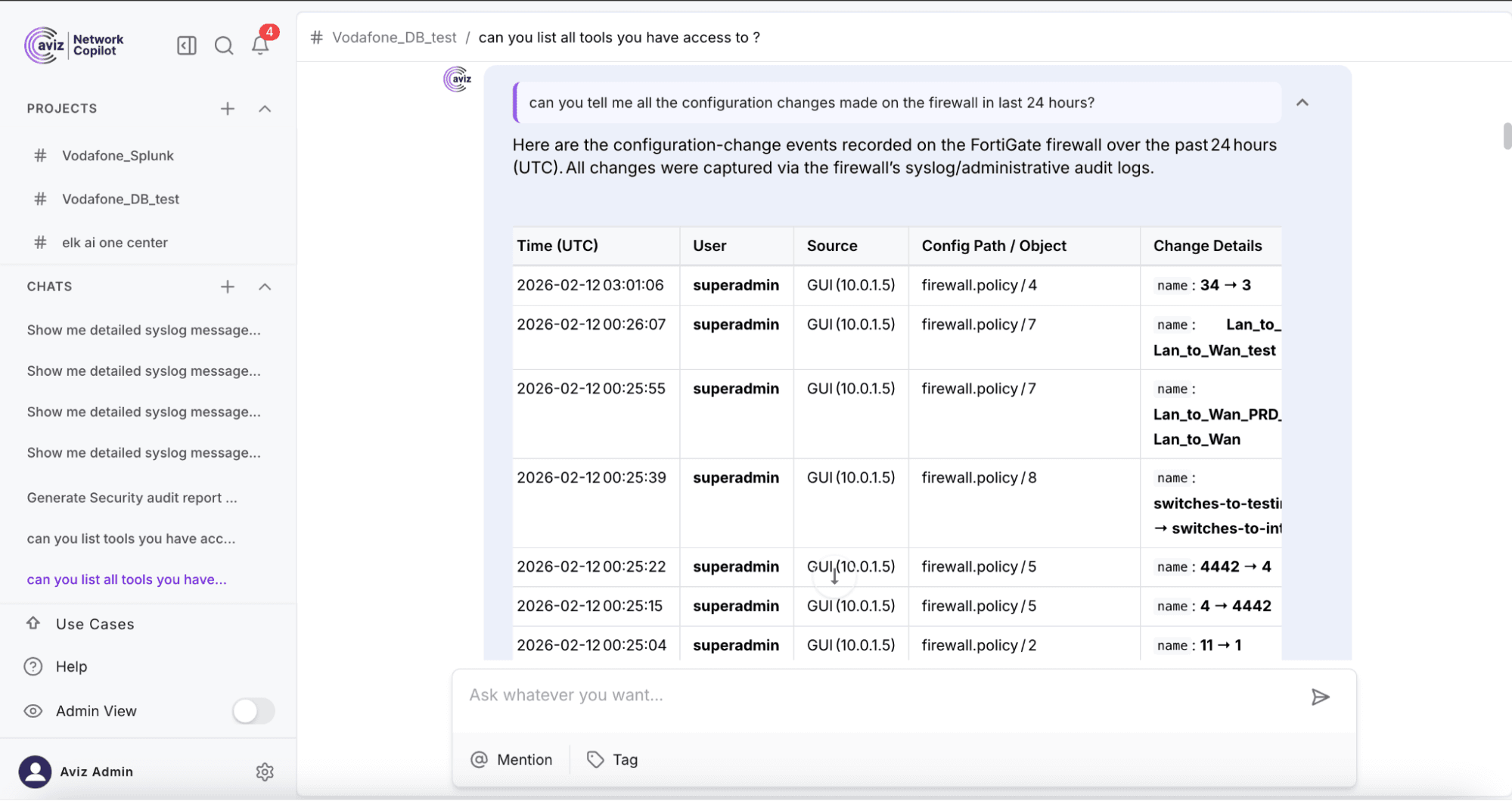
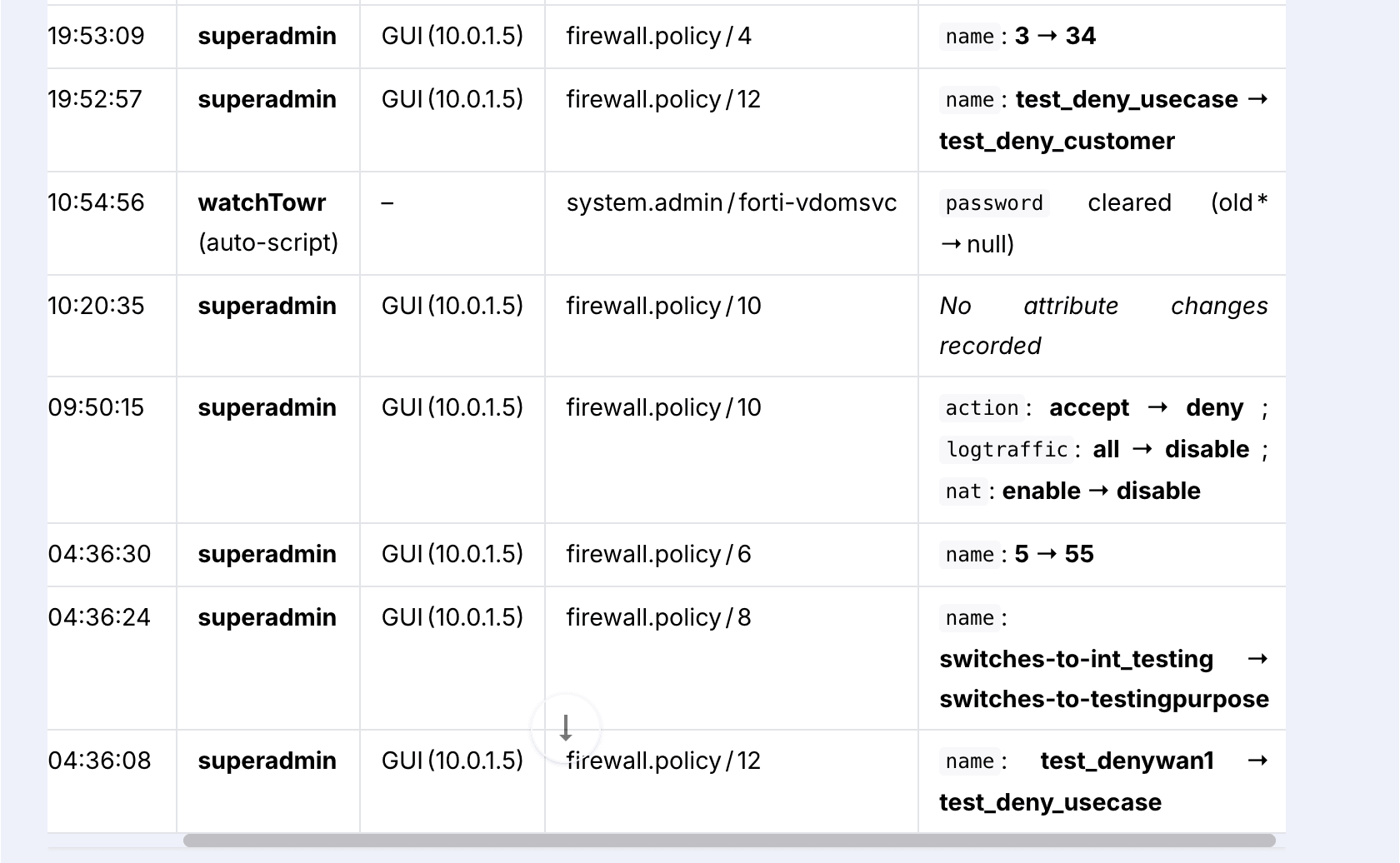
Description: The above image (information) is about the “change details” that were performed by the user, summarizing all the before and after changes.
Use Case 2: User Unable to Connect to FortiGate
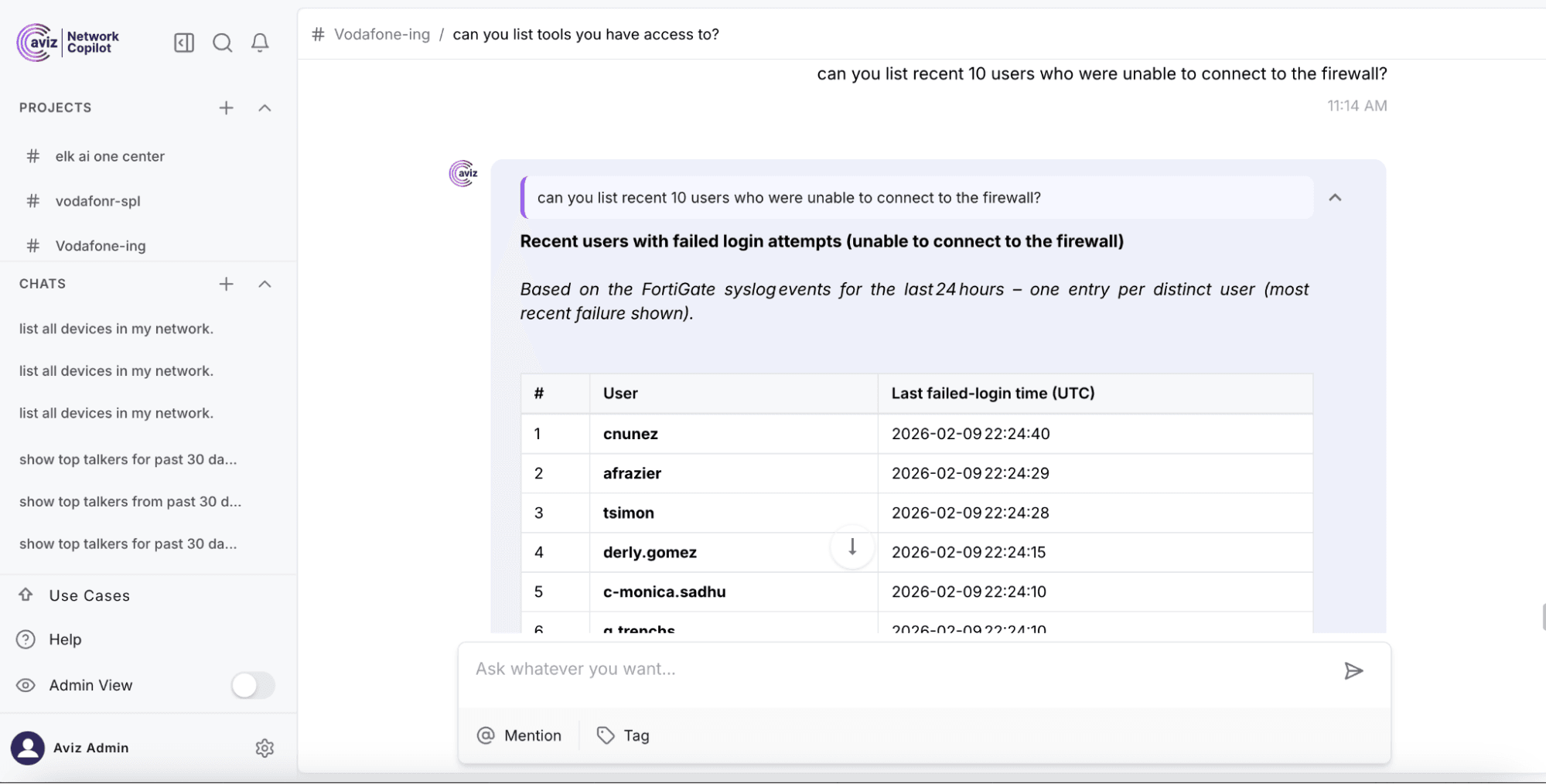
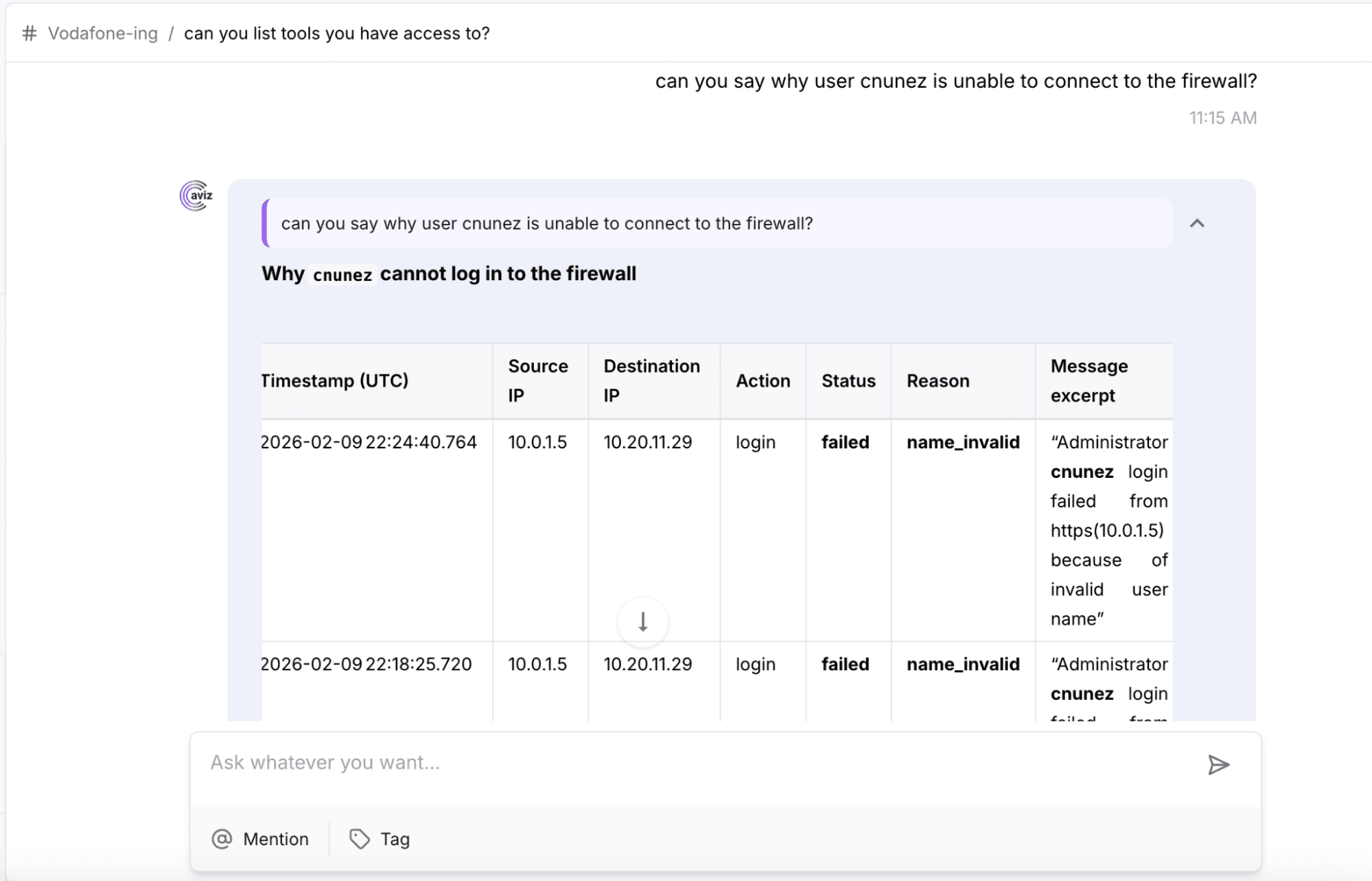
Operator Question: “Why is user unable to connect to FortiGate?”
Sample FortiGate Log
date=2026-02-09 time=22:24:40 devname="one-ai-fortinetr-10_20_11_29" devid="FGT81ETK18004040"
eventtime=1770666280000000000 tz="-0800" logid="0100032002"
type="event" subtype="system" level="alert" vd="root"
user="cnunez"
ui="https(10.0.1.5)"
method="https"
srcip=10.0.1.5
dstip=10.20.11.29
action="login"
status="failed"
reason="name_invalid"
msg="Administrator cnunez login failed from https(10.0.1.5) because of invalid user name"
Expected NCP Outcome
- Detect authentication failure
- Identify the user and the source IP
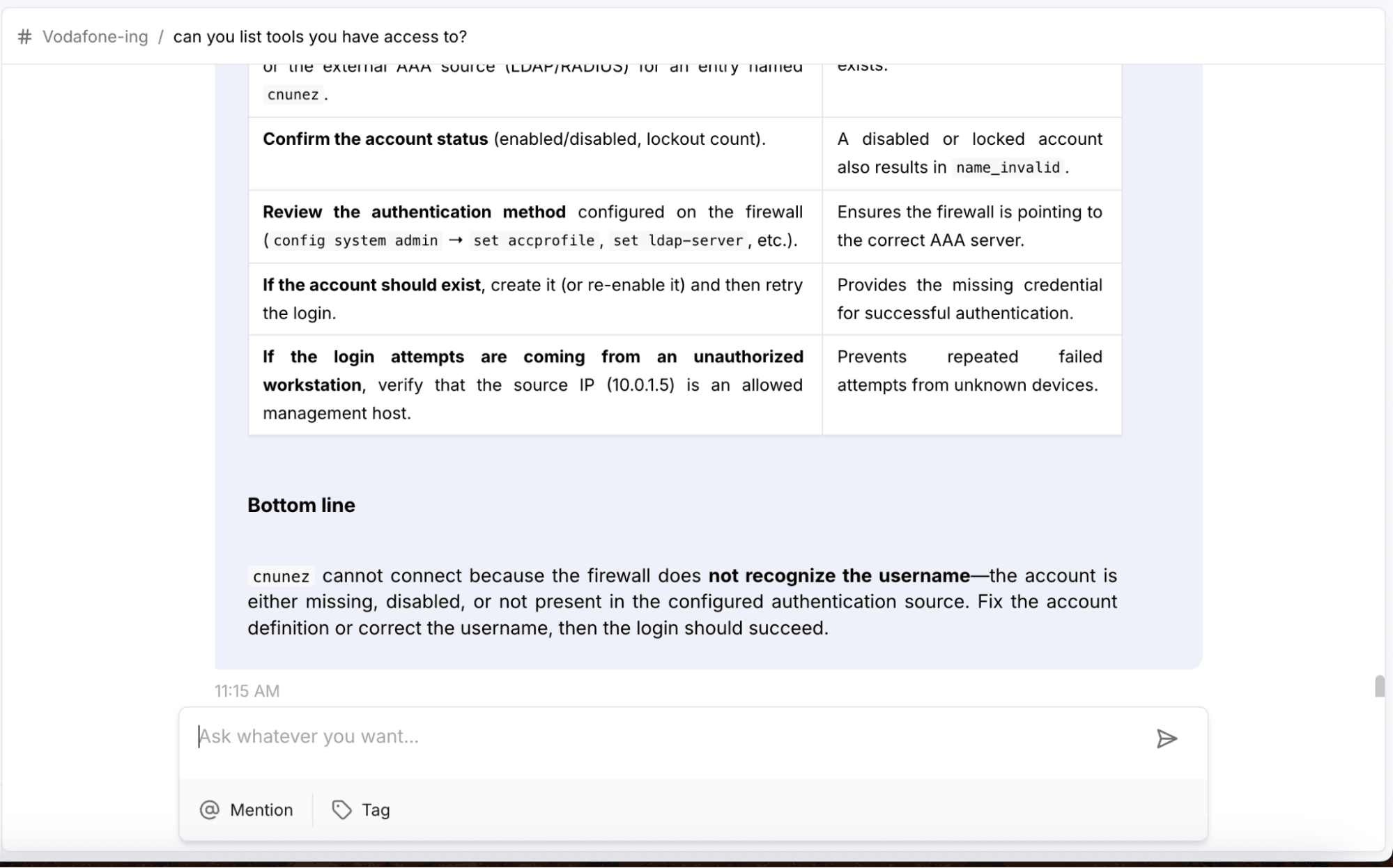
- Explain the reason for failure
- Indicate whether the issue is related to credentials, configuration, or security
How to Test
- Trigger a failed login attempt from a lab client
- Verify authentication logs in Splunk
- Query NCP for root cause
- Validate explanation quality
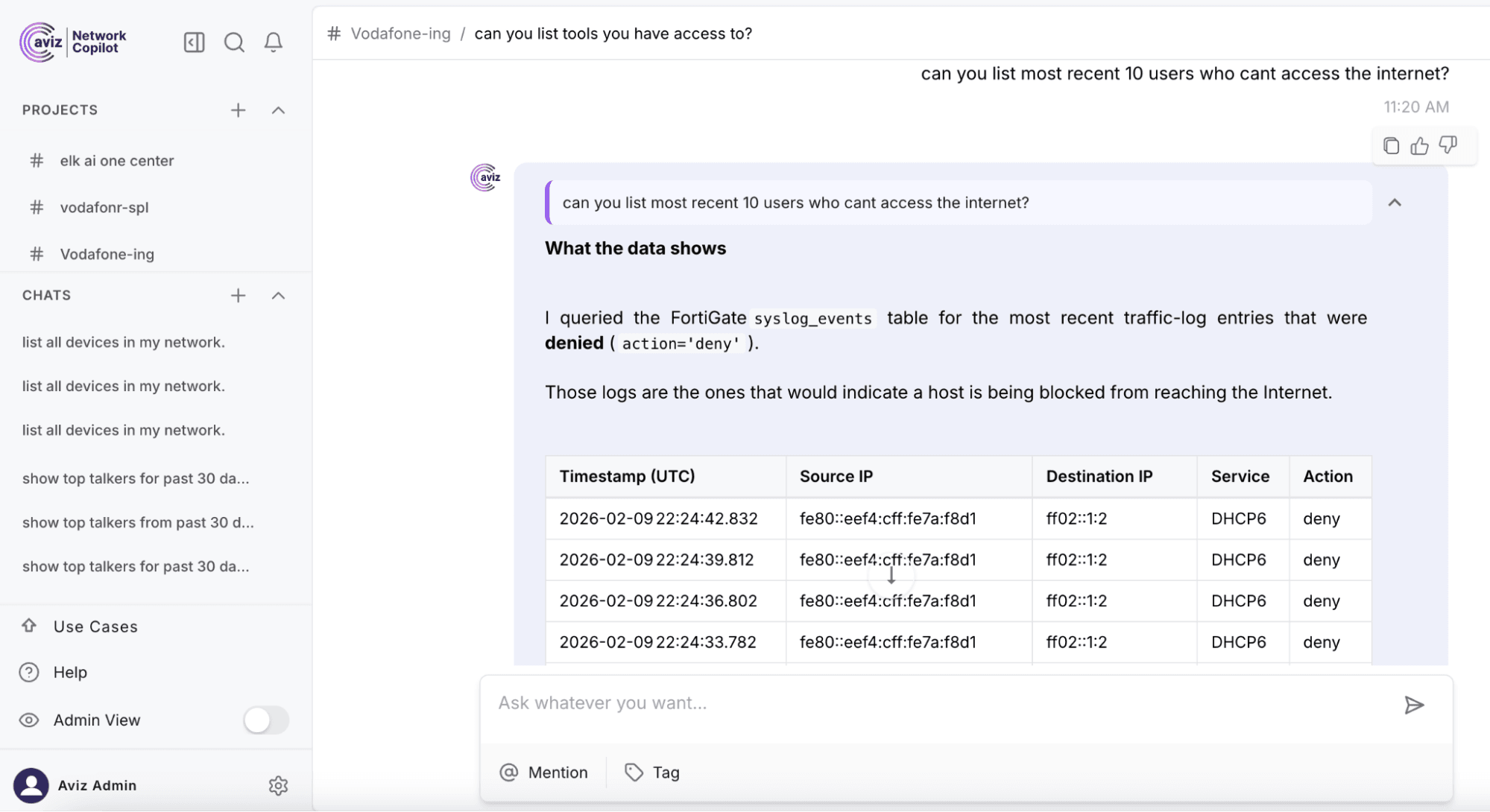
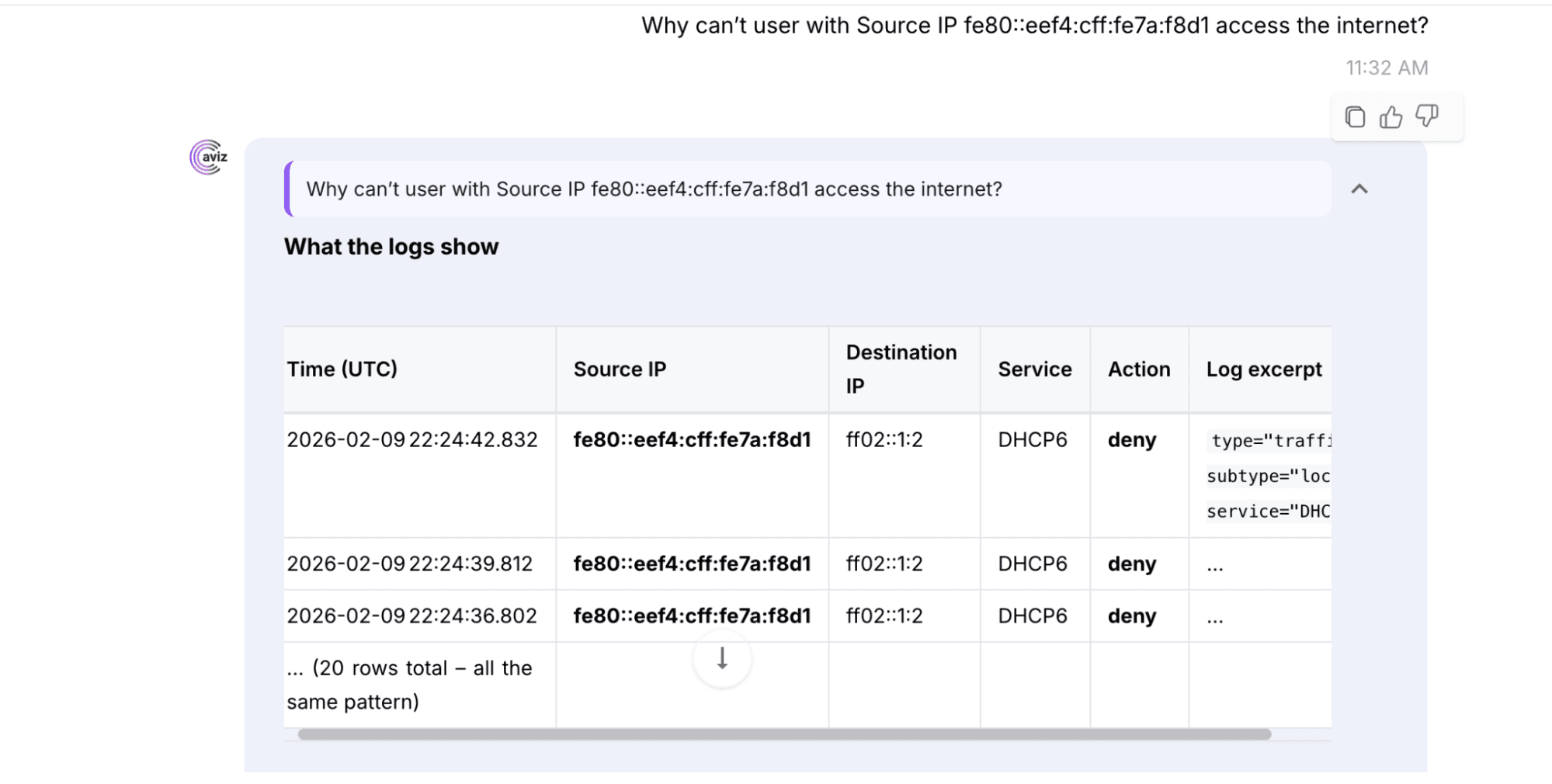
Use Case 3: User Unable to Access the Internet
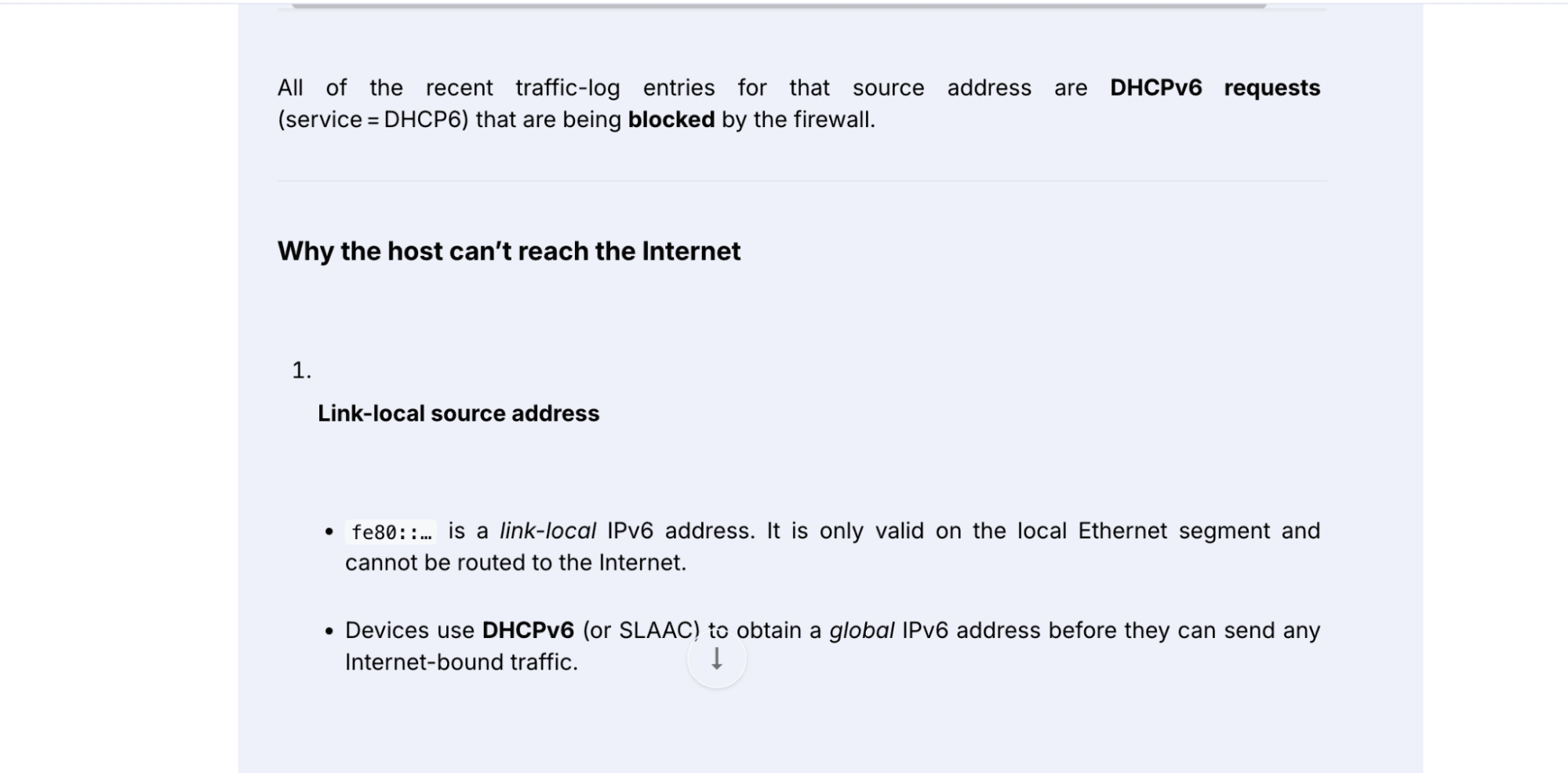
Operator Question: “Why can’t user access the internet?”
Sample FortiGate Log
date=2026-02-09 time=22:24:42 devname="one-ai-fortinetr-10_20_11_29" devid="FGT81ETK18004040"
eventtime=1770666282832000000 tz="-0800" logid="0000000013"
type="traffic" subtype="forward" level="notice" vd="root"
srcip="fe80::eef4:cff:fe7a:f8d1"
srcport=546
srcintf="port11"
srcintfrole="lan"
dstip="ff02::1:2"
dstport=547
dstintf="port1"
dstintfrole="wan"
proto=17
service="DHCP6"
direction="outgoing"
policyid=0
action="deny"
sessionid=0
msg="Denied by implicit policy"
Expected NCP Outcome
- Identify blocked traffic
- Detect missing or misconfigured firewall policy
- Correlate with recent configuration changes (if applicable)
- Provide clear remediation guidance
How to Test
- Generate blocked traffic from a lab client
- Confirm traffic logs ingestion
- Query NCP using natural language
- Validate root-cause explanation
Why Does This Matter for L1/L2 Teams?
Network Copilot fundamentally changes operations by:
- Reducing reliance on senior engineers
- Turning tribal knowledge into accessible intelligence
- Shrinking MTTR from hours to minutes
- Making troubleshooting explainable and auditable
It doesn’t replace engineers, it augments them.
Conclusion
This white paper highlights how AI operations are moving from concept to concrete, tangible results that are both demonstrable and fit for production. The implementation of our agentic AI operational assistant, Network Copilot (NCP), can transform network and security operations while breaking down the silos between network firewall data and operational data long separated. Operating against real FortiGate traffic and the operational data housed in Splunk logs, NCP is providing explainable, contextualized responses through natural language- AI so that your L1 and L2 teams can solve problems quickly, shorten MTTR, and bring previously specialized knowledge to all members of your network and security teams. With modern network footprints only ever growing larger and more complex, NCP exemplifies how the nature of NetOps and SecOps work is changing fundamentally, shifting from reactionary and manual process, toward intelligent and auditable operations; extending human expertise, securing internal knowledge and paving the way toward modern operations standards.
Frequently Asked Questions
What is Network Copilot (NCP)?
Network Copilot (NCP) is an agentic AI platform that ingests MELT data (Metrics, Events, Logs, and Traces) from FortiGate firewalls and correlates it with logs stored in Splunk to provide explainable, context-aware answers to operator questions in natural language.
How does NCP help L1 and L2 teams?
NCP reduces reliance on senior engineers by turning complex, siloed telemetry into accessible, explainable root-cause analysis, shrinking mean-time-to-resolution (MTTR) from hours to minutes.
What types of data sources does NCP support?
NCP can parse configuration and log data from firewalls, SIEMs, routers, and switches, enabling cross-domain correlation across heterogeneous sources in real time.
How does NCP handle root-cause analysis?
NCP performs root-cause analysis 3 to 7 times faster than manual methods by correlating information from multiple systems simultaneously, delivering explainable answers rather than black-box outputs.
Can operators interact with NCP using plain English?
Yes, operators can ask NCP questions in natural language, such as "Why is this user blocked?" or "What configuration changes were made in the last 24 hours?" and receive clear, contextualized responses.
Does NCP automatically fix network issues?
NCP provides guided remediation recommendations but does not apply automatic fixes, keeping human engineers in control of any changes made to the environment.
Where does NCP store telemetry data?
NCP can forward telemetry to Splunk for collection and indexing, and it can also store telemetry directly in its own native storage to enable real-time analysis alongside historical data.
What real-world scenarios can NCP help troubleshoot?
NCP can identify recent configuration changes on FortiGate, diagnose authentication failures, and detect blocked traffic caused by missing or misconfigured firewall policies, among other common operational issues.
If your team is still manually stitching together FortiGate, Splunk, and other telemetry sources to find root cause, there's a faster way. Explore to see how an agentic AI assistant can correlate your existing tools and cut MTTR from hours to minutes.


