




Aviz Service Node R2.6
ONES Fabric-Driven Intelligence — Custom App Classification, AI Session Parsing, DC Export Enhancements, and Flexible Operations
 November 4, 2026
 Deep Network Observability
Introduction
Aviz Service Node R2.6 introduces Custom App-ID, Kafka Export Topic Configuration, DC Session Export Enhancements with TCP insights and Packet Loss KPIs, Custom Disk Path, and the new ASN Core AI Parser, and HTTP/2 Sessions Optimization enabling operator-defined traffic classification, runtime export control, richer consolidated session records, flexible storage management, and unprecedented visibility into AI inference traffic, all without requiring ASN restarts or additional instrumentation.
What's New in R2.6
- Custom App-ID (DC and Telco): Define operator-specific application identification rules using inner-flow fields and payload signatures, exported as custom app_name and app_group attributes,hot-reloaded at runtime without an ASN restart.
- Kafka Export Topic Configuration (DC and Telco): Configure Kafka export topic names for every export stream through ONES UI at runtime. Replaces static topic name configuration with fully dynamic control.
- DC Session Enhancements — Combined Export and TCP Insights: Single unified record per TCP session replaces per-direction records, with per-interval packet loss, retransmission counts, and TCP state indicators for richer DC analytics.
- HTTP/2 Sessions Optimization: Eliminates recurring 50–60-second control-core stalls caused by inline HPACK context flushing, using permanent per-slot memory arenas for zero-interruption packet processing.
- ASN Core AI Parser (DC): Passively dissects OpenAI-compatible chat-completion traffic to extract per-call requester identity, model, token cost, and response timing — no client or server instrumentation required.
- Custom Disk Path (DC and Telco): Relocate all ASN-managed files to a single configurable path at install time or at runtime, enabling dedicated volume assignments and simplified storage management.
Custom App-ID
Traffic classification beyond built-in PACE2 is now operator-configurable. Rules tag matching flows with a custom app_name and app_group — exported directly in Kafka and IPFIX records alongside standard DPI attributes. No enrichment pipeline needed.
Rules match on any combination of source/destination IP, port, transport protocol, and payload byte signature. They live in a YAML file and hot-reload through FlowVision — ASN validates and swaps the rule set live, with no traffic gap and no restart. Invalid rules are rejected and the previous set stays active.
Unmatched flows fall through to PACE2 as normal, preserving existing classification behavior for all traffic not covered by a custom rule.
Kafka Export Topic Configuration
Kafka export topic names, previously hard-coded in ASN, are now operator-configurable through ONES UI. Custom names can be set per export stream — U-Plane user sessions, EPC and 5GC control plane, RADIUS, Diameter, SIP, and PFCP — and take effect immediately without a restart. Deployments without custom configuration continue using existing defaults.
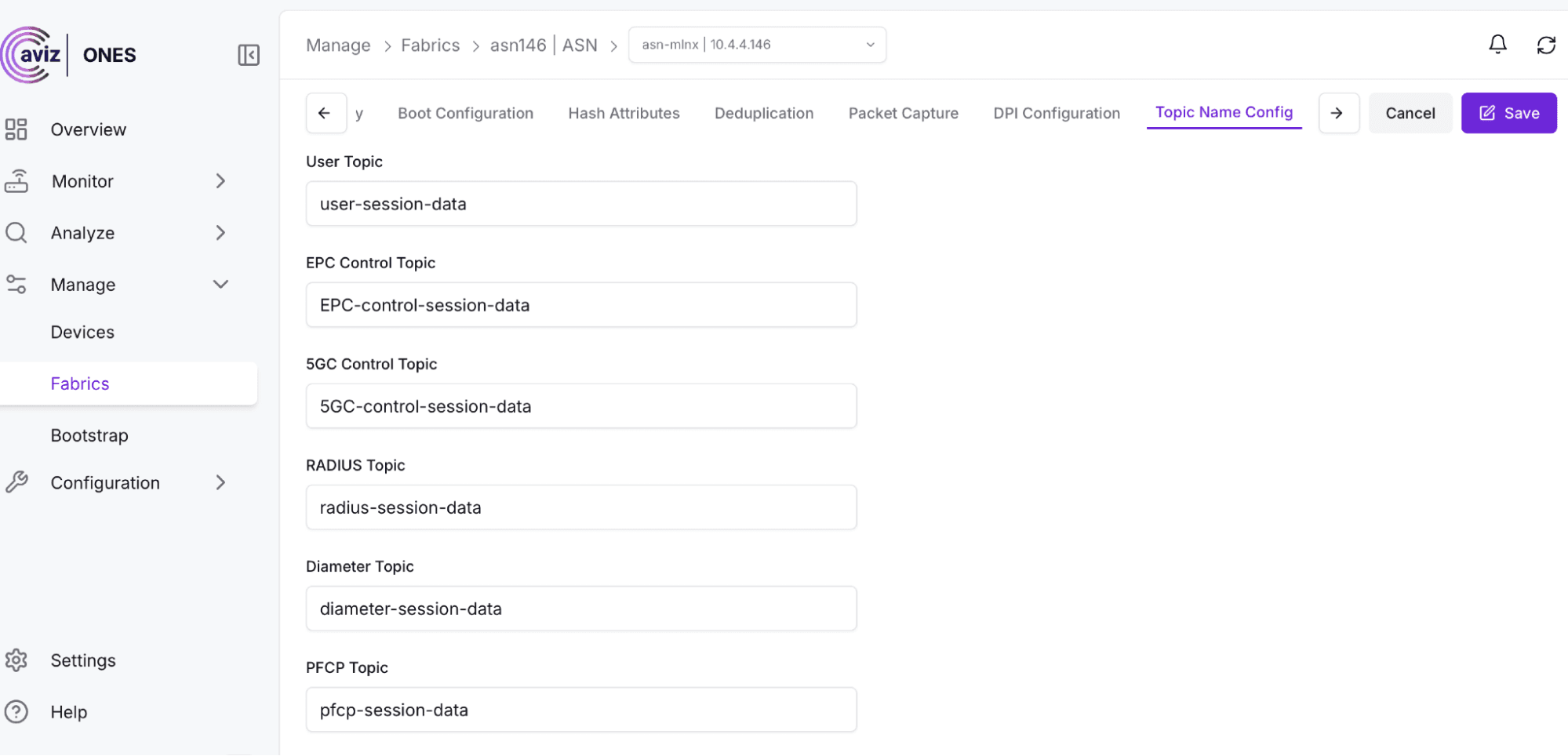
Kafka Export Topic Configuration — ONES UI
DC Session Enhancements -Combined Export and TCP Insights
The previous per-direction TCP export model in DC mode produced separate uplink and downlink records per session, requiring a downstream join to reconstruct the full session view. A single unified record per session now carries uplink and downlink bytes, packets, and latency side by side — eliminating the join step and halving export volume.
The consolidated record also introduces fields not previously available:
- Interval Packet Loss (UL/DL): Per-interval lost packet count in each direction, computed from sequence number gap analysis.
- Retransmission Count (UL/DL): Per-interval retransmitted segment count detected in each direction.
- TCP Status: Connection state indicators — SYN, SYN-ACK, FIN, RST, ESTABLISHED — enabling detection of setup failures, abnormal terminations, and half-open sessions.
All fields are available over both Kafka and IPFIX, with no changes required to existing export consumers.
HTTP/2 Sessions Optimization
The N11 HTTP/2 partial-session table holds up to one million entries and fills in roughly one hour under production load. Previously, when it reached capacity, the system flushed it inline on the control core — walking all entries and freeing HPACK inflate contexts in a single blocking pass that took 50–60 seconds, dropped all packet processing, and broke header decompression for every live HTTP/2 connection in flight.
Each table slot now owns a permanent 32 KB memory arena with a dedicated nghttp2 allocator. HPACK state lives entirely within that arena — no global heap, no teardown bookkeeping. Flushing a slot is a pointer drop. The hourly stall is gone, HPACK decode state survives across all live connections, and the control core maintains full throughput at all times.
ASN Core AI Parser (DC Mode)
LLM-serving platforms such as vLLM expose only engine-side metrics — GPU utilization, queue depth, batch statistics. They do not identify which tenant issued a request, what model was used, or how the response performed on the wire. The ASN Core AI Parser closes this gap by passively dissecting OpenAI-compatible chat-completion traffic in transit and reconstructing per call:
- Requester identity — the client IP or tenant associated with the inference request
- Model used — the model name from the API request
- Token cost — prompt and completion token counts from the API response
- Response timing — end-to-end latency from request to final response token, as observed on the wire
The parser runs on an ASN appliance in DC mode positioned to observe traffic between AI clients and inference endpoints via tap, mirror, or inline capture. No instrumentation of the AI client or inference server is required. Parsed records are exported through the standard ASN Kafka path alongside existing session data, enabling downstream platforms to correlate request patterns, track model-level token consumption, and monitor inference latency — derived entirely from network traffic.
Custom Disk Path
All ASN-managed files — session state, export buffers, diagnostics, and configuration — can now be redirected to a single operator-specified directory, at install time or at runtime. Previously fixed to system locations, storage can now be pointed at a dedicated NVMe volume, a compliance-segregated mount, or any path that fits the deployment's storage layout — without reinstallation.
The path is validated on activation. An invalid or inaccessible path falls back to the previous setting with a warning, and the configured path persists across restarts. One directory governs all ASN data, making retention policies, quotas, and backups straightforward.
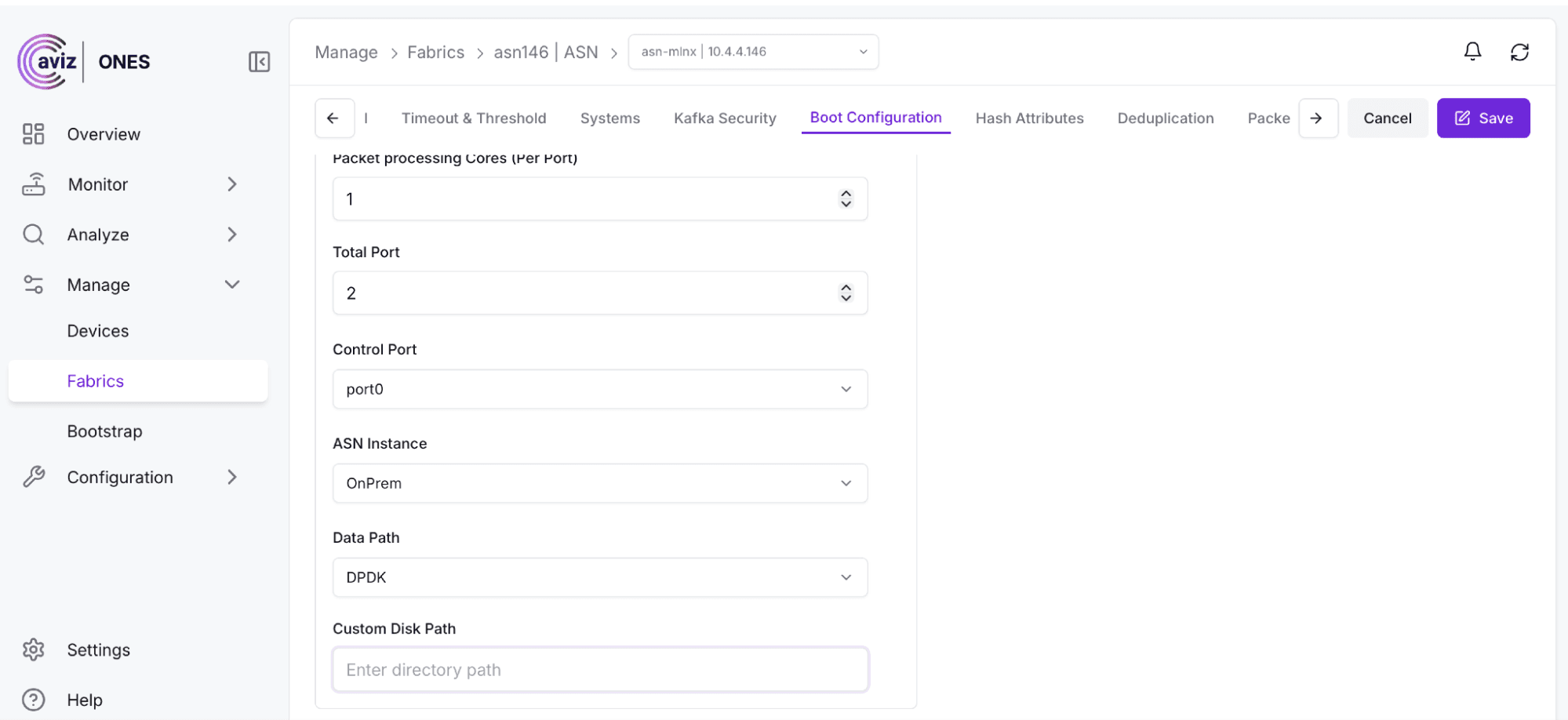
Custom Disk Path configuration — ONES UI
Conclusion
ASN R2.6 advances operator control across classification, export, session data quality, storage, and AI workload observability. Custom App-ID brings operator taxonomy into the DPI pipeline. Kafka Topic Configuration removes the last runtime rigidity in export management. DC Session Enhancements deliver a cleaner, richer session model with quality signals operators have long needed. The HTTP/2 Optimization eliminates a systemic stall that could not be worked around at scale. The ASN Core AI Parser opens a new category of network-derived visibility into LLM inference traffic. And Custom Disk Path simplifies the operational reality of running ASN in production storage environments.
FAQs
What is new in Aviz Service Node R2.6?
Aviz Service Node R2.6 introduces Custom App-ID, Kafka Export Topic Configuration, DC Session Export Enhancements with TCP insights and Packet Loss KPIs, Custom Disk Path, the new ASN Core AI Parser, and HTTP/2 Sessions Optimization, all without requiring ASN restarts or additional instrumentation.
What is Custom App-ID in Aviz Service Node?
Custom App-ID lets operators define operator-specific application identification rules using inner-flow fields and payload signatures, exported as custom app_name and app_group attributes. Rules match on any combination of source/destination IP, port, transport protocol, and payload byte signature, and hot-reload at runtime without an ASN restart. Unmatched flows fall through to PACE2 as normal.
Can Kafka export topic names be changed without restarting ASN?
Yes. Kafka export topic names, previously hard-coded in ASN, are now operator-configurable through ONES UI. Custom names can be set per export stream and take effect immediately without a restart. Deployments without custom configuration continue using existing defaults.
What TCP insights are included in DC session export?
A single unified record per TCP session now carries uplink and downlink bytes, packets, and latency side by side, eliminating the join step and halving export volume. The record also adds Interval Packet Loss, Retransmission Count, and TCP Status (SYN, SYN-ACK, FIN, RST, ESTABLISHED), enabling detection of setup failures, abnormal terminations, and half-open sessions.
How does Aviz Service Node provide visibility into AI inference traffic?
The ASN Core AI Parser passively dissects OpenAI-compatible chat-completion traffic in transit and reconstructs per call: requester identity, model used, token cost, and response timing. Parsed records are exported through the standard ASN Kafka path alongside existing session data.
Does the ASN Core AI Parser require instrumentation of the AI client or inference server?
No. The parser runs on an ASN appliance in DC mode positioned to observe traffic between AI clients and inference endpoints via tap, mirror, or inline capture. No instrumentation of the AI client or inference server is required.
What problem does the HTTP/2 Sessions Optimization solve?
It eliminates recurring 50–60-second control-core stalls caused by inline HPACK context flushing. Each table slot now owns a permanent 32 KB memory arena with a dedicated nghttp2 allocator. The hourly stall is gone, and the control core maintains full throughput at all times.
What is Custom Disk Path in Aviz Service Node?
Custom Disk Path lets operators redirect all ASN-managed files (session state, export buffers, diagnostics, and configuration) to a single operator-specified directory, at install time or at runtime, without reinstallation. An invalid or inaccessible path falls back to the previous setting with a warning, and the configured path persists across restarts.
See ASN R2.6's Custom App-ID and AI Parser on your own traffic.


