





How Does Aviz ONES Manage IPAM and DHCP for Tenant VPCs?
 November 16, 2026
 AI Factory
TL;DR
Aviz ONES now manages IP addresses for north-south tenant VPCs, end to end. Turn IPAM on for a fabric and every tenant gets its own address pool. From there, choose how servers get their addresses. In static mode, ONES hands out the next free address and can configure it on the server for you. In DHCP mode, ONES programs an external Kea DHCP server and the DHCP relays across the VXLAN fabric, so servers lease addresses in their tenant's subnet. Either way, adding a server to a tenant gives it an address, removing it gives the address back, and one API call tells you who holds what.
Introduction
Creating a tenant VPC on an AI fabric is now a single API call. Giving that tenant's servers working IP addresses often still isn't. Someone picks a subnet, tracks which addresses are taken in a spreadsheet, logs into each server to configure an interface, and hopes nobody reuses an address after a server moves to another tenant.
At GPU-cloud scale, where tenants come and go weekly and servers move between them, that manual step becomes the slowest and most error-prone part of onboarding. It's also where the network's source of truth and reality drift apart.
This release closes that gap. IP address management is now built into ONES for north-south tenant VPCs, with two modes to fit how your servers are managed: static addressing driven by ONES, or DHCP through your own Kea server with ONES programming the fabric in between.
Static or DHCP: Which Mode Fits?
Use static allot when your own provisioning system configures hosts, static assign when ONES should configure the server too, and DHCP when you already run DHCP or have VM-based, container-based or short-lived workloads.
IPAM is set per fabric, and each fabric runs one mode at a time. Every tenant gets its own address pool, carved from the fabric's tenant compute IP pool.
| Mode | What happens when a server joins a tenant | Best for |
|---|---|---|
| Static, allot | ONES reserves the next free address in the tenant pool and returns it. Nothing changes on the server | Platforms where your own provisioning system configures hosts and just needs a conflict-free address |
| Static, assign | ONES reserves the address and configures it on the server: a VLAN sub-interface on the tenant VLAN plus a netplan file. Removing the server undoes both | Bare-metal GPU clouds where ONES should own the host side of tenant networking too |
| DHCP | ONES creates the tenant's subnet on your Kea DHCP server and programs DHCP relay on the fabric. Servers lease addresses as standard DHCP clients | Environments that already run DHCP, VM- or container-based tenants, and short-lived workloads |
| Off | No addresses are managed | Fabrics where addressing is handled entirely outside ONES |
The pools come from the same place in every mode, so the choice is about who configures the server: your tooling, ONES, or the server's own DHCP client.
How Does ONES Manage the DHCP Server?
In DHCP mode, you keep your own Kea DHCP server, and ONES runs it for you. Point ONES at the server once and it takes over every tenant-facing task. No one has to edit Kea scopes or touch switch configuration when tenants come and go.
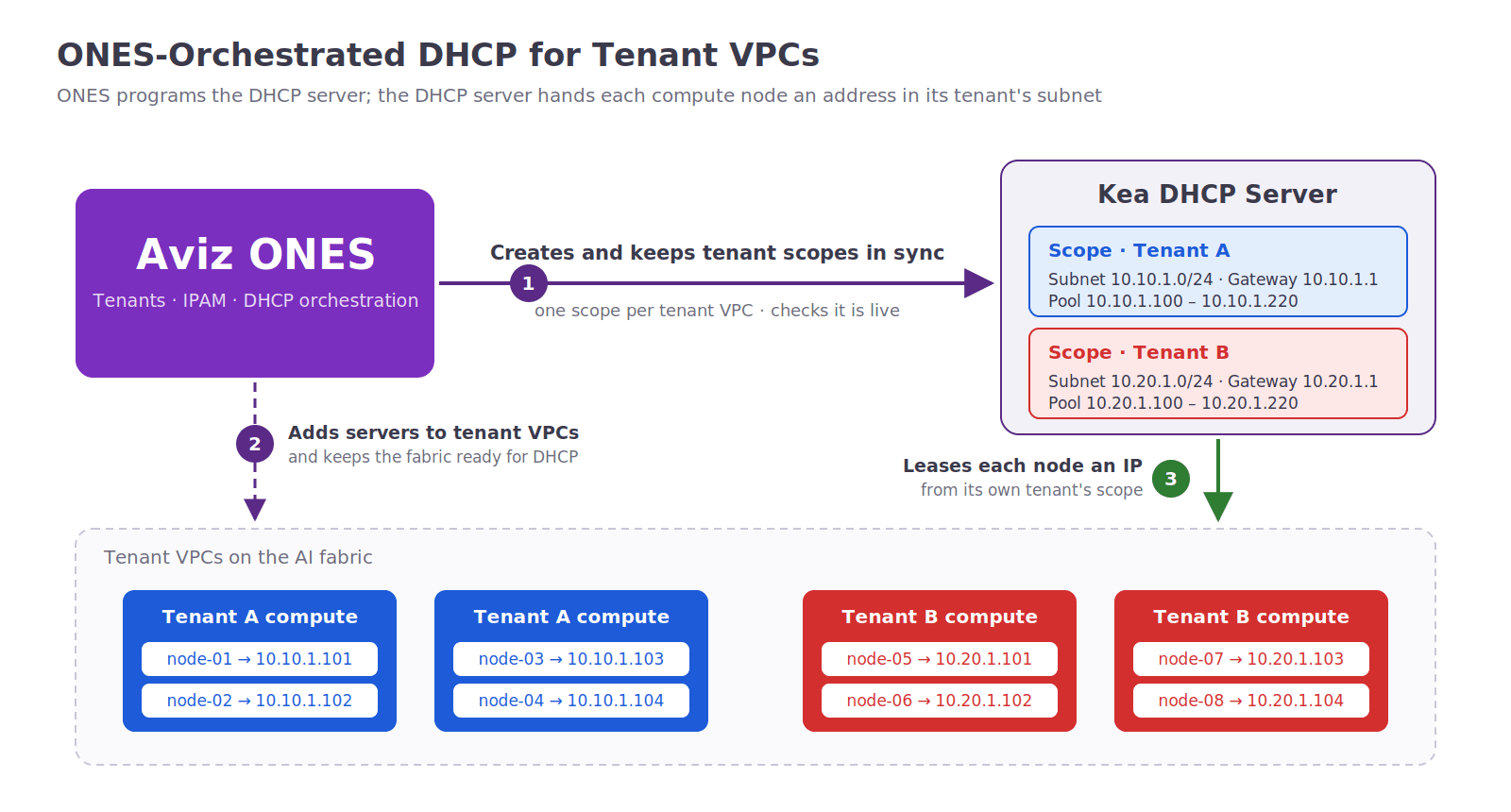
Figure 1: ONES creates a scope per tenant on the Kea DHCP server and adds servers to their tenant VPCs. The DHCP server then leases each compute node an address from its own tenant's subnet.
What Does ONES Take Care Of?
- A scope for every tenant. When a tenant is set up, ONES creates its subnet on the DHCP server, with the tenant's gateway and an address pool, and removes it when the tenant goes away.
- A fabric that reaches the server. ONES configures the switches so every tenant VPC can reach the shared DHCP server while staying isolated from every other tenant.
- Tenants kept apart. Two tenants can request addresses at the same moment from the same server, and each still gets an address from its own subnet.
- The server kept in step. ONES checks that each tenant's subnet is live on the server, and can re-apply one tenant or the whole fabric if they ever drift apart.
How Do I Turn IPAM On?
Make sure the fabric meets the prerequisites, set the mode for the whole fabric with one PATCH to the IPAM config, and in DHCP mode connect ONES to your Kea server's control API.
All IPAM calls go to Fabric Manager (https://<ones-host>:8443) with an ONES bearer token.
What Does the Fabric Need?
- External tenant control, so tenants are driven through the APIs.
- A tenant compute IP pool, the "Tenant Compute IP Pool" set when the fabric is designed. Each tenant's pool is carved from it.
- For DHCP mode: VXLAN tenant segmentation and a reachable Kea DHCP server.
- IPAM enabled before the first server joins a tenant. A tenant gets its pool when its first server is added.
How do you choose the IPAM mode for a fabric?
One PATCH sets the mode for the whole fabric. Exactly one of static and dhcp is enabled.
PATCH /fabrics/{fabricName}/ipam/config
{
  "enableIpam": true,
  "static": { "enabled": true, "enableIpAssign": true },
  "dhcp": { "enabled": false }
}
enableIpAssign: false gives allot mode and true gives assign mode. For DHCP, flip the two blocks and set the lease time:
{
  "enableIpam": true,
  "static": { "enabled": false },
  "dhcp": { "enabled": true, "leaseTimeSeconds": 3600 }
}
GET /fabrics/{fabricName}/ipam/config reads the setting back at any time. The guard rails are built into the API:
- Enabling both modes returns MUTUALLY_EXCLUSIVE_ASSIGN_MODE.
- Switching directly between static and DHCP isn't allowed. Turn IPAM off first, then back on in the new mode.
- IPAM can't be turned off while servers still hold addresses (IPAM_HAS_ALLOCATIONS), unless you deliberately pass force=true.
How do you connect the Kea DHCP server? (DHCP mode only)
Point the fabric at your Kea server's control API, then confirm ONES can reach it:
PATCH /fabrics/{fabricName}/dhcp/config
{
  "url": "https://<kea-host>:<port>",
  "username": "<kea-api-user>",
  "password": "<kea-api-password>"
}
GET /fabrics/{fabricName}/dhcp/status
{ "status": "success", "message": "DHCP server reachable and authenticated." }
If the server doesn't answer, ONES says so up front with DHCP_SERVER_UNREACHABLE, before any tenant depends on it.
What Does Static Mode Look Like in Practice?
In static mode there's no separate "allocate an IP" step. Adding a server to a tenant is the allocation.
What happens when you add a server to a tenant?
PATCH /fabrics/{fabricName}/tenants/{tenantName}
{ "operation": "ADD", "servers": [ { "serverName": "su00-node01", "shared": false } ] }
The response returns the address alongside the server. In assign mode it's already configured on the host:
{
  "status": "success",
  "data": {
    "tenantName": "ipdoc",
    "operation": "ADD",
    "servers": [
      {
        "serverName": "su00-node01",
        "status": "SUCCESS",
        "ipAddress": "172.1.64.4/18",
        "ipAssignStatus": "ASSIGNED"
      }
    ],
    "partial": false
  }
}
ipAssignStatus says exactly what happened: ALLOCATED_ONLY in allot mode, ASSIGNED when ONES configured the server, or IP_ASSIGN_FAILED if the server couldn't be reached. A failure comes back as a 207 partial success, so the address is never silently lost.
Who Holds Which Address?
Three read-only lookups answer that from three angles:
| Question | Endpoint |
|---|---|
| What is this tenant's pool, and who's in it? | GET /fabrics/{fabric}/tenants/{tenant}/ip-addresses |
| What address does this server have in this tenant? | GET /fabrics/{fabric}/tenants/{tenant}/computes/{server}/ip-address |
| What addresses does this server hold across all tenants? | GET /fabrics/{fabric}/computes/{server}/ip-addresses |
The tenant view shows pool usage and every allocation, with paging and a status filter:
{
  "data": {
    "tenantName": "ipdoc",
    "pool": { "cidr": "172.1.64.0/18", "allocatableAddressCount": 16381, "allocatedCount": 2 },
    "allocations": [
      { "serverName": "su00-node00", "ipAddress": "172.1.64.2", "prefixLength": 18,
        "assignStatus": "ALLOCATED_ONLY", "interfaceName": null },
      { "serverName": "su00-node01", "ipAddress": "172.1.64.4", "prefixLength": 18,
        "assignStatus": "ASSIGNED", "interfaceName": "ens4.101" }
    ]
  }
}
In assign mode, interfaceName names the VLAN sub-interface ONES created on the server, ens4.101 for tenant VLAN 101. The server-wide view matters for shared servers, which hold one address per tenant they belong to.
What happens when you remove a server from a tenant?
A DELETE operation on the same endpoint releases the address to the tenant pool ("released": true). In assign mode it also removes the sub-interface and netplan file from the server. A tenant can't be deleted while any server still holds an address (IPAM_ALLOCATIONS_ACTIVE), so offboarding never leaves orphaned addresses behind.
What Does DHCP Mode Look Like in Practice?
In DHCP mode, ONES creates each tenant's subnet on the Kea server and configures relay on the fabric. Servers simply run a DHCP client on their tenant interface.
What Did ONES Set Up for This Tenant, and Who Has a Lease?
One call shows the tenant's subnet as ONES created it, whether Kea is actually serving it, and the live leases:
GET /fabrics/{fabricName}/tenants/{tenantName}/dhcp
{
  "status": "success",
  "message": "Tenant DHCP subnet retrieved successfully.",
  "data": {
    "subnet": {
      "vlanId": 101,
      "networkName": "test_dhcp_vlan101",
      "subnetCidr": "192.1.0.0/16",
      "gatewayIp": "192.1.128.1",
      "poolStart": "192.1.64.2",
      "poolEnd": "192.1.127.254"
    },
    "liveInKea": true,
    "leases": [
      {
        "ipAddress": "192.1.64.3",
        "macAddress": "0c:95:42:3e:00:08",
        "state": "ASSIGNED",
        "validLifetimeSeconds": 60,
        "lastRenewedAt": "2026-10-21T17:15:55Z",
        "expiresAt": "2026-10-21T17:16:55Z"
      }
    ]
  }
}
liveInKea is the important flag. It confirms the subnet ONES intends exists on the DHCP server right now, so "the server isn't getting an address" can be narrowed down in seconds.
What If the DHCP Server and ONES Drift Apart?
Two repair actions keep Kea in step with ONES:
| Action | Endpoint | Use it when |
|---|---|---|
| Retry one tenant | POST /fabrics/{fabric}/tenants/{tenant}/dhcp/retry | A tenant's DHCP provisioning failed, for example because the DHCP server was briefly unreachable |
| Reconcile the fabric | POST /fabrics/{fabric}/dhcp/reconcile | Kea was restored, rebuilt or edited by hand, and every tenant subnet should be re-applied from ONES |
Both report each stage of the Kea update back to you:
dhcp_fabric: CONFIG_TEST OK; dhcp_fabric: CONFIG_SET OK; dhcp_fabric: CONFIG_WRITE OKReconcile treats ONES as the source of truth and rebuilds Kea's tenant networks from the tenants that have IPAM pools. Back up the DHCP server's configuration before you run it on a fabric in service.
See how Aviz ONES manages tenant VPCs across your AI fabric: explore ONES for AI factory networking.
Can I Manage It as Code?
Yes. The Aviz fabricapi Terraform provider covers IPAM and DHCP alongside fabrics and tenants:
| Terraform type | Kind | Covers |
|---|---|---|
| fabricapi_ipam_config | Resource and data source | Turn IPAM on in static or DHCP mode, change it, turn it off |
| fabricapi_tenant_ip_addresses | Data source | A tenant's pool and allocations |
| fabricapi_tenant_compute_ip | Data source | One server's address in one tenant |
| fabricapi_server_ip_addresses | Data source | Every address a server holds |
| fabricapi_tenant_dhcp | Data source | A tenant's DHCP subnet, live_in_kea and lease count |
| fabricapi_tenant_dhcp_retry, fabricapi_dhcp_reconcile | Resources | Retry one tenant, or reconcile the whole fabric |
resource "fabricapi_ipam_config" "this" {
  mode = "static"
  enable_ip_assign = true
}
data "fabricapi_tenant_compute_ip" "node01" {
  tenant_name = "genomics-institute"
  server_name = "su00-node01"
}
The server's address then becomes an ordinary Terraform output. It can feed your DNS records, inventory, or the next module in the pipeline.
What If Something Goes Wrong?
Every IPAM error comes back in the same envelope with a stable error.code, so automation can branch on the code rather than the message. The ones you're most likely to meet:
| error.code | Meaning | What to do |
|---|---|---|
| IPAM_CIDR_REQUIRED | IPAM is on but the fabric has no tenant compute pool | Set the Tenant Compute IP Pool on the fabric |
| MUTUALLY_EXCLUSIVE_ASSIGN_MODE | Static and DHCP both enabled | Enable exactly one |
| ASSIGN_MODE_CHANGE_NOT_ALLOWED | Direct switch between static and DHCP | Turn IPAM off, then on in the new mode |
| IPAM_HAS_ALLOCATIONS | Turning IPAM off while servers hold addresses | Release them first, or use force=true deliberately |
| IPAM_ALLOCATIONS_ACTIVE | Deleting a tenant whose servers still hold addresses | Remove the servers first |
| DHCP_SERVER_UNREACHABLE / DHCP_DISABLED | Kea not reachable, or no DHCP server configured | Fix dhcp/config and check dhcp/status |
| DHCP_SUBNET_NOT_FOUND | The tenant has no DHCP subnet | Create the tenant after DHCP mode is on, or run a retry |
Conclusion
A tenant VPC isn't ready until its servers can talk, and that starts with an address. With IPAM built into ONES, the address becomes part of the tenant lifecycle instead of a separate chore. A server joins a tenant and gets an address. It leaves and the address goes back. The tenant can't be deleted while anything is still allocated.
Teams that want ONES to own addressing end to end can use static assign mode. Teams with their own provisioning can use allot mode. Teams that already run DHCP can keep their Kea server, and ONES programs the relays, scopes and subnets across the VXLAN fabric for them. Every mode shares the same pools, the same lookups and the same clean teardown.
One source of truth for every tenant address, on every north-south VPC. That's IPAM the way an AI fabric needs it.
FAQ
Can a fabric run static and DHCP IPAM at the same time?
No. IPAM is set per fabric, and each fabric runs one mode at a time. Enabling both modes returns MUTUALLY_EXCLUSIVE_ASSIGN_MODE.
Can you switch a fabric directly from static to DHCP mode?
No. Switching directly between static and DHCP isn't allowed. Turn IPAM off first, then back on in the new mode.
Where do tenant IP address pools come from?
Each tenant's pool is carved from the fabric's Tenant Compute IP Pool, set when the fabric is designed. A tenant gets its pool when its first server is added.
Can a tenant be deleted while its servers still hold IP addresses?
No. Deleting a tenant whose servers still hold addresses returns IPAM_ALLOCATIONS_ACTIVE, so offboarding never leaves orphaned addresses behind.
What happens if ONES can't configure the address on the server?
ipAssignStatus comes back as IP_ASSIGN_FAILED, and the failure is returned as a 207 partial success, so the address is never silently lost.
Do shared servers get one IP address per tenant?
Yes. Shared servers hold one address per tenant they belong to, and the server-wide lookup shows every address a server holds across all tenants.


