





Breaking Silos with Network Copilot Agentic AI: Correlating FortiGate and Splunk for Intelligent Operations
Executive Summary
AI is moving beyond hype into measurable operational impact. AI-driven network fabrics, intelligent assistants, and agentic NetOps are redefining how network and security teams operate. This guide presents a real-world implementation of Network Copilot (NCP) that deploys an intelligent agent that receives metrics, events, logs, and traces (MELT) from FortiGate firewalls and forwarded to Splunk for centralized indexing. The agent queries Splunk in real time to correlate events and answer user questions with context-aware insights. In addition, the platform can store telemetry directly in its internal database, allowing the agent to perform historical analysis and deliver comprehensive, data-driven responses across both Splunk and platform-native data sources
NCP reduces complexity, lowers mean-time-to-resolution (MTTR), and transforms day-to-day troubleshooting for L1/L2 teams by delivering explainable, context-aware answers in natural language.
Unlike traditional dashboards or static analytics, NCP operates as an agentic AI platform, capable of parsing configurations and logs across firewalls, SIEMs, switches, and routers; to perform rapid root-cause analysis (RCA).
Introduction
Modern network and security environments generate massive volumes of telemetry across
heterogeneous systems. While observability platforms such as Splunk are individually powerful, the operational
burden of manual correlation of logs from various components remains a primary bottleneck.
This paper demonstrates how Network Copilot (NCP) functions as an AI operational assistant,
bridging silos, understanding intent, and delivering answers the way an experienced engineer would, but at machine
speed.
From Siloed Logs to Agentic AI Operational Assistant
Operational Challenges Today:
- Logs are spread across firewalls, SIEMs, and application platforms
- Troubleshooting requires manual correlation and deep domain expertise
- Root-cause analysis is slow and error-prone
- L1/L2 teams depend heavily on senior engineers
In a typical NetOps environment, FortiGate enforces firewalling, access control, and threat protection, while Splunk aggregates logs centrally from different components. The missing link is human-level correlation across these systems; precisely the gap NCP addresses.
Network Copilot Overview
At its core, Network Copilot NCP is designed to think like an experienced network and security engineer, but operate at machine speed.
Key Capabilities:
Freedom of Choice
Log ingestion and normalization across heterogeneous sources
Faster Innovation
Cross-domain correlation (firewall, network, system, application)
Operational Simplicity
Natural-language interaction (“Why is this user blocked?”)
Scalable Architecture
Explainable root-cause analysis, not black-box answers
Community Driven
Guided remediation, without risky auto-fixes
NCP enables teams to build and deploy AI agents that parse configurations and logs across firewalls, SIEMs, switches, and routers; accelerating RCA by correlating insights across diverse systems.
Reference Architecture and Deployment Model
This implementation uses a real FortiGate deployment inline with live traffic;, closely mirroring production conditions.
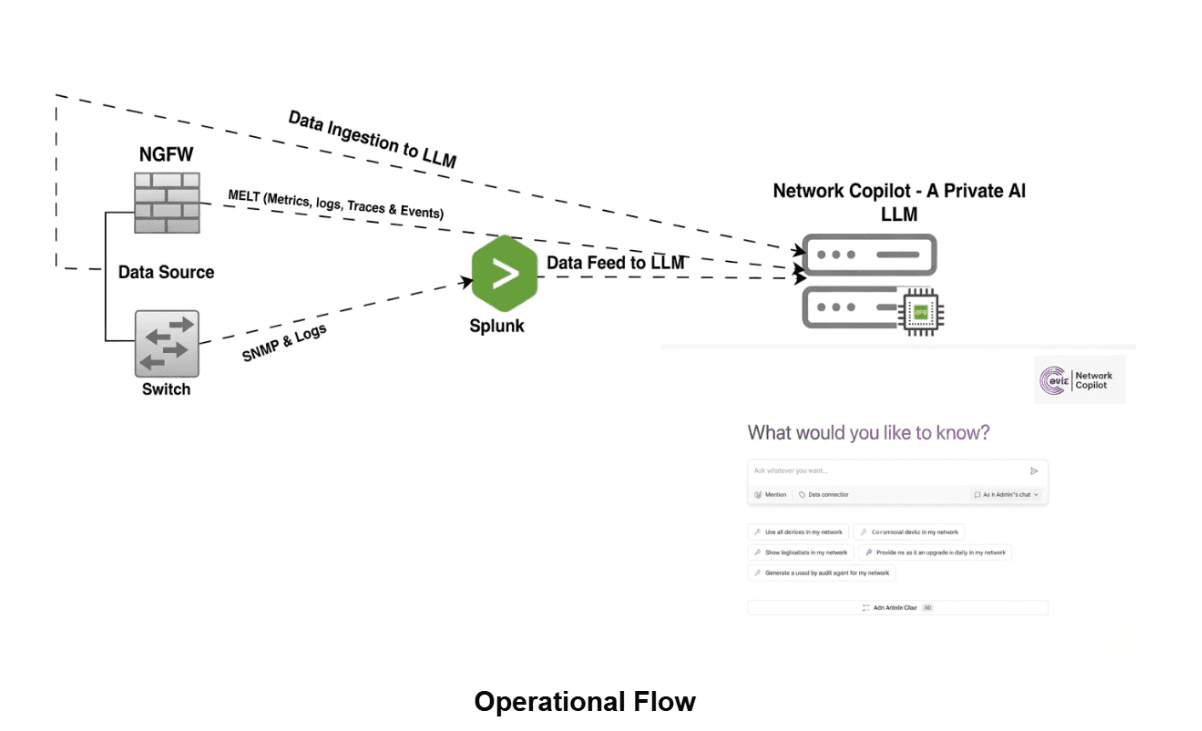
Operational Flow:
This paper explains using a real FortiGate deployment inline with live traffic—closely mirroring production conditions.
Day-to-Day Operations: Solved with Natural Language
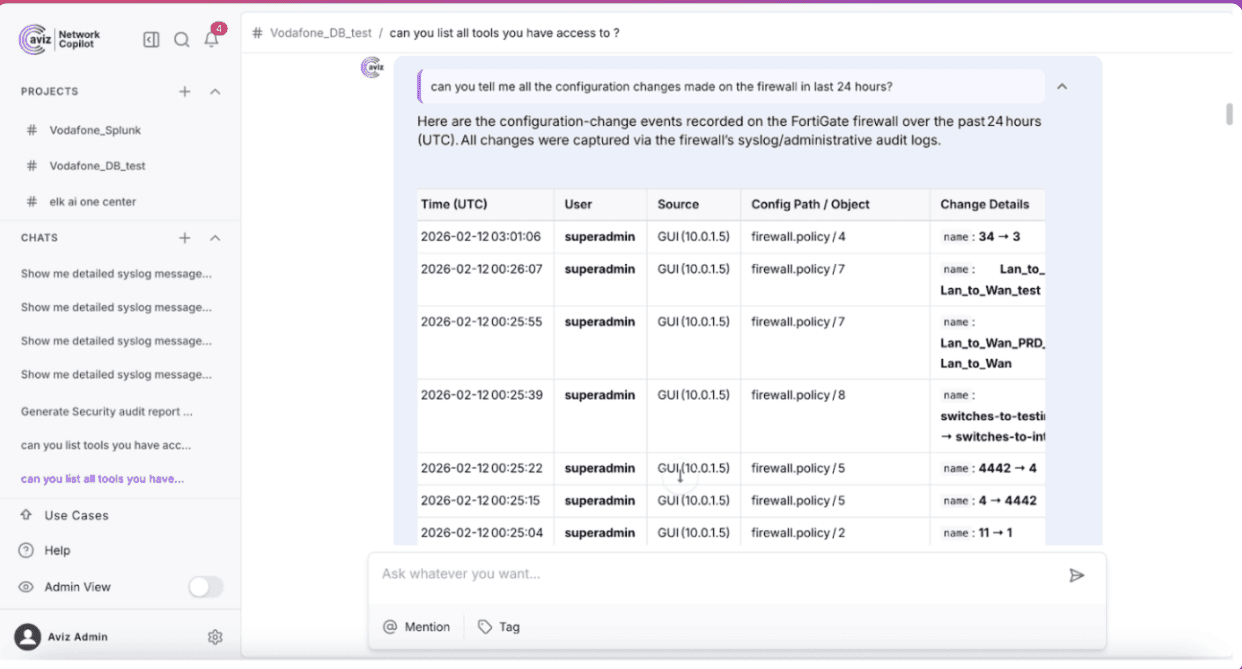
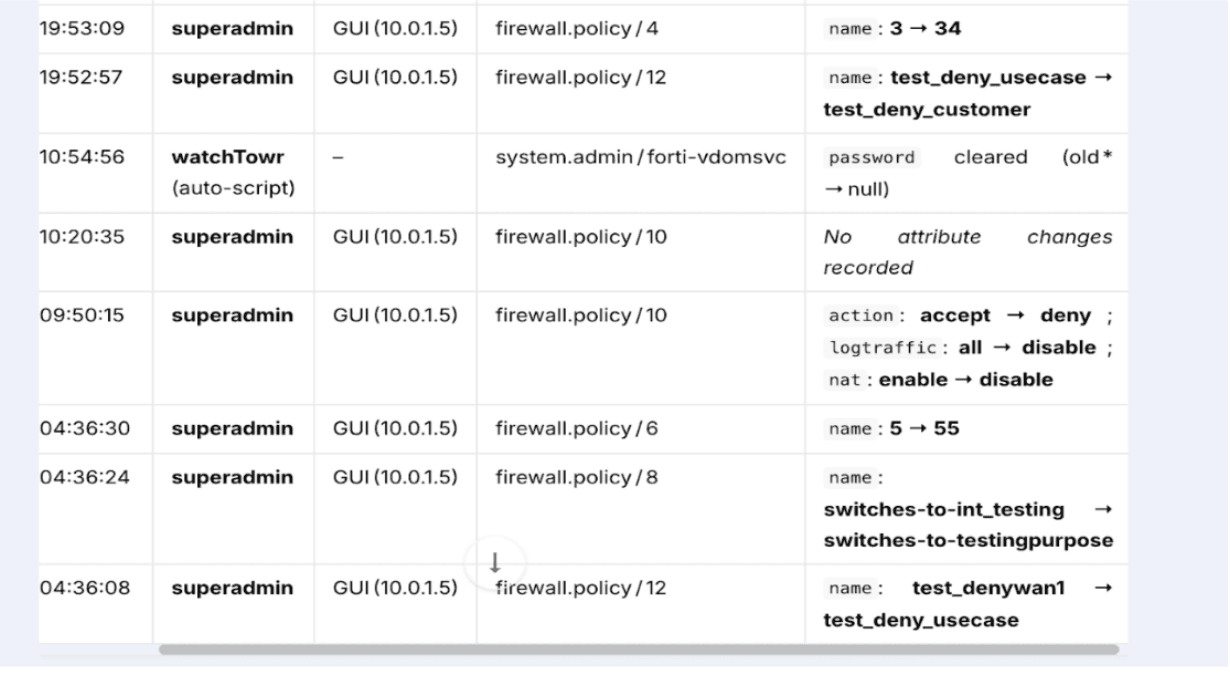
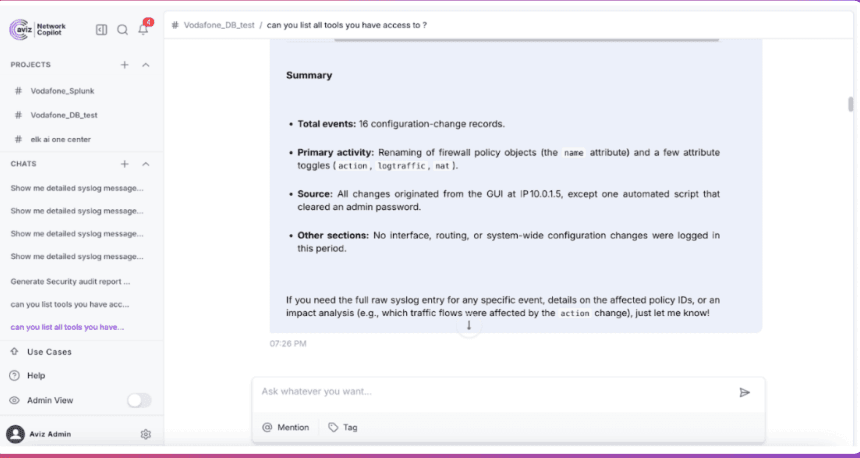
Use Case 1: Identify Recent Configuration Changes
Operator Question:
"What configuration changes were made on FortiGate in the last 24 hours?"
Sample FortiGate Log:
date=2026-02-12 time=19:53:09 devname="one-ai-fortinetr-10_20_11_29" devid="FGT81ETK18004040"
eventtime=1771008789000000000 tz="-0800" logid="0100044547"
type="event" subtype="system" level="notice" vd="root"
user="superadmin"
ui="GUI(10.0.1.5)"
method="https"
srcip=10.0.1.5
action="cfg-change"
cfgpath="firewall.policy"
cfgobj="policyid=4"
cfgattr="name"
oldvalue="3"
newvalue="34"
msg="Firewall policy name changed from 3 to 34"
Expected NCP Outcome:
How to Test:
Modify a firewall policy in the lab
Confirm logs are ingested into Splunk and NCP
Query NCP using natural language
Validate clarity and accuracy of the response
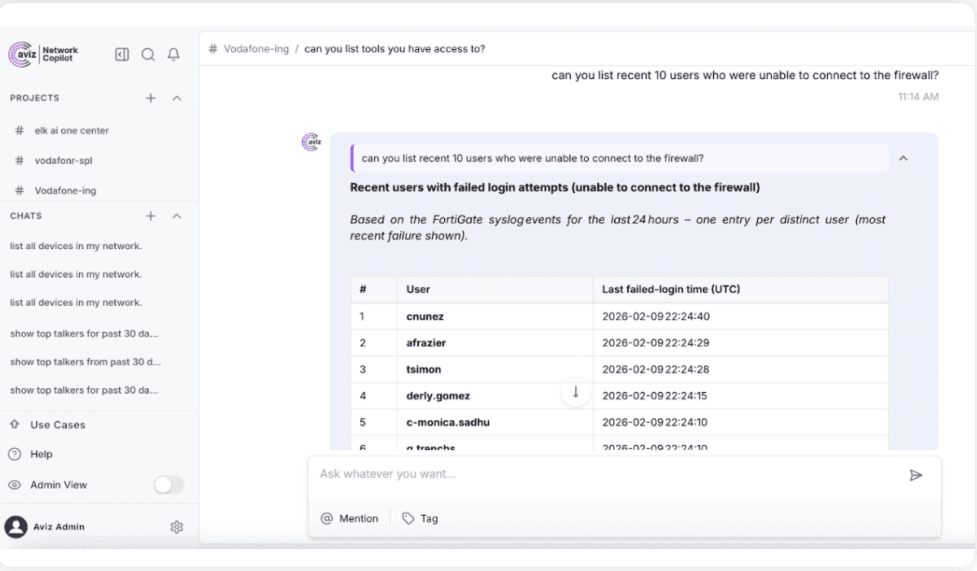
Use Case 2: User Unable to Connect to FortiGate
Operator Question:
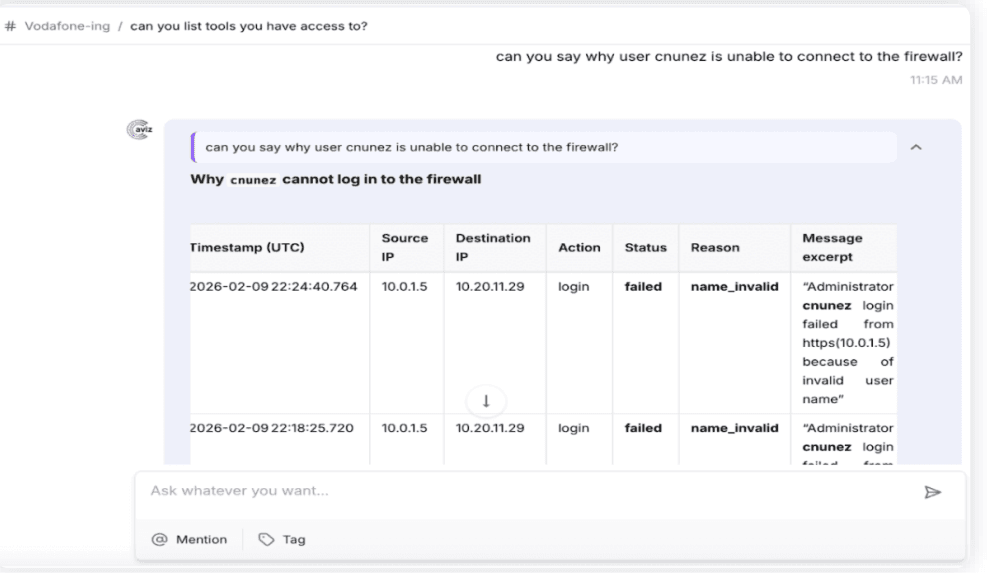
“Why is user unable to connect to FortiGate?"
Sample FortiGate Log:
date=2026-02-09 time=22:24:40 devname="one-ai-fortinetr-10_20_11_29" devid="FGT81ETK18004040"
eventtime=1770666280000000000 tz="-0800" logid="0100032002"
type="event" subtype="system" level="alert" vd="root"
user="cnunez"
ui="https(10.0.1.5)"
method="https"
srcip=10.0.1.5
dstip=10.20.11.29
action="login"
status="failed"
reason="name_invalid"
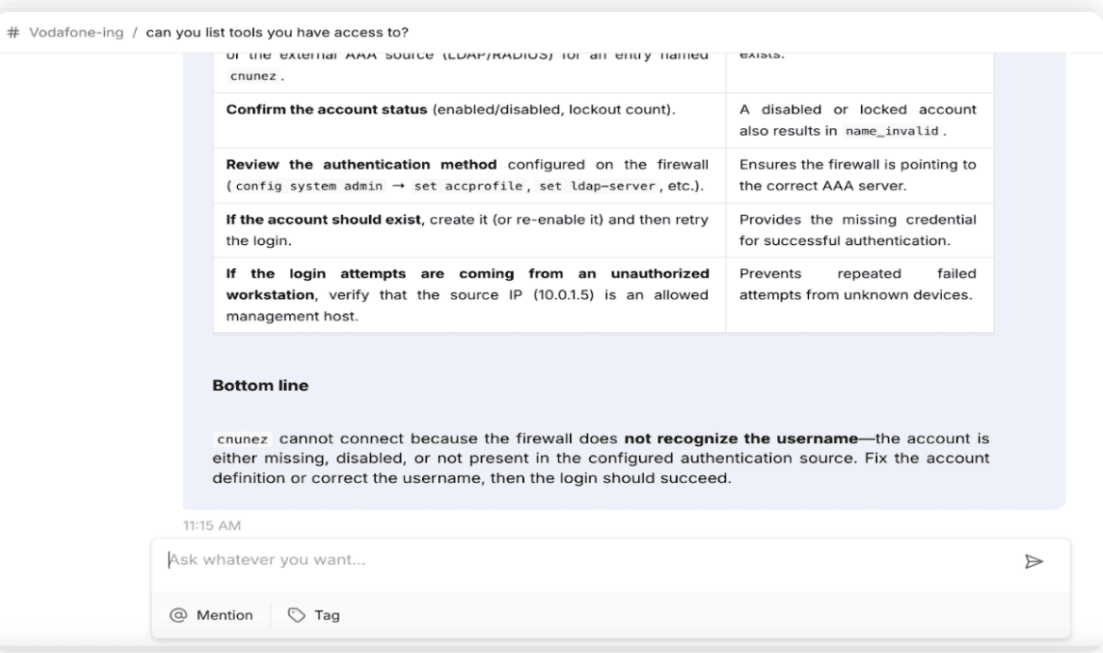
msg="Administrator cnunez login failed from https(10.0.1.5) because of invalid user name"
Expected NCP Outcome:
How to Test:
Trigger a failed login attempt from a lab client
Verify authentication logs in Splunk
Query NCP for root cause
Validate explanation quality
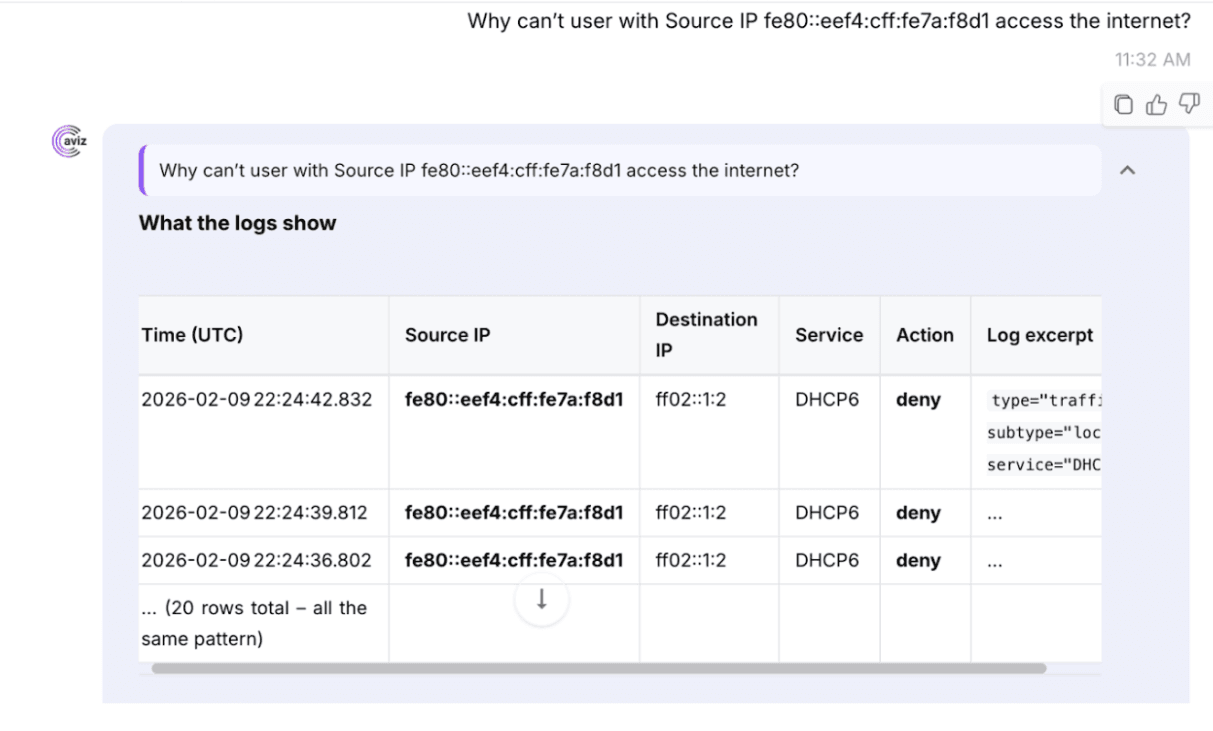
Use Case 3: User Unable to Access the Internet
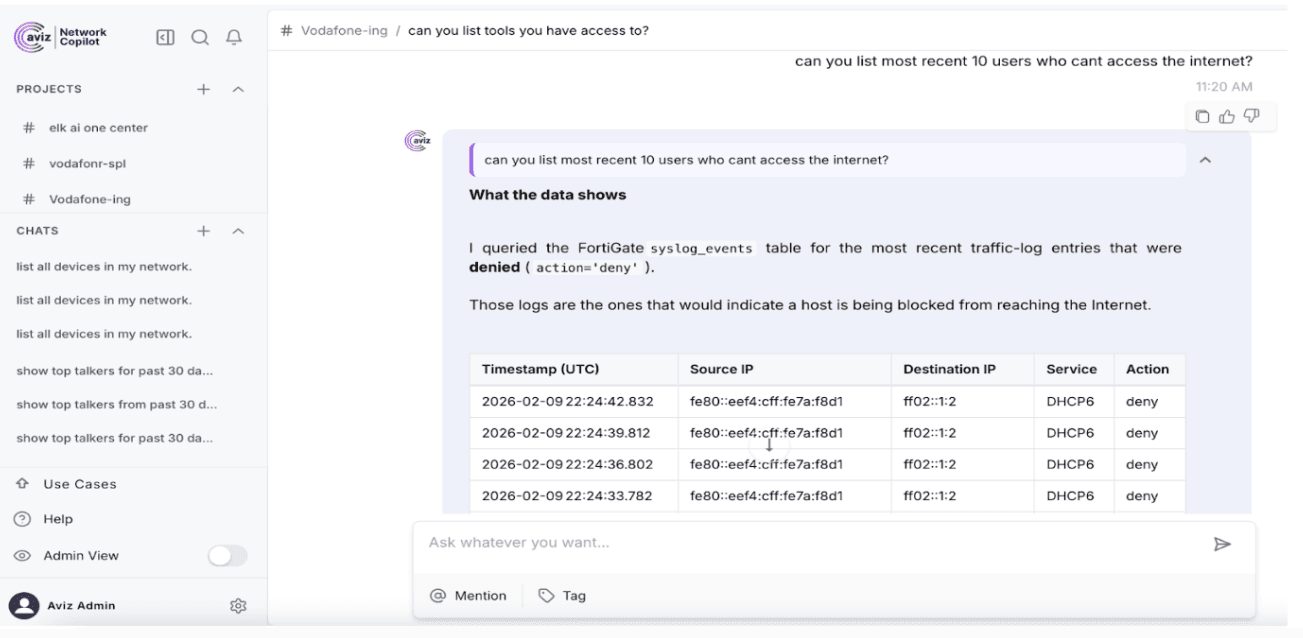
Operator Question:
“Why can’t user access the
internet?”
Sample FortiGate Log:
date=2026-02-09 time=22:24:42 devname="one-ai-fortinetr-10_20_11_29" devid="FGT81ETK18004040"
eventtime=1770666282832000000 tz="-0800" logid="0000000013"
type="traffic" subtype="forward" level="notice" vd="root"
srcip="fe80::eef4:cff:fe7a:f8d1"
srcport=546
srcintf="port11"
srcintfrole="lan"
dstip="ff02::1:2"
dstport=547
dstintf="port1"
dstintfrole="wan"
proto=17
service="DHCP6"
direction="outgoing"
policyid=0
action="deny"
sessionid=0
msg="Denied by implicit policy"
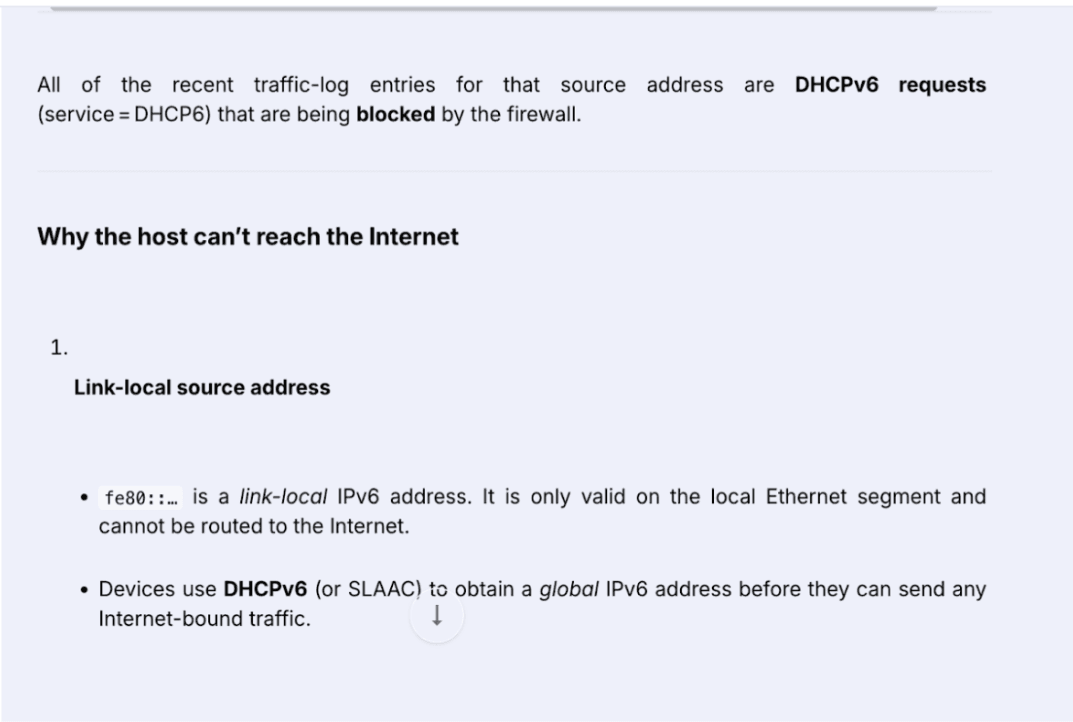
Expected NCP Outcome:
How to Test:
Generate blocked traffic from a lab client
Confirm traffic logs ingestion
Query NCP using natural language
Validate root-cause explanation
Why This Matters for L1/L2 Teams
Network Copilot fundamentally changes operations by: