




AI Fabric Orchestration: Supercharging AI Networks with SONiC NOS
 November 6, 2024
 ONES & SONiC
Explore the latest in AI network management with our ONES 3.0 series
As the demand for high-performance parallel processing surges in the AI era, GPU clusters have become the heart of data-intensive workloads. But it's not just about the GPUs themselves—intercommunication between GPU servers is the backbone of their overall performance. Enters the network switch fabric, which is pivotal in overcoming communication bottlenecks and ensuring seamless data flow between GPU servers. Technologies like RoCE (RDMA over Converged Ethernet) allow massive chunks of data to move efficiently between servers, but ensuring that these critical data streams remain lossless and uncongested requires a powerful solution.
That's where SONiC's QoS (Quality of Service) features come into play. SONiC enables you to prioritize critical data traffic, ensuring high-priority packets are always transferred ahead of other traffic and also that your important data is not lost. Using SONiC's robust QoS capabilities and ONES 3.0's orchestration, you can turn your switch fabric into a lossless, priority-driven highway for GPU server communications.
Let's explore how you can achieve this through SONiC via ONES 3.0 Fabric Manager orchestration tool.
Lossless And Prioritized Data Flow
Any packet entering the fabric with any DSCP/DOT1P marking can be mapped to any queue of the interface and enabling PFC on this queue makes it lossless. With PFC in place, when congestion is detected in the queue, a pause frame is sent back to the sender, signaling it to temporarily halt sending traffic of that priority. This mechanism effectively prevents packet drops, ensuring lossless transmission for traffic of particular priority.
Beyond PFC, there's another layer of congestion management—Explicit Congestion Notification (ECN). With ECN, we can define buffer thresholds, exceeding which Congestion Notification (ECN-CNP) packets are sent to the sender, prompting it to reduce the transmission rate and proactively avoid congestion.
At this stage, we've ensured that our priority traffic is lossless. Moving into the egress phase, we can further enhance performance by prioritizing this traffic over others, even under congestion. SONiC provides scheduling algorithms like Deficit Weighted Round Robin (DWRR), Weighted Round Robin (WRR), and Strict Priority Scheduling (STRICT). By binding priority queues to these schedulers, the system can ensure that higher-priority traffic is transmitted preferentially, either in a weighted manner (for WRR/DWRR) or with absolute priority (for STRICT).
In summary, through PFC, ECN, and advanced scheduling techniques, SONiC ensures that high-priority traffic from GPU servers is not only lossless but also prioritized during both congestion and egress phases.
Simplifying Complex QoS Configurations with ONES Orchestration
Configuring SONiC's complex QoS features may sound daunting, but with ONES 3.0's seamless orchestration, it's a breeze. ONES allows you to set up essential QoS configurations like DSCP to traffic-class mapping, PFC, ECN thresholds, and even scheduler types—all with a few lines in a YAML template. Here's a snapshot of the YAML template showcasing how ONES orchestrates SONiC QoS:
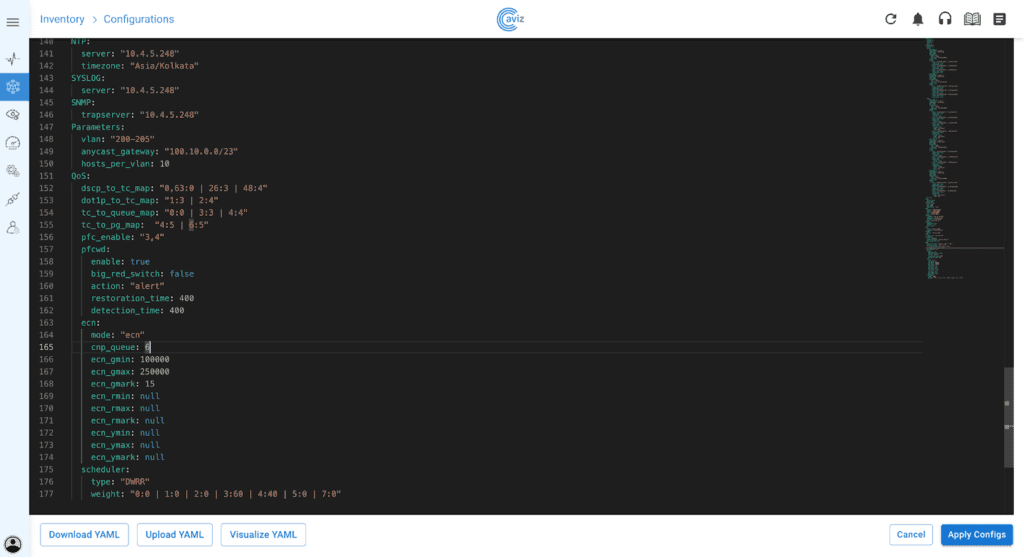
The Fabric Manager automates the creation and assignment of QoS profiles, saving administrators from manually configuring multiple aspects. Here's how it works:
Mapping Traffic Classes and Queues
Orchestration begins by mapping traffic into appropriate classes and queues. ONES 3.0 Orchestration allows you to specify mapping values from DSCP (Layer 3) and dot1p (Layer 2) to traffic classes, traffic classes to queues, and traffic classes to priority groups (PGs). Upon specifying these mapping values, profiles would be created with standard namings using these mapping values like DOT1P_TC_PROFILE, TC_QUEUE_PROFILE, TC_PG_PROFILE, DSCP_TC_PROFILE and are binded to the interfaces that are part of the orchestration. This configuration ensures that each type of traffic is routed to its appropriate queue and handled correctly.
For example, we can specify mapping values in the YAML as above in image and FM will create the corresponding profiles and bind it to the interface.
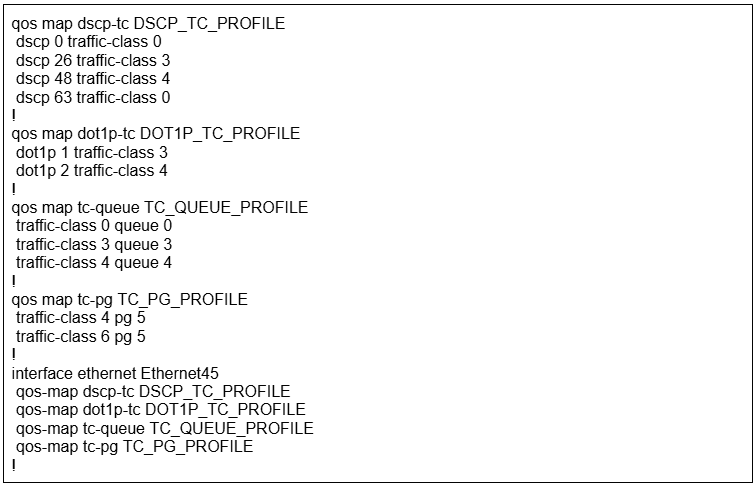
Priority Flow Control (PFC) and Explicit Congestion Notification (ECN)
The next critical part of QoS orchestration involves Priority Flow Control (PFC), where ONES YAML allows users to define the queues that should be PFC-enabled. Moreover a PFC Watchdog can be configured to ensure that the PFC is well functioning with restoration, detection times and action to be taken in case of malfunctioning.
ECN configuration parameters can be provided in the YAML template using which ONES Fabric Manager creates a profile WRED_PROFILE and attaches it to all the queues that are PFC enabled for all the interfaces that are part of orchestration.
Here's an example of how this would be configured on the interface for the YAML input in the above image.
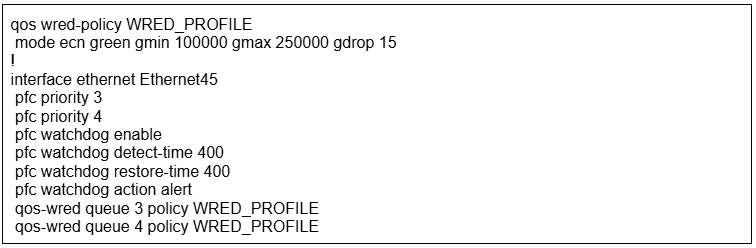
This approach ensures that your network proactively manages congestion and minimizes packet drops for high-priority traffic.
Advanced Scheduling for Optimized Egress
Finally, Scheduling plays a vital role in controlling how packets are forwarded from queues. Orchestration allows administrators to choose between scheduling mechanisms such as Deficit Weighted Round Robin (DWRR), Weighted Round Robin (WRR), or STRICT priority scheduling, depending on their needs.
In the case of DWRR or WRR, weights can be assigned to each queue, influencing how often a queue is serviced relative to others. Upon specifying these parameters in the YAML, ONES-FM creates the scheduler policies (SCHEDULER.
For instance in the below given image YAML input, there are two unique weights 60 and 40 that are assigned to queue 3 and 4 respectively. So, two scheduler policies SCHEDULER.40, SCHEDULER.60 are created and binded to the interface queues 3 and 4 respectively.
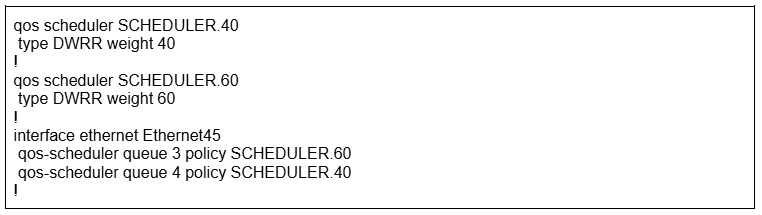
Now, here comes a question, what if all the queues are congested. How does the congestion notification packets even traverse through the network to reach the sender to stop or slow down the traffic coming in?
ONES-FM provides an option to designate a specific queue for ECN_CNP (Explicit Congestion Notification packets) traffic, using STRICT scheduling, ensuring that even when the network is heavily congested there is always a room left for the congestion notification packets, preventing further blockages. cnp_queue under the ECN section represents that and is orchestrated by ONES-FM.

Flexible, Day-2 Support for QoS Management
One of the standout features of ONES-FM 3.0 is its support for Day-2 operations. As your network evolves and traffic patterns change, you can modify the QoS configurations through either the YAML template or the NetOps API. This flexibility ensures your network is always tuned to deliver the performance required by your AI workloads.
Future-Proof Your AI Infrastructure with ONES 3.0
With its intuitive YAML-based approach and support for dynamic Day-2 adjustments, ONES Fabric Manager eliminates much of the complexity associated with configuring and managing networks. ONES makes one confident that network infrastructure is both reliable and future-proof. In essence, ONES Fabric Manager enables seamless orchestration for AI fabrics, ensuring your network is always ready to meet the growing demands of AI-driven data centers.
Ready to supercharge your AI network with SONiC and ONES 3.0? Contact us today to learn how Fabric Manager can transform your GPU cluster communications.
FAQs
1. How does SONiC NOS enable lossless data transfer for GPU-based AI workloads?
SONiC NOS supports Priority Flow Control (PFC) and Explicit Congestion Notification (ECN), ensuring lossless, high-priority traffic flows—critical for real-time communication between GPU clusters in AI data centers.
2. What is the role of ONES 3.0 Fabric Manager in orchestrating SONiC QoS configurations?
ONES 3.0 Fabric Manager simplifies complex QoS configurations through YAML-based templates. It automates the creation and assignment of QoS profiles, including DSCP mapping, PFC, ECN thresholds, and scheduler policies across all fabric interfaces.
3. Can ONES 3.0 handle multi-vendor AI fabric orchestration?
Yes, ONES 3.0 supports multi-vendor environments running SONiC NOS. The Fabric Manager provides a unified orchestration layer that works across different hardware platforms from various vendors.
4. How does ONES handle ECN and congestion feedback during network overloads?
ONES configures ECN buffer thresholds through YAML templates. When thresholds are exceeded, ECN-CNP packets are sent to senders, prompting them to reduce transmission rates and proactively avoid congestion.
5. What scheduling algorithms does SONiC support for AI traffic prioritization?
SONiC supports multiple scheduling algorithms including:
- DWRR (Deficit Weighted Round Robin): Weighted scheduling based on queue weights
- WRR (Weighted Round Robin): Similar weighted approach for queue servicing
- STRICT: Absolute priority scheduling for critical traffic
6. How does a network operation tool simplify complex QoS configurations for AI fabrics?
ONES 3.0 abstracts complex QoS configurations into simple YAML templates. Administrators define DSCP mappings, PFC queues, ECN thresholds, and scheduler weights in a few lines, and the Fabric Manager automatically creates and applies the corresponding profiles across all fabric interfaces.
7. Why is proactive congestion management critical in AI switch fabrics?
AI workloads require massive data transfers between GPU nodes with minimal latency. Proactive congestion management through PFC and ECN prevents packet drops and ensures continuous, lossless data flow—essential for maintaining AI model training performance.
8. Can an AI network assistant adjust QoS settings after deployment (Day-2 operations)?
Yes, ONES 3.0 fully supports Day-2 operations. Network administrators can modify QoS configurations through updated YAML templates or the NetOps API, allowing the network to adapt to changing traffic patterns without disruption.
9. How does network observability enhance QoS orchestration?
ONES provides comprehensive observability into QoS metrics including queue utilization, PFC events, and ECN counters. This visibility helps administrators fine-tune configurations and identify bottlenecks before they impact performance.
10. What happens if all queues in the AI fabric become congested?
ONES-FM allows designating a specific queue for ECN-CNP traffic with STRICT scheduling priority. This ensures congestion notification packets can always traverse the network, even during heavy congestion, preventing traffic deadlocks.


